
Walfront TB-388
Walfront TB-388 Mechanical Timer Switch User Manual
Model: TB-388
1. Konec produktuview
The Walfront TB-388 is a heavy-duty 24-hour mechanical timer switch designed for controlling electrical loads such as lamps, lighting systems, and other home appliances. It features a robust mechanical design, a 24-hour time range, and a minimum setting unit of 15 minutes, allowing for precise scheduling of up to 96 ON/OFF cycles per day. This timer is equipped with a removable battery to maintain timekeeping during power outages.
Klíčové vlastnosti:
- 24-hour mechanical timing with power failure backup.
- Minimum setting unit: 15 minutes.
- Up to 96 ON/OFF settings per day.
- Removable battery for time retention.
- Suitable for AC220V, 10A applications.

Obrázek 1: Přední view of the Walfront TB-388 Mechanical Timer Switch, showing the 24-hour dial, control pins, and the included backup battery.
2. Specifikace
| Parametr | Hodnota |
|---|---|
| Model | TB-388 |
| Electric Shock Capacity | AC220V 10A |
| Časový rozsah | 24 hodin |
| Minimum Setting Unit | 15 minut |
| Maximum Setting Times | 96 times / 15 minutes |
| Typ baterie | 100mAh battery (removable) |
| Spotřeba energie | 5W |
| Hmotnost položky | 9.2 unce |
3. Instalace a nastavení
3.1 Bezpečnostní opatření
- Ensure power is disconnected at the main circuit breaker before any installation or wiring.
- Pokud nejste obeznámeni s elektrickým zapojením, měl by instalaci provést kvalifikovaný elektrikář.
- Ověřte svtage and current ratings of your load do not exceed the timer's specifications (AC220V 10A).
3.2 Instalace baterie
The timer includes a removable 100mAh battery to maintain timekeeping during power interruptions. Install this battery before initial use.
- Locate the battery compartment or connection point, typically on the side or back of the timer.
- Connect the provided battery to the designated connector. Ensure correct polarity.
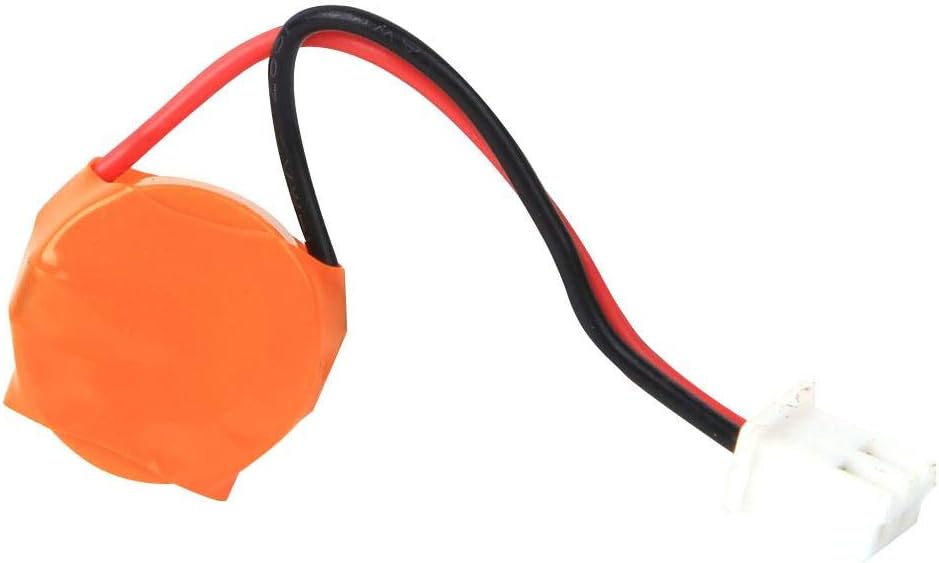
Obrázek 2: The removable 100mAh battery for the Walfront TB-388 timer, used for power backup.
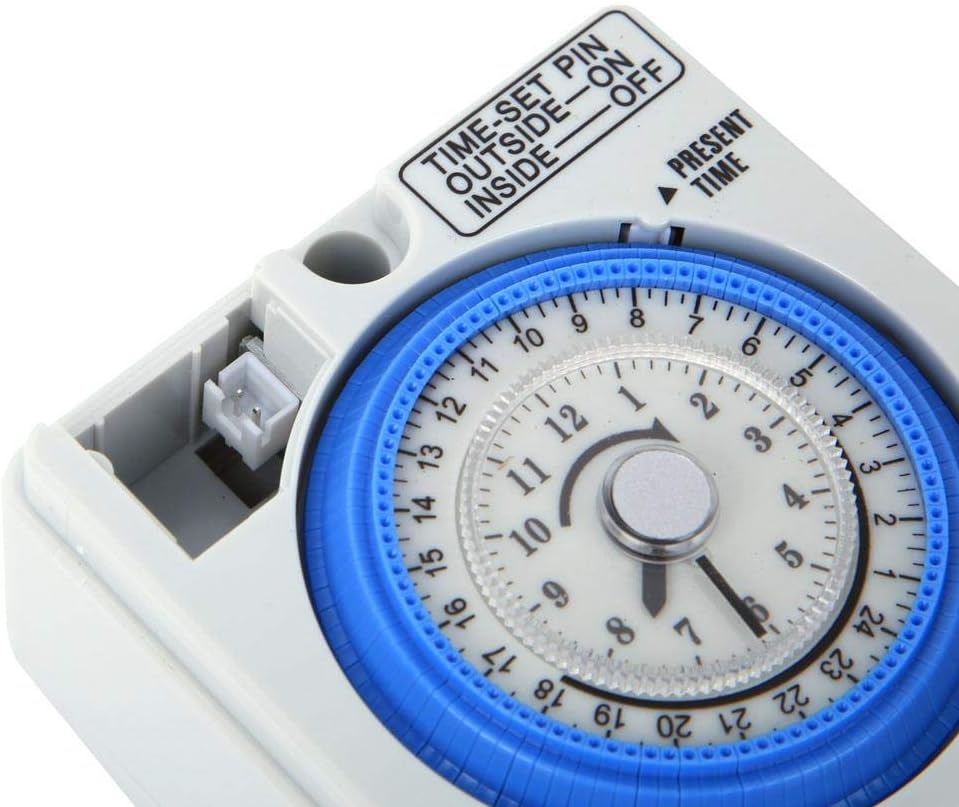
Obrázek 3: Detail of the battery connection port on the Walfront TB-388 timer, located near the dial.
3.3 Pokyny pro zapojení
The timer is designed for fixed installation. Refer to the wiring diagram on the unit or consult a qualified electrician for proper connection.
- Identify the input terminals (L1, N) and output terminals (S1, S2, or Load). For a simple load, L1 is typically Live In, N is Neutral In, and the output would be Switched Live and Neutral to the load.
- Connect the main power supply (AC220V) to the designated input terminals.
- Connect your appliance or lighting system to the output terminals.
- Ujistěte se, že všechny spoje jsou bezpečné a izolované.

Obrázek 4: The wiring terminals (S1, S2, L1) at the bottom of the Walfront TB-388 timer for electrical connections.
4. Návod k obsluze
4.1 Nastavení aktuálního času
- Rotate the 24-hour dial clockwise until the "PRESENT TIME" arrow points to the current time. The dial is marked from 1 to 24 hours.
- Ensure the time is set accurately for proper scheduling.

Obrázek 5: The main dial of the Walfront TB-388 timer, indicating the "PRESENT TIME" arrow and the 24-hour markings.
4.2 Programování časů ZAP/VYP
The timer uses small pins around the dial to set ON and OFF periods. Each pin represents a 15-minute interval.
- Chcete-li nastavit ON period, push the corresponding pins VNĚJŠÍ (away from the center of the dial).
- Chcete-li nastavit VYPNUTO period, leave the corresponding pins VNITŘNÍ (towards the center of the dial).
- You can set up to 96 ON/OFF cycles within a 24-hour period.

Obrázek 6: The time-set pins on the Walfront TB-388 timer. Pins pushed outward correspond to ON times, while inward pins correspond to OFF times.
4.3 Přepínač provozního režimu
The timer features a three-position switch for selecting the operating mode:
- OFF: The connected appliance will remain off, overriding any programmed settings.
- AUTO: The timer will operate according to the programmed ON/OFF settings.
- NA: The connected appliance will remain on, overriding any programmed settings.
5. Údržba
5.1 Čištění
- Před čištěním odpojte napájení.
- Wipe the exterior of the timer with a soft, dry cloth.
- Nepoužívejte tekuté čisticí prostředky ani abrazivní materiály.
5.2 Výměna baterie
The internal 100mAh battery provides backup power for timekeeping. If the timer loses time during power outages, the battery may need replacement.
- Disconnect the main power supply to the timer.
- Carefully access the battery compartment or connection point.
- Disconnect the old battery and replace it with a new 100mAh battery of the same type.
- Ensure correct polarity when connecting the new battery.
- Zajistěte přihrádku na baterie.
6. Řešení problémů
- Timer not turning ON/OFF at programmed times:
- Check if the "PRESENT TIME" is set correctly.
- Ensure the ON/OFF pins are pushed in/out correctly for the desired schedule.
- Verify the operating mode switch is set to "AUTO".
- Confirm the timer is receiving power.
- Appliance not receiving power:
- Check the main power supply to the timer.
- Ujistěte se, že jsou kabelová připojení bezpečná.
- Test the appliance by plugging it directly into a working outlet.
- Verify the timer's operating mode switch is not set to "OFF".
- Timer loses time during power outages:
- The internal backup battery may be depleted or faulty. Refer to Section 5.2 for battery replacement.
- Ujistěte se, že je baterie správně nainstalována.
7. Podpora
For further assistance or technical support, please contact Walfront customer service. Refer to the product packaging or the Walfront official webstránky pro kontaktní informace.
Můžete také navštívit Walfront Store on Amazon pro více informací o produktu.
Ask a question about this manual
Ask about setup, troubleshooting, compatibility, parts, safety, or missing instructions. Manuals+ will review the question and use this page’s manual context to help answer it.