
Zavedení
This manual provides comprehensive instructions for the installation, operation, and maintenance of the AXIS P1447-LE Network Camera. Please read this manual thoroughly before using the product to ensure proper functionality and safety.
The AXIS P1447-LE Network Camera is designed for surveillance applications, offering excellent image quality at 5-megapixel resolution and a 16:9 aspect ratio.
Konec produktuview
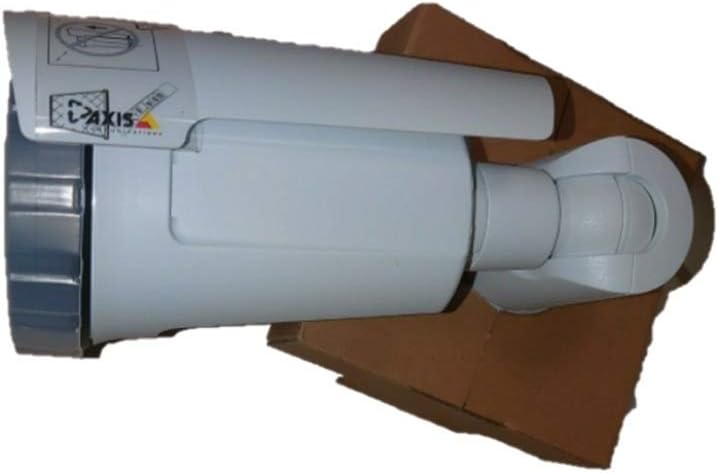
Figure 1: The AXIS P1447-LE Network Camera, a white bullet-style camera with a sun shield, shown resting on a brown cardboard box. The camera features the AXIS logo on its side.
The AXIS P1447-LE is a robust network camera built for reliable outdoor surveillance. Key features include:
- 5 MP resolution for detailed video capture.
- 16:9 format for wide-angle viewIng.
- Low light technology (Night Color) for improved performance in challenging lighting conditions.
- Outdoor suitability with IP54 international protection rating.
- Wired connectivity and ONVIF compatibility.
Nastavení a instalace
1. Vybalování
Opatrně vyjměte všechny součásti z obalu. Zkontrolujte, zda jsou přítomny všechny položky uvedené v dodacím listu. Uschovejte si originální obal pro budoucí přepravu nebo skladování.
2. Montáž kamery
The AXIS P1447-LE supports ceiling mount installation. Choose a stable mounting surface that can support the camera's weight and provide an optimal field of view.
- Drill pilot holes according to the mounting template (if provided).
- Secure the mounting bracket to the surface using appropriate screws and anchors.
- Připevněte tělo kamery k montážnímu držáku a ujistěte se, že je pevně zajištěno na místě.
3. Napájení a síťové připojení
Connect the camera to a power source (AC/DC) and to your network via an Ethernet cable. The camera supports wired connectivity and ONVIF protocol for integration with network video recorders (NVRs) or video management systems (VMS).
- Ensure the power supply meets the camera's specifications.
- Use a reliable Ethernet cable for stable network connection.
Návod k obsluze
1. Počáteční přístup a konfigurace
Upon first power-up, the camera will acquire an IP address from your network's DHCP server. Use the AXIS IP Utility or your VMS to discover the camera on the network.
- Přístup k fotoaparátu web interface using its IP address in a web prohlížeč.
- Log in with the default credentials (refer to the camera's packaging or quick start guide for default username and password). It is highly recommended to change the default password immediately for security.
- Configure network settings, video resolution (up to 5 MP), frame rate (30 fps), and image quality settings.
2. Video Surveillance and Recording
The camera is primarily used for surveillance. It supports motion-only alert types and can be integrated with various surveillance platforms.
- Set up motion detection zones and sensitivity within the camera's web interface or your VMS.
- Configure recording schedules and storage locations (e.g., NVR, NAS, or cloud storage).
- Utilize the optical zoom feature for detailed viewkonkrétních oblastí.
3. Remote Control and Monitoring
The camera can be controlled and monitored remotely. It is compatible with Amazon Alexa for certain control functions, and general remote control is available via its web interface or integrated VMS.
Údržba
Regular maintenance ensures optimal performance and longevity of your AXIS P1447-LE Network Camera.
- Čištění objektivu: Pravidelně čistěte objektiv fotoaparátu měkkým hadříkem, který nepouští vlákna. Na odolné nečistoty použijte jemný čisticí roztok na objektivy. Vyhněte se abrazivním materiálům, které by mohly objektiv poškrábat.
- Inspekce bydlení: Inspect the camera housing and mounting bracket for any signs of damage, corrosion, or loose connections. Tighten screws as needed.
- Aktualizace firmwaru: Zkontrolujte výrobce website regularly for firmware updates. Keeping the firmware updated can improve performance, add new features, and address security vulnerabilities.
- Kontroly vlivů na životní prostředí: Ensure the camera's operating environment remains within specified temperature and humidity ranges. Clear any obstructions that might block the camera's view nebo větrání.
Odstraňování problémů
This section provides solutions to common issues you might encounter with your network camera.
| Problém | Možná příčina | Řešení |
|---|---|---|
| Žádný kanál videa |
|
|
| Špatná kvalita obrazu |
|
|
| Nelze získat přístup web rozhraní |
|
|
Specifikace
| Funkce | Detail |
|---|---|
| Model | P1447-LE (01054-001) |
| Značka | ADI (AXIS) |
| Rozlišení záznamu videa | 5 MP |
| Snímková frekvence | 30 snímků za sekundu |
| Technologie připojení | Kabelové |
| Protokol připojení | ONVIF |
| Zdroj napájení | AC/DC |
| Typ montáže | Stropní držák |
| Vnitřní/venkovní použití | Venkovní |
| Hodnocení mezinárodní ochrany | IP54 |
| Technologie nízkého osvětlení | Noční barva |
| Typ upozornění | Pouze pohyb |
| Kontrolní metoda | Remote, Amazon Alexa |
| Form Factor | Kulka |
| UPC | 753359771953 |
Záruka a podpora
For warranty information and technical support, please refer to the official ADI (AXIS) webwebu nebo se obraťte přímo na jejich zákaznický servis. Uschovejte si účtenku jako doklad o koupi.
Poznámka: Konkrétní záruční podmínky a kanály podpory se mohou lišit v závislosti na regionu.