
Zavedení
Děkuji za nákupasing the VOKSUN S300 Portable Bluetooth Vinyl Record Player. This device is designed to provide a unique and versatile audio experience, allowing you to enjoy your vinyl collection and digital music with ease. This manual will guide you through the setup, operation, and maintenance of your record player to ensure optimal performance and longevity.
Před použitím produktu si prosím pečlivě přečtěte tento návod k obsluze a uschovejte si jej pro budoucí použití.
Bezpečnostní pokyny
To prevent fire or shock hazards, observe the following precautions:
- Nevystavujte jednotku dešti nebo vlhkosti.
- Nepoužívejte toto zařízení v blízkosti vody.
- Čistěte pouze suchým hadříkem.
- Nezakrývejte žádné větrací otvory. Nainstalujte v souladu s pokyny výrobce.
- Neinstalujte v blízkosti zdrojů tepla, jako jsou radiátory, tepelné regulátory, kamna nebo jiná zařízení (včetně amplifikátory), které produkují teplo.
- Chraňte napájecí kabel před šlapáním nebo přiskřípnutím, zejména u zástrček, zásuvek a v místě, kde vychází z jednotky.
- Používejte pouze nástavce/příslušenství určené výrobcem.
- Odpojte toto zařízení během bouřky s blesky nebo když se delší dobu nepoužívá.
- Veškeré opravy svěřte kvalifikovanému servisnímu personálu. Servis je nutný v případě, že byla jednotka jakýmkoli způsobem poškozena, například je poškozen napájecí kabel nebo zástrčka, pokud do jednotky vnikla kapalina nebo do jednotky spadly předměty, jednotka byla vystavena dešti nebo vlhkosti, nefunguje normálně. , nebo byla vypuštěna.
Obsah balení
Ověřte, zda je v balení obsaženo vše:
- VOKSUN S300 Portable Bluetooth Vinyl Record Player
- Napájecí adaptér
- USB kabel
- 3.5 mm AUX kabel
- Návod k použití
Konec produktuview
Připojení zadního panelu
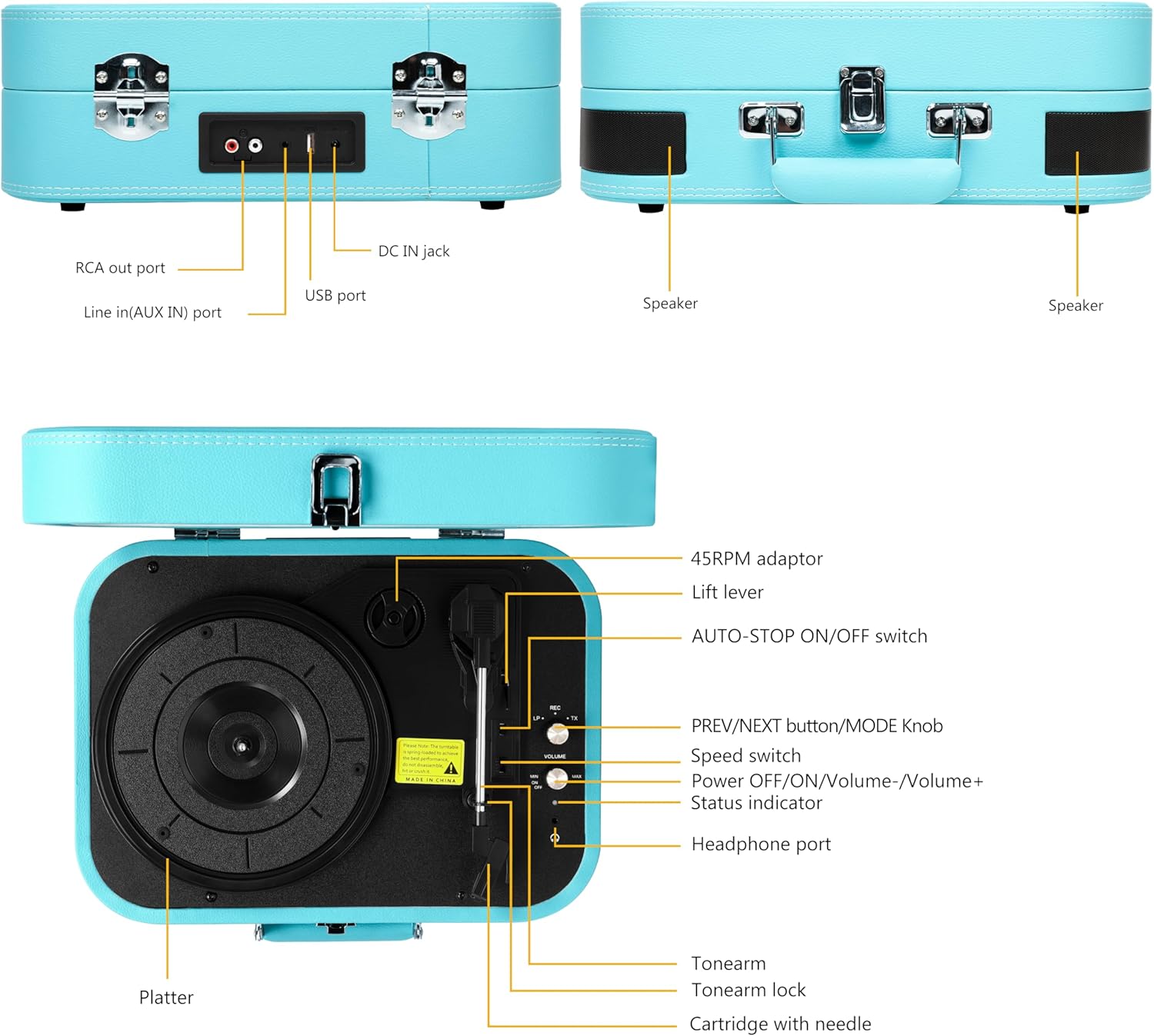
This image displays the rear panel of the record player, highlighting the RCA output for external speakers, the AUX input for connecting external audio devices, the DC IN jack for power, and the USB port for playback and recording.
- RCA Out Port: Connects to external speakers for enhanced audio output.
- Line In (AUX IN) Port: Connects external audio devices (e.g., smartphones, MP3 players) via a 3.5mm cable.
- DC IN Jack: Power input for the record player.
- USB port: Pro přehrávání MP3 files from a USB flash drive or recording vinyl to MP3.
Top Panel Controls and Components

This image illustrates the top view of the record player, detailing the platter, tonearm assembly, speed selector, and various control buttons and ports.
- 45RPM Adaptor: Používá se pro přehrávání 45 otáček za minutu desek s velkým středovým otvorem.
- Zvedací páka: Zvedne a spustí tonearm.
- AUTO-STOP ON/OFF Switch: Enables or disables the auto-stop function at the end of a record.
- PREV/NEXT Button / MODE Knob: Controls track selection (USB/Bluetooth) and switches between input modes (Vinyl, Bluetooth, AUX, USB).
- Přepínač rychlosti: Selects playback speed (33-1/3, 45, 78 RPM).
- Power OFF/ON / Volume-/Volume+ Knob: Zapíná/vypíná přístroj a upravuje hlasitost.
- Indikátor stavu: LED light indicating current mode or status.
- Port pro sluchátka: Připojuje sluchátka pro soukromý poslech.
- Rameno: Drží kazetu a stylus.
- Zámek raménka přenosky: Secures the tonearm when not in use or during transport.
- Cartridge with Needle: Reads the grooves of the vinyl record.
- Talíř: Rotující povrch, na který se umisťují desky.
Nastavení
1. Vybalování
Carefully remove the record player from its packaging. Retain the packaging for future transport or storage. Ensure all components listed in the 'Package Contents' section are present.
2. Připojení napájení
- Connect the power adapter to the DC IN jack on the rear of the record player.
- Plug the other end of the power adapter into a suitable wall outlet.
3. Počáteční umístění
Place the record player on a stable, level surface away from direct sunlight, heat sources, and excessive dust or vibrations. Ensure adequate ventilation around the unit.
Návod k obsluze
1. Basic Vinyl Playback
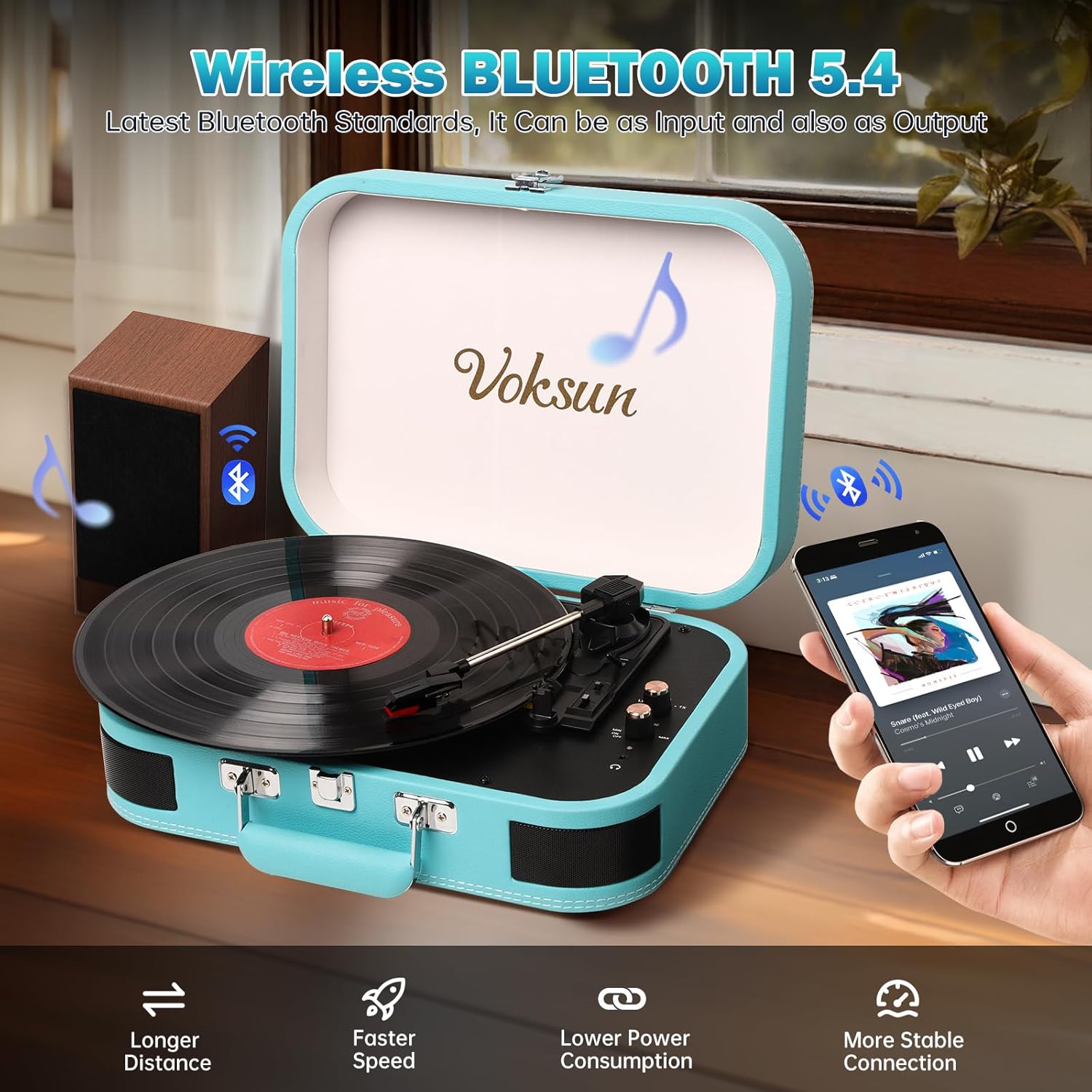
This image shows the record player in an open position with a vinyl record placed on the platter, illustrating its readiness for playing music.
- Otevřete víko gramofonu.
- Turn the Power OFF/ON/Volume knob clockwise to power on the unit. The status indicator will light up.
- Umístěte vinylovou desku na talíř.
- Select the appropriate speed (33-1/3, 45, or 78 RPM) using the Speed Switch, matching your record's speed. Use the 45RPM adaptor if necessary for 45 RPM records.
- Release the Tonearm Lock.
- Lift the Tonearm using the Lift Lever.
- Carefully position the stylus over the desired track of the record.
- Gently lower the Tonearm using the Lift Lever. The record will begin to play.
- Adjust the volume using the Power OFF/ON/Volume knob.
- At the end of the record, if the AUTO-STOP switch is ON, the platter will stop rotating automatically. If OFF, it will continue to rotate.
- Chcete-li přehrávání zastavit ručně, zvedněte raménko, vraťte ho do klidové polohy a zajistěte raménko zámkem.
2. Režim Bluetooth
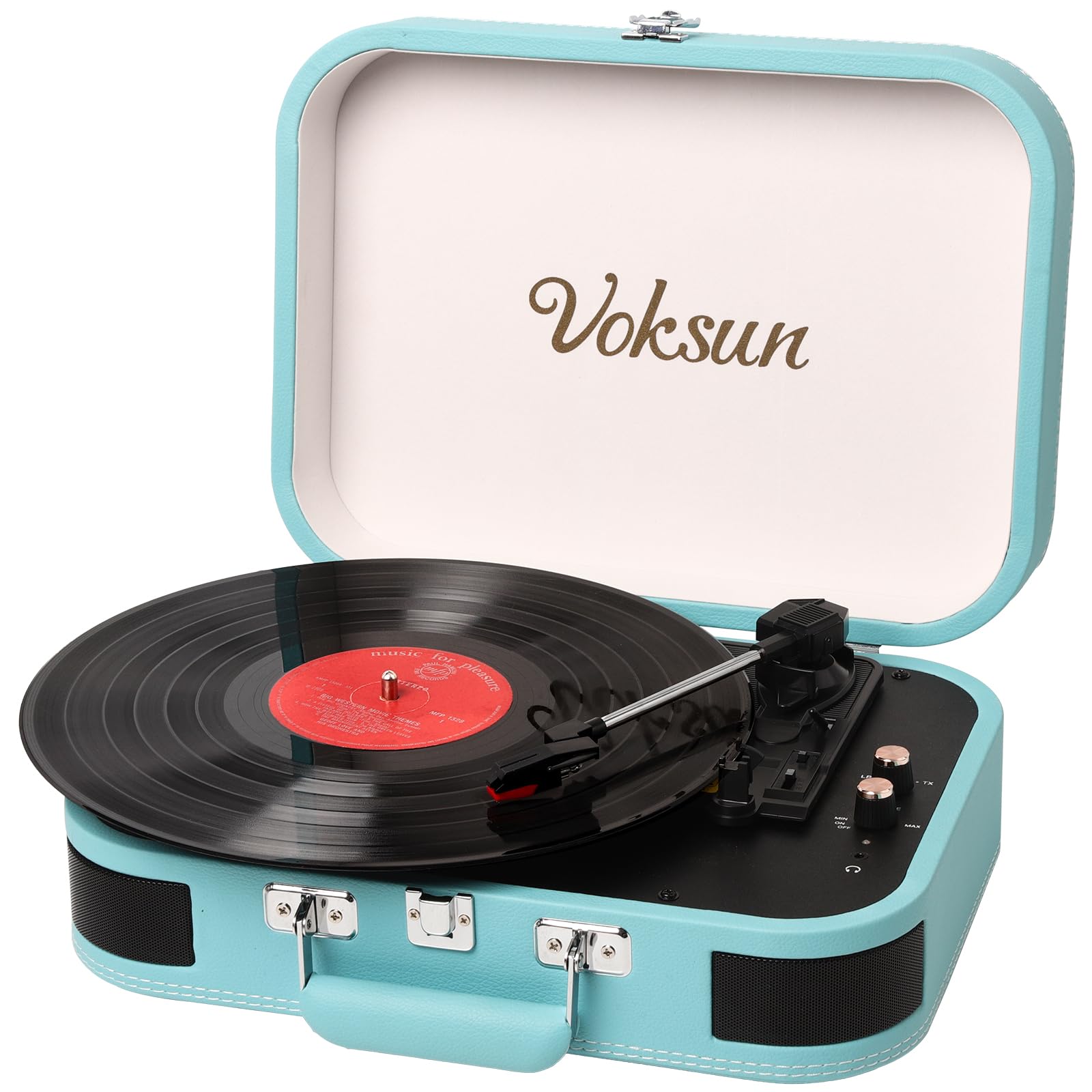
This image demonstrates the record player's Bluetooth connectivity, showing a smartphone wirelessly streaming music to the unit.
- Zapněte gramofon.
- Rotate the MODE knob to select Bluetooth mode. The status indicator will flash blue, indicating pairing mode.
- Povolte Bluetooth na svém smartphonu nebo jiném zařízení s podporou Bluetooth.
- Hledat "VOKSUN" in your device's Bluetooth list and select it to pair.
- Once paired, the status indicator will stop flashing and remain solid blue.
- You can now play music from your device through the record player's speakers. Adjust volume on both the record player and your device.
3. Vstup AUX

This image illustrates the use of the 3.5mm AUX IN and Headphone ports, showing a user enjoying music with headphones and an AUX cable connected.
- Zapněte gramofon.
- Connect one end of the 3.5mm AUX cable to the AUX IN port on the rear of the record player.
- Connect the other end of the AUX cable to the headphone jack of your external audio device (e.g., smartphone, MP3 player).
- Rotate the MODE knob to select AUX mode.
- Play music from your external device. The audio will be routed through the record player's speakers.
- Adjust volume on both the record player and your external device.
4. Přehrávání z USB
- Zapněte gramofon.
- Vložte USB flash disk s audio soubory ve formátu MP3 files into the USB port on the rear of the record player.
- Rotate the MODE knob to select USB mode.
- The record player will automatically begin playing the MP3 files z USB disku.
- Pro přeskakování skladeb použijte tlačítka PREV/NEXT.
- Adjust the volume using the Power OFF/ON/Volume knob.
5. Vinyl to MP3 Recording

This diagram visually explains how to transform audio from vinyl records into WAV format files, which are then saved to a USB flash drive.
- Ensure a USB flash drive is inserted into the USB port.
- Start playing a vinyl record as described in 'Basic Vinyl Playback'.
- While the record is playing, press and hold the MODE knob for a few seconds until the status indicator changes, indicating recording has started.
- The record player will convert the vinyl audio into MP3 files and save them to the connected USB drive.
- To stop recording, press the MODE knob again.
6. External Speaker Connection (RCA)

This image provides a clear visual guide for connecting the record player to external speakers via RCA output, as well as other portable audio devices.
- Connect RCA cables (not included) to the RCA Out ports on the rear of the record player.
- Connect the other end of the RCA cables to the corresponding audio input jacks on your external ampzesilovač nebo aktivní reproduktory.
- Ensure the record player is in the desired playback mode (Vinyl, Bluetooth, AUX, or USB).
- Adjust the volume on both the record player and your external audio system.
7. Použití sluchátek
- Plug your headphones into the Headphone Port on the top panel.
- Zvuk bude automaticky směrován do sluchátek a vestavěné reproduktory se ztlumí.
- Adjust the volume using the Power OFF/ON/Volume knob.
Údržba
1. Čištění
- Wipe the record player's exterior with a soft, dry cloth. Do not use abrasive cleaners or solvents.
- Pokud gramofon nepoužíváte, mějte víko zavřené, abyste zabránili usazování prachu na talíři a raménku.
2. Péče o stylus

This close-up image focuses on the stylus and cartridge, which are crucial for reading the grooves of a vinyl record.
- The stylus (needle) is delicate. Handle it with care.
- Nedotýkejte se stylusu prsty.
- Periodicky čistěte stylus měkkým kartáčkem, jemně jej kartáčujte zezadu dopředu.
- A worn stylus can damage records and degrade sound quality. Replace the stylus when necessary.
3. Skladování
When storing the record player, ensure the tonearm is secured with the tonearm lock and the lid is closed. Store in a cool, dry place.
Odstraňování problémů
| Problém | Možná příčina | Řešení |
|---|---|---|
| Žádná síla | Napájecí adaptér není připojen nebo je vadný. | Ujistěte se, že je napájecí adaptér bezpečně připojen k jednotce a k funkční zásuvce. |
| Žádný zvuk z reproduktorů | Příliš nízká hlasitost; zvolen nesprávný režim; připojena sluchátka. | Increase volume. Verify correct mode (Vinyl, Bluetooth, AUX, USB). Disconnect headphones if present. |
| Přeskakování nahrávky nebo zkreslení zvuku | Deska je znečištěná nebo poškrábaná; hrot je znečištěný nebo opotřebovaný; přístroj není v rovině. | Clean record. Clean or replace stylus. Place unit on a stable, level surface. |
| Bluetooth není párování | Record player not in Bluetooth mode; device too far; device already paired to another unit. | Ensure record player is in Bluetooth mode (flashing blue light). Move device closer. Disconnect from other Bluetooth devices. |
| Vinyl to MP3 recording not working | USB drive not inserted or full; USB drive not formatted correctly. | Ensure USB drive is inserted and has sufficient space. Format USB drive to FAT32 if necessary. |
Specifikace
This image highlights the record player's ability to play records at different speeds (33-1/3, 45, 78 RPM) and accommodate various record sizes.
| Funkce | Detail |
|---|---|
| Číslo modelu | S300 |
| Značka | VOKSUN |
| Rychlosti přehrávání | 33-1/3, 45, 78 ot./min |
| Konektivita | Bluetooth, AUX In, USB, RCA Out, Headphone Jack |
| Funkce nahrávání | Vinyl to MP3 (via USB) |
| Vestavěné reproduktory | Yes, Stereo |
| Zdroj napájení | DC napájecí adaptér |
| Typ materiálu | Plastic (with PVC leather finish) |
| Rozměry produktu | 35 x 25.5 x 12.5 cm (13.8 x 10 x 4.9 palce) |
| Hmotnost položky | 2.97 kg (6.55 lb) |
| Barva | Modrý |
Záruka a podpora
VOKSUN products are designed and manufactured to the highest quality standards. For warranty information, please refer to the warranty card included in your package or contact your local retailer.
For technical support, troubleshooting assistance, or service inquiries, please contact VOKSUN customer service through the contact information provided on the product packaging or the official VOKSUN webwebu. Při kontaktování podpory mějte prosím k dispozici číslo modelu (S300) a datum zakoupení.