
Zavedení
This manual provides detailed instructions for the assembly, operation, and maintenance of your RFIVER TF3001 TV Floor Stand. Please read these instructions carefully before installation to ensure safe and correct usage. This stand is designed for televisions ranging from 32 to 65 inches, with a maximum VESA pattern of 400x400mm and a weight capacity of up to 35 kg (77 lbs).
Bezpečnostní informace
- Nepřekračujte maximální nosnost 35 kg (77 liber).
- Ujistěte se, že je váš televizor kompatibilní se standardem VESA (100x100 mm až 400x400 mm).
- Stojan vždy sestavujte na měkkém a čistém povrchu, abyste zabránili poškrábání.
- Verify all screws and bolts are securely tightened before placing the TV on the stand.
- Během montáže držte děti a domácí zvířata mimo dosah.
- Do not attempt to modify the stand in any way.
Obsah balení
Před zahájením montáže zkontrolujte, zda jsou všechny součásti přítomny a nepoškozené. Pokud některé součásti chybí nebo jsou poškozené, kontaktujte zákaznickou podporu.
- Hlavní podpůrná tyč
- Základna z tvrzeného skla
- Držák na TV
- Adaptační desky VESA (pokud jsou k dispozici)
- Hardware Kit (screws, washers, spacers, nuts)
- Klipy pro správu kabelů
- Montážní nářadí (např. imbusový klíč)
- Návod k použití
Pokyny pro nastavení
Pro správnou montáž pečlivě dodržujte tyto kroky.
Step 1: Assemble the Base and Support Pole
Attach the main support pole to the tempered glass base using the provided hardware. Ensure the pole is securely fastened to the base for stability.

Image: The assembled RFIVER TF3001 TV Floor Stand, ready for TV mounting.
Step 2: Determine VESA Pattern and Attach Brackets to TV
Identify your TV's VESA mounting pattern (the distance between the mounting holes on the back of your TV). Select the appropriate screws, washers, and spacers from the hardware kit. Attach the TV mounting brackets to the back of your television. Ensure the brackets are level and securely tightened.

Obrázek: Přample of VESA mounting holes on a TV back panel.

Image: VESA compatibility chart and stand dimensions.
Krok 3: Připevněte televizor na stojan
Carefully lift the TV (with assistance if necessary) and hook the attached brackets onto the mounting plate of the stand. Ensure the TV is centered and level. Secure the TV using the safety lock mechanism to prevent accidental dislodgement.

Image: Detail of the safety lock for securing the TV.
Návod k obsluze
Nastavení výšky
The TV stand allows for height adjustment between 1000mm and 1300mm. To adjust the height, loosen the securing bolts on the main support pole, carefully raise or lower the TV to the desired position, and then securely tighten the bolts. Always ensure the TV is stable after adjustment.

Image: Illustration of the height adjustment mechanism.
Funkce otáčení
The TV mounting bracket can swivel 60 degrees (30 degrees left and 30 degrees right) to provide optimal viewing angles. Gently rotate the TV to your preferred position. No tools are required for this adjustment.
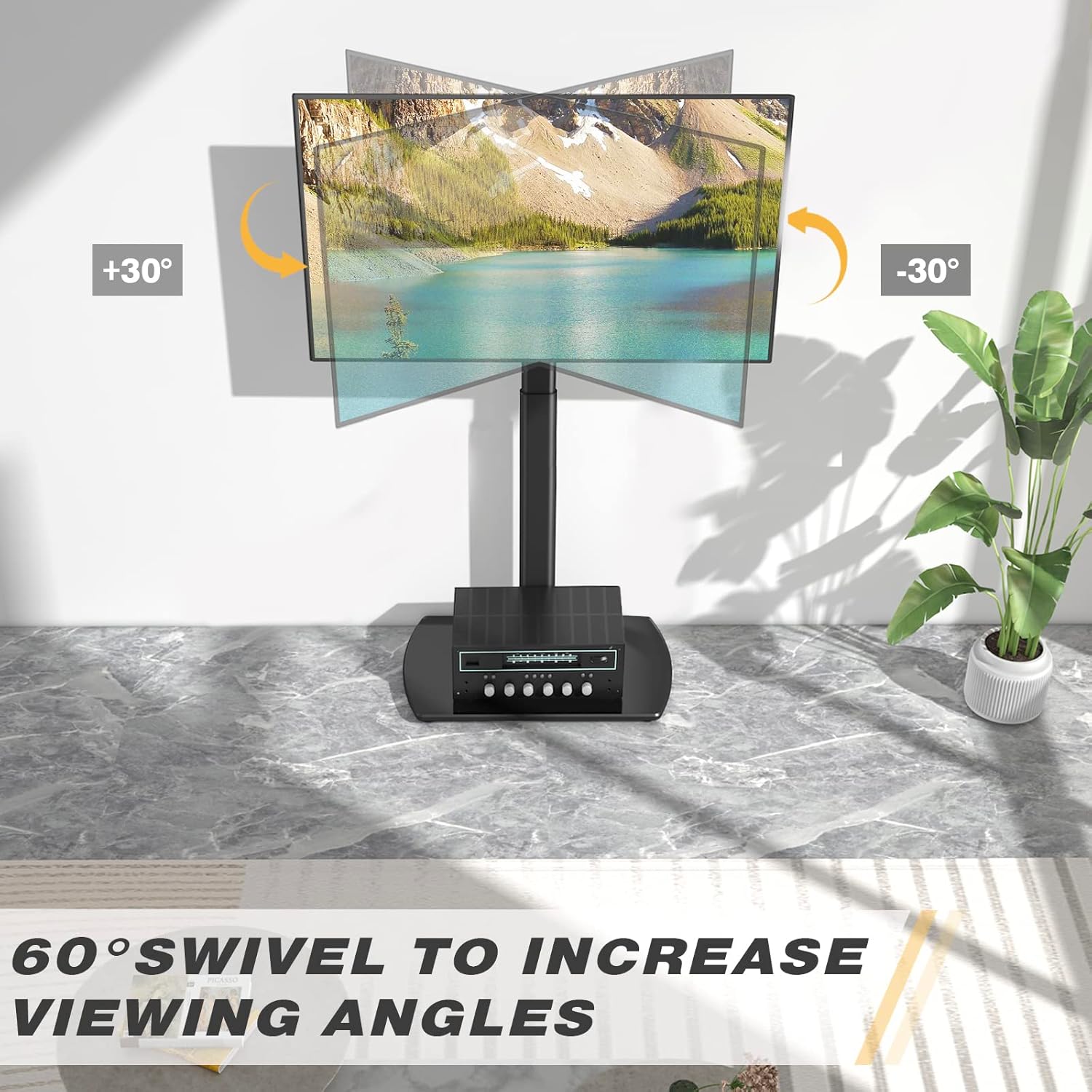
Image: Visual representation of the 60-degree swivel range.

Image: Close-up of the swivel joint.
Správa kabelů
Utilize the integrated cable management clips on the rear of the main support pole to organize and conceal TV cables. This helps maintain a tidy appearance and prevents cable clutter.

Image: Cable management clips on the stand's pole.
Údržba
- Čištění: Otřete stojan měkkým hadříkemamp hadříkem. Nepoužívejte abrazivní čisticí prostředky ani rozpouštědla, která by mohla poškodit povrchovou úpravu.
- Pravidelné kontroly: Pravidelně kontrolujte všechny šrouby a vruty, zda jsou pevně utažené. V případě potřeby je dotáhněte.
- Péče o skleněnou základnu: The tempered glass base is durable but can be scratched. Use coasters for items placed on it and avoid dropping heavy objects.
Odstraňování problémů
| Problém | Možná příčina | Řešení |
|---|---|---|
| Televizor není v rovině. | Mounting brackets are not aligned or tightened unevenly. | Re-check the alignment of the TV mounting brackets and ensure all screws are tightened evenly. |
| Stojan se zdá být nestabilní. | Loose connections or uneven floor surface. | Verify all assembly bolts are securely tightened. Ensure the stand is placed on a flat, stable surface. Check non-slip feet. |
| Televizi nelze namontovat. | Nesprávný vzor VESA nebo velikost/hmotnost televizoru. | Confirm your TV's VESA pattern and weight are within the stand's specifications (Max VESA 400x400mm, Max 35kg/77lbs). |
Specifikace
| Značka: | RFIVER |
| Model: | TF3001 |
| Kompatibilní velikosti televizorů: | 32 - 65 palce |
| Max VESA Compatibility: | 400x400mm (also supports 100x100, 100x200, 200x100, 200x200, 300x200, 200x300, 300x300, 400x200, 400x300) |
| Maximální hmotnostní kapacita: | 35 kg (77 lb) |
| Rozsah nastavení výšky: | 1000 mm - 1300 mm |
| Úhel otočení: | ±30 stupňů (celkem 60 stupňů) |
| Materiál: | Legovaná ocel, tvrzené sklo |
| Barva: | Černý |
| Rozměry produktu (D x Š x V): | 55 x 38 x 130 cm (approximate, at max height) |
| Hmotnost produktu: | 8.8 kg |
Záruka a podpora
RFIVER products are designed for durability and performance. For any questions, missing parts, or support needs, please contact RFIVER customer service. Please retain your proof of purchase for warranty claims.
For further assistance, please visit the official RFIVER webwebu nebo kontaktujte jejich zákaznickou podporu.