
1. Úvod
Děkuji za nákupasing the Nedis RDIN2500WT Internet Radio. This manual provides essential information for the safe and efficient operation of your device. Please read these instructions carefully before use and retain them for future reference.
2. Bezpečnostní pokyny
- Nevystavujte zařízení dešti, vlhkosti ani extrémním teplotám.
- Zajistěte dostatečné větrání kolem jednotky. Neblokujte žádné větrací otvory.
- Používejte pouze dodaný napájecí adaptér. Použití neschváleného adaptéru může poškodit zařízení a vést ke ztrátě záruky.
- Nepokoušejte se zařízení rozebírat ani upravovat. Veškerý servis svěřte kvalifikovanému personálu.
- Udržujte zařízení mimo dosah silných magnetických polí.
- Zařízení čistěte pouze měkkým, suchým hadříkem. Nepoužívejte tekuté čisticí prostředky ani aerosoly.
3. Obsah balení
Ověřte, zda jsou v balení přítomny všechny položky:
- Nedis RDIN2500WT Internet Radio Unit
- Dálkové ovládání
- Napájecí adaptér (DC 12V)
- 3.5mm audio kabel
- Uživatelská příručka (tento dokument)

Figure 3.1: Nedis RDIN2500WT Internet Radio with included accessories: radio unit, remote control, power adapter, and 3.5mm audio cable.
4. Konec produktuview
4.1 Ovládací prvky na předním a horním panelu

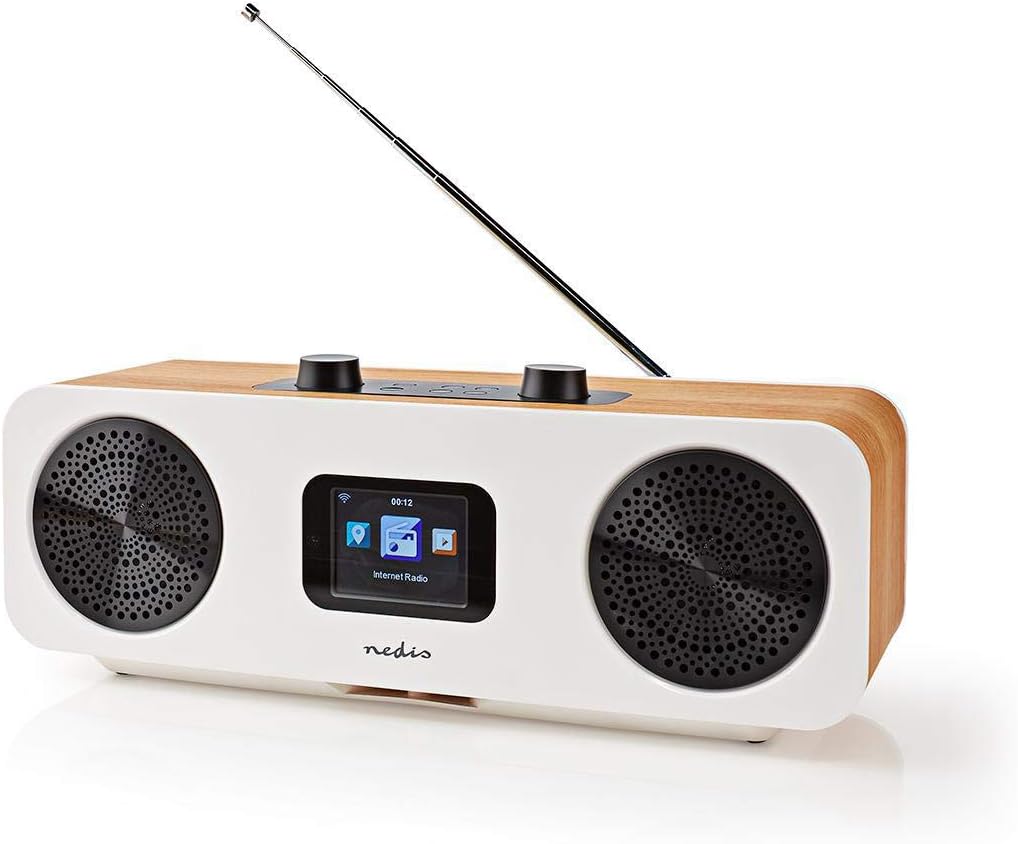
Obrázek 4.1: Přední strana view of the radio with display.
The front of the radio features a 2.4-inch color LCD display and two speaker grilles. The top panel includes the main control buttons and knobs.
Obrázek 4.2: Horní ovládací panel.
- Hlasitost - / +: Nastavuje hlasitost zvuku.
- Ztlumit: Ztlumí nebo zapne zvuk.
- Standby (Power button): Turns the radio on or off, or puts it into standby mode.
- Menu: Accesses the main menu or goes back to the previous screen.
- režim: Switches between different operating modes (Internet Radio, DAB+, FM, Bluetooth, AUX).
- Přednastaveno: Accesses or saves preset stations.
- Left / Right (Navigation buttons): Navigates through menus or tunes stations.
- Zadejte: Potvrzuje výběr.
- Skip (Forward / Backward): Skips tracks in Bluetooth mode or navigates through lists.
4.2 Připojení zadního panelu

Obrázek 4.3: Připojení na zadním panelu.
- Teleskopická anténa: For DAB+ and FM reception. Extend fully for best signal.
- Vstup DC 12V: Zde připojte dodaný napájecí adaptér.
- USB port: For firmware updates or charging external devices (check manual for specific functionality).
- Vstup AUX: Connect external audio devices using the 3.5mm audio cable.
4.3 Dálkové ovládání

Figure 4.4: Remote control layout.
The remote control provides convenient access to all radio functions. Ensure batteries are inserted correctly (not included, typically 2x AAA).
5. Nastavení
5.1 Připojení napájení
- Connect the provided power adapter to the DC 12V input on the rear of the radio.
- Zapojte napájecí adaptér do vhodné zásuvky.
5.2 Nastavení antény
For optimal DAB+ and FM reception, fully extend the telescopic antenna located on the rear of the unit.
5.3 Počáteční nastavení a připojení k Wi-Fi
Upon first power-on, the radio will guide you through an initial setup wizard:
- Výběr jazyka: Pomocí navigačních tlačítek vyberte preferovaný jazyk a stiskněte Vstupte.
- Čas/Datum: Set the current time and date. The radio can synchronize this automatically via network or DAB+ signal.
- Konfigurace sítě: Rádio prohledá dostupné sítě Wi-Fi.
- Ze seznamu vyberte svou síť Wi-Fi.
- Enter your Wi-Fi password using the navigation buttons and Vstupte to confirm each character. Press Vstupte again to connect.
- Once connected, the radio will confirm the network status.
6. Ovládání rádia
6.1 Přepínání režimů
Stiskněte tlačítko Režim button on the radio or remote control to cycle through the available modes:
- Internetové rádio
- Rádio DAB+
- FM rádio
- Bluetooth
- Vstup AUX
6.2 Internetové rádio
In Internet Radio mode, you can access thousands of stations worldwide.
- V nabídce režimů vyberte možnost „Internetové rádio“.
- Navigate through categories (e.g., Location, Genre, Popular Stations) using the Vlevo/vpravo a potvrďte tlačítkem Vstupte.
- Vyberte stanici pro zahájení přehrávání.
6.3 DAB+ rádio
In DAB+ mode, the radio will automatically scan for available digital stations.
- Select "DAB+ Radio" from the mode menu.
- The radio will perform a scan and list available stations.
- Použití Vlevo/vpravo to select a station and Vstupte poslouchat.
6.4 FM rádio
In FM mode, you can tune into analog radio stations.
- V nabídce režimů vyberte možnost „FM rádio“.
- Použití Vlevo/vpravo to manually tune the frequency, or press and hold Vlevo/vpravo pro automatické vyhledání další dostupné stanice.
6.5 Párování Bluetooth
Connect your smartphone or tablet via Bluetooth to stream audio.
- Select "Bluetooth" from the mode menu. The radio will enter pairing mode.
- On your mobile device, enable Bluetooth and search for "RDIN2500WT".
- Select the radio from the list to pair. Once connected, you can play audio from your device.
6.6 Vstup AUX
Connect external audio sources like MP3 players using the 3.5mm audio cable.
- Connect one end of the 3.5mm audio cable to the AUX input on the radio's rear panel.
- Druhý konec připojte ke konektoru pro sluchátka nebo audio výstupu vašeho externího zařízení.
- Select "AUX Input" from the mode menu.
6.7 předvoleb
Uložte si své oblíbené stanice pro rychlý přístup.
- Nalaďte požadovanou stanici.
- Stiskněte a podržte Přednastaveno button until the "Save to Preset" menu appears.
- Použití Vlevo/vpravo to select a preset number (1-10) and press Vstupte uložit.
- Chcete-li vyvolat předvolbu, stiskněte tlačítko Přednastaveno krátce stiskněte tlačítko a poté použijte Vlevo/vpravo vyberte požadovanou předvolbu a stiskněte Vstupte.
6.8 Funkce budíku a spánku
The radio includes an integrated alarm clock and sleep timer.
- Poplach: Stiskněte tlačítko Poplach button on the remote control or navigate through the main menu to set up alarms (time, source, volume).
- Spát: Stiskněte tlačítko Spát button on the remote control or navigate through the main menu to set a sleep timer, which will turn off the radio after a set duration.
6.9 App Control (AirMusic)
Control your radio using the AirMusic app on your smartphone or tablet.
- Download the "AirMusic" app from your device's app store.
- Ensure your smartphone/tablet and the radio are connected to the same Wi-Fi network.
- Open the AirMusic app; it should automatically detect your radio.
- You can now control the radio, browse stations, and manage presets from the app.
7. Údržba
7.1 Čištění
To clean the radio, gently wipe the surfaces with a soft, dry, lint-free cloth. Do not use abrasive cleaners, waxes, or solvents as they may damage the finish.
7.2 Skladování
If storing the radio for an extended period, disconnect it from the power outlet and store it in a cool, dry place, away from direct sunlight and extreme temperatures.
8. Řešení problémů
If you encounter issues with your radio, refer to the following table for common problems and solutions.
| Problém | Možná příčina | Řešení |
|---|---|---|
| Žádná síla | Napájecí adaptér není připojen nebo je zásuvka vadná. | Ujistěte se, že je napájecí adaptér bezpečně připojen k rádiu a k funkční zásuvce. |
| Žádný zvuk | Volume too low, muted, or incorrect input mode. | Increase volume, check if muted, ensure correct mode (e.g., Internet Radio, DAB+). |
| Internetové rádio se nepřipojuje | Nesprávné heslo k Wi-Fi, slabý signál nebo problém se sítí. | Re-enter Wi-Fi password, move radio closer to router, restart router, check network settings. |
| Špatný příjem DAB+/FM | Anténa není vysunutá, signál je slabý nebo je rušená. | Zcela vysuňte teleskopickou anténu. Zkuste přemístit rádio. |
| Párování Bluetooth se nezdařilo | Rádio není v režimu párování, zařízení je příliš daleko nebo je již spárováno s jiným zařízením. | Ensure radio is in Bluetooth mode. Place devices closer. Disconnect from other Bluetooth devices. |
| Dálkové ovládání nefunguje | Vybité baterie nebo překážka. | Replace batteries. Ensure no obstruction between remote and radio. |
9. Specifikace
| Funkce | Specifikace |
|---|---|
| Značka | NEDIS |
| Číslo modelu | RDIN 2500 WT |
| Barva | Wood / White |
| Technologie připojení | Bluetooth, WiFi |
| Technologie ladění | DAB+ |
| Podporovaná rádiová pásma | FM, DAB+, internetové rádio |
| Speciální funkce | Integrated Clock, Alarm Clock |
| Rozměry produktu (D x Š x V) | 15.1 x 16 x 42.1 cm |
| Zdroj napájení | Napájecí adaptér (DC 12V) |
| Typ zobrazení | LCD (2.4" Color Screen) |
| Max FM Frequency | 108 MHz |
10. Záruka a podpora
This product is covered by the standard manufacturer's warranty. For detailed warranty terms and conditions, please refer to the warranty card included with your purchase or visit the official Nedis webmísto.
For technical support, troubleshooting assistance, or service inquiries, please contact Nedis customer support through their official channels. Contact information can typically be found on the Nedis webmístě nebo na obalu produktu.