
ORACLE 1720-504
ORACLE Lighting ColorSHIFT BC1 Bluetooth Controller User Manual
Model: 1720-504
1. Úvod
This manual provides comprehensive instructions for the installation, operation, and maintenance of your ORACLE Lighting ColorSHIFT BC1 Bluetooth Controller. Please read this manual thoroughly before installation and use to ensure proper function and longevity of the product.
The ORACLE Lighting ColorSHIFT BC1 Bluetooth Controller is designed to manage RGB LED ColorSHIFT lights, offering customizable lighting effects via a Bluetooth-enabled application.
2. Konec produktuview
2.1 Obsah balení
- (1) BC1 Bluetooth ColorSHIFT RGB LED Controller
- (4) Accessory Plugs with Waterproof Connections
- (3) Waterproof End Caps for Unused Plugs
2.2 Klíčové vlastnosti
- Bluetooth connectivity for app control
- 4 outputs with waterproof connections
- ColorSHIFT technology for customizable RGB LED lighting
- Adjustable brightness and strobing effects
- Music synchronization capability
- Universal fitment for various vehicles
- Waterproof design (IP67 rating)
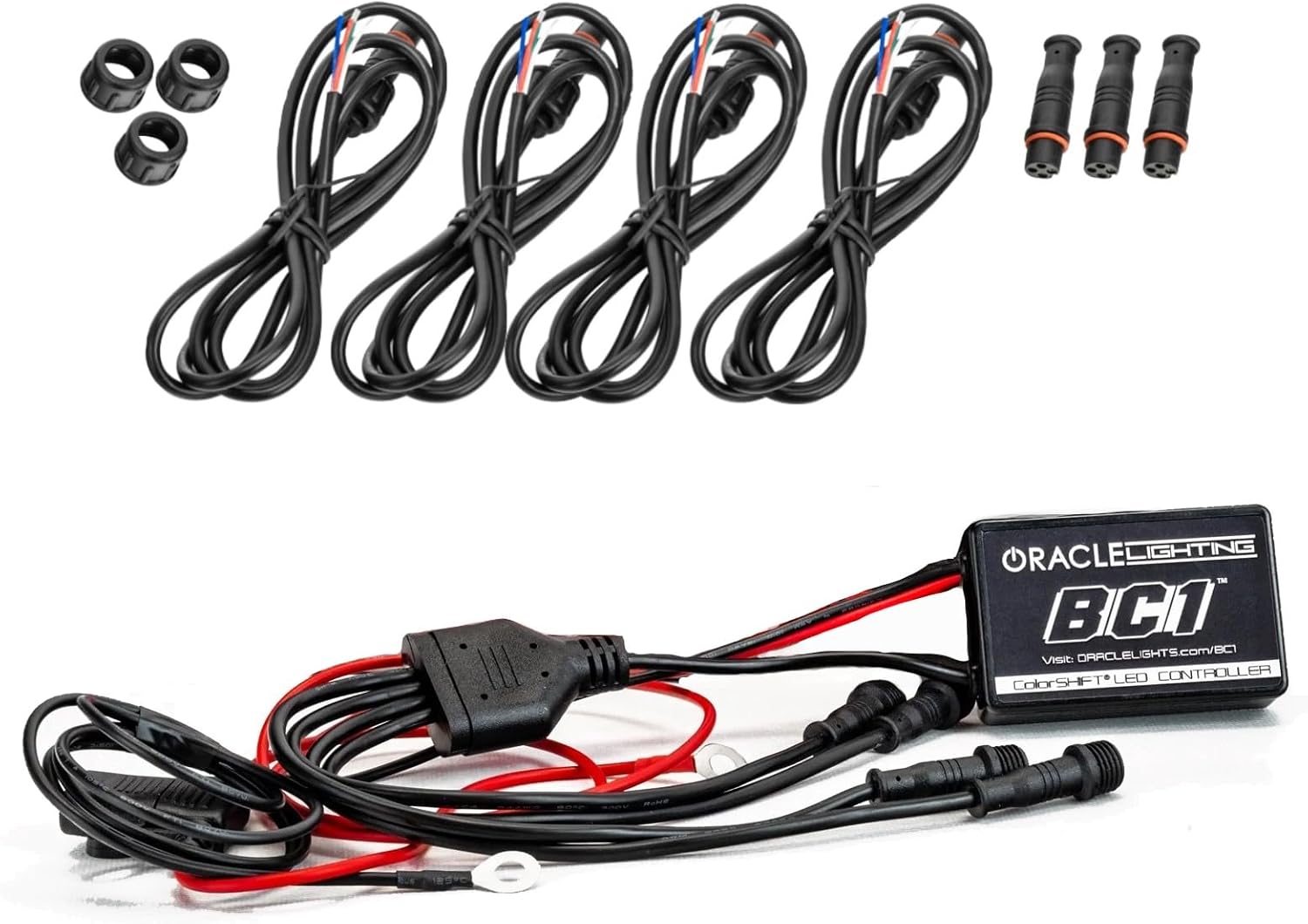
Figure 1: ORACLE Lighting BC1 Bluetooth Controller and included accessories, including the main controller unit, four accessory plugs with waterproof connections, and three waterproof end caps.
3. Bezpečnostní informace
Always disconnect the vehicle's battery before performing any electrical work. Ensure all connections are secure and properly insulated to prevent short circuits. This product is designed for 12VDC automotive systems. Do not exceed the maximum current output of 10A per channel.
Návrh 65 Varování: Tento produkt může obsahovat chemikálie, o kterých je ve státě Kalifornie známo, že způsobují rakovinu a vrozené vady nebo jiné reprodukční poškození. Více informací naleznete na www.P65Warnings.ca.gov.
4. Instalace
4.1 Kontrolní seznam před instalací
- Ujistěte se, že je baterie vozidla odpojena.
- Připravte si potřebné nástroje: odizolovací kleště, krimpovací kleště, izolační pásku, stahovací pásky a multimetr.
- Identify the mounting location for the controller. It can be mounted inside or outside the vehicle cabin.
- Plan the wiring path to avoid moving parts, heat sources, and sharp edges.
4.2 Pokyny pro zapojení
- Připojení napájení: Connect the positive (+) wire (typically red) from the BC1 controller to a constant 12V power source. It is recommended to use an inline 10A fuse within 12 inches of this connection.
- Zemní připojení: Connect the negative (-) wire (typically black) from the BC1 controller to a reliable chassis ground point on the vehicle.
- Připojení LED světel: Connect your RGB LED ColorSHIFT lights to the four output ports on the BC1 controller. Each output port is waterproof. Ensure the connections are secure.
- Unused Ports: If not all four output ports are used, install the provided waterproof end caps on the unused ports to protect them from moisture and debris.

Figure 2: The ORACLE Lighting BC1 Bluetooth Controller showing its main unit and the four output wires with waterproof connections, ready for installation.
4.3 Montáž regulátoru
Secure the BC1 controller in a location that is protected from extreme heat and direct physical damage. Use zip ties or mounting screws (not included) to firmly attach the controller. Ensure the location allows for proper cable routing and access if needed.
5. Provoz
5.1 Instalace aplikace
The ORACLE Lighting ColorSHIFT BC1 Controller is operated via a dedicated mobile application. Download the "ColorSHIFT" app from your device's app store (available for iOS and Android).
5.2 Připojení k ovladači
- Ensure your vehicle's battery is reconnected and the controller is powered.
- Povolte na svém mobilním zařízení Bluetooth.
- Open the ColorSHIFT app. The app will automatically scan for and connect to nearby BC1 controllers.
- Once connected, the app interface will display controls for your lights.
5.3 Základní funkce
- Výběr barvy: Use the color wheel or preset options within the app to choose your desired light color.
- Nastavení jasu: Adjust the intensity of the lights using the brightness slider.
- Stroboskopické efekty: Activate and customize strobing patterns.
- Synchronizace hudby: Synchronize your lights with music playing on your device or through the app's microphone input.
- Custom Themes: Create and save personalized lighting themes for quick access.

Obrázek 3: Přample of ColorSHIFT LED lighting installed in a vehicle interior, demonstrating customizable color options.
6. Údržba
The ORACLE Lighting BC1 Bluetooth Controller requires minimal maintenance. Periodically inspect all wiring connections for corrosion or damage. Ensure the controller unit is free from excessive dirt or moisture buildup. Clean the unit with a soft, dry cloth if necessary.
Due to its waterproof design (IP67), the controller is protected against dust ingress and temporary immersion in water. However, prolonged submersion or high-pressure water jets should be avoided.
7. Řešení problémů
| Problém | Možná příčina | Řešení |
|---|---|---|
| Světla se nerozsvěcují. | No power to controller; loose wiring; blown fuse; faulty LED lights. | Check power and ground connections. Verify fuse. Test LED lights independently. |
| Nelze se připojit přes Bluetooth. | Bluetooth disabled on device; app not open; controller out of range; interference. | Ensure Bluetooth is on. Open the ColorSHIFT app. Move closer to the controller. Restart app/device. |
| Lights do not respond to app commands. | Poor Bluetooth connection; app malfunction; controller malfunction. | Verify strong Bluetooth connection. Restart the app. If issues persist, contact support. |
| Lights reset to default color upon vehicle startup. | Controller wired to switched power instead of constant power for memory retention. | The BC1 controller does not retain settings if power is cut. For memory retention, the controller's positive wire needs constant 12V power. A relay can be used to switch the LED power while keeping the controller powered (refer to advanced wiring diagrams or professional installation). |
8. Specifikace
- Model: 1720-504
- Vstupní objemtage: 12V DC
- Max Current Output: 10A
- Operace: Ground-Switched RGB
- Hodnocení odolnosti proti povětrnostním vlivům: IP67
- Dimensions (Controller): Přibližně 4 x 9 x 9 palce (D x Š x V)
- Materiál: Plast
- Vybavení: Univerzální

Figure 4: Visual representation of the ORACLE Lighting BC1 Bluetooth Controller and its key specifications, including input voltage, current output, operation type, and weatherproof rating.
9. Záruka a podpora
9.1 Informace o záruce
ORACLE Lighting products are manufactured to high standards. For specific warranty details, please refer to the warranty information provided with your purchase or visit the official ORACLE Lighting webmísto.
9.2 Zákaznická podpora
If you encounter any issues or have questions regarding your ORACLE Lighting ColorSHIFT BC1 Bluetooth Controller, please contact ORACLE Lighting customer support through their official webwebu nebo kontaktních informací uvedených na obalu produktu.
ORACLE Lighting Webmísto: www.oraclelights.com
Ask a question about this manual
Ask about setup, troubleshooting, compatibility, parts, safety, or missing instructions. Manuals+ will review the question and use this page’s manual context to help answer it.