
1. Úvod a konecview
The ESX INFOTAINMENT VN1015-MA-DAB-4G is an advanced Android-based naviceiver designed for vehicle integration, offering a comprehensive multimedia and navigation experience. This unit features a 10.1-inch anti-glare multi-angle touchscreen, Android operating system, 4G/LTE connectivity, DAB+ digital radio, and Google Maps navigation. It supports Bluetooth hands-free calling and audio streaming, USB and MicroSD media playback, and includes inputs for rearview cameras and auxiliary devices.
Mezi klíčové vlastnosti patří:
- 10.1-inch high-resolution, anti-glare multi-angle touchscreen.
- Android Operating System for versatile app usage.
- Integrated 4G/LTE dongle for mobile internet (requires optional SIM card).
- DAB+ digital radio reception with station logos and AM/FM radio with RDS.
- Google Maps navigation (online and offline capabilities).
- Bluetooth hands-free system with audio streaming.
- Multiple connectivity options: 2x USB ports, 1x MicroSD slot, 1x camera input, 2x video outputs, 1x AUX/video input, 1x AUX/audio input.
- Support for steering wheel controls (optional adapter may be required).
2. Nastavení a instalace
Proper installation is crucial for the optimal performance of your ESX VN1015-MA-DAB-4G naviceiver. It is highly recommended that installation be performed by a qualified professional to ensure correct wiring and vehicle compatibility.
2.1. Identifikace součásti
Familiarize yourself with the various ports and connections on the rear of the unit before installation.
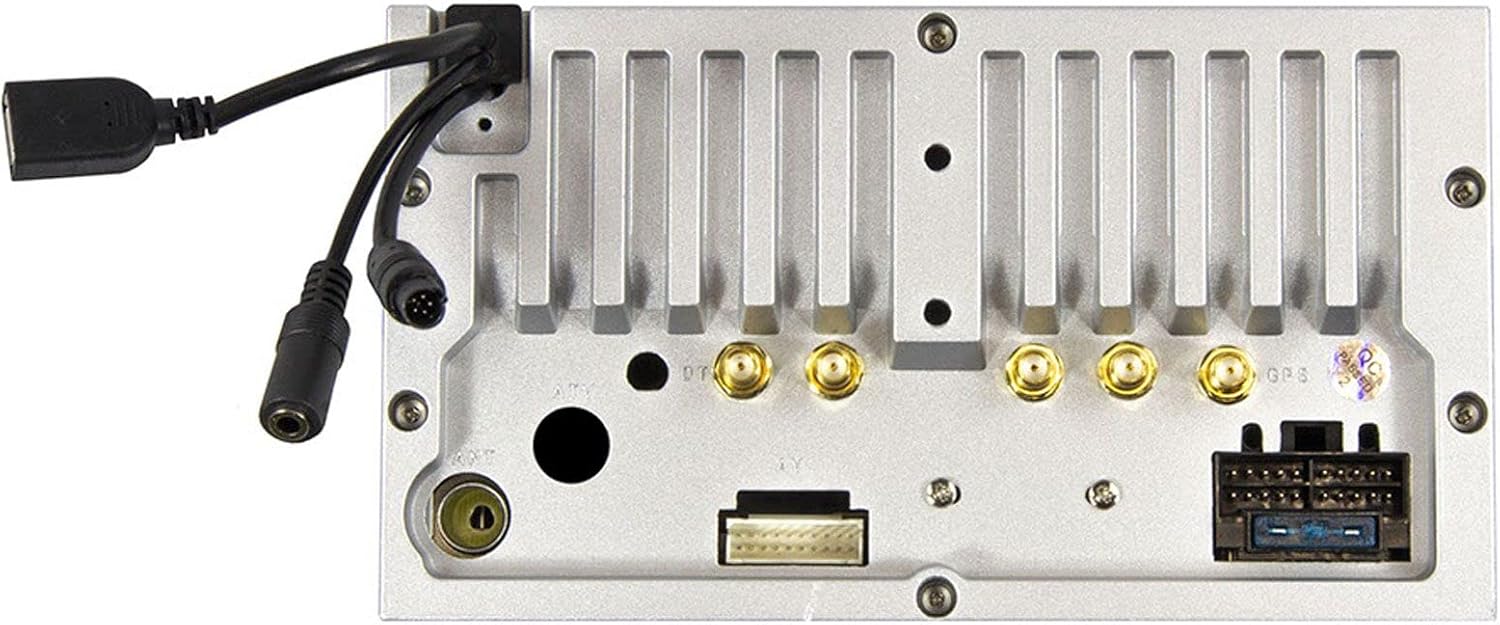
Obrázek 2.1: Zadní view of the ESX VN1015-MA-DAB-4G unit, illustrating the power harness, antenna inputs, USB ports, and auxiliary connections.
2.2. Připojení vodičů
- Napájení: Connect the main power harness to your vehicle's electrical system, ensuring correct positive, negative, and accessory (ACC) connections.
- Výstupy reproduktorů: Connect your vehicle's speakers to the corresponding outputs on the naviceiver.
- Připojení antény: Connect the FM/AM antenna. For DAB+ digital radio, connect the included DAB+ antenna to the designated port.
- GPS anténa: Připojte GPS anténu a namontujte ji na místo s volným view oblohy pro optimální příjem signálu.
- USB porty: Connect external USB devices for media playback or smartphone connectivity.
- Mikrofon: Connect the external microphone (VNA-MIC-AND, optional) for improved hands-free call quality.
- Zadníview Fotoaparát: Připojte zadní částview camera to the dedicated camera input. Ensure the reverse trigger wire is correctly connected for automatic display switching.
- Video výstupy: Utilize the two video outputs for connecting external monitors.
- AUX vstupy: Connect external audio/video sources to the AUX/video and AUX/audio inputs.
- 4G/LTE Dongle: If using mobile internet via 4G/LTE, insert a compatible SIM card into the optional 4G/LTE dongle and connect it to a USB port.
- Ovládání na volantu: If your vehicle supports steering wheel controls, an optional adapter may be required to integrate this functionality.
2.3. Počáteční zapnutí
After all connections are secure, turn on your vehicle's ignition. The naviceiver should power on. Follow any on-screen prompts for initial setup, such as language selection and time zone.
3. Návod k obsluze
This section details the primary functions and operations of your ESX VN1015-MA-DAB-4G naviceiver.
3.1. Základní ovládací prvky a rozhraní
The unit features a responsive touchscreen and physical buttons for common functions.

Obrázek 3.1: The main screen showing the radio interface with frequency display and control buttons.
- Vypínač: Press and hold to turn the unit on/off. A short press may mute audio or put the unit into standby.
- Ovládání hlasitosti: Upravte úroveň zvukového výstupu.
- Tlačítko Domů: Návrat na hlavní domovskou obrazovku systému Android.
- Tlačítko Zpět: Navigates back one step in menus or applications.
- Tlačítko fotoaparátu: Direct access to the camera input display (e.g., rearview fotoaparát).
3.2. Android Operating System
The naviceiver runs on an Android operating system, allowing access to various applications and customization options.
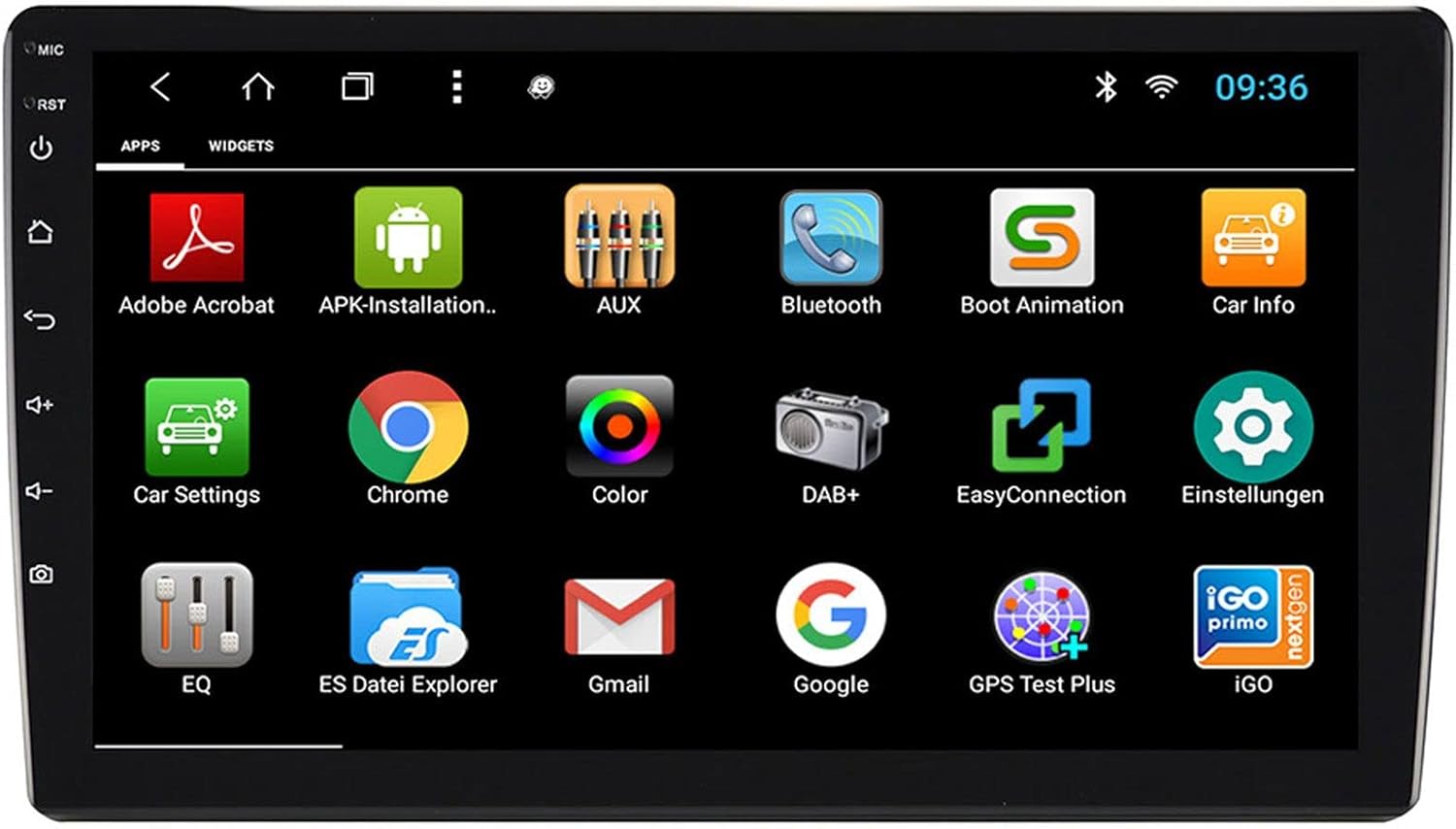
Obrázek 3.2: The applications screen, displaying various pre-installed and user-installed Android apps.
- App Launcher: Access all installed applications from the app drawer.
- Widgety: Customize your home screen with widgets for quick access to information or functions.
- Nastavení: Adjust system settings, network connections, display, audio, and more.
- Připojení k internetu: Connect to the internet via a WiFi hotspot (from a compatible smartphone) or by inserting a SIM card into the 4G/LTE dongle.
3.3. Radio Functions (AM/FM/DAB+)
The unit supports both analog and digital radio broadcasts.
- Výběr kapely: Switch between AM, FM, and DAB+ bands.
- tuning: Manually tune or use the auto-scan function to find available stations.
- Předvolby: Uložte si své oblíbené stanice pro rychlý přístup.
- RDS (FM): Radio Data System displays station information (e.g., station name, song title).
- Funkce DAB+: Enjoy higher quality digital audio and view station logos where available.
3.4. Připojení Bluetooth
Pair your smartphone for hands-free communication and audio streaming.
- Párování: Enable Bluetooth on your smartphone and search for the naviceiver. Select the unit and confirm the pairing code.
- Hands-free volání: Make and receive calls directly from the naviceiver screen.
- Streamování zvuku: Play music from your smartphone wirelessly through the naviceiver.
3.5. Navigation (Google Maps)
Utilize Google Maps for turn-by-turn navigation.

Obrázek 3.3: The navigation interface showing a map with a selected destination.
- Online navigace: Requires an active internet connection (WiFi hotspot or 4G/LTE).
- Offline mapy: Download maps for specific regions to use navigation without an internet connection.
- Zadání cíle: Enter addresses or points of interest using the touchscreen keyboard.
3.6. Přehrávání médií
Přehrávání zvuku a videa files z různých zdrojů.
- USB: Connect USB drives containing media files.
- MicroSD: Insert a MicroSD card into the dedicated slot for media or navigation data.
- Podporované formáty: The unit supports a wide range of audio and video formats. Refer to the system settings for a complete list.
3.7. Vstup z kamery
The naviceiver automatically displays the rearview camera feed when the vehicle is in reverse, or manually via the camera button.

Obrázek 3.4: Zadníview zobrazení kamery s dynamickými parkovacími pokyny.
- Automatická aktivace: When connected correctly, the rearview camera image appears automatically when shifting into reverse.
- Pokyny pro parkování: Adjustable parking lines assist with maneuvering.
4. Údržba
Regular maintenance ensures the longevity and optimal performance of your naviceiver.
- Čištění obrazovky: Dotykovou obrazovku jemně otřete měkkým hadříkem, který nepouští vlákna. V případě odolných šmouh lehceampOtřete hadřík vodou nebo čisticím prostředkem vhodným pro obrazovky. Vyhněte se agresivním chemikáliím nebo abrazivním materiálům.
- Aktualizace softwaru: Pravidelně kontrolujte dostupné aktualizace softwaru prostřednictvím nastavení systému nebo pokynů výrobce. website. Updates can improve performance, add features, and fix bugs.
- Obecná péče: Nevystavujte jednotku extrémním teplotám, delšímu přímému slunečnímu záření nebo nadměrné vlhkosti. Ujistěte se, že všechna připojení jsou bezpečná.
5. Řešení problémů
This section addresses common issues you might encounter with your ESX VN1015-MA-DAB-4G naviceiver.
| Problém | Možná příčina | Řešení |
|---|---|---|
| Jednotka se nezapne. | Žádné napájení; Spálená pojistka; Nesprávné zapojení. | Check vehicle's fuse box and the unit's power connections. Ensure ACC wire is receiving power. |
| Žádný zvuk. | Volume too low; Mute activated; Incorrect speaker wiring; Audio source issue. | Increase volume. Check if mute is active. Verify speaker connections. Try a different audio source. |
| GPS signal loss or inaccurate navigation. | GPS antenna obstructed or disconnected; Outdated maps. | Ujistěte se, že má anténa GPS volný view oblohy a je bezpečně připojen. V případě potřeby aktualizujte mapy. |
| Problémy s připojením Bluetooth. | Zařízení není v režimu párování; Rušení; Jednotka není viditelná. | Ensure both devices are in pairing mode. Restart both devices. Check Bluetooth settings on the naviceiver. |
| Dotykový displej nereaguje. | System freeze; Software error. | Perform a soft reset (refer to the unit's specific reset procedure, often a small reset button). If persistent, a factory reset might be needed (data loss may occur). |
| DAB+ radio not receiving stations. | DAB+ antenna not connected or faulty; Poor signal area. | Check DAB+ antenna connection. Ensure the antenna is correctly installed. Try rescanning for stations in a different location. |
If you encounter issues not listed here or if the suggested solutions do not resolve the problem, please contact ESX customer support or your authorized dealer.
6. Specifikace
Below are the technical specifications for the ESX VN1015-MA-DAB-4G Naviceiver:
| Funkce | Detail |
|---|---|
| Značka | Rozšíření ESX |
| Model | VN1015-MA-DAB-4G |
| Velikost obrazovky | 10.1 palců (25.6 cm) |
| Typ zobrazení | High-resolution, anti-glare multi-angle touchscreen |
| Operační systém | Android |
| BERAN | 4 GB |
| Flash paměť | 64 GB |
| Konektivita | Bluetooth, USB, 4G/LTE (via dongle), WiFi (via hotspot) |
| Rádiový tuner | AM/FM with RDS, DAB+ Digital Radio |
| Navigace | Google Maps (online/offline) |
| Vstupy | 1x Camera Input, 1x AUX/Video Input, 1x AUX/Audio Input, 2x USB Ports, 1x MicroSD Slot |
| Výstupy | 2x Video Outputs, Pre-amplified outputs (Front/Rear/Subwoofer) |
| Kontrolní metoda | Dotyková obrazovka |
| Kompatibilní zařízení | Smartphone |
7. Záruka a podpora
Your ESX VN1015-MA-DAB-4G naviceiver comes with a Certificate of Authenticity. For specific warranty terms and conditions, please refer to the documentation provided with your purchase or contact your authorized ESX dealer.
For technical support, troubleshooting assistance beyond this manual, or inquiries regarding parts and service, please contact your point of purchase or visit the official ESX webstránky s kontaktními informacemi zákaznického servisu.