
Zavedení
The Techbee Digital Infinite Repeat Cycle Intermittent Timer Plug is a versatile 3-in-1 device designed to automate your electrical appliances. It features daily ON-OFF timing, countdown and turn ON/OFF functions, and short ON-OFF cycle timing. This manual provides detailed instructions to help you set up, operate, maintain, and troubleshoot your timer plug effectively.

Figure 1: The Techbee Digital Timer Outlet, showcasing its key features including infinite repeat cycle ON-OFF intervals, three groups of daily ON-OFF timers, countdown and turn ON/OFF functionality, child lock to prevent misoperation, and easy access to after-sales service.
Bezpečnostní informace
Před použitím tohoto výrobku si prosím přečtěte a pochopte všechny bezpečnostní pokyny. Nedodržení těchto pokynů může vést k úrazu elektrickým proudem, požáru nebo vážnému zranění.
- Pouze k použití v interiéru. Nevystavujte vodě ani vlhkosti.
- Do not exceed the maximum load capacity of 15A, 1875W.
- Ujistěte se, že je časovač bezpečně zapojený do uzemněné zásuvky.
- Keep out of reach of children. The child lock function should be utilized to prevent accidental operation.
- Do not disassemble or attempt to repair the device. Contact qualified personnel for service.
Konec produktuview
The Techbee Digital Timer Plug features a large LCD screen for clear display of digits and numbers, along with intuitive buttons for easy programming.

Obrázek 2: Přední strana view of the Techbee Digital Timer Plug, displaying the LCD screen, power outlet, and control buttons for timing, countdown, and cycle settings.
Komponenty a ovládací prvky
- LCD displej: Shows current time, program settings, and countdowns.
- SWITCH/OFF Button: Manually turns the timer ON or OFF.
- Tlačítko HODINY: Adjusts hour settings.
- Tlačítko MINUTA: Adjusts minute settings.
- Tlačítko ENTER: Potvrdí nastavení.
- TIMING SETTING Button: Accesses daily ON-OFF timer programs.
- CTD SETTING Button: Accesses countdown timer settings.
- CYCLE SETTING Button: Accesses continuous interval timer settings.
- Tlačítko R (Reset): Resets the timer to factory defaults (requires a pin).

Figure 3: The timer's screen may have an invisible protective film. This can be peeled off for a clearer view or left on.

Figure 4: Physical dimensions of the timer plug, measuring 2.16"D x 2.26"W x 4.33"H.
Pokyny pro nastavení
Initial Setup: Clock Setting
Before using the timer, ensure the internal battery is charged by plugging the timer into a live outlet for at least 30 minutes. If the display is blank or malfunctions, press the 'R' button with a pin to reset it.
- Stiskněte tlačítko SWITCH/OFF button to turn the timer OFF.
- Stiskněte a podržte ENTER button until the digits on the screen flash.
- Repeatedly press or press and hold the HODINA tlačítko pro nastavení hodin.
- Repeatedly press or press and hold the MINUTA tlačítko pro nastavení minut.
- Stiskněte ENTER to confirm the clock setting.
Video 1: Detailed instructions for setting the clock on the Techbee T319 timer plug (0:08 - 0:54 in video).
Important Notes on Clock Setting:
- Only 24-hour (military) time is supported. 12-hour time with AM/PM is not supported.
- This is a 24-hour programmable timer, not a 7-day weekly timer. Setting the day of the week is not supported.
- To use all features, always set the clock time before use.
Návod k obsluze
The timer offers multiple functions to automate your devices. Ensure the appliance's ON/OFF switch is always in the ON position for the timer to control it.
Video 2: Konecview of the Techbee T319 24 Hour Interval Cycle Timer Plug with Countdown functionality.
Daily ON-OFF Timing (Function 1)
This function allows you to set specific ON and OFF times for your appliance each day.
- Stiskněte SWITCH/OFF to turn the timer OFF.
- Stiskněte NASTAVENÍ ČASOVÁNÍ to set the first ON time. Use HODINA a MINUTA upravit.
- Stiskněte NASTAVENÍ ČASOVÁNÍ again to set the first OFF time. Use HODINA a MINUTA upravit.
- Repeat for up to 3 ON-OFF programs if needed. Leave blank if not needed.
- Stiskněte ENTER to confirm all desired timing programs.

Figure 5: Daily ON-OFF Timer applications, such as turning Christmas lights on at 7:30 PM and off at 11:30 PM every day.
Video 3: Detailed instructions for setting daily ON-OFF timing (1:13 - 2:21 in video).
Continuous Interval in Hour & Minute Mode (Function 2)
This mode allows the timer to continuously cycle between ON and OFF intervals, measured in hours and minutes.
- Stiskněte SWITCH/OFF to turn the timer OFF.
- Stiskněte NASTAVENÍ CYKLU to set the ON interval. Use HODINA a MINUTA upravit.
- Stiskněte NASTAVENÍ CYKLU again to set the OFF interval. Use HODINA a MINUTA upravit.
- Stiskněte ENTER to confirm. The upper screen will alternately show the remaining ON and OFF interval.
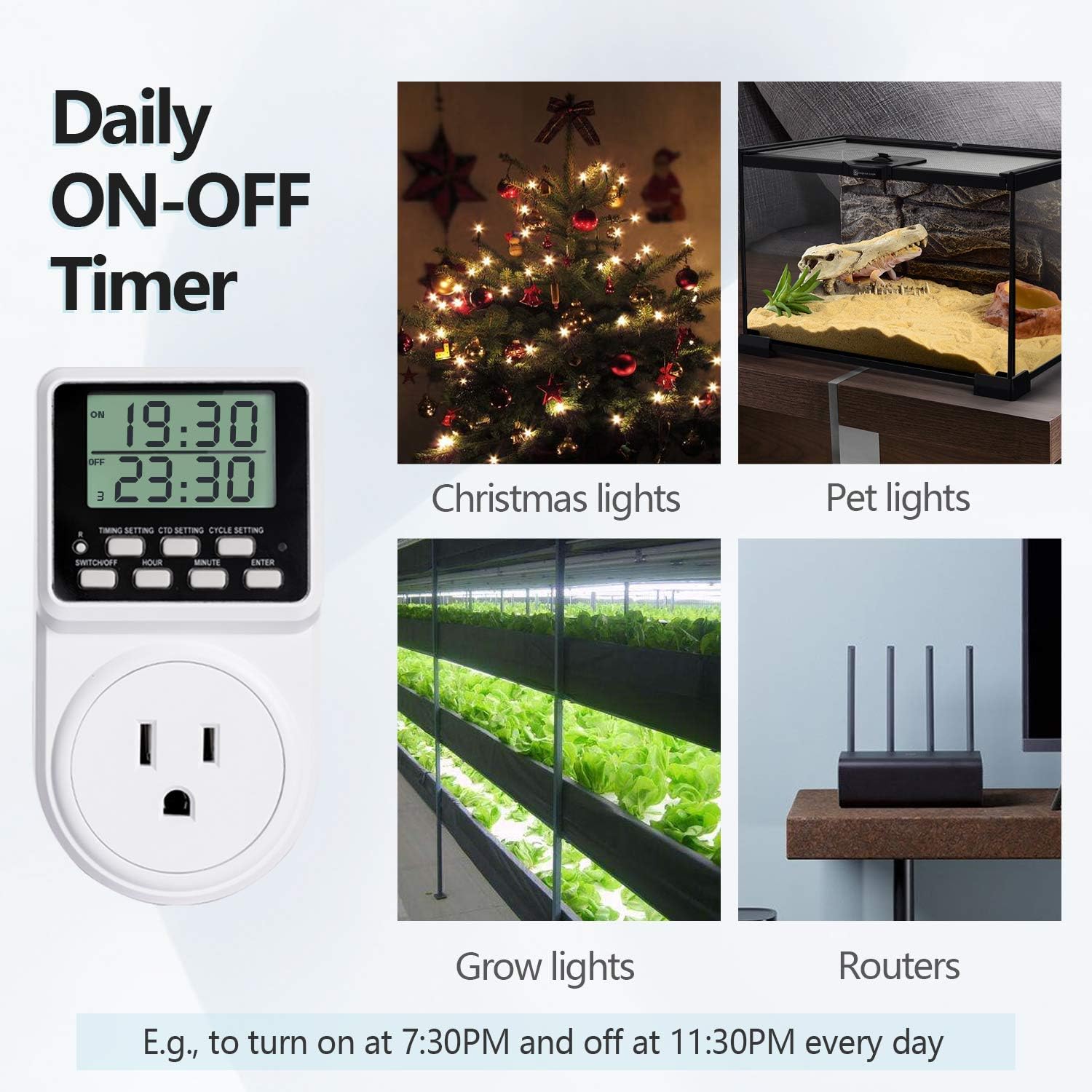
Figure 6: Countdown and Turn OFF/ON applications, such as cutting off power after 1.5 hours for chargers or hair tools.
Video 4: Detailed instructions for setting continuous interval in Hour & Minute Mode (2:21 - 3:08 in video).
Continuous Interval in Minute & Second Mode (Function 3)
This mode is similar to Function 2 but allows for shorter ON and OFF intervals, measured in minutes and seconds.
- Stiskněte SWITCH/OFF to turn the timer OFF.
- Stiskněte a podržte NASTAVENÍ CYKLU until the top of the screen flashes.
- Použití HODINA to set minutes and MINUTA to set seconds for the ON interval.
- Stiskněte NASTAVENÍ CYKLU again. Use HODINA to set minutes and MINUTA to set seconds for the OFF interval.
- Stiskněte ENTER potvrdit.

Figure 7: Repeat Cycle Timer applications, such as cycling
Ask a question about this manual
Ask about setup, troubleshooting, compatibility, parts, safety, or missing instructions. Manuals+ will review the question and use this page’s manual context to help answer it.