
1. Úvod
This manual provides essential information for setting up, operating, and maintaining your HP EliteOne 800 G5 All-in-One (AiO) computer. The HP EliteOne 800 G5 AiO is designed to offer a streamlined computing experience with its integrated display and powerful components. Please read this manual thoroughly before using your device to ensure proper functionality and longevity.
2. Obsah balení
Ověřte, zda jsou v balení přítomny všechny položky:
- HP EliteOne 800 G5 All-in-One Computer
- Napájecí adaptér a kabel
- Klávesnice
- Myš
- Dokumentace (Stručná úvodní příručka, Záruční informace)
3. Konec produktuview
Familiarize yourself with the main components of your HP EliteOne 800 G5 AiO computer.
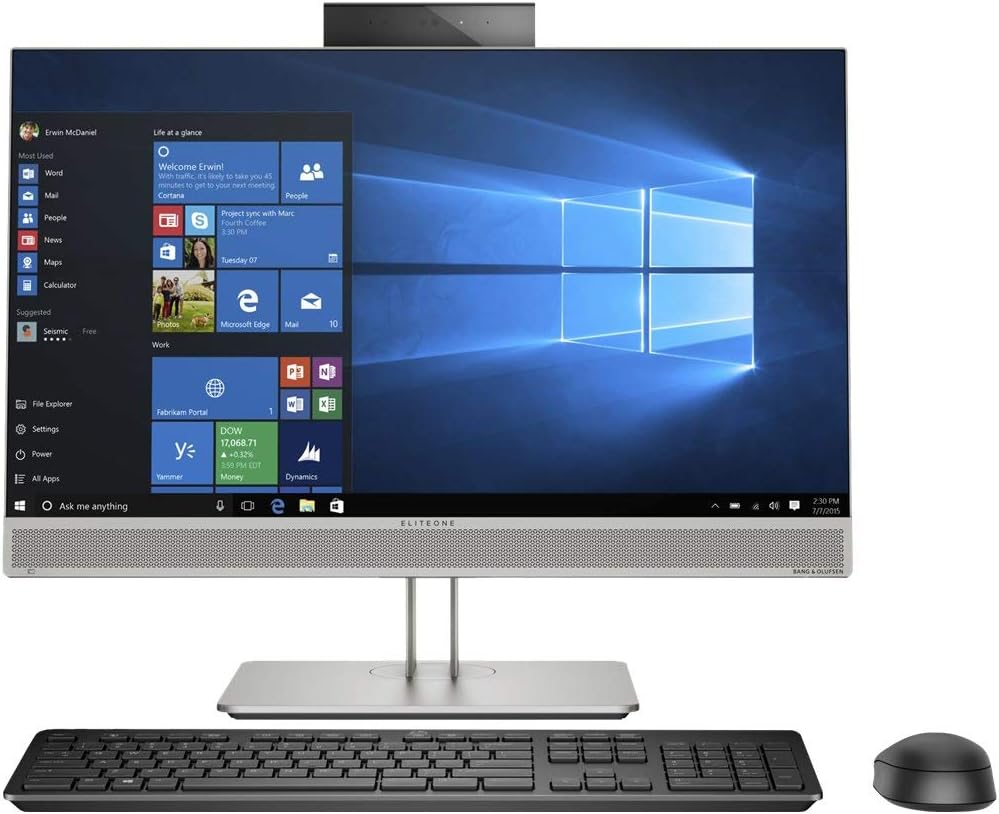
Obrázek 3.1: Přední strana view of the HP EliteOne 800 G5 All-in-One computer, displaying the screen, integrated webcam, speakers, and accompanying keyboard and mouse.

Obrázek 3.2: Úhlové view of the HP EliteOne 800 G5 All-in-One computer, showcasing the slim display profile and the stand, along with the keyboard and mouse.

Obrázek 3.3: Další úhlový view of the HP EliteOne 800 G5 All-in-One computer, highlighting the display and the included peripherals.
Klíčové komponenty:
- Zobrazit: 23.8-inch Full HD (1920x1080) anti-glare screen.
- Webvačka: Integrovaná kamera pro videokonference.
- Řečníci: Vestavěný zvukový výstup.
- Porty: Various USB ports, audio jacks, and video output ports (locations may vary).
- Optická mechanika: DVD-Writer for disc media.
4. Pokyny k nastavení
Pro počáteční nastavení postupujte takto:
- Rozbalení počítače: Opatrně vyjměte všechny součásti z obalu.
- Position the AiO: Place the HP EliteOne 800 G5 on a stable, flat surface. Ensure adequate ventilation around the device.
- Připojení periferií:
- Connect the USB keyboard to an available USB port on the computer.
- Connect the USB mouse to another available USB port.
- Připojte napájení: Connect the power cable to the power adapter, then connect the adapter to the computer's power input. Plug the power cable into a grounded electrical outlet.
- Zapnutí: Stiskněte tlačítko napájení, které se obvykle nachází na boční nebo spodní straně displeje.
- Počáteční nastavení Windows: Postupujte podle pokynů na obrazovce a dokončete nastavení systému Windows 10 Pro, včetně jazyka, regionu, síťového připojení a vytvoření uživatelského účtu.
5. Návod k obsluze
Základní provoz:
- Zapnutí/vypnutí: Press the power button to turn the computer on. To turn off, click the Start button, then Power > Shut down.
- Restartovat: Klikněte na tlačítko Start a poté na Napájení > Restartovat.
- Režim spánku: Klikněte na tlačítko Start a poté na Napájení > Spánek.
Using the Operating System (Windows 10 Pro):
Navigate the Windows 10 Pro interface using the mouse and keyboard. The Start Menu provides access to applications, settings, and system functions. Use the taskbar for quick access to frequently used programs and system notifications.
Připojení k síti:
Your AiO supports both wired (Ethernet) and wireless (Wi-Fi) network connections. To connect to Wi-Fi, click the network icon in the taskbar, select your desired network, and enter the password if prompted.
Using the DVD-Writer:
Insert a CD or DVD into the optical drive. The operating system will typically prompt you with options for playing media or accessing files na disku.
6. Údržba
Regular maintenance helps ensure optimal performance and extends the lifespan of your computer.
- Čištění: K čištění obrazovky a šasi použijte měkký hadřík, který nepouští vlákna. V případě odolných skvrn lehceampOtřete hadřík vodou nebo čisticím prostředkem na obrazovky. Vyhněte se agresivním chemikáliím.
- Aktualizace softwaru: Regularly check for and install Windows updates and driver updates from the HP support website to ensure security and performance.
- Záloha dat: Pravidelně zálohujte důležité filena externí disk nebo do cloudového úložiště, aby se zabránilo ztrátě dat.
- Větrání: Ujistěte se, že ventilační otvory nejsou zablokovány, aby nedošlo k přehřátí.
7. Řešení problémů
If you encounter issues, try these common troubleshooting steps:
- Bez napájení: Check if the power cable is securely connected to the computer and the electrical outlet. Try a different outlet.
- Bez displeje: Ensure the computer is powered on. If using an external monitor, check its connections.
- Pomalý výkon: Close unnecessary applications. Check for malware. Ensure sufficient free disk space.
- Periferie nefunguje: Ensure the peripheral is correctly connected to a functional USB port. Try restarting the computer.
- Problémy s připojením k internetu: Check your network cable or Wi-Fi connection. Restart your router/modem.
V případě složitějších problémů se obraťte na podporu HP webwebu nebo se obraťte na zákaznický servis HP.
8. Specifikace
| Funkce | Specifikace |
|---|---|
| Číslo modelu | 7YD11UT#ABA |
| Procesor | Intel Core i5-9500 (9th Gen), 3 GHz |
| BERAN | 8 GB DDR4 SDRAM |
| Skladování | 256GB SSD (sériový ATA) |
| Zobrazit | 23.8 Inches, 1920 x 1080 (Full HD) |
| Grafika | Grafická karta Intel UHD 630 (integrovaná) |
| Operační systém | Windows 10 Pro |
| Optická mechanika | DVD-Writer |
| USB porty | 1x USB 2.0 (additional USB ports may be present) |
| Rozměry (DxŠxV) | 7.1 x 21.2 x 18.4 palce |
| Hmotnost | 19.2 libry |
| Barva | Černý |
9. Záruka a podpora
Your HP EliteOne 800 G5 All-in-One computer comes with a standard limited warranty. For detailed warranty terms and conditions, please refer to the warranty documentation included with your product or visit the official HP support webweb. Technickou pomoc, ovladače ke stažení a další zdroje podpory naleznete na www.hp.com/support.