
1. Úvod
This manual provides detailed instructions for the safe and efficient installation, operation, and maintenance of your LogiLink BP0100 Aluminium Monitor Desk Stand. This desk mount is designed for 17-32 inch touch screens, offering a full range of motion for optimal positioning. It features a gas lift mechanism for easy height adjustment and balancing of monitor weight. Please read this manual thoroughly before assembly and use.
2. Bezpečnostní informace
- Před montáží se ujistěte, že jsou všechny součásti přítomny a nepoškozené. Nepoužívejte, pokud některé součásti chybí nebo jsou vadné.
- Verify that the desk surface can support the combined weight of the stand and your monitor.
- Nepřekračujte maximální nosnost 10 kg (22 lb).
- Always follow the assembly steps in the correct order. Incorrect installation may result in injury or equipment damage.
- Během instalace držte děti a domácí zvířata v dostatečné vzdálenosti. Malé části mohou představovat nebezpečí udušení.
- Adjust the gas spring tension carefully according to your monitor's weight to ensure stable positioning.
- Pravidelně kontrolujte všechny šrouby a spoje, abyste se ujistili, že jsou bezpečně utažené.
3. Obsah balení
Zkontrolujte prosím balení, zda neobsahuje následující položky:
- 1 x LogiLink BP0100 Touchscreen Monitor Desk Stand
- 1 x Screw Pack (various screws for monitor attachment)
- 1 x Uživatelská příručka (tento dokument)
- Necessary tools for assembly (e.g., Allen keys)
4. Specifikace
| Model | BP0100 |
| Kompatibilní zařízení | Monitors (17-32 inches) |
| Materiál | Hliník |
| Typ montáže | Stolní držák |
| Kapacita zatížení | Max. 10 kg (22 liber) |
| Kompatibilita VESA | 75x75 mm, 100x100 mm |
| Rozsah náklonu | -90° až +90° |
| Otočný rozsah | -40° až +40° |
| Rozsah otáčení | -180° až +180° |
| Rozměry produktu (D x Š x V) | 38.2 x 30.6 x 32.5 cm |
| Hmotnost položky | 3.96 kg |
5. Nastavení a instalace
Follow these steps to assemble and install your monitor desk stand:
- Připevněte základnu: Place the stand base on a stable desk surface. Ensure it is positioned securely and does not wobble.
- Příprava monitoru: Lay your monitor face down on a soft, clean surface to prevent scratches. Locate the VESA mounting holes on the back of your monitor.
- Připojte desku VESA k monitoru: Align the VESA mounting plate from the stand with the VESA holes on your monitor (75x75mm or 100x100mm). Use the appropriate screws from the provided screw pack to secure the plate to the monitor. Do not overtighten.
- Montáž monitoru na rameno: Carefully lift the monitor with the attached VESA plate and slide it onto the arm's mounting head. Ensure it clicks into place or is secured with the provided locking mechanism.


- Správa kabelů: Route your monitor cables through the integrated cable management channels on the stand arm to keep your workspace tidy.

6. Obsluha a seřízení
The LogiLink BP0100 stand offers various adjustments for optimal viewpohodlí:
- Height Adjustment (Gas Lift): The integrated gas lift allows for smooth and effortless vertical positioning of your monitor. Gently push or pull the monitor to the desired height. If the monitor drifts or is difficult to move, adjust the gas spring tension using the provided tool (usually an Allen key) at the designated adjustment point on the arm.

- Nastavení sklonu: Tilt your monitor forward or backward to reduce glare and find the best viewing angle. The stand supports a tilt range of -90° to +90°.


- Nastavení otáčení: Otočte monitor doleva nebo doprava, chcete-li sdílet obrazovku s ostatními nebo upravit viewing position. The stand allows for a swivel range of -40° to +40°.
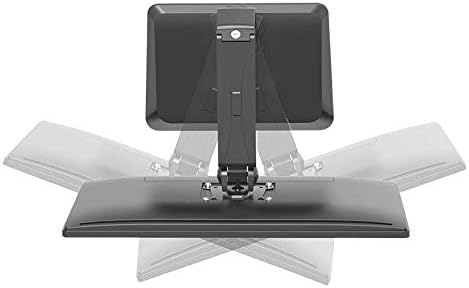
- Nastavení rotace: Rotate your monitor 360° to switch between landscape and portrait orientations. This is particularly useful for coding, document viewing, or specific applications. The stand supports a rotation range of -180° to +180°.

The stand is also ideal for touchscreen use, allowing easy interaction with the display.

7. Údržba
- Čištění: Použijte měkký, damp cloth to clean the stand. Avoid abrasive cleaners or solvents that could damage the finish.
- Inspekce: Periodically inspect all mounting hardware and connections to ensure they are tight and secure. Retighten any loose screws as necessary.
- Plynová pružina: The gas spring is designed for long-term use and generally requires no maintenance. If you notice a significant change in its performance, refer to the troubleshooting section or contact support.
8. Řešení problémů
| Problém | Možná příčina | Řešení |
|---|---|---|
| Monitor se prohýbá nebo nedrží v požadované výšce. | Napětí plynové pružiny je vzhledem k hmotnosti monitoru příliš nízké. | Adjust the gas spring tension using the provided Allen key. Turn clockwise to increase tension for heavier monitors, counter-clockwise for lighter monitors. |
| Monitor se obtížně posouvá nahoru nebo dolů. | Napětí plynové pružiny je vzhledem k hmotnosti monitoru příliš vysoké. | Adjust the gas spring tension using the provided Allen key. Turn counter-clockwise to decrease tension. |
| Stojan se zdá být nestabilní nebo vratký. | Mounting screws are loose or desk surface is uneven. | Ensure all assembly screws are tightened. Verify the desk surface is flat and stable. |
9. Informace o záruce
For specific warranty details regarding your LogiLink BP0100 Monitor Desk Stand, please refer to the warranty card included with your product or visit the official LogiLink webUschovejte si doklad o koupi pro případ reklamace.
10. Zákaznická podpora
If you have any questions, require technical assistance, or need to report a problem with your LogiLink BP0100 Monitor Desk Stand, please contact LogiLink customer support through their official webwebu nebo kontaktních informací uvedených na obalu produktu.