
1. Úvod
Thank you for choosing the AZDome BN03 QuadHD Wifi GPS Dashcam. This device is designed to provide reliable video recording of your journeys, enhancing safety and providing crucial evidence in case of incidents. Featuring high-resolution recording, advanced night vision, integrated GPS, and Wi-Fi connectivity, the BN03 offers a comprehensive solution for your in-car surveillance needs. Please read this manual thoroughly before operating the device to ensure proper usage and optimal performance.
2. Vlastnosti produktu
- Sony Starvis Night Vision: Records in high-quality 2K 1440p at 30fps or Full HD 1080p at 30fps, delivering excellent performance even in low-light conditions thanks to the 3.0 Megapixel Sony Starvis sensor.
- Dual-Band Wi-Fi (2.4 & 5.0 GHz): Snadno view a stáhnout footage directly to your smartphone or tablet via the AZDome app (available for iOS and Android). The Wi-Fi has a range of approximately 10 meters.
- Automatic Time Lapse Parking Mode: Secures your vehicle when parked by recording a photo every second, which is then played back as a video. This conserves storage space on the SD card, allowing for extended recording periods.
- Volitelná podpora zadní kamery: Can be expanded with an optional BN03 rear camera (with IMX307 sensor) for Full HD 1080p 30fps recording of the rear view. The rear camera connects directly to the front dashcam via a 6-meter cable.
- Vestavěný GPS modul: Displays speed on the recording and tracks coordinates, allowing you to review exact locations of recordings using the provided software.
3. Obsah balení
Po vybalení zkontrolujte obsah balení:
- AZDome BN03 Dashcam Unit
- Nabíječka do auta
- Micro USB kabel
- Windshield Mount (with 3M adhesive pad)
- Elektrostatické nálepky
- Cable Clips & Pry Tool
- Uživatelská příručka
4. Konec produktuview

Figure 4.1: AZDome BN03 Dashcam with its companion mobile application interface.

Obrázek 4.2: Přední strana view of the AZDome BN03 dashcam, showing the main camera lens.
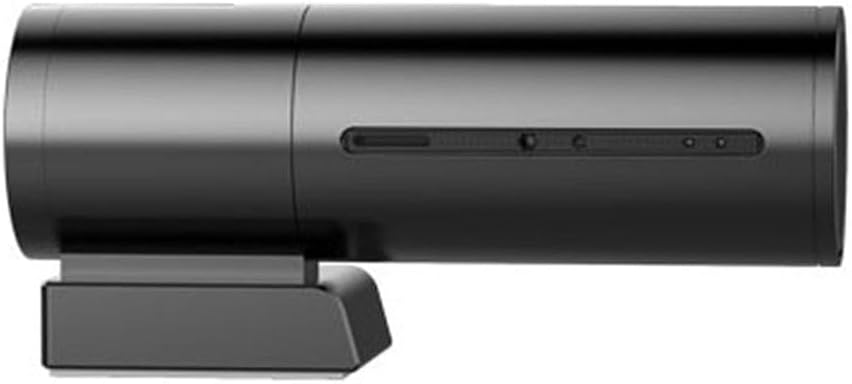
Obrázek 4.3: Strana view of the AZDome BN03 dashcam, highlighting its cylindrical design.
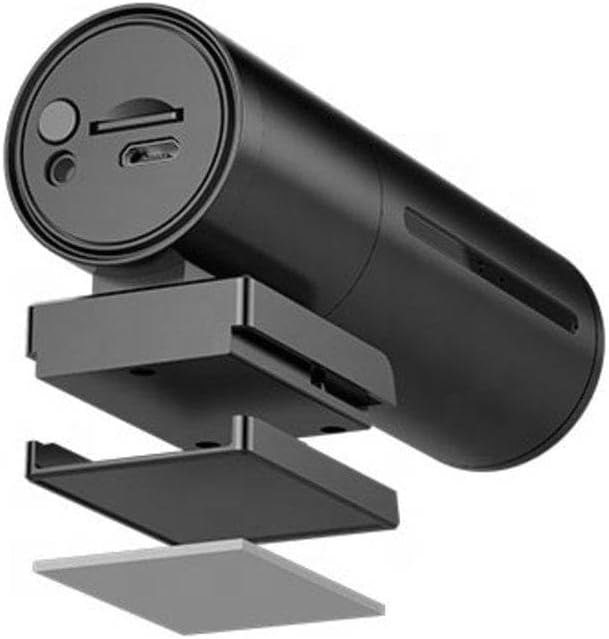
Obrázek 4.4: Rozložené view illustrating the components of the dashcam's mounting bracket.

Figure 4.5: The AZDome BN03 dashcam showing the connection point for the optional rear camera.
The AZDome BN03 dashcam features a compact, cylindrical design. The main camera lens is located at one end, while the other end typically houses the power input, memory card slot, and possibly a reset button. The device attaches to your windshield via a discreet mounting bracket.
5. Průvodce nastavením
5.1 Instalace karty Micro SD
- Ujistěte se, že je palubní kamera vypnutá.
- Locate the Micro SD card slot on the dashcam.
- Insert a high-speed (Class 10 or higher, U1/U3 recommended) Micro SD card into the slot until it clicks into place.
- Chcete-li kartu vyjmout, jemně ji zatlačte, dokud nevyskočí.
5.2 Montáž palubní kamery
- Důkladně očistěte vybrané místo na čelním skle.
- Apply the electrostatic sticker to the windshield first, then attach the 3M adhesive pad of the mount to the sticker. This allows for easier repositioning without leaving residue.
- Attach the dashcam to the mounting bracket.
- Upravte úhel kamery pro zajištění jasného obrazu view cesty před sebou.
5.3 Připojení napájení
- Connect the Micro USB cable to the dashcam's power input port.
- Plug the other end of the USB cable into the car charger, and then insert the car charger into your vehicle's 12V power outlet (cigarette lighter socket).
- Route the power cable neatly along the windshield and dashboard using the provided cable clips to avoid obstructing your view nebo narušování řízení.
5.4 Installing the AZDome App
The AZDome app allows you to control your dashcam, view živé footage, and download recordings. Hledat "AZDome" in your device's app store or use the links below:
- Pro zařízení iOS: https://apps.apple.com/nl/app/azdome/id1449342214
- Pro zařízení Android: https://play.google.com/store/apps/details?id=cn.com.blackview.azdome
6. Operating the Dashcam
6.1 Základní nahrávání
Once connected to power, the dashcam will automatically power on and begin recording when your vehicle starts. Recording will stop when the vehicle is turned off and power is disconnected.
6.2 Připojení k Wi-Fi a používání aplikací
- Zapněte palubní kameru.
- On your smartphone, go to Wi-Fi settings and connect to the AZDome dashcam's Wi-Fi network (SSID typically starts with AZDome_BN03_XXXX). The default password is usually 12345678 or 88888888.
- Open the AZDome app. You should now see a live view from the dashcam.
- Z aplikace můžete view recorded videos, download them to your phone, change settings, and manage the SD card.
Important Note: It is not recommended to change the default Wi-Fi name and password as this may cause connection issues.
6.3 Automatic Time Lapse Parking Mode
The dashcam automatically enters Time Lapse parking mode when the vehicle is turned off and the dashcam detects no motion for a period (requires continuous power supply, e.g., via a hardwire kit, not included). In this mode, the camera captures still images at set intervals (e.g., one frame per second) and compiles them into a time-lapse video, efficiently monitoring your parked vehicle.
6.4 Funkce GPS
The built-in GPS module automatically records your driving speed and location data. This information is embedded in the video files a může být viewed using the dedicated PC viewer software (usually available for download from the AZDome website) or within the mobile app.
7. Údržba
7.1 Správa SD karty
- It is recommended to format the Micro SD card regularly (e.g., once a month) to maintain optimal recording performance and prevent data corruption. This can usually be done via the dashcam's settings menu or through the AZDome app.
- Use only high-quality, reputable brand Micro SD cards designed for dashcam use (high endurance).
7.2 Čištění zařízení
- Wipe the dashcam lens and body with a soft, dry cloth.
- Nepoužívejte abrazivní čisticí prostředky ani rozpouštědla, protože by mohly poškodit zařízení.
8. Řešení problémů
| Problém | Možná příčina | Řešení |
|---|---|---|
| Autokamera se nezapne. | No power supply; faulty cable/charger; dead car outlet. | Check power connection; try a different USB cable/charger; test car outlet with another device. |
| Nahrávání se zastaví nebo zamrzne. | SD card error; full SD card; low-quality SD card. | Format the SD card; replace with a high-endurance SD card. |
| Problémy s připojením k Wi-Fi. | Incorrect password; changed SSID/password; interference. | Ensure correct password; reset dashcam to factory settings if SSID/password were changed; move away from other Wi-Fi sources. |
| GPS nefunguje. | No clear sky view; GPS module error. | Ensure dashcam has clear view of sky; restart device. |
| Špatná kvalita videa v noci. | Znečištěný objektiv; extrémně slabé světelné podmínky. | Clean the lens; ensure no obstructions on windshield. |
9. Specifikace
| Funkce | Detail |
|---|---|
| Značka | AZDOME |
| Číslo modelu | 6923788073483 (AZDome BN03 2K Wifi GPS) |
| Rozlišení záznamu videa | 1080p, 1440p |
| Obrazový snímač | Sony Starvis (3.0 Megapixel) |
| Velikost obrazovky | 2.4 palců |
| Konektivita | USB, Dual-Band Wi-Fi (2.4 & 5.0 GHz) |
| GPS | Vestavěný GPS modul |
| Zdroj napájení | Battery, Car Charger |
| Typ montáže | Držák na čelní sklo |
| Paměťový slot | 1 (Secure Digital Card) |
| Hmotnost položky | 228 g |
| První dostupný termín | 24. února 2020 |
10. Záruka a podpora
For warranty information, please refer to the specific terms and conditions provided at the time of purchase or visit the official AZDome website. Support resources, including firmware updates and frequently asked questions, are typically available on the manufacturer's website. For technical assistance, please contact AZDome customer support through their official channels.