
Shot Navi SN-NEO2-HP
Shot Navi NEO2 HP Golf GPS Device
Model: SN-NEO2-HP
Značka: Shot Navi
Zavedení
This manual provides detailed instructions for the proper use and maintenance of your Shot Navi NEO2 HP Golf GPS Device. Please read this manual thoroughly before using the device to ensure optimal performance and longevity.
Konec produktuview
Klíčové vlastnosti
- High-precision positioning with Michibiki L1S support.
- Provides low difference and reference distance displays.
- Features voice guidance and a large character display option.
- Includes a competition mode for compliant play.
- Pre-loaded with golf course data for Japan (100%+), Asia, Hawaii, Guam, and Saipan.
Obsah balení
Ověřte, zda jsou v balení obsaženy všechny níže uvedené položky:
- Shot Navi NEO2 HP Main Unit
- microUSB kabel
- AC adaptér
- Návod k obsluze se záručním listem
- Rychlý průvodce

Figure 1: Shot Navi NEO2 HP device and its key features.
Nastavení
1. Nabíjení zařízení
- Connect the microUSB cable to the device's charging port.
- Connect the other end of the microUSB cable to the AC adapter.
- Zapojte AC adaptér do elektrické zásuvky.
- Allow approximately 3 hours for a full charge. The battery indicator on the screen will show charging status.
Plné nabití poskytuje přibližně 17 hodin nepřetržitého používání.
2. Počáteční zapnutí
Press and hold the power button (usually located on the side or top) until the Shot Navi logo appears on the screen.
3. Satelitní akvizice
For accurate distance measurement, the device needs to acquire satellite signals. Perform initial setup outdoors with a clear view z nebe.
- Zapněte zařízení.
- Wait for the GPS signal icon to stabilize, indicating successful satellite acquisition. This may take a few minutes on first use or after a long period of inactivity.

Figure 2: Michibiki L1S satellite signal reception for enhanced accuracy.
Návod k obsluze
1. Základní navigace
Once satellites are acquired, the device will automatically detect the golf course and display relevant information.

Figure 3: Main display showing distance to the green.
2. Režimy zobrazení
The NEO2 HP offers various display modes to suit your needs:
- Jednoduchý View: Basic distance to the green.
- Zelený View: Detailní view of the green, often showing front, center, and back distances.
- Nebezpečí View: Displays distances to various hazards on the course.
- Large Character View: Tilting the device horizontally will enlarge the distance display for easier readability.
- Low Difference Display: Shows elevation differences and adjusted distances.
Použijte Přepínač button to cycle through different display modes.
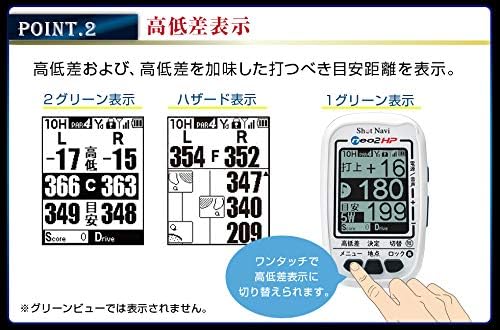
Obrázek 4: Přamples of Low Difference Display, Hazard Viewa Zelená View.

Figure 5: Large Character View activated by tilting the device.
3. Voice Guidance
The device can provide audible distance information to the green center. This is useful when you prefer not to look at the screen or are using the Hazard View.
- Stiskněte tlačítko Power/Voice button to activate voice guidance.
- The device will announce the distance to the green center.

Figure 6: Voice guidance feature in action.
4. Competition Mode
For official competitions, the device features a competition mode that disables certain functions to comply with rules.
- In competition mode, features like low difference, reference distance, and flight distance are not displayed.
- Refer to the quick guide or full manual for instructions on how to activate/deactivate competition mode.
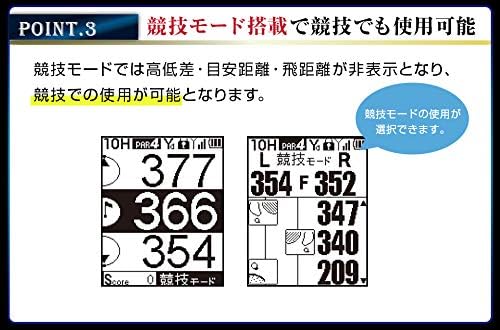
Figure 7: Display in Competition Mode.
5. Data Management Functions
- Point Recording: Mark specific locations on the course.
- Měření vzdálenosti: Measure shot distances.
- SCO Log Support: Log your scores and course data.
- Scorecard Function: Keep track of your score directly on the device.
- Score Counter Function: A simple counter for strokes.
Access these functions through the device's menu. Consult the quick guide for specific button operations.
Údržba
1. Čištění
- Otřete zařízení měkkým suchým hadříkem.
- Pro odolnou špínu lehceampOpláchněte hadřík vodou. Nepoužívejte agresivní chemikálie ani abrazivní čisticí prostředky.
- Ensure the charging port cover is securely closed to maintain IPX4 water resistance.
2. Data Updates
Golf course data can be updated via USB storage mode using a Windows or Mac computer. Regularly update your device to ensure the most current course information.
- Connect the device to your computer using the microUSB cable.
- The device should appear as a removable storage drive.
- Visit the Shot Navi official website for the latest update software and instructions.
3. Skladování
Pokud zařízení nepoužíváte, skladujte ho na chladném a suchém místě mimo dosah přímého slunečního záření a extrémních teplot.
Odstraňování problémů
| Problém | Možná příčina | Řešení |
|---|---|---|
| Zařízení se nezapne. | Slabá nebo vybitá baterie. | Charge the device for at least 3 hours using the provided AC adapter and microUSB cable. |
| Cannot acquire satellite signals. | Zabráněno view of the sky; first-time use; device not updated. | Ujistěte se, že jste venku s jasným view of the sky. Wait a few minutes. Update the device's course data. |
| Nepřesné odečty vzdálenosti. | Poor satellite signal; outdated course data. | Move to an area with a clearer view of the sky. Update the device's course data. |
| Obrazovka nereaguje nebo zamrzá. | Softwarová závada. | Proveďte měkký reset stisknutím a podržením tlačítka napájení po dobu 10–15 sekund, dokud se zařízení nerestartuje. |
If you encounter issues not listed here or if the suggested solutions do not resolve the problem, please contact Shot Navi customer support.
Specifikace

Obrázek 8: Tabulka specifikací produktu.
| Obecné specifikace | |
|---|---|
| Značka | Shot Navi |
| Číslo modelu | SN-NEO2-HP |
| Rozměry (D x Š x V) | 49 mm x 18 mm x 80 mm |
| Hmotnost | 62 gramů |
| Zobrazit | 2-inch Black and White LCD (128x160 dots) |
| Typ baterie | Lithium-iontová |
| Doba plného nabití | Přibl. 3 hodin |
| Doba nepřetržitého používání | Přibl. 17 hodin |
| Hodnocení voděodolnosti | IPX4 |
| Konektivita | USB |
| Podporované satelitní systémy | QZSS (Michibiki L1S) |
| Typ mapy | Asia (including Japan, Hawaii, Guam, Saipan) |
| Data Update Method | USB Storage Mode (Windows/Mac) |
| Klíčové funkce | |
|---|---|
| Navi Functions | Jednoduchý View, Zelená View, Hazard View, Large Character View, Low Difference Display |
| Správa dat | Point Recording, Distance Measurement, SCO Log Support, Scorecard Function, Score Counter Function |
| Další funkce | Auto Start, Navi Interruption Function, Black/White Reversal Display, Voice Guidance, Competition Mode |
Záruka a podpora
Informace o záruce
The Shot Navi NEO2 HP comes with a jednoletá záruka from the date of purchase. This warranty is limited to defects arising from normal use. Please retain your proof of purchase and the warranty card included in the package.
Zákaznická podpora
For technical assistance, troubleshooting, or warranty claims, please contact Shot Navi customer support. Refer to the contact information provided in your warranty card or visit the official Shot Navi webstránky pro podrobnosti o podpoře.
Official Shot Navi Webmísto: www.shotnavi.jp
Ask a question about this manual
Ask about setup, troubleshooting, compatibility, parts, safety, or missing instructions. Manuals+ will review the question and use this page’s manual context to help answer it.