
1. Úvod
This manual provides detailed instructions for the setup, operation, and maintenance of your Crony ZXTL-13A Digital LED Table and Wall Clock. This device displays time, date, day, and temperature, and includes alarm and radio functions. Please read this manual thoroughly before using the product to ensure proper function and longevity.
2. Bezpečnostní informace
- Nevystavujte zařízení extrémním teplotám, přímému slunečnímu záření nebo vysoké vlhkosti.
- Zabraňte pádu zařízení nebo jeho vystavení silným nárazům.
- Nepokoušejte se zařízení rozebírat ani opravovat sami. Veškerý servis svěřte kvalifikovanému personálu.
- Uchovávejte mimo dosah dětí.
- Use only the specified power adapter and battery type (AAA).
3. Konec produktuview
The Crony ZXTL-13A is a versatile digital clock designed for both desk and wall mounting. It features a clear LED display and multiple functions.
3.1 Klíčové vlastnosti
- Digital LED Display for Time, Date, Day, and Temperature
- Built-in Alarm Function
- Built-in Radio Function
- Desk & Shelf or Wall Mountable
- Durable Metal Material Construction
- Battery Powered (AAA) and AC Power Option
3.2 Clock Components

Obrázek 1: Přední strana View of the Crony ZXTL-13A Clock. This image shows the main display area with segments for AM/PM, current time, alarm status, day of the week, month, temperature in Celsius, and week number.
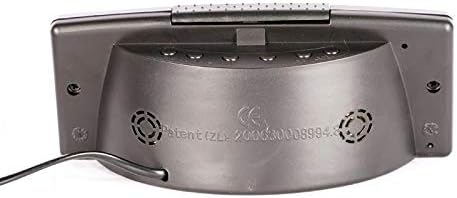
Obrázek 2: Zpět View of the Crony ZXTL-13A Clock. This image illustrates the rear panel, typically where control buttons for setting time, alarm, and mode selection are located, along with the power input port and possibly a battery compartment.
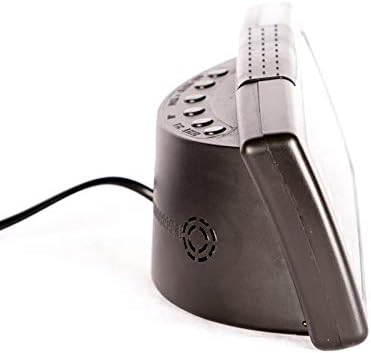
Obrázek 3: Strana View of the Crony ZXTL-13A Clock. This image highlights the clock's profile, demonstrating its integrated stand for desk placement and the connection point for the power cable.
4. Nastavení
4.1 Napájení hodin
The Crony ZXTL-13A clock can be powered by either AAA batteries or an AC power adapter.
- Instalace baterie: Locate the battery compartment on the back of the clock (refer to Figure 2). Insert the required number of AAA batteries, ensuring correct polarity (+/-).
- Napájení střídavým proudem: Connect the provided power adapter to the DC input port on the back of the clock (refer to Figure 2 and 3). Plug the adapter into a standard wall outlet.
- For continuous operation and full functionality, it is recommended to use the AC power adapter. Batteries serve as a backup in case of power outage or for portability.
4.2 Možnosti montáže
- Desk/Shelf Placement: Utilize the integrated stand at the base of the clock for stable placement on any flat surface.
- Montáž na stěnu: The clock features mounting holes on the back for secure attachment to a wall. Use appropriate screws and wall anchors (not included) for installation.
5. Návod k obsluze
The control buttons are typically located on the back of the clock (refer to Figure 2). Common buttons include MODE, UP/+, DOWN/-.
5.1 Čas nastavení
- Stiskněte a podržte MODE tlačítko, dokud nezačnou blikat číslice hodin.
- Použijte NAHORU/+ or DOLŮ/- tlačítka pro nastavení hodiny.
- Stiskněte MODE again to move to the minute digits, then adjust with NAHORU/+ or DOLŮ/-.
- Pokračujte v stisknutí MODE to cycle through 12/24-hour format and AM/PM settings (if applicable), adjusting each with NAHORU/+ or DOLŮ/-.
- Stiskněte MODE ještě jednou nebo počkejte několik sekund, než se nastavení automaticky uloží.
5.2 Setting Date and Day
- Z normálního zobrazení času stiskněte tlačítko MODE button repeatedly until the date or year digits flash.
- Použití NAHORU/+ or DOLŮ/- to set the year, then press MODE.
- Upravte měsíc a poté stiskněte MODE.
- Upravte den a poté stiskněte MODE. The day of the week should automatically update.
- Wait for the settings to save.
5.3 Nastavení budíku
- Stiskněte tlačítko MODE dokud se nezobrazí čas budíku (často označený ikonou budíku nebo „AL“).
- Stiskněte a podržte MODE dokud nezačnou blikat číslice hodin budíku.
- Adjust the alarm hour with NAHORU/+ or DOLŮ/-. Stiskněte MODE.
- Adjust the alarm minute with NAHORU/+ or DOLŮ/-. Stiskněte MODE.
- To activate/deactivate the alarm, look for a dedicated alarm ON/OFF button or press NAHORU/+ or DOLŮ/- while the alarm time is displayed (not flashing). An alarm icon will appear on the display when active.
5.4 Funkce rádia
The clock includes a built-in radio. Specific operation details may vary, but generally:
- Press a dedicated RÁDIO nebo procházejte režimy pomocí tlačítka MODE button until the radio frequency is displayed.
- Použití NAHORU/+ or DOLŮ/- to tune to desired stations.
- Some models may have auto-scan or preset functions. Refer to on-screen prompts if available.
5.5 Zobrazení teploty
The clock automatically displays the ambient temperature. Some models may allow switching between Celsius (°C) and Fahrenheit (°F). Look for a dedicated button or a setting within the MODE cycle to change the temperature unit.
6. Údržba
6.1 Čištění
Chcete-li hodiny vyčistit, jemně otřete displej a casing with a soft, dry, lint-free cloth. Do not use abrasive cleaners, solvents, or spray directly onto the clock.
6.2 Výměna baterie
If using batteries for backup, replace them when the display dims or functions become erratic. Ensure to use fresh AAA batteries and dispose of old batteries responsibly.
7. Řešení problémů
| Problém | Možná příčina | Řešení |
|---|---|---|
| Displej je prázdný nebo tmavý. | No power, low batteries, or power adapter issue. | Check AC power connection. Replace AAA batteries. Ensure power outlet is functional. |
| Hodiny neukazují přesný čas. | Incorrect initial setting, power interruption. | Reset the time following Section 5.1. Ensure stable power supply. |
| Alarm se nespustí. | Alarm not activated, incorrect alarm time, low volume. | Verify alarm is ON (alarm icon displayed). Check alarm time setting. Adjust volume if applicable. |
| Radio not working or poor reception. | Poor signal, antenna not extended (if applicable), incorrect frequency. | Adjust clock position. Extend any external antenna. Rescan for stations. |
8. Specifikace
| Funkce | Detail |
|---|---|
| Model | ZXTL-13A |
| Značka | Kamarád |
| Typ zobrazení | Digitální LED |
| Funkce | Time, Date, Day, Temperature, Alarm, Radio |
| Zdroj napájení | Battery Powered (AAA), AC Adapter |
| Materiál | Kov |
| Typ montáže | Nástěnný držák, Stůl/Police |
| Rozměry balení | 20 x 9 x 8.6 cm |
| Hmotnost | 420 g |
9. Záruka a podpora
For warranty information or technical support, please refer to the documentation included with your purchase or contact Crony customer service directly. Keep your proof of purchase for warranty claims.
Pro další pomoc navštivte oficiální stránky výrobce webwebu nebo kontaktujte jejich kanály podpory.