
VMAI HD-019
VMAI 38 Inch 2.1 Sound Bar User Manual
Model: HD-019
1. Úvod
Thank you for choosing the VMAI 38 Inch 2.1 Sound Bar. This sound bar is designed to enhance your home entertainment experience with powerful audio, featuring dual built-in subwoofers and versatile connectivity options. Please read this manual thoroughly before use to ensure proper operation and to maximize your enjoyment of the product.
2. Bezpečnostní informace
- Nevystavujte tento spotřebič kapajícím ani stříkajícím tekutinám.
- Nezakrývejte žádné větrací otvory. Nainstalujte v souladu s pokyny výrobce.
- Neinstalujte v blízkosti zdrojů tepla, jako jsou radiátory, tepelné regulátory, kamna nebo jiná zařízení (včetně amplifikátory), které produkují teplo.
- Chraňte napájecí kabel před šlapáním nebo přiskřípnutím, zejména u zástrček, zásuvek a v místě, kde vychází ze zařízení.
- Používejte pouze nástavce/příslušenství určené výrobcem.
- Odpojte tento spotřebič během bouřky s blesky nebo když jej nebudete delší dobu používat.
3. Obsah balení
Zkontrolujte prosím, zda je ve vašem balíčku obsaženo vše:
- VMAI 38 Inch Sound Bar
- Dálkové ovládání
- Premium 5 ft Optical cable
- 5 ft RCA cable
- Napájecí adaptér
- Nástěnné držáky a šrouby
- Uživatelská příručka
4. Konec produktuview
The VMAI Sound Bar HD-019 is engineered to deliver a powerful and clear audio experience. It features dual 25W built-in subwoofers and four speakers, providing 90W of total power for room-shaking bass and precise sound.

Figure 4.1: VMAI 38 Inch Sound Bar and included remote control.
The sound bar incorporates advanced DSP technology and Bluetooth 5.0 for stable and fast wireless transmission. It offers multiple input connections including HDMI ARC, Optical, AUX, and USB (for flash drives only).

Figure 4.2: Internal components of the VMAI Sound Bar, highlighting the 6 speakers and 90 watts of power for a superb sound experience.

Figure 4.3: Illustration of the sound bar's dual built-in subwoofers, designed to deliver deep bass.
5. Nastavení
5.1 Možnosti umístění
The VMAI Sound Bar offers flexible placement options to suit your home theater setup:
- Umístění na počítači: Position the sound bar directly in front of your TV on a flat surface, ensuring it does not obstruct the TV's remote sensor.
- Montáž na stěnu: For an elegant, space-saving setup, the sound bar can be mounted on the wall using the included mounting brackets and template. Ensure the wall can support the weight of the sound bar.

Figure 5.1: The sound bar's mountable design allows for both wall mounting and desktop placement.
5.2 Připojení zvukového panelu
The sound bar supports various connection methods to integrate with your devices:
- HDMI ARC: Connect an HDMI cable from the sound bar's HDMI ARC port to your TV's HDMI ARC port. This allows for audio return channel functionality, simplifying control.
- Optický vstup: Use the included optical cable to connect the sound bar to your TV's optical audio output.
- Vstup AUX: Connect devices using the included RCA cable to the AUX input.
- Vstup USB: Pro přehrávání zvuku z USB flash disku.
- Bluetooth 5.0: Wirelessly connect your Bluetooth-enabled devices.

Figure 5.2: The sound bar supports HDMI (ARC), AUX, Optical, USB, and Bluetooth 5.0 connections.
5.3 Important Note for Optical Mode (PCM Setting)
When using the Optical input, it is crucial to adjust your TV's audio settings to PCM (Pulse Code Modulation). Failure to do so may result in no sound or distorted audio.
Steps to enable PCM (may vary by TV brand):
- Go to the 'Settings' menu on your TV.
- Navigate to 'Audio Format' or 'Sound Output' settings.
- Select 'PCM' as the digital audio output format.
- If using HDMI ARC, also check 'HDMI Audio Format' and set it to 'PCM'.
6. Návod k obsluze
6.1 Zapnutí/vypnutí
Stiskněte tlačítko Napájení/režim button on the sound bar or the remote control to turn the unit on or off.
6.2 Výběr vstupu
Stiskněte tlačítko Selection (M) tlačítko na zvukové liště nebo na VSTUP button on the remote control to cycle through available input sources (HDMI ARC, Optical, AUX, USB, Bluetooth).
6.3 Ovládání hlasitosti
Použijte Hlasitost + a Hlasitost - buttons on the sound bar or remote control to adjust the volume level.
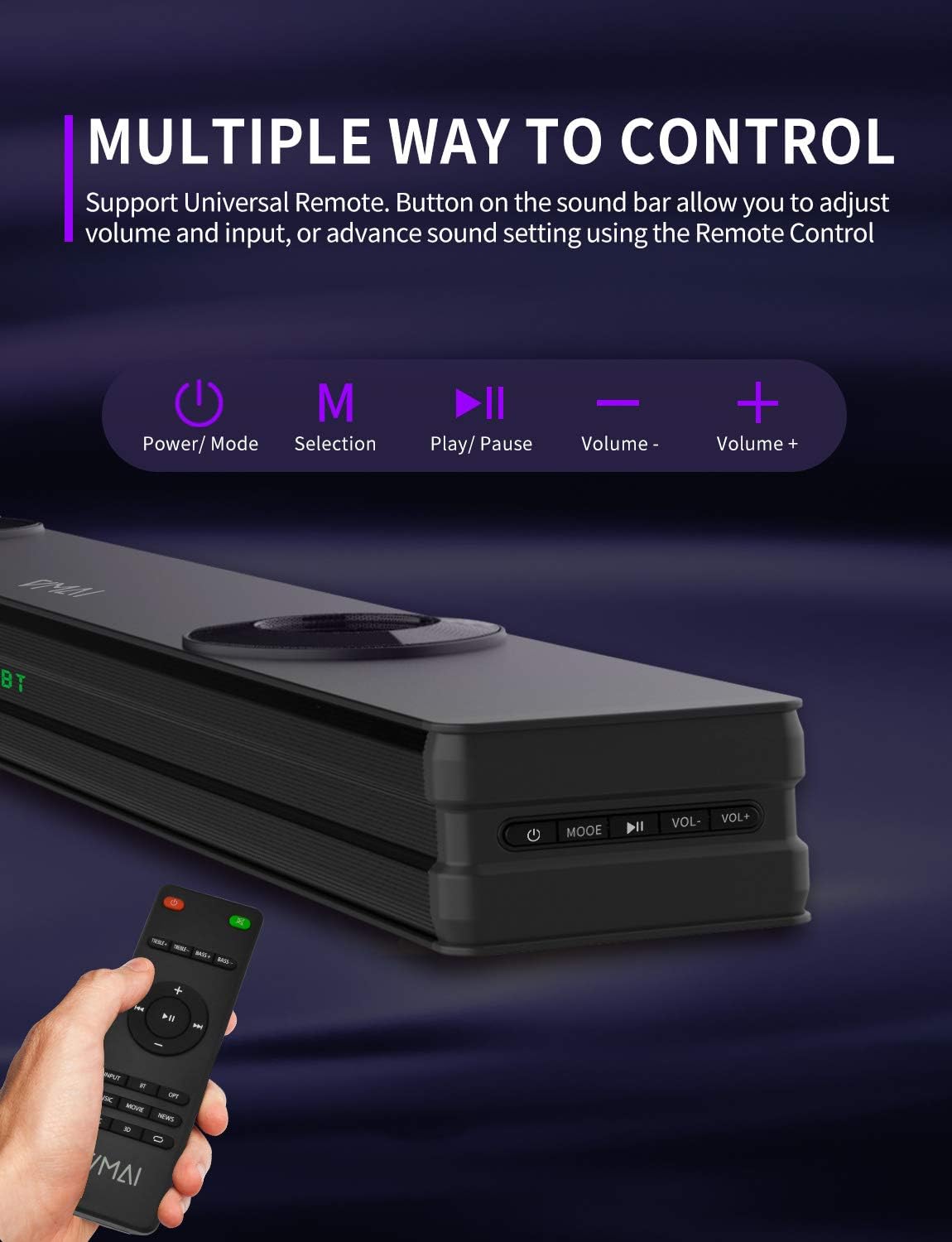
Figure 6.1: The sound bar can be controlled via its integrated buttons or the included remote control.
6.4 Režimy ekvalizéru
The sound bar features 4 distinct sound modes to optimize your listening experience. Use the remote control to switch between them:
- Hudební režim: Optimalizováno pro přehrávání hudby, vylepšená čistota a basy.
- Movies Mode: Provides a cinematic surround sound experience, ideal for films.
- Režim zpráv: Enhances vocal clarity for news broadcasts and dialogue-heavy content.
- Režim 3D prostorového zvuku: Creates an immersive, three-dimensional audio field.
6.5 Párování Bluetooth
To pair your Bluetooth device:
- Switch the sound bar to Bluetooth mode (indicated by 'BT' on the display).
- Povolte Bluetooth na svém zařízení (chytrý telefon, tablet atd.).
- Hledat 'VMAI Sound Bar' in your device's Bluetooth settings.
- Select it to pair. Once connected, the 'BT' indicator will stop flashing.
7. Údržba
To ensure the longevity and optimal performance of your VMAI Sound Bar, follow these maintenance guidelines:
- Čištění: Use a soft, dry cloth to clean the surface of the sound bar. Do not use liquid cleaners or aerosol sprays.
- Větrání: Ujistěte se, že ventilační otvory nejsou zablokovány, aby nedošlo k přehřátí.
- Skladování: If storing the sound bar for an extended period, unplug it from the power outlet and store it in a cool, dry place.
- Vyhněte se vlhkosti: Chraňte soundbar před vodou a vysokou vlhkostí.
8. Řešení problémů
If you encounter issues with your VMAI Sound Bar, please refer to the following common problems and solutions:
| Problém | Možná příčina / řešení |
|---|---|
| Ze soundbaru není slyšet žádný zvuk. |
|
| Zkreslený nebo špatná kvalita zvuku. |
|
| Problémy s připojením Bluetooth. |
|
| Dálkové ovládání nefunguje. |
|
| Bass is weak or not noticeable. |
|
9. Specifikace
| Funkce | Specifikace |
|---|---|
| Název modelu | HD-019 |
| Rozměry (D x Š x V) | 4.3"H x 38"Š x 2.5"V |
| Hmotnost položky | 6 libry |
| Maximální výstupní výkon reproduktoru | 90 wattů |
| Vstupní objemtage | 240 voltů |
| Typ reproduktoru | 3D, Soundbar, Subwoofer, Prostorový zvuk |
| Technologie připojení | Optical, HDMI (ARC), AUX, USB, Bluetooth |
| Verze Bluetooth | 5.0 |
| Dosah Bluetooth | 15.24 metrů (50 stop) |
| Režim zvukového výstupu | Stereo, prostorový zvuk |
| Materiál | Kov |
| Barva | Matná černá |
10. Záruka a podpora
VMAI offers a 12-month coverage for its products. Every VMAI sound bar undergoes a strict quality test process before shipment. For any issues or inquiries, please contact VMAI customer support. We are committed to resolving all your problems within 24 hours.
VMAI aims to provide high-quality audio products that deliver fantastic audio-visual enjoyment and an authentic interactive experience.
Ask a question about this manual
Ask about setup, troubleshooting, compatibility, parts, safety, or missing instructions. Manuals+ will review the question and use this page’s manual context to help answer it.