
1. Úvod a konecview
The DOOGEE X95 is a feature-rich smartphone designed for everyday use, offering a large display, capable cameras, and a long-lasting battery. This manual provides essential information on setting up, operating, maintaining, and troubleshooting your device.

Obrázek 1.1: Přední a zadní strana view of the DOOGEE X95 smartphone.
2. Obsah balení
Pečlivě zkontrolujte obsah balení. Pokud některé položky chybí nebo jsou poškozené, kontaktujte zákaznickou podporu.
- DOOGEE X95 Unlocked 4G Smartphone x 1
- Napájecí adaptér x 1
- USB datový kabel x 1
- Návod k použití x 1
- DOOGEE X95 TPU Smartphone Case x 1
- Screen Protector Film (pre-applied) x 1
Note: There is no earphone included in the phone box.
3. Nastavení
3.1. Instalace SIM karty a TF karty
The DOOGEE X95 smartphone supports dual Nano SIM cards or a Nano SIM card combined with a TF (microSD) card for expandable storage. Ensure the phone is powered off before inserting or removing cards.
- Vyhledejte držák SIM karty na boku telefonu.
- Vložte nástroj pro vysunutí SIM karty do malého otvoru vedle zásuvky, abyste ji otevřeli.
- Opatrně vytáhněte zásobník.
- Vložte kartu (karty) Nano SIM a/nebo kartu TF do určených slotů v držáku a ujistěte se, že zlaté kontakty směřují dolů.
- Jemně zatlačte zásobník zpět do telefonu, dokud nezacvakne na místo.
3.2. První zapnutí a nabíjení
Before first use, it is recommended to fully charge your DOOGEE X95.
- Connect the USB data cable to the phone's charging port and the power adapter.
- Plug the power adapter into a wall outlet. The charging indicator will appear on the screen.
- Po úplném nabití odpojte nabíječku.
- To power on, press and hold the Power button (usually on the right side) until the DOOGEE logo appears.
- Postupujte podle pokynů na obrazovce a dokončete počáteční nastavení, včetně výběru jazyka, připojení k Wi-Fi a nastavení účtu Google.

Figure 3.1: Key features of the DOOGEE X95.
4. Ovládání smartphonu
4.1. Funkce displeje
The DOOGEE X95 features a 6.52-inch Incell 19.5:9 Waterdrop HD display, offering vibrant colors and stunning clarity. The waterdrop notch design maximizes screen-to-body ratio for an immersive viewzkušenosti.

Figure 4.1: DOOGEE X95 Waterdrop HD Screen details.
4.2. Správa baterií
Equipped with a large 4350mAh battery, the DOOGEE X95 provides extended usage time. It supports 10W fast charging to quickly replenish power.
- Nabíjení: Use the provided power adapter and USB cable for optimal charging speed.
- Životnost baterie: The 4350mAh battery offers approximately 15 days of standby time and 12 hours of working time under typical usage conditions.
- Optimalizace: To extend battery life, manage background app usage, reduce screen brightness, and disable unnecessary connectivity features (Wi-Fi, Bluetooth, GPS) when not in use.

Figure 4.2: DOOGEE X95 4350mAh Big Battery features.
4.3. Funkce fotoaparátu
Capture your moments with the DOOGEE X95's versatile camera system:
- Zadní kamery: Features a 13.0MP main camera complemented by two 2.0MP sub-cameras, enhancing clarity and color richness in your photos.
- Přední kamera: A 5.0MP front camera with smart beauty features for high-quality selfies and video calls.
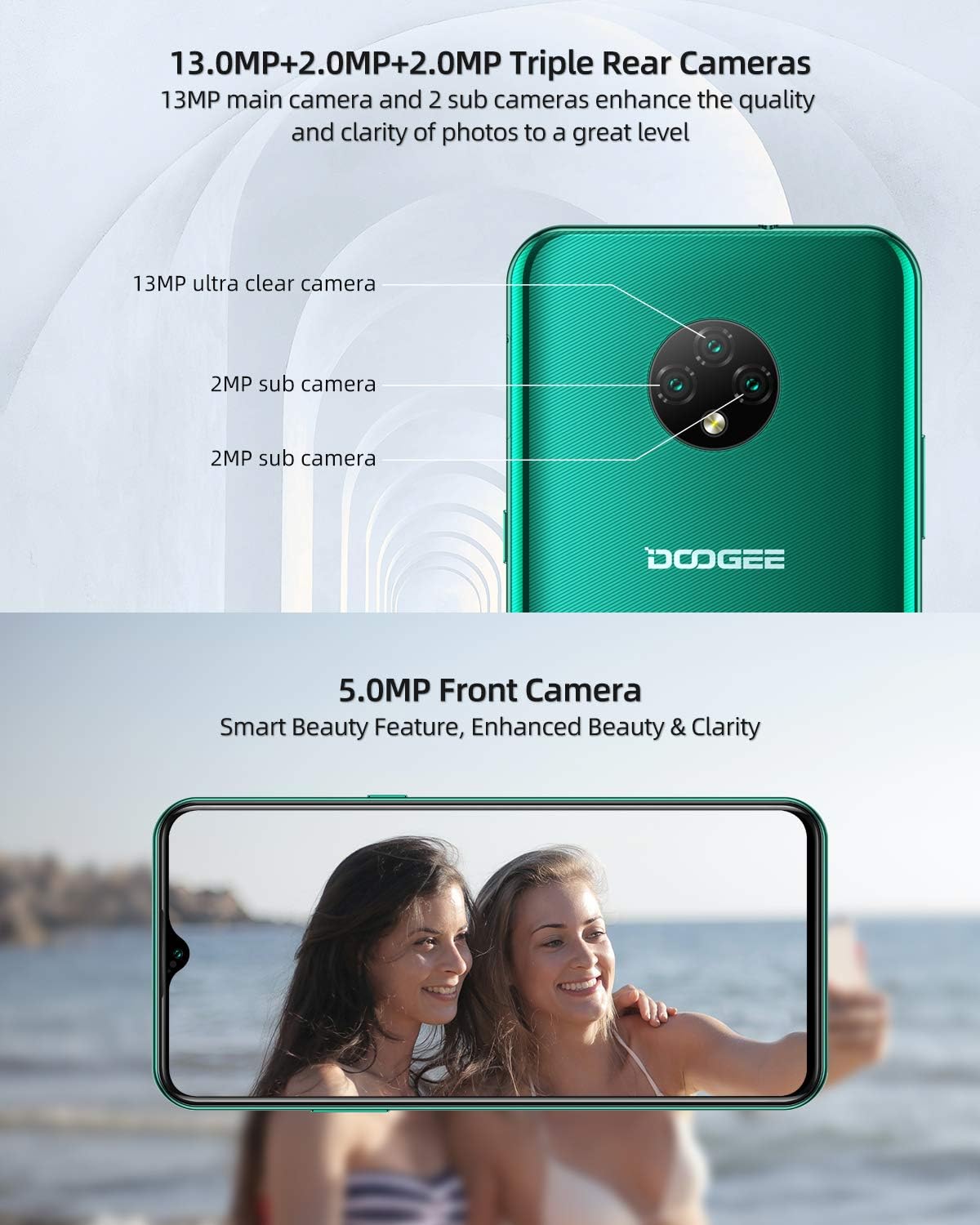
Figure 4.3: DOOGEE X95 Triple Rear and Front Cameras.
4.4. Android 10 GO Operating System
The DOOGEE X95 runs on the latest Android 10 GO operating system, providing a smarter, more efficient, and user-friendly experience. It supports features like facial unlock and 4G Dual SIM standby.

Figure 4.4: Android 10 GO Interface.
4.5. Připojení k síti
The DOOGEE X95 supports various network bands for reliable connectivity:
- GSM: 850/900/1800/1900 MHz
- 3G: B1/B8
- 4G: B1/3/7/8/20
5. Specifikace
| Funkce | Specifikace |
|---|---|
| Značka | DOOGEE |
| Název modelu | DOOGEE X95 |
| Operační systém | Android 10.0 |
| Velikost obrazovky | 6.52 palce |
| Velikost nainstalované paměti RAM | 2 GB |
| Kapacita paměti | 16 GB |
| Efektivní rozlišení | 13 megapixelů |
| Kapacita baterie | 4350mAh (Lithium-polymer) |
| Nabíjecí port | USB typ C |
| Buněčná technologie | 3G, 4G |
| Technologie připojení | Wi-Fi, mobilní připojení |
| Barva | Zelený |
6. Řešení problémů
If you encounter any issues with your DOOGEE X95, please refer to the following common troubleshooting steps:
- Zařízení se nezapíná: Ujistěte se, že je baterie nabitá. Připojte telefon k nabíječce a před opětovným zapnutím počkejte několik minut.
- Problémy se sítí: If you experience issues with network connectivity (calls, data), verify that your SIM card is correctly inserted and active. Check your network settings and ensure you are within network coverage. If problems persist, please inform us in advance.
- Pády/zamrzání aplikací: Try restarting the application. If the issue continues, restart the phone. Ensure your apps and operating system are updated to the latest versions.
- Pomalý výkon: Zavřete nepotřebné aplikace na pozadí. Vymažte mezipaměť aplikací a zvažte uvolnění úložného prostoru.
- Problémy s nabíjením: Ensure the charging cable and adapter are securely connected and undamaged. Try using a different compatible charger if available.
For more complex issues, please contact our customer support.
7. Záruka a podpora
Your DOOGEE X95 smartphone comes with a comprehensive warranty and support:
- Dvouletá záruka kvality: Our products come with a 2-year quality warranty. If you purchase a DOOGEE X95 smartphone from our store (DOOGEE-EU) and your SIM-free smartphone has an issue, please feel free to contact our Amazon support center for assistance.
- Zákaznická podpora: We are committed to providing prompt and courteous support, with responses typically within 24 hours.
- CE certifikace: This X95 mobile phone has passed CE certification, ensuring it meets European safety, health, and environmental protection requirements. You can use this phone with confidence.
For warranty claims or technical assistance, please refer to the contact information provided with your purchase or visit the official DOOGEE support webmísto.


