
1. Úvod
This manual provides instructions for the proper use and maintenance of your Yenkee YHC 101SR USB 2.0 Hub and Card Reader. Please read this guide thoroughly before using the device to ensure optimal performance and longevity. The YHC 101SR is a versatile adapter that combines a 3-port USB 2.0 hub with a multi-format card reader, designed to expand your computer's connectivity.
2. Obsah balení
- Yenkee YHC 101SR USB 2.0 Hub and Card Reader
- Uživatelská příručka (tento dokument)
3. Klíčové vlastnosti
- Plug & Play: Pro většinu operačních systémů není nutná instalace ovladačů.
- 3 porty USB 2.0: Expand your PC's connectivity for external devices.
- Multi-Format Card Reader: Supports SD, SDXC, SDHC, and Micro SD cards.
- Automatic Card Recognition: Simplifies data transfer from memory cards.
- Kompaktní design: Přenosný a snadno ovladatelný.
- Vysokorychlostní přenos dat: Up to 480 Mbps via USB 2.0.
4. Pokyny k nastavení
The Yenkee YHC 101SR is designed for simple Plug & Play operation. Follow these steps to set up your device:
- Připojení k počítači: Locate an available USB port on your computer. Insert the USB connector of the YHC 101SR into this port.
- Instalace ovladače (automatická): Your operating system (Windows, macOS, Linux) will automatically detect the device and install the necessary drivers. This process usually takes a few seconds.
- Připraven k použití: Once the installation is complete, the device is ready to use. You can now connect USB devices or insert memory cards.
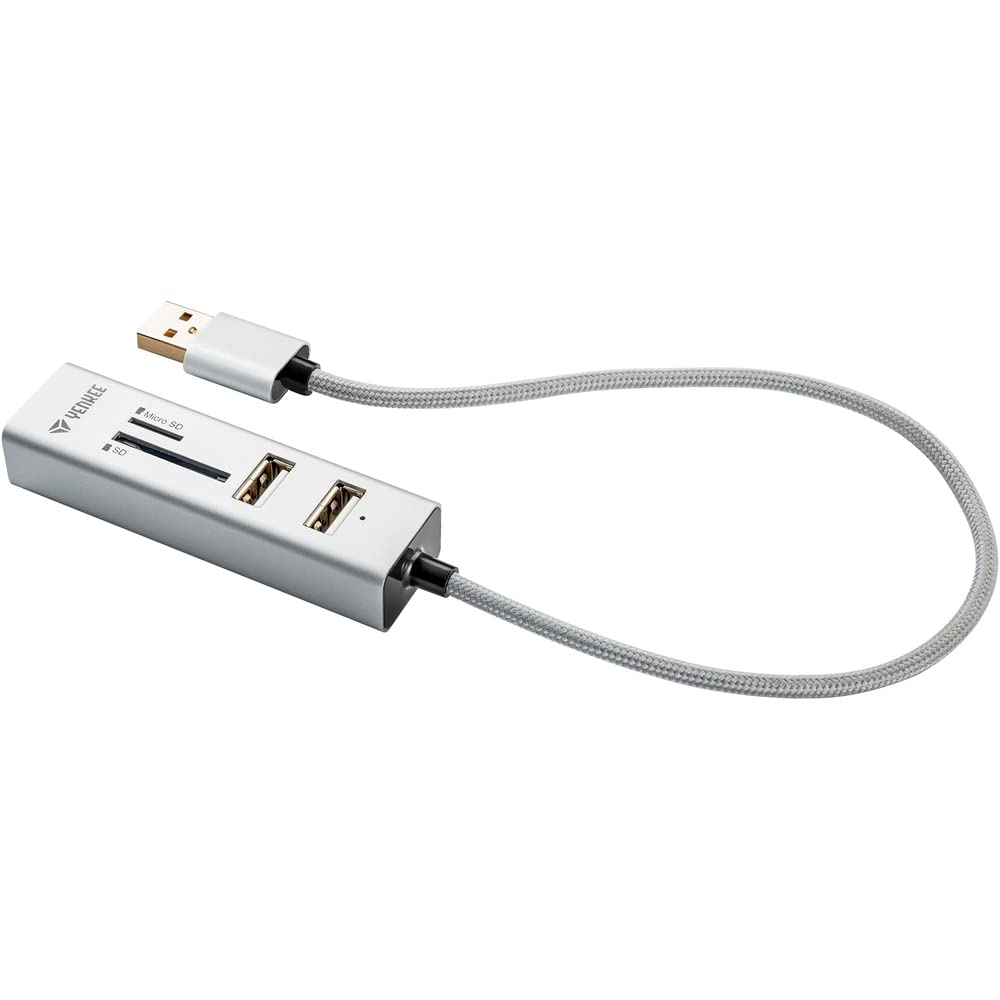
Image 1: The Yenkee YHC 101SR USB 2.0 Hub and Card Reader. This image shows the compact design of the device with its integrated USB cable, ready to be connected to a computer.
5. Návod k obsluze
5.1 Používání USB rozbočovače
The YHC 101SR provides three additional USB 2.0 ports for connecting various peripherals.
- Připojení USB zařízení: Plug your USB devices (e.g., mouse, keyboard, flash drive, external hard drive) into any of the three available USB ports on the hub.
- Rozpoznávání zařízení: Your computer will recognize the connected devices automatically.
- Úvahy o napájení: For high-power consumption devices (e.g., some external hard drives), ensure your computer's USB port can provide sufficient power. If issues arise, try connecting the high-power device directly to a computer port or use a powered USB hub (if available).
5.2 Používání čtečky karet
The integrated card reader supports common memory card formats.
- Identify Card Slot: The device has two slots: one for standard SD cards and another for Micro SD cards.
- Vložte paměťovou kartu: Gently insert your SD, SDXC, SDHC, or Micro SD card into the corresponding slot until it clicks into place. Ensure the card is inserted in the correct orientation.
- Přístupová data: Your computer will detect the memory card as a removable drive. You can then access, transfer, or manage files using your computer's file badatel.
- Bezpečné vysunutí: Before removing the memory card, always safely eject it from your operating system to prevent data corruption.
6. Údržba a péče
- Čištění: K čištění zařízení používejte měkký, suchý hadřík. Nepoužívejte tekuté čisticí prostředky ani rozpouštědla.
- Skladování: Přístroj skladujte na chladném a suchém místě mimo dosah přímého slunečního záření a extrémních teplot.
- Zacházení: Zabraňte pádu zařízení nebo jeho vystavení silným nárazům.
- vlhkost: Udržujte zařízení mimo dosah vody a vysoké vlhkosti.
7. Řešení problémů
| Problém | Možná příčina | Řešení |
|---|---|---|
| Zařízení nebylo počítačem rozpoznáno. | Loose connection, faulty USB port, operating system issue. |
|
| USB device connected to hub is not working. | Insufficient power, faulty USB device, driver issue for the connected device. |
|
| Paměťová karta nebyla detekována. | Incorrect insertion, unsupported card format, faulty card. |
|
8. Specifikace
| Číslo modelu | YHC 101SR |
| Značka | Yenkee |
| USB Standardní | USB 2.0 |
| Počet portů USB | 3 |
| Sloty pro čtečky karet | SD slot, Micro SD slot |
| Podporované formáty karet | SD, SDXC, SDHC, Micro SD |
| Rychlost přenosu dat | Až 480 Mbps |
| Výstupní výkon | DC 5V / 500mA |
| Délka kabelu | 30 cm |
| Rozměry (D x Š x V) | 84 x 24 x 16 mm |
| Hmotnost | 39 gramů |
| Systémové požadavky | USB port, Windows Vista/7/8/10, Linux 2.4 or higher, Mac OS X |
| Kompatibilní zařízení | Keyboards, Monitors (as per manufacturer's data) |
9. Záruka a podpora
Yenkee products are designed for reliability and performance. For information regarding warranty terms, technical support, or service, please refer to the official Yenkee webnebo se obraťte na místního prodejce. Uschovejte si účtenku jako doklad o koupi pro případ reklamace.
Poznámka: Konkrétní záruční podmínky se mohou lišit v závislosti na regionu a prodejci.