
Walfront TM919B-1
Walfront TM919B-1 Digital Programmable Timer Switch
Návod k použití
Model: TM919B-1 | Brand: Walfront
1. Úvod
The Walfront TM919B-1 is a digital programmable timer switch designed for automated control of electrical appliances. It features 24-hour and 7-day programming capabilities, allowing users to set up to 16 ON/OFF programs per day. This device is suitable for controlling lights, fans, and other electrical loads, enhancing energy efficiency and convenience.
This manual provides detailed instructions for the installation, operation, and maintenance of your TM919B-1 timer switch. Please read it thoroughly before use to ensure proper function and safety.
2. Bezpečnostní informace
- Elektrické nebezpečí: Installation should only be performed by a qualified electrician or knowledgeable individual. Ensure power is disconnected at the circuit breaker before installation or maintenance.
- svtage Kompatibilita: This device is designed for AC100-130V power supplies. Do not connect to voltagmimo tento rozsah.
- Kapacita zatížení: Do not exceed the maximum load capacity of 30A or 5000W. Overloading can cause damage to the device and create a fire hazard.
- Pouze pro vnitřní použití: This timer switch is intended for indoor use in dry environments. Do not expose to water, moisture, or extreme temperatures.
- Správné zapojení: Follow all wiring diagrams and local electrical codes. Incorrect wiring can lead to malfunction or electrical shock.
3. Konec produktuview
Familiarize yourself with the components and controls of your Walfront TM919B-1 timer switch.

Obrázek 3.1: Přední strana View of Timer Switch. This image displays the front of the Walfront TM919B-1 timer switch, showing the LCD digital display, the red 'ON' indicator light, and the control buttons: 'P' (Program), 'D+' (Day), 'H+' (Hour), 'M+' (Minute), 'RESET', and 'MANUAL'. The top terminals (1, 2) for power input and bottom terminals (3, 4, 5) for load connection are also visible.

Obrázek 3.2: Úhlové View with Terminals. Tento obrázek poskytuje úhlový pohled view of the timer switch, highlighting the screw terminals for wiring. Terminals 1 and 2 are for the AC input (L and N), while terminals 3, 4, and 5 are for the load connection (Common, Normally Open, Normally Closed).
3.1. Součásti a ovládací prvky
- Digitální LCD displej: Shows current time, day, and programming status (e.g., AUTO, ON, OFF).
- ON Indicator: Red LED light indicating the timer is currently in an ON state.
- Tlačítko P (Program): Používá se pro vstup a navigaci v programovacích režimech.
- D+ (Day) Button: Adjusts the day of the week or selects days for programming.
- H+ (Hour) Button: Adjusts the hour or sets the hour for programming.
- M+ (Minute) Button: Adjusts the minute or sets the minute for programming.
- Tlačítko reset: Clears all settings and returns the timer to factory defaults.
- Tlačítko MANUAL: Allows manual override of the programmed state (ON/AUTO/OFF).
- Terminály 1 a 2: Power input (L and N).
- Terminals 3, 4, & 5: Load output (Common, Normally Open, Normally Closed).
4. Specifikace
| Funkce | Specifikace |
|---|---|
| Model | TM919B-1 |
| Napájení | AC 100-130V |
| Frekvence | 50/60 Hz |
| Kapacita zatížení | 30 A / 5000 XNUMX W. |
| Časový rozsah | 1 minuta - 168 hodin |
| Programy | 16 ON/OFF per day (15 combinations per week) |
| Funkce odpočítávání | Maximum 24 hours to OFF |
| Zobrazení hodin | 12-hour / 24-hour format |
| Interní baterie | CR2450 (for memory backup) |
| Provozní teplota | -10 °C až 50 °C |
| Montáž | 35 mm DIN lišta |
| Materiál | Plast |
| Hmotnost položky | 5 unce |
5. Nastavení a instalace
5.1. Montáž
The Walfront TM919B-1 timer switch is designed for 35mm DIN rail mounting. Simply clip the device onto a standard DIN rail within your electrical panel or enclosure.

Image 5.1: Timer Switch Dimensions. This image illustrates the physical dimensions of the Walfront TM919B-1 timer switch, showing its height, width, and depth in centimeters, which is useful for planning installation space.
5.2. Zapojení
WARNING: Ensure power is OFF at the main circuit breaker before performing any wiring.
The timer switch has five terminals:
- Terminály 1 a 2: Power input for the timer module (AC 100-130V). Connect the Live (L) wire to terminal 1 and the Neutral (N) wire to terminal 2.
- Terminál 3: Common (COM) terminal for the relay output.
- Terminál 4: Normally Open (NO) terminal for the relay output. The circuit between 3 and 4 closes when the timer is ON.
- Terminál 5: Normally Closed (NC) terminal for the relay output. The circuit between 3 and 5 opens when the timer is ON.
Choose the appropriate wiring diagram based on your application:

Image 5.2: Simple Wiring Diagram. This diagram shows a direct connection of the timer switch to a light bulb. The Live (L) and Neutral (N) wires power the timer (terminals 1 and 2). The Live wire is also connected to terminal 3 (Common). Terminal 4 (Normally Open) is connected to one side of the light bulb, and the other side of the bulb is connected to Neutral (N).
For loads exceeding the timer's direct capacity (30A/5000W) or for inductive loads, an external contactor (relay) must be used. The timer switch will then control the coil of the contactor, and the contactor will switch the main load.
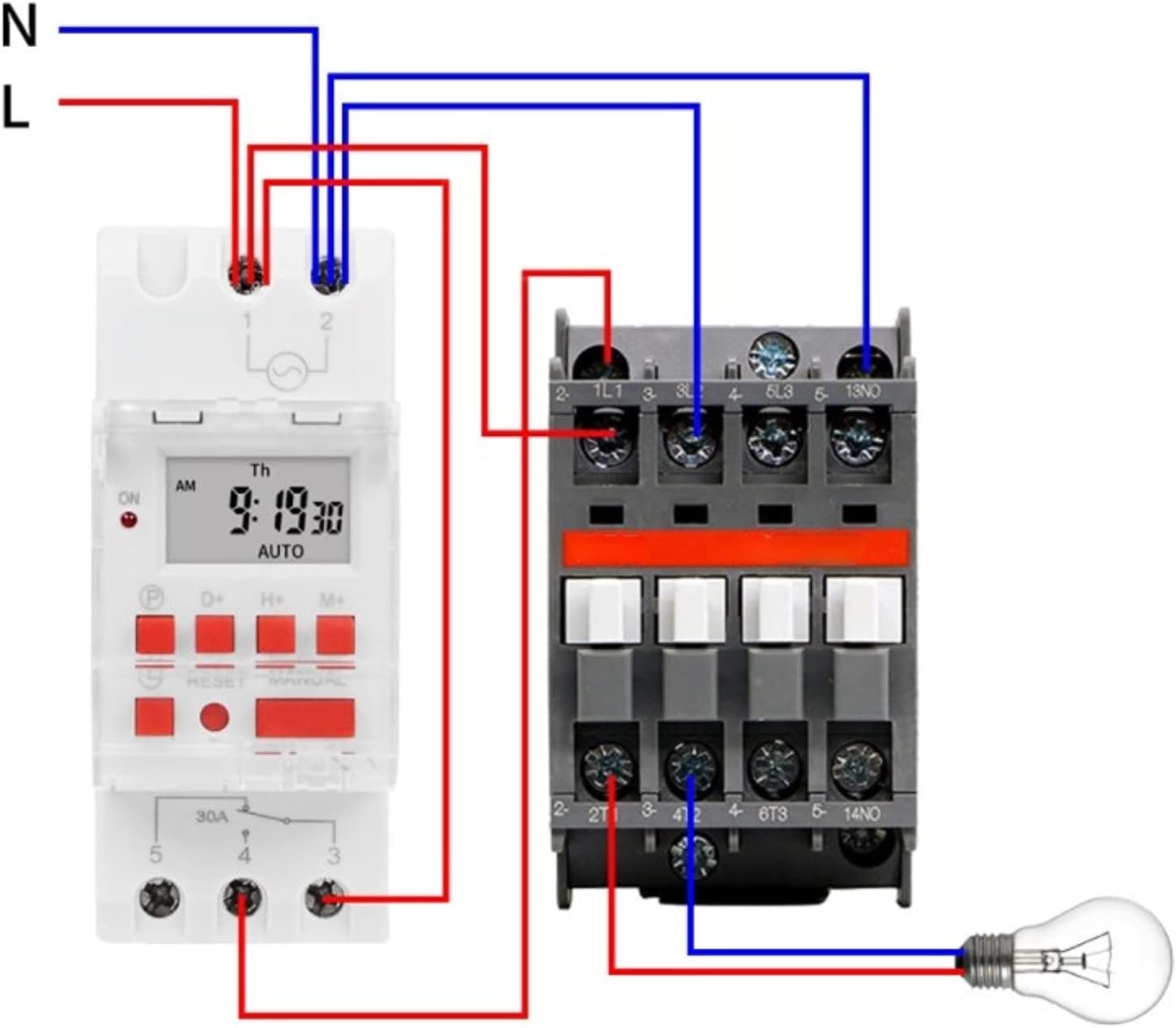
Image 5.3: Wiring Diagram with Contactor. This diagram illustrates how to wire the timer switch with an external contactor to control a higher-power load. The timer's output (terminals 3 and 4) is used to energize the coil of the contactor. The contactor then switches the main power to the load (e.g., a light bulb), ensuring the timer itself is not overloaded.
5.3. Počáteční zapnutí
After wiring, restore power to the circuit. The LCD display should illuminate. If the display is blank or shows garbled characters, press the RESETOVAT button using a pointed object (e.g., a pen tip) to clear the memory and restart the device. The internal CR2450 battery provides memory backup for programmed settings during power outages.
6. Návod k obsluze
6.1. Nastavení aktuálního času a dne
- Stiskněte tlačítko P button once. The display will show the current time setting.
- Stiskněte D+ pro nastavení aktuálního dne v týdnu.
- Stiskněte H+ to set the current hour (12-hour or 24-hour format).
- Stiskněte M+ pro nastavení aktuální minuty.
- To exit the time setting mode, press the P button again or wait for approximately 10 seconds for the display to return to normal operation.
6.2. Programming ON/OFF Events
Časovač podporuje až 16 programů ZAP/VYP. Každý program se skládá z času ZAP a času VYP.
- Stiskněte tlačítko P button repeatedly until '1 ON' appears on the display. This is your first ON program.
- Stiskněte D+ to select the day(s) for this program. You can choose a single day, weekdays, weekends, or various combinations (e.g., Mon-Fri, Mon-Sat, etc.).
- Stiskněte H+ pro nastavení hodiny pro „1 ZAP“.
- Stiskněte M+ pro nastavení minuty pro „1 ZAP“.
- Stiskněte P again. '1 OFF' will appear. Set the day(s), hour, and minute for the OFF time of the first program using D+, H+a M+.
- Repeat steps 1-5 for additional programs (2 ON, 2 OFF, up to 16 ON, 16 OFF). If you do not need all 16 programs, simply stop programming.
- Chcete-li opustit režim programování, stiskněte tlačítko P button until the display shows the current time, or wait for approximately 10 seconds.
6.3. Ruční ovládání
The MANUÁL button allows you to temporarily override the programmed state. Pressing it cycles through the following modes:
- AUTO ON: The timer is currently ON and will follow the next programmed OFF event.
- AUTOMATICKÉ VYPNUTÍ: The timer is currently OFF and will follow the next programmed ON event.
- NA: The timer is forced ON, ignoring programs.
- OFF: The timer is forced OFF, ignoring programs.
To return to automatic operation, press MANUÁL until 'AUTO ON' or 'AUTO OFF' is displayed.
6.4. Funkce odpočítávání
The timer includes a countdown function, allowing you to set a specific duration for the load to be ON or OFF, up to 24 hours.
- From the main time display, press and hold the P button for approximately 3 seconds. The display will show 'd 00:00'.
- Použití H+ a M+ to set the desired countdown duration (up to 23 hours and 59 minutes).
- Stiskněte P again to start the countdown. The display will show the remaining time.
- Once the countdown finishes, the timer will switch the load to the opposite state (e.g., if it was ON, it will turn OFF).
- To cancel the countdown, press and hold the P tlačítko znovu na 3 sekund.
7. Údržba
- Čištění: Zařízení otřete měkkým, suchým hadříkem. Nepoužívejte abrazivní čisticí prostředky ani rozpouštědla.
- Baterie: The internal CR2450 battery provides memory backup. If the display frequently resets or loses settings during power outages, the battery may need replacement. This typically requires professional service.
- Inspekce: Pravidelně kontrolujte, zda jsou kabelové spoje pevné a zda nejeví známky opotřebení nebo poškození.
8. Řešení problémů
| Problém | Možná příčina | Řešení |
|---|---|---|
| Displej je prázdný nebo zkreslený. | No power, incorrect wiring, or internal error. | Check power supply. Verify wiring. Press the RESETOVAT tlačítko. |
| Programy se nespouští. | Timer is in manual ON/OFF mode, incorrect programming, or current time is wrong. | Ensure the display shows 'AUTO ON' or 'AUTO OFF'. Verify program settings. Check and correct the current time. |
| Zátěž se nezapíná/nevypíná. | Incorrect wiring, faulty load, or overloaded circuit. | Check load wiring (terminals 3, 4, 5). Test the load directly. Ensure load capacity is not exceeded. |
| Nastavení se po výpadku napájení ztratítage. | Internal battery is depleted. | The internal CR2450 battery may need replacement. Contact customer support if this issue persists. |
9. Záruka a podpora
Walfront products are manufactured to high-quality standards. For specific warranty information, please refer to the documentation provided at the time of purchase or contact your retailer. If you encounter any issues or require technical assistance, please reach out to Walfront customer support through their official channels or your point of purchase.
Ask a question about this manual
Ask about setup, troubleshooting, compatibility, parts, safety, or missing instructions. Manuals+ will review the question and use this page’s manual context to help answer it.