
Zavedení
This manual provides comprehensive instructions for the Doro 6040 Senior Mobile Phone, model 7826. Designed for ease of use, this phone features a clear display, large buttons, and essential functions to keep you connected. Please read this manual carefully to ensure proper operation and maintenance of your device.
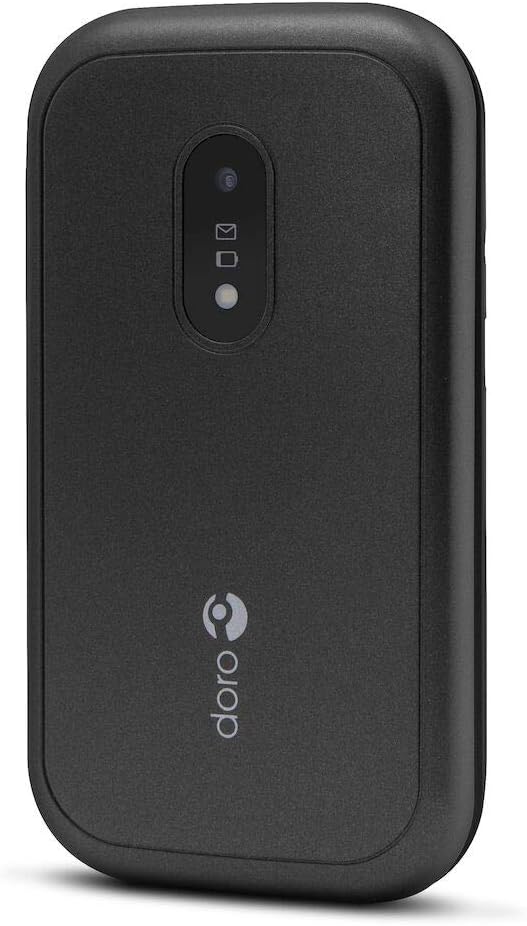
Figure 1: Doro 6040 Senior Mobile Phone (Rear View)
This image displays the rear of the Doro 6040 mobile phone, featuring its black casing. Visible elements include the rear camera lens, indicators for messages and notifications, and the Doro brand logo positioned vertically on the lower part of the phone's back.
Co je v krabici
Po otevření balení se prosím ujistěte, že jsou přítomny všechny komponenty:
- Doro 6040 Mobile Phone
- Baterie (lithium-iontová)
- Adaptér (nabíječka)
- Stručný návod k obsluze
Nastavení
1. Instalace baterie
- Opatrně sejměte zadní kryt telefonu.
- Insert the Lithium Ion battery into the battery compartment, ensuring the gold contacts align with those in the phone.
- Nasaďte zadní kryt zpět, dokud bezpečně nezacvakne na místo.
2. Instalace SIM karty
The Doro 6040 uses a MicroSIM card.
- Po vyjmutí baterie vyhledejte slot pro SIM kartu.
- Insert your MicroSIM card into the designated slot, ensuring the cut corner aligns correctly.
- Znovu nainstalujte baterii a zadní kryt.
3. Nabíjení telefonu
Před prvním použitím plně nabijte baterii telefonu.
- Připojte adaptér do elektrické zásuvky.
- Plug the charging cable into the phone's charging port.
- The battery indicator on the screen will show charging progress. Disconnect the charger once the battery is full.
4. Zapnutí/vypnutí
- To power on: Press and hold the Power button until the screen lights up.
- Vypnutí: Stiskněte a podržte tlačítko Napájení a poté z možností vyberte možnost „Vypnout“.
Návod k obsluze
Uskutečňování a přijímání hovorů
- Chcete-li vytočit: Zadejte telefonní číslo pomocí klávesnice a stiskněte zelené tlačítko pro volání.
- Odpovědět: Jakmile telefon zazvoní, stiskněte zelené tlačítko pro volání.
- To end call: Stiskněte červené tlačítko pro ukončení hovoru.
- Answering by opening: The phone supports answering calls by simply opening the flip.
Contacts (Phonebook)
- Přejděte do nabídky „Kontakty“.
- Use the navigation keys to scroll through your contacts.
- To call a contact, select their name and press the green call button.
Messaging (SMS/MMS)
- Go to the "Messages" menu to read or compose new messages.
- The phone supports both Short Message Services (SMS) and Multimedia Messaging System (MMS).
Fotoaparát
- Přístup k fotoaparátu z hlavní nabídky.
- Point the camera at your subject and press the capture button to take a photo.
- The phone features a 2 MP rear camera with a built-in flash.
Nouzové tlačítko
The Doro 6040 is equipped with an emergency button on the back, which can be activated if configured. Refer to the Quick Setup Guide for instructions on setting up emergency contacts and functions.
Další funkce
- Svítilna: An integrated flashlight is available for convenience.
- Funkce alarmu: Nastavte budíky pro připomenutí nebo buzení.
- Kalkulačka: A basic calculator is included for simple arithmetic.
- Kalendář: Sledujte termíny a schůzky.
- Bluetooth: Connect to compatible Bluetooth devices (version 3.0).
Údržba
- Čištění: K čištění vnější strany telefonu používejte měkký, suchý hadřík. Nepoužívejte tekuté čisticí prostředky ani aerosoly.
- Péče o baterie: To prolong battery life, avoid exposing the phone to extreme temperatures. Charge the battery regularly, but avoid overcharging.
- Skladování: If storing the phone for an extended period, ensure the battery is partially charged (around 50%) and store it in a cool, dry place.
- Aktualizace softwaru: Keep your phone's software updated if prompted, to ensure optimal performance and security.
Odstraňování problémů
If you encounter issues with your Doro 6040, refer to the following common problems and solutions:
| Problém | Možná příčina / řešení |
|---|---|
| Telefon se nezapne. | Baterie může být vybitá. Nabíjejte telefon alespoň 30 minut. Ujistěte se, že je baterie správně vložena. |
| Nelze uskutečňovat ani přijímat hovory. | Check if the SIM card is properly inserted. Ensure you have network coverage. Contact your service provider. |
| Audio quality is poor during calls. | Adjust the call volume. Move to an area with better network signal. Ensure the speaker/microphone is not obstructed. |
| Difficulty finding contacts in phonebook. | Scrolling through contacts using only up/down keys can be slow. Ensure contacts are saved correctly. |
| Ringtone volume is low (custom tones). | Custom ringtones via microSD or Bluetooth may have lower volume than pre-installed tones. Adjust phone volume settings. |
| Telefon se zasekne nebo přestane reagovat. | Vyjměte a znovu vložte baterii, abyste provedli měkký reset. |
Specifikace
| Funkce | Detail |
|---|---|
| Název modelu | Doro 6040 (Model 7826) |
| Rozměry produktu | 2.24 x 0.79 x 4.17 palce (57 x 20 x 106.7 mm) |
| Hmotnost položky | 4.2 unce (118 g) |
| Zobrazit | 2.8 Inches, 320 x 240 pixels resolution |
| Kapacita baterie | Lithium-iontová kapacita 1000 mAh |
| Doba hovoru (2G) | 6.8 hodin |
| Standby Time (2G) | 420 hodin |
| Zadní kamera | 2 MP with built-in flash |
| Typ SIM karty | MicroSIM (Single SIM capacity) |
| Konektivita | Bluetooth 3.0, 2G Cellular Technology |
| Jack pro sluchátka | 3.5 mm |
| Operační systém | Android (Note: This is from the product data, but for a feature phone, it's likely a highly customized or simplified version, not full Android OS as on smartphones.) |
| Kapacita paměti | 1.58 MB |
| Barva | Černý |
| Vlastnosti | Calculator, Calendar, Alarm function, Integrated flashlight, SMS, MMS, Emergency button. |
Záruka a podpora
Informace o záruce
The Doro 6040 Senior Mobile Phone comes with a Dvouletá záruka against factory defects. Please retain your proof of purchase for warranty claims.
Zákaznická podpora
For further assistance, technical support, or warranty inquiries, please contact Doro customer service. Refer to the contact information provided in your Quick Setup Guide or visit the official Doro webmísto.
For online resources and frequently asked questions, you may visit the Doro Support Page.