
Zavedení
The Power Dynamics PPA30 is a versatile 30W 100V amplifier designed for small to medium-sized public address and background music applications. This amplifier features multiple input options including microphone inputs, stereo line inputs, Bluetooth connectivity for wireless streaming, and a built-in MP3 player with USB and SD card support. A remote control is included for convenient operation.
Bezpečnostní informace
Please read these instructions carefully before using the device. Keep this manual for future reference. Always observe the following safety precautions:
- Nevystavujte zařízení dešti nebo vlhkosti.
- Do not open the housing. There are no user-serviceable parts inside. Refer all servicing to qualified personnel.
- Zajistěte napájení objtage odpovídá požadavkům uvedeným na zařízení.
- Chraňte napájecí kabel před pošlapáním nebo přiskřípnutím.
- Disconnect the device from the mains during lightning storms or when unused for long periods.
- Place the device on a stable, level surface with adequate ventilation.
Obsah balení
Po otevření balíku zkontrolujte, zda jsou všechny položky přítomny a v dobrém stavu:
- Power Dynamics PPA30 Ampdoživotní
- Napájecí kabel
- Dálkové ovládání
- Uživatelská příručka
Konec produktuview
Přední panel
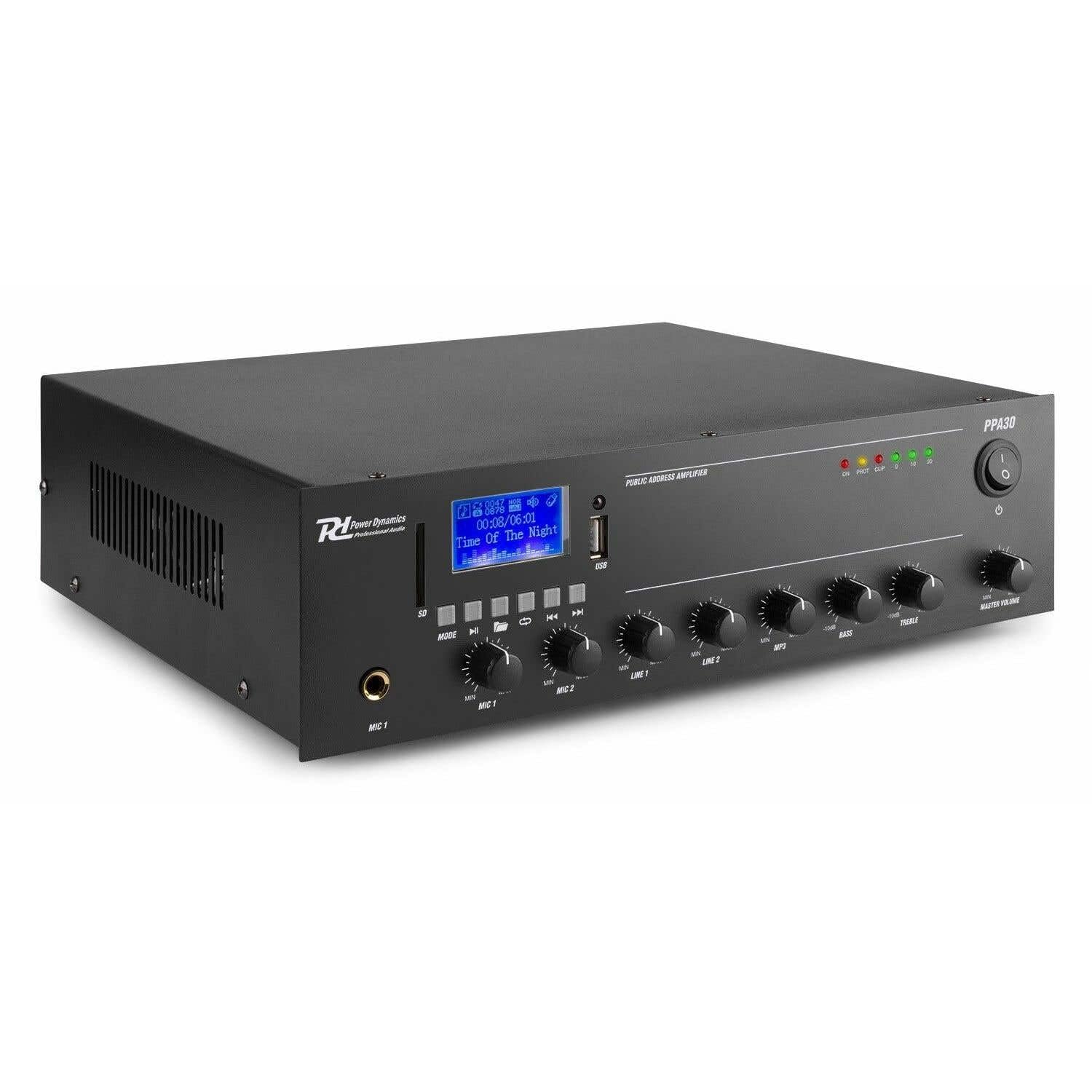
Figure 1: Front Panel Layout of the PPA30 Ampzáchranář. Tento obrázek zobrazuje amplifier's front face, including the display screen, USB/SD card slots, control buttons for media playback, input volume controls for microphones and line inputs, bass and treble adjustments, and the master volume knob. The power switch and indicator lights are also visible.
Přední panel poskytuje přístup ke všem hlavním ovládacím prvkům a indikátorům:
- Vypínač: Otočí ampživější zapnuto nebo vypnuto.
- Displej: Shows current mode, track information, and other status indicators.
- Sloty pro USB/SD karty: For connecting USB drives or SD cards for MP3 playback.
- Tlačítko režimu: Switches between input sources (Bluetooth, USB, SD, Line 1, Line 2).
- Ovládání přehrávání médií: Play/Pause, Previous, Next, Repeat.
- MIC 1 & MIC 2 Inputs: 6.3mm jack vstupy pro mikrofony.
- MIC 1 & MIC 2 Volume Controls: Upravuje hlasitost pro každý mikrofonní vstup.
- LINE 1 & LINE 2 Volume Controls: Adjusts the volume for line inputs.
- MP3 Volume Control: Adjusts the volume for USB/SD/Bluetooth playback.
- Bass & Treble Controls: Adjusts the low and high frequencies of the audio output.
- Hlavní hlasitost: Ovládá celkovou výstupní hlasitost ampživější.
- Kontrolky: Power (ON), Protection (PROT), Clip, and Output Level (0, 10, 20).
Zadní panel

Figure 2: Rear Panel Connections of the PPA30 Amplifier. This image illustrates the back of the amplifier, detailing the AC power input, DC input, speaker output terminals (COM, 8Ω, 70V, 100V), and RCA line inputs (LINE OUT, LINE 1, LINE 2, MIC 2). Safety warnings and product information are also visible.
The rear panel houses the power input, speaker outputs, and additional audio inputs:
- Vstup střídavého proudu: Připojuje se k hlavnímu zdroji napájení.
- DC vstup: Optional 12V DC power input.
- Výstupní terminály reproduktorů: Connections for 100V, 70V, and 8 Ohm speakers. Ensure correct impedance matching.
- LINE OUT: RCA output for connecting to another ampzvedací nebo záznamové zařízení.
- LINE 1 & LINE 2 Inputs: RCA stereo inputs for external audio sources (e.g., CD player, mixer).
- Vstup MIC 2: Additional 6.3mm jack input for a microphone.
Dálkové ovládání

Figure 3: Remote Control for the PPA30 Amplifier. This image shows the handheld remote control with buttons for power, mode selection, volume adjustment, track navigation, EQ settings, and direct number input for track selection.
The remote control allows for convenient operation from a distance. Functions include power on/off, mode selection, volume control, track navigation, and EQ settings.
Nastavení
- Umístění: Umístěte amplifier on a flat, stable surface. Ensure adequate ventilation around the unit to prevent overheating.
- Připojení reproduktorů: Connect your 100V, 70V, or 8 Ohm speakers to the appropriate terminals on the rear panel. Ensure correct polarity (+ to + and - to - or COM). For 100V/70V systems, ensure your speakers are compatible and correctly wired for constant voltage.
- Připojení zdroje zvuku:
- Mikrofony: Plug microphones into the MIC 1 or MIC 2 inputs on the front panel.
- Line Devices: Connect external audio sources (e.g., CD player, mixer) to the LINE 1 or LINE 2 RCA inputs on the rear panel.
- USB/SD karta: Insert a USB drive or SD card into the respective slot on the front panel for MP3 playback.
- Připojení napájení: Connect the supplied power cable to the AC power input on the rear panel and then to a suitable mains outlet.
- Počáteční zapnutí: Zapněte amplifier using the power switch on the front panel. The 'ON' indicator light should illuminate.
Návod k obsluze
Výběr zdroje vstupu
Stiskněte tlačítko MODE button on the front panel or remote control to cycle through available input sources: Bluetooth, USB, SD, Line 1, Line 2.
Provoz Bluetooth
- Vyberte režim Bluetooth pomocí MODE button. The display will indicate Bluetooth mode.
- Na smartphonu, tabletu nebo počítači povolte Bluetooth a vyhledejte dostupná zařízení.
- Select "PPA30" from the list of devices to pair. Once paired, you can stream audio wirelessly to the ampživější.
- Adjust the MP3 volume control on the front panel or the volume buttons on the remote control.
Přehrávání z USB/SD karty
- Vložte USB disk nebo SD kartu s audio soubory ve formátu MP3 files do odpovídajícího slotu.
- The amplifier should automatically switch to USB or SD mode and begin playback. If not, select the correct mode using the MODE tlačítko.
- Use the Play/Pause, Previous, Next, and Repeat buttons on the front panel or remote control to manage playback.
- Adjust the MP3 volume control.
Použití mikrofonu
- Connect your microphone(s) to the MIC 1 or MIC 2 inputs.
- Slowly increase the corresponding MIC 1 or MIC 2 volume control until the desired level is reached.
- Avoid setting the volume too high to prevent feedback or clipping (indicated by the 'CLIP' light).
Využití řádkového vstupu
- Connect your external audio source to the LINE 1 or LINE 2 RCA inputs.
- Select the appropriate line input using the MODE tlačítko.
- Adjust the corresponding LINE 1 or LINE 2 volume control.
Ovládání tónu
Použijte BASS a ZTROJNÁSOBIT knobs on the front panel to adjust the low and high frequencies of the overall audio output to suit your preference or room acoustics.
Hlavní hlasitost
The HLAVNÍ HLASITOST knob controls the overall output level of all active audio sources. Adjust this to achieve the desired listening volume.
Údržba
- Čištění: K čištění vnějších částí používejte měkký, suchý hadřík ampNepoužívejte abrazivní čisticí prostředky ani rozpouštědla.
- Větrání: Ujistěte se, že ventilační otvory nejsou zablokovány, aby nedošlo k přehřátí.
- Skladování: Pokud budete jednotku skladovat delší dobu, odpojte ji od napájení a uložte ji na chladném a suchém místě.
Odstraňování problémů
| Problém | Možná příčina | Řešení |
|---|---|---|
| Žádná síla | Napájecí kabel není připojen; Vypínač je vypnutý; V zásuvce není napájení. | Zkontrolujte připojení napájecího kabelu; Zapněte hlavní vypínač; Vyzkoušejte zásuvku s jiným zařízením. |
| Žádný zvukový výstup | Incorrect input selected; Volume too low; Speaker connections loose; Speakers faulty. | Select correct input (MODE button); Increase Master Volume and input specific volume; Check speaker wiring; Test with different speakers. |
| Zkreslený zvuk | Volume too high (clipping); Incorrect tone settings; Faulty audio source. | Reduce Master Volume or input volume until 'CLIP' light is off; Adjust Bass/Treble controls; Test with a different audio source. |
| Bluetooth se nepřipojuje | Bluetooth mode not selected; Device not in pairing mode; Interference. | Zajistit amplifier is in Bluetooth mode; Make sure your device's Bluetooth is on and searching; Move closer to the ampRestartujte obě zařízení. |
| Problémy s přehráváním z USB/SD karet | Nesprávný file formát; Poškozený files; USB/SD karta není správně vložena. | Zajistit files are MP3 format; Try a different USB/SD card; Reinsert the card/drive. |
Specifikace
| Funkce | Specifikace |
|---|---|
| Značka | Dynamika výkonu |
| Model | PPA30 |
| Výstupní výkon | 30 wattů |
| Počet kanálů | 2 |
| svtage (AC) | 220-230 Volt (AC) |
| Rozměry položky (DxŠxV) | 27 x 32 x 8.6 cm |
| Hmotnost položky | 3.25 kg |
| Typ montáže | Volné stání |
| Provozní teplota | Až 40 stupňů Celsia |
| Certifikace | CE, RoHS |
Záruka a podpora
This product is covered by a standard manufacturer's warranty. Please refer to the warranty card included in your package for specific terms and conditions. For technical support, service, or warranty claims, please contact your retailer or the Power Dynamics customer service department. Keep your proof of purchase for warranty validation.
For more information, visit the official Power Dynamics webmísto: www.power-dynamics.eu