
Zavedení
The EVOLVEO EASYPHONE FM is a user-friendly mobile phone designed for straightforward communication. It features large, separated keys, a clear display, and essential functions to ensure ease of use. This manual provides instructions for setting up, operating, and maintaining your device.
1. Obsah balení
Zkontrolujte prosím balení, zda neobsahuje následující položky:
- EVOLVEO EASYPHONE FM Mobile Phone
- Nabíjecí dok
- AC adaptér
- Li-ion 1000 mAh Battery
- Uživatelská příručka
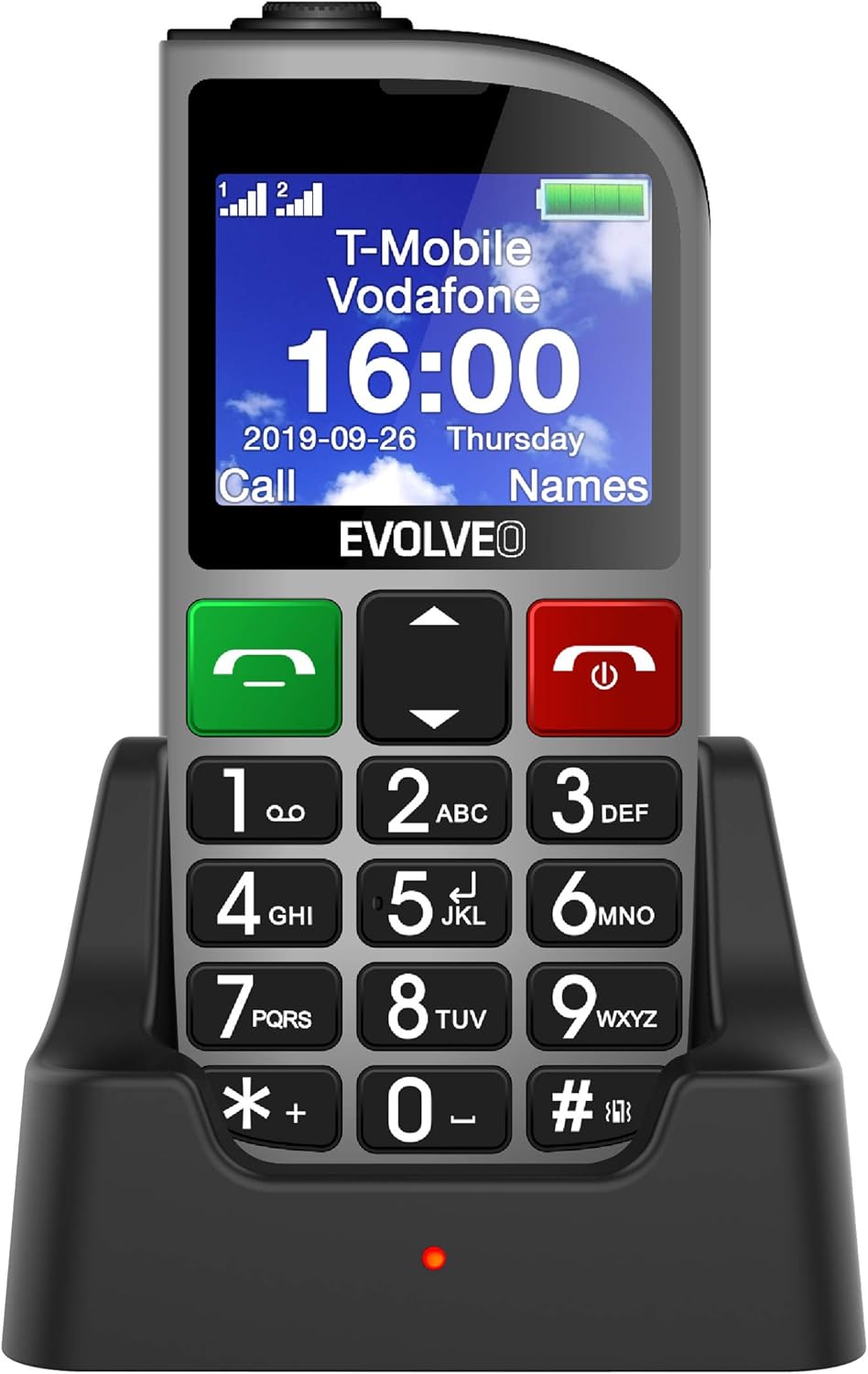
Obrázek 1.1: EVOLVEO EASYPHONE FM placed in its charging dock. The phone features a large display showing time and network information, with prominent green call and red end call buttons, and a numeric keypad below.
2. Nastavení
2.1. Instalace a nabíjení baterie
- Odstraňte zadní kryt telefonu.
- Insert the Li-ion 1000 mAh battery, ensuring the contacts align correctly.
- Nasaďte zadní kryt.
- Connect the AC adapter to the charging dock.
- Place the phone into the charging dock. The charging indicator light will illuminate.
- Před prvním použitím nechte telefon plně nabít.
2.2. Vložení SIM karty (kart)
The phone supports two SIM cards (Dual SIM) for GSM/GPRS 850/900/1800/1900 MHz networks.
- Ujistěte se, že je telefon vypnutý.
- Odstraňte zadní kryt a baterii.
- Vyhledejte sloty pro SIM karty.
- Insert your SIM card(s) into the designated slots, ensuring correct orientation.
- Vložte zpět baterii a zadní kryt.
2.3. Inserting a MicroSDHC Card
You can expand the phone's storage for music, photos, and other files by inserting a MicroSDHC card.
- Ujistěte se, že je telefon vypnutý.
- Odstraňte zadní kryt a baterii.
- Locate the MicroSDHC card slot.
- Gently insert the MicroSDHC card until it clicks into place.
- Vložte zpět baterii a zadní kryt.
3. Návod k obsluze
3.1. Zapnutí/vypnutí
- Zapnutí: Stiskněte a podržte tlačítko Red End Call/Power dokud se obrazovka nerozsvítí.
- Vypnutí: Stiskněte a podržte tlačítko Red End Call/Power tlačítko, dokud se nezobrazí možnosti vypnutí, a poté potvrďte.

Obrázek 3.1: Přední view of the EVOLVEO EASYPHONE FM, highlighting the large display, call buttons, and numeric keypad for easy dialing.
3.2. Uskutečňování a přijímání hovorů
- Uskutečnění hovoru: Dial the number using the numeric keypad and press the Zelené volání tlačítko.
- Rychlé vytáčení: The phone supports quick access to 8 popular contacts. Assign numbers to keys 2-9 for speed dialing. Press and hold the assigned key to dial.
- Příjem hovoru: Stiskněte tlačítko Zelené volání tlačítko pro přijetí příchozího hovoru.
- Ukončení hovoru: Stiskněte tlačítko Red End Call/Power button to end an active call.
3.3. Odesílání a přijímání SMS zpráv
The separated keyboard keys facilitate easy writing of SMS messages.
- Navigate to the Messaging menu.
- Vyberte „Napsat zprávu“ pro napsání nové SMS zprávy.
- Zadejte číslo příjemce nebo jej vyberte z kontaktů.
- Napište zprávu pomocí klávesnice.
- Stiskněte tlačítko „Odeslat“ pro odeslání zprávy.
3.4. Ovládání hlasitosti
Adjust the call and ringtone volume using the dedicated volume control button located on the left side of the phone.

Obrázek 3.2: Left side of the phone, showing the volume control buttons and the FM radio activation button.
3.5. Nouzové tlačítko SOS
The SOS button, located on the back of the device, allows for quick emergency calls and messages.
- Before use, configure up to five emergency contact numbers in the phone settings.
- V případě nouze stiskněte a podržte SOS tlačítko.
- The phone will automatically dial the predefined emergency numbers sequentially and send an emergency message to these contacts.

Obrázek 3.3: Zadní view of the EVOLVEO EASYPHONE FM, showing the prominent red SOS emergency button and the camera lens.
3.6. FM rádio
The phone includes an FM radio with a dedicated activation button.
- To turn on the FM radio, press the independent FM button on the side of the device.
- The radio can play in the background, allowing you to use other phone functions.
- During an incoming or outgoing call, the radio will automatically mute and resume playback after the call ends.
3.7. Svítilna
A powerful flashlight is integrated into the phone, activated by a dedicated button.
- Press the dedicated flashlight button on the side of the phone to turn the flashlight on or off.

Obrázek 3.4: Right side of the phone, showing the dedicated flashlight button.
3.8. Další funkce
- Fotoaparát: The phone includes a VGA camera for basic photo capture.
- Hudební přehrávač: Přehrávejte hudbu files stored on your MicroSDHC card.
- Digital Recorder (Dictaphone): Record voice notes.
- Kalendář: Sledujte důležitá data a události.
- Budík: Nastavte budíky pro připomenutí.
- Kalkulačka: Proveďte základní výpočty.
- Zvětšovací sklo: Utilize the screen as a magnifying glass.
4. Údržba
4.1. Čištění zařízení
- Use a soft, dry cloth to clean the phone's surface and screen.
- Avoid using liquid cleaners or abrasive materials, as they may damage the device.
- Zajistěte, aby se do nabíjecího portu ani jiných otvorů nedostala vlhkost.
4.2. Péče o baterie
- Chcete-li prodloužit výdrž baterie, nevystavujte telefon extrémním teplotám.
- Charge the battery regularly, but avoid overcharging or letting it completely drain for extended periods.
- If the phone will not be used for a long time, charge the battery to about 50% before storing it.
5. Řešení problémů
If you encounter issues with your EVOLVEO EASYPHONE FM, refer to the following common problems and solutions:
5.1. Telefon se nezapne
- Ujistěte se, že je baterie správně nainstalována a nabita.
- Connect the phone to the charger and wait a few minutes before attempting to power it on again.
- Zkontrolujte, zda jsou kontakty baterie čisté.
5.2. Nelze uskutečňovat ani přijímat hovory
- Check if the SIM card(s) are correctly inserted and activated.
- Ensure you have network coverage.
- Verify that the phone is not in airplane mode (if applicable).
- Check your account balance or subscription status with your service provider.
5.3. FM Radio Not Working
- Ensure you are in an area with good FM signal reception.
- Check if the FM radio is properly activated using its dedicated button.
5.4. Problémy se zobrazením
- If the display is dim, check the brightness settings.
- If the screen is unresponsive, try restarting the phone.
6. Specifikace
| Značka | Evolveo |
| Model | EASYPHONE FM |
| Velikost displeje | 1.8 palců |
| Rozlišení displeje | 320 x 240 px |
| Buněčná technologie | 2G (GSM/GPRS 850/900/1800/1900 MHz) |
| Podpora SIM | Duální SIM |
| Konektivita | Bluetooth, 3.5mm jack |
| Baterie | Li-ion 1000 mAh |
| Rozměry | 130 × 61 × 16.5 mm |
| Hmotnost | 105 g (s baterií) |
| Fotoaparát | VGA |
| Rozšíření úložiště | Slot pro kartu MicroSDHC |
Poznámka: Specifikace se mohou změnit bez předchozího upozornění.
7. Záruka a podpora
For warranty information and technical support, please refer to the warranty card included in your package or visit the official Evolveo webUschovejte si doklad o koupi pro případ reklamace.