
1. Úvod
This manual provides comprehensive instructions for the safe and efficient operation of your Nedis Ultra HD 4K Dashcam (Model DCAM44BK). This device is designed to record your car journeys in high definition, offering advanced features for enhanced road safety and evidence collection. Please read this manual thoroughly before using the product and retain it for future reference.
2. Obsah balení
Ujistěte se, že máte v balení všechny níže uvedené položky:
- Nedis Ultra HD 4K Dashcam (DCAM44BK)
- Magnetická montáž
- Car Charger (Micro USB)
- USB datový kabel
- Uživatelská příručka (tento dokument)

Obrázek 2.1: Dashcam and included accessories.
3. Vlastnosti produktu
The Nedis Ultra HD 4K Dashcam offers a range of features to enhance your driving experience and security:
- Ultra HD 4K Recording: Captures video at 4K resolution (24 frames per second) for clear and detailed footage.
- 2.4palcový LCD displej: Integrated screen for instant video playback and menu navigation.
- 140° široký Viewúhel: Provides a broad perspective of the road, capturing more details.
- Micro USB Connectivity: For power supply and connection to a PC/notebook.
- Podpora Micro SD karet: Supports Micro SD cards up to 128 GB for ample storage (card not included).
- Nahrávání ve smyčce: Automaticky přepíše nejstarší soubor footage, když je paměťová karta plná, což zajišťuje nepřetržitý záznam.
- Vestavěný mikrofon a reproduktor: For recording and playing back audio with video.
- G-senzor: Detekuje náhlé nárazy nebo kolize a automaticky uzamkne aktuální video file aby nedošlo k jeho přepsání.
- Parkovací režim: Activates recording when vibrations are detected while the vehicle is parked, providing surveillance.
- Noční vidění: Ensures clear recordings even in low-light conditions.
- Magnetická montáž: Allows for easy attachment and removal of the dashcam.
3.1 video: Konecview of the Nedis Dashcam's key features and benefits.
4. Nastavení
4.1 Vložení Micro SD karty
- Ujistěte se, že je palubní kamera vypnutá.
- Locate the Micro SD card slot on the side of the dashcam.
- Vložte kompatibilní kartu Micro SD (třídy 10 nebo vyšší, až do 128 GB) do slotu, dokud nezacvakne.
- Chcete-li kartu vyjmout, jemně ji zatlačte, dokud nevyskočí.

Obrázek 4.1: Micro SD card slot location.
4.2 Montáž palubní kamery
- Clean the desired area on your windshield where you intend to mount the dashcam. Ensure it does not obstruct your view.
- Attach the magnetic mount to the windshield using its adhesive pad. Press firmly for several seconds.
- Align the dashcam with the magnetic mount. The strong magnets will securely hold the dashcam in place.
- Upravte úhel kamery tak, aby jasně zachytila silnici před vámi.

Obrázek 4.2: Dashcam with magnetic mount.

Obrázek 4.3: Magnetic contact points on the dashcam.
4.3 Powering the Dashcam
- Connect the Micro USB end of the car charger to the dashcam's Micro USB port.
- Zapojte druhý konec autonabíječky do 12V zásuvky ve vozidle (zásuvka zapalovače cigaret).
- The dashcam will typically power on automatically when the vehicle's ignition is turned on and begin recording.
5. Návod k obsluze
5.1 Základní obsluha
- Zapnutí/vypnutí: The dashcam powers on automatically with vehicle ignition. To manually power on/off, press and hold the Power button (refer to Figure 5.1 for button layout).
- Záznam: Once powered on, the dashcam will automatically start recording. A flashing red indicator or icon on the screen usually indicates active recording.
- Zastavit/Spustit nahrávání: During recording, press the OK button to stop recording. Press it again to resume.
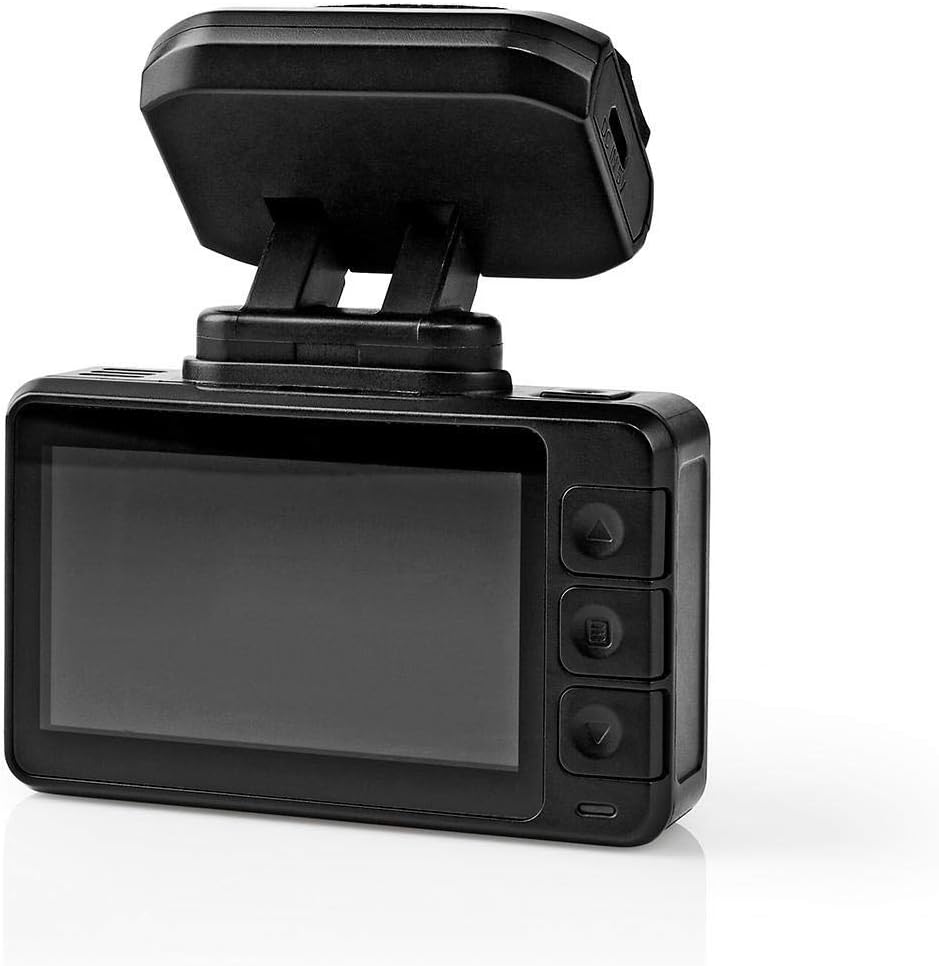
Obrázek 5.1: Dashcam rear view with LCD and control buttons.
5.2 Navigace v nabídce
Use the buttons on the side of the dashcam (Up, Down, Menu/Mode, OK) to navigate through settings and options on the LCD screen.
- Tlačítko nabídky: Press to enter the settings menu. Press again to cycle through different menu pages (e.g., video settings, system settings).
- Tlačítka nahoru/dolů: Slouží k procházení možností nabídky.
- Tlačítko OK: Stisknutím potvrdíte výběr nebo vstoupíte do podnabídky.
5.3 Přehrávání videa
- Stop recording if currently active.
- Press the Mode button (often combined with Menu) to switch to playback mode.
- Use the Up/Down buttons to browse through recorded video files.
- Stisknutím tlačítka OK přehrajete vybrané video.
- To exit playback mode, press the Mode button again.
5.4 Funkce G-senzoru
The built-in G-Sensor detects sudden acceleration, braking, or impacts. When triggered, it automatically locks the current video segment, preventing it from being overwritten by loop recording. The sensitivity of the G-Sensor can usually be adjusted in the settings menu.
5.5 Parkovací režim
When parking mode is enabled and the vehicle is stationary, the dashcam will automatically start recording if it detects vibrations or impacts. This feature provides surveillance for your parked vehicle. Ensure the dashcam has a continuous power supply (e.g., hardwired kit, not included) for extended parking mode operation.
5.6 Noční vidění
The dashcam is equipped with night vision capabilities, allowing it to capture clear video footage even in low-light conditions or at night. This feature typically activates automatically.
6. Údržba
- Čištění: Use a soft, dry cloth to clean the dashcam lens and screen. Do not use abrasive cleaners or solvents.
- Skladování: If storing the dashcam for an extended period, remove the Micro SD card and store the device in a cool, dry place away from direct sunlight.
- Micro SD karta: Periodically format the Micro SD card (at least once a month) to maintain optimal performance and prevent data corruption. Back up any important files před formátováním.
7. Řešení problémů
| Problém | Možná příčina | Řešení |
|---|---|---|
| Autokamera se nezapne. | Žádné napájení; vadná nabíječka do auta; uvolněné připojení. | Check car charger connection; ensure vehicle's 12V outlet is working; try a different USB cable/charger. |
| Nahrávání se neočekávaně zastaví. | Full Micro SD card; slow Micro SD card; card error. | Format the Micro SD card; use a Class 10 or higher card; replace the card if faulty. |
| Video footage je rozmazané nebo nejasné. | Znečištěný objektiv; na objektivu stále ochranná fólie; nesprávné zaostření. | Clean the lens with a soft cloth; remove any protective film; ensure the camera is securely mounted. |
| G-senzor je příliš citlivý/nedostatečně citlivý. | Nastavení citlivosti G-senzoru je příliš vysoké/nízké. | Adjust G-Sensor sensitivity in the dashcam's settings menu. |
8. Specifikace
| Funkce | Detail |
|---|---|
| Číslo modelu | DCAM44BK |
| Značka | Nedis |
| Rozlišení záznamu videa | 4K |
| Snímky za sekundu (FPS) | 24 |
| Typ zobrazení | LCD |
| Velikost obrazovky | 2.4 palců |
| Viewúhel | 140 stupňů |
| Technologie připojení | USB |
| Typ montáže | Magnetická montáž |
| Kontrolní metoda | Dotek |
| Technologie optických senzorů | CMOS |
| Speciální funkce | Night Vision, G-Sensor, Parking Mode, Loop Recording |
| Rozměry produktu | 5.7 x 73 x 38 cm |
| Hmotnost položky | 85 gramů |
9. Bezpečnostní informace
- Do not operate the dashcam in extreme temperatures or humidity.
- Ensure the dashcam is securely mounted and does not obstruct the driver's view nebo narušovat bezpečnostní prvky vozidla.
- Nepokoušejte se zařízení rozebírat ani opravovat sami. Kontaktujte kvalifikovaný servisní personál.
- Používejte pouze dodané nebo doporučené příslušenství.
- Udržujte zařízení mimo dosah dětí.
- Adhere to all local laws and regulations regarding the use of dashcams.
10. Záruka a podpora
Nedis products are manufactured to high quality standards. In the unlikely event of a defect during the warranty period, please contact your retailer for support. The warranty terms and conditions are typically provided by your retailer at the time of purchase. For further assistance or product information, please visit the official Nedis webnebo kontaktujte jejich zákaznickou podporu.