
1. Úvod
Thank you for choosing the Homcloud AS-CM1 Wi-Fi Smart Shutter Module. This module is designed to integrate your traditional roller shutters, blinds, or curtains into your smart home system, allowing for convenient control via a smartphone application or voice commands. Please read this manual carefully before installation and use to ensure proper operation and safety.
2. Konec produktuview
The Homcloud AS-CM1 is a compact Wi-Fi module that can be recessed into a standard electrical box (e.g., 503 type) behind your existing shutter switch. It enables smart control of motorized shutters while retaining the functionality of your traditional wall switch. Key features include remote control, timer scheduling, and compatibility with popular voice assistants like Amazon Alexa and Google Home.

Obrázek 2.1: Homcloud Wi-Fi Curtain Module AS-CM1 product label. This image displays the product label of the Homcloud Wi-Fi Curtain Module, model AS-CM1. It shows the Homcloud logo, product name 'Wi-Fi Curtain Module', Homcloud code AS-CM1, model QS-WIFI-C01, operating voltage 220-240V~50Hz, maximum current 3A, Wi-Fi specification 2.4Ghz 802.11 b/g/n, and the website www.homcloud.com. Below these details are the terminal markings N, L, and symbols for motor connections.
3. Bezpečnostní informace
- Elektrické nebezpečí: Instalaci by měl provádět pouze kvalifikovaný elektrikář nebo osoba s důkladnými znalostmi elektrických systémů.
- Odpojení napájení: Před prováděním jakýchkoli elektrických prací vždy odpojte napájení hlavním jističem.
- svtage a aktuální: Ensure the module's specifications (220-240V~50Hz, Max. 3A) are compatible with your electrical system and motor.
- Pouze pro vnitřní použití: This device is intended for indoor use in dry environments.
- Bezpečnost dětí: Udržujte zařízení mimo dosah dětí.
4. Specifikace
| Funkce | Specifikace |
|---|---|
| Výrobce | Homcloud |
| Kód položky | AS-CM1 |
| Rozměry produktu | 4.6 x 4.6 x 1.8 cm |
| Číslo modelu položky | AS-CM1 |
| Wattage | 650 wattů |
| Provozní režim | Zapnuto-vypnuto-zapnuto |
| Jmenovitý proud | 3 Ampere |
| Provozní svtage | 230 voltů |
| Typ kontaktu | Normálně zavřeno |
| Typ přepínače | Smart, 1 way |
| Terminál | Pájka |
| Materiál | Plast |
| Speciální funkce | APP control, Works in parallel with traditional switches |
| Hmotnost položky | 40 g |
| Baterie jsou součástí dodávky? | Žádný |
| Jsou vyžadovány baterie? | Žádný |
5. Instalace
Důležité: Před zahájením instalace se ujistěte, že je hlavní jistič odpojen od napájení.
- Příprava elektrické krabice: Open the electrical box (e.g., 503 type) where your traditional shutter switch is located.
- Zapojení: Connect the Homcloud AS-CM1 module according to the wiring diagram. The module has terminals for Line (L), Neutral (N), and motor control (Up/Down). Ensure correct connections to avoid damage to the module or motor.

Obrázek 5.1: Homcloud Wi-Fi Smart Shutter Module 2-gang/2-way wiring diagram. This image provides a detailed wiring diagram for the Homcloud Wi-Fi Smart Shutter Module in a 2-gang/2-way configuration. It shows connections for Line (L), Neutral (N), and motor control (up/down arrows), along with the physical switches and the module itself, illustrating how to integrate it into an existing electrical system.
- Umístění modulu: Carefully place the module inside the electrical box behind the existing shutter switch. Its compact size is designed to fit into standard recessed boxes.
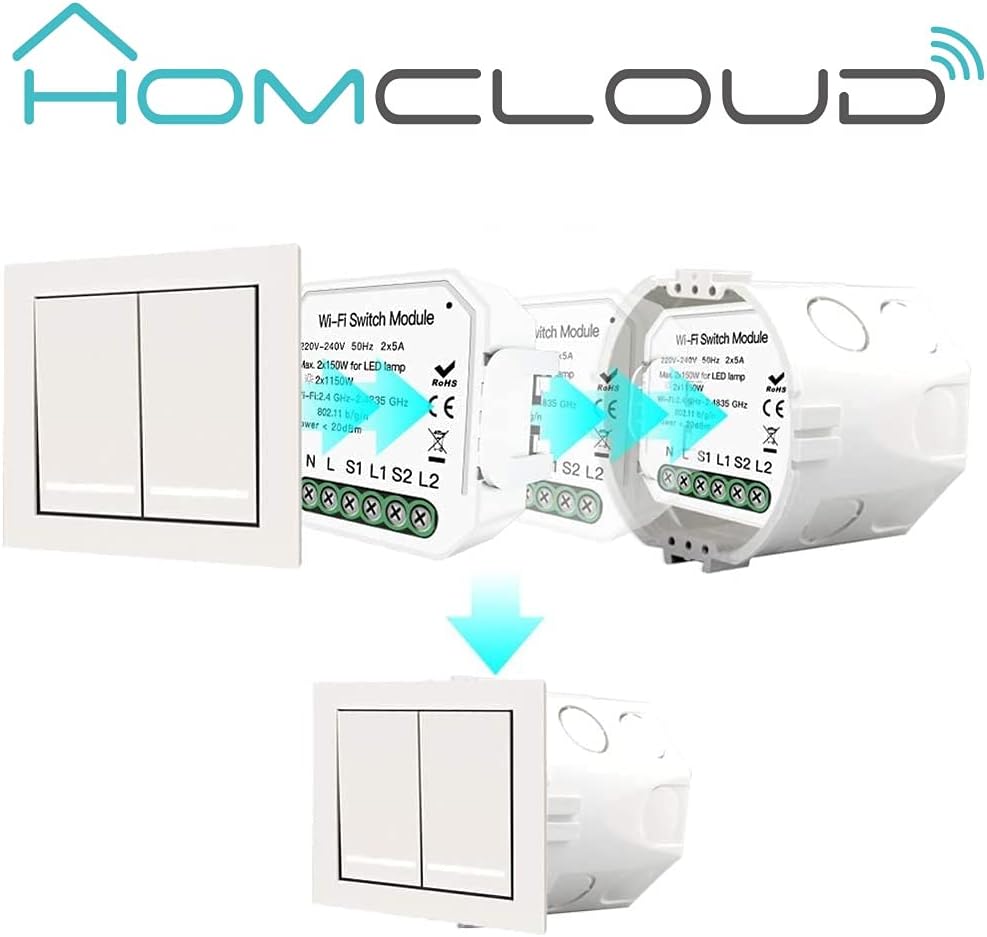
Obrázek 5.2: Homcloud Wi-Fi Smart Shutter Module installation diagram. This diagram illustrates the installation process of the Homcloud Wi-Fi Smart Shutter Module. It shows a standard wall switch, the smart module, and how the module is placed behind the switch within the electrical box, indicating a seamless integration.

Obrázek 5.3: Homcloud Wi-Fi Smart Shutter Module recessed installation. A close-up view showing the Homcloud Wi-Fi Smart Shutter Module neatly installed inside a standard electrical wall box, positioned behind the wall switch. This demonstrates its compact design suitable for recessed installation.
- Secure and Restore Power: Close the electrical box and secure the switch plate. Restore power at the main circuit breaker.
6. Nastavení
6.1. Stažení a registrace aplikace
- Stáhněte si Homcloud App or Smart Life App z App Storu (iOS) nebo z Obchodu Google Play (Android).
- Zaregistrujte si nový účet nebo se přihlaste pomocí stávajícího.

Obrázek 6.1: Homcloud Smart Home Solutions app download. This image shows multiple smartphones displaying the Homcloud app interface, along with QR codes and buttons for downloading the app from the App Store and Google Play. It highlights the 'Homcloud Smart Home Solutions' branding and the app's availability for both iOS and Android devices. You can also find the app at smartapp.tuya.com/homcloudsmart.
6.2. Párování zařízení
- Ujistěte se, že je váš smartphone připojen k síti Wi-Fi s frekvencí 2.4 GHz.
- After restoring power to the module, it should enter pairing mode (often indicated by a blinking light or sound). If not, locate the reset button on the module (refer to Image 6.2) and press it for 5-10 seconds until it enters pairing mode.

Obrázek 6.2: Homcloud Wi-Fi Smart Shutter Module with reset button. This diagram illustrates the Homcloud Wi-Fi Smart Shutter Module, highlighting its reset button ('Ripristino/reset') and the mounting clip ('Clip montaggio'). This shows key physical features for installation and initial setup.
- In the Homcloud/Smart Life App, tap '+' or 'Add Device'.
- Select 'Curtain Switch' or 'Shutter Module' from the device list.
- Follow the on-screen instructions to connect the module to your Wi-Fi network. This typically involves confirming the indicator light status and entering your Wi-Fi password.
- Once connected, you can rename the device for easier control (e.g., "Living Room Shutter").
6.3. Kalibrace
For accurate partial opening/closing, you need to calibrate the module by setting the maximum operation time:
- In the app, navigate to the device settings for your shutter module.
- Find the calibration or 'Motor Travel Time' setting.
- Measure the time it takes for your shutter to fully open or fully close (e.g., 30 seconds).
- Enter this duration in seconds into the app. This allows the module to estimate the shutter's position for percentage-based control.
7. Návod k obsluze
7.1. Ovládání aplikací
The Homcloud/Smart Life App provides comprehensive control over your smart shutter module:
- Otevřít zavřít: Tap the respective buttons to fully open or close the shutters.
- Partial Control: Use the slider or percentage input to set the shutter to a specific open position (e.g., 50% open).
- Časovač/Plán: Set schedules for automatic opening and closing at specific times (e.g., open at 7 AM, close at 8 PM).
- Tvorba scény: Integrate the shutter module into smart scenes with other devices (e.g., 'Good Morning' scene opens shutters and turns on lights).
- Sdílení zařízení: Sdílejte ovládání modulu s členy rodiny prostřednictvím aplikace.

Obrázek 7.1: Remote control via smartphone app. This image depicts a hand holding a smartphone displaying the Homcloud app interface, with a large power button icon, indicating remote control functionality for the smart shutter module. The background shows a modern living room, suggesting smart home integration.
7.2. Hlasové ovládání
The module is compatible with Amazon Alexa and Google Home. Link your Homcloud/Smart Life account to your voice assistant app.
- Základní příkazy:
- "Alexa, open [Device Name]"
- "Hey Google, close [Device Name]"
- Partial Control Commands:
- "Alexa, set [Device Name] to 50%"
- "Hey Google, open [Device Name] by 20%"
7.3. Ruční ovládání
The Homcloud AS-CM1 module works in parallel with your traditional wall switch. You can still use the physical switch to open, close, or stop the shutters. The app will reflect the current status even after manual operation.
8. Údržba
- Čištění: Ensure the module is clean and free from dust. Disconnect power before cleaning. Use a dry, soft cloth.
- Žádné díly opravitelné uživatelem: Do not attempt to open or repair the module yourself. This will void the warranty and may pose a safety risk.
- Aktualizace firmwaru: Periodically check the Homcloud/Smart Life App for available firmware updates to ensure optimal performance and security.
9. Řešení problémů
- Modul nereaguje:
- Check if the module has power.
- Verify your Wi-Fi network is active and the module is within range.
- Try restarting the module by cycling its power at the circuit breaker.
- If issues persist, attempt to re-pair the device with the app.
- Problémy s připojením aplikace:
- Ujistěte se, že je váš telefon připojen k internetu.
- Confirm your Wi-Fi router is functioning correctly and providing a 2.4GHz signal.
- Restartujte Wi-Fi router.
- Inaccurate Shutter Position (Calibration):
- Recalibrate the motor travel time in the app settings (refer to Section 6.3).
- Ensure the shutter moves freely without obstruction.
- Hlasové ovládání nefunguje:
- Verify that your Homcloud/Smart Life account is correctly linked to Alexa or Google Home.
- Check the device name in the voice assistant app and ensure it matches your commands.
- Ensure your voice assistant device is online and functioning.
10. Záruka a podpora
Homcloud provides support for its products. If you encounter any issues not covered in this manual or require further assistance, please contact Homcloud customer support. Refer to the product packaging or the Homcloud webstránky pro kontaktní informace.