
Zavedení
This manual provides essential information for the safe and efficient operation of your Dual MCR 4 Portable DAB+/FM Radio. This device offers both digital DAB+ and analog FM radio reception, ensuring a wide range of listening options. Its color TFT display enhances usability by showing station names and additional information. With intuitive controls, auxiliary input, and headphone jack, the MCR 4 is designed for versatile and enjoyable audio experiences.
Bezpečnostní informace
- Před použitím zařízení si pečlivě přečtěte všechny pokyny.
- Chraňte zařízení před vodou, vlhkostí a vysokými teplotami.
- Nepokoušejte se jednotku rozebírat ani upravovat. Veškerý servis svěřte kvalifikovanému personálu.
- Use only the provided power adapter or recommended battery types.
- Během provozu zajistěte dostatečné větrání v okolí zařízení.
- Baterie zlikvidujte zodpovědně v souladu s místními předpisy.
Obsah balení
Zkontrolujte prosím, zda jsou v balení přítomny všechny položky:
- Dual MCR 4 Main Unit
- Napájecí adaptér
- Uživatelská příručka
Konec produktuview
The Dual MCR 4 features a compact design with intuitive controls for easy access to its functions. Key components include:
- Color TFT Display: Zobrazuje informace o stanici, čas a možnosti nabídky.
- Otočný knoflík: For tuning, volume control, and menu navigation.
- Paměťová tlačítka: To save and recall your favorite radio stations.
- Teleskopická anténa: Pro optimální příjem rádiového signálu.
- Pomocný vstup (AUX-IN): Located at the back, for connecting external audio devices.
- Sluchátkový jack: Located at the back, for private listening.
- Mechanical On/Off Switch: Located at the back, for direct power control.
- Passive Membrane: Located at the back, contributing to exceptional sound quality.
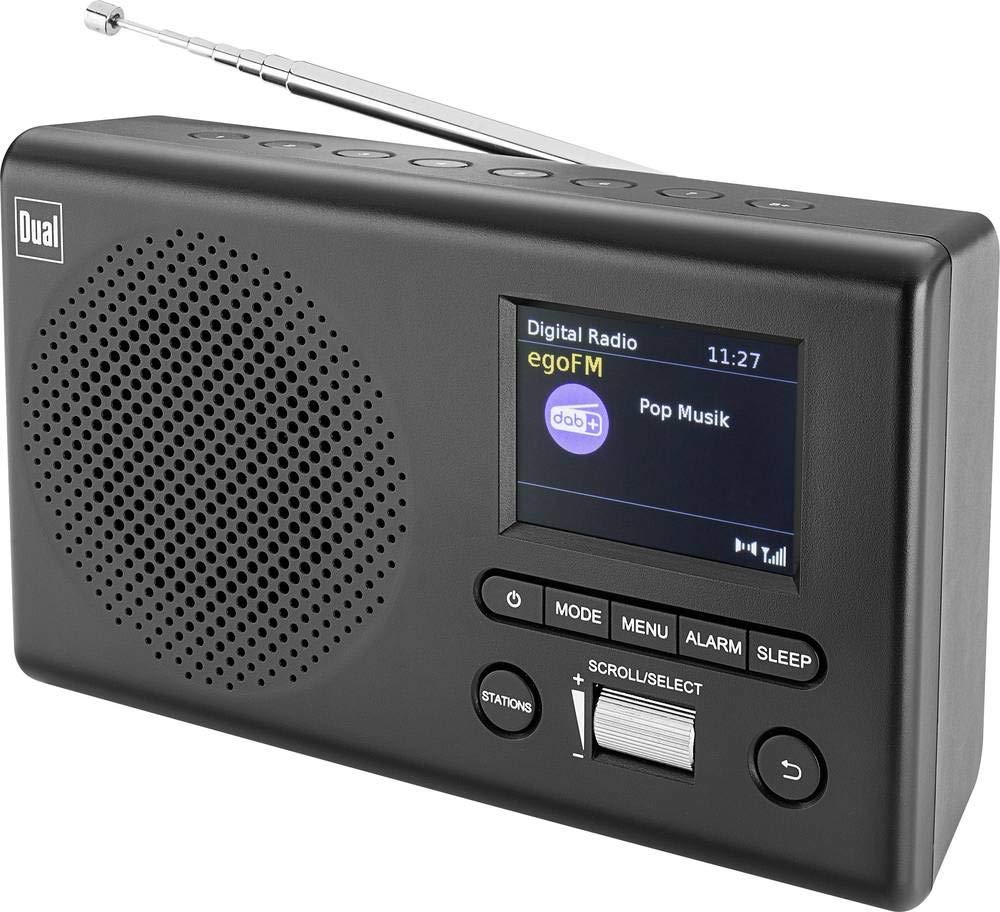
Obrázek: Přední strana view of the Dual MCR 4 Portable DAB+/FM Radio, showing the color TFT display, rotary knob, and control buttons. The radio has a black and silver finish.
Nastavení
1. Napájení zařízení
The Dual MCR 4 can be powered by either the included AC power adapter or batteries, offering portability.
- Použití AC adaptéru: Connect the power adapter to the DC IN port on the back of the radio and plug the other end into a standard wall outlet.
- Použití baterií: Open the battery compartment on the bottom/back of the radio and insert the required batteries (type and quantity usually specified inside the compartment or in the full manual). Ensure correct polarity.
2. Nastavení antény
Extend the telescopic antenna fully for optimal reception of both DAB+ and FM radio signals. Adjust its position for the best signal quality.
3. Initial Power On and Station Scan
After connecting power, switch on the radio using the mechanical ON/OFF switch at the back. The radio will typically perform an automatic station scan upon first use, searching for available digital (DAB+) and analog (FM) radio stations. This process may take a few moments.
Návod k obsluze
1. Základní obsluha
- Zapnutí/vypnutí: Use the mechanical switch at the back. For standby, a dedicated button on the front might be available (refer to physical unit).
- Ovládání hlasitosti: Rotate the main rotary knob to adjust the listening volume.
2. Režim rádia DAB+
- Selecting DAB+ Mode: Press the MODE button (if available) or navigate through the menu using the rotary knob until DAB+ mode is selected.
- Výběr stanice: After an automatic scan, use the rotary knob to scroll through the list of available DAB+ stations. Press the knob to confirm your selection.
- Ukládání předvoleb: Tune to your desired station. Press and hold a memory button (e.g., 1-5) until the display confirms the station is saved.
- Vyvolání předvoleb: Briefly press the corresponding memory button to recall a saved station.
- Informace o displeji: The color TFT display will show station name, program information (DLS), and potentially station logos or slideshows.
3. Režim FM rádia
- Selecting FM Mode: Press the MODE button or navigate through the menu until FM mode is selected.
- Ruční ladění: Rotate the tuning knob to manually adjust the frequency.
- Automatické skenování: Press and hold the tuning knob or a dedicated scan button to automatically search for the next available FM station.
- Ukládání předvoleb: Tune to your desired FM station. Press and hold a memory button until the display confirms the station is saved.
- Vyvolání předvoleb: Briefly press the corresponding memory button to recall a saved station.
4. Auxiliary Input (AUX-IN)
Connect an external audio device (e.g., smartphone, MP3 player) to the AUX-IN port on the back of the radio using a 3.5mm audio cable. Select AUX mode on the radio to play audio from the connected device.
5. Použití sluchátek
For private listening, plug standard 3.5mm headphones into the headphone jack located on the back of the unit. The internal speaker will automatically mute.
Údržba
- Čištění: Rádio otírejte měkkým, suchým hadříkem. Nepoužívejte abrazivní čisticí prostředky ani rozpouštědla.
- Skladování: If storing for an extended period, remove batteries and store the unit in a cool, dry place.
- Péče o anténu: S teleskopickou anténou zacházejte opatrně, abyste ji nepoškodili.
Odstraňování problémů
| Problém | Možné řešení |
|---|---|
| Žádná síla |
|
| Špatný příjem rádia |
|
| Žádný zvuk z reproduktorů |
|
Specifikace
| Značka | Dvojí |
| Číslo modelu | 76074 |
| Barva | Černá, Stříbrná |
| Technologie ladění | DAB+, FM |
| Technologie připojení | Auxiliary (AUX-IN) |
| Speciální funkce | Portable, Color TFT Display |
| Kompatibilní zařízení | Headphones, External Audio Devices (via AUX-IN) |
| Zdroj napájení | Mains (AC Adapter), Battery Powered |
| Zahrnuté komponenty | Main Unit, Power Adapter, User Manual |
| Doporučené použití | Hudba |
Záruka a podpora
For warranty information and technical support, please refer to the specific warranty card included with your product or contact Dual customer service. The included user manual provides detailed instructions and contact information.


