
1. Úvod
The V7 KW550ESBT Bluetooth Keyboard is designed to enhance your productivity with versatile connectivity options. This compact, ultra-slim keyboard offers a comfortable and quiet typing experience, featuring laser-etched keys for long-lasting durability. It supports connection to multiple devices via Bluetooth or a 2.4 GHz USB dongle.
Mezi klíčové vlastnosti patří:
- Seamless switching between up to 2 Bluetooth devices or connection via the included 2.4 GHz USB dongle.
- Scissor-switch keys for comfortable and quiet typing.
- Laser-etched keys for enhanced durability.
- Ultra-slim and compact design.
- Includes two AAA batteries for immediate use.
2. Obsah balení
Zkontrolujte prosím balení, zda neobsahuje následující položky:
- V7 KW550ESBT Bluetooth Keyboard
- 2.4 GHz USB Receiver (dongle)
- 2 x AAA baterie
- Uživatelská příručka (tento dokument)

Image: The V7 KW550ESBT keyboard shown with its accompanying 2.4 GHz USB receiver, ready for connection.
3. Nastavení
3.1. Instalace baterie
- Vyhledejte přihrádku na baterie na spodní straně klávesnice.
- Otevřete kryt bateriového prostoru.
- Vložte dvě baterie typu AAA a dbejte na správnou polaritu (+/-).
- Bezpečně zavřete kryt bateriového prostoru.
3.2. Connecting via 2.4 GHz USB Dongle
- Remove the 2.4 GHz USB receiver from its storage slot (usually within the battery compartment or a dedicated slot).
- Zapojte USB přijímač do volného USB portu na vašem počítači nebo zařízení.
- The keyboard should automatically connect. If not, ensure the keyboard is powered on and the connection indicator light (if present) is active.
3.3. Připojení přes Bluetooth
The V7 KW550ESBT keyboard supports connecting to up to two Bluetooth devices.
- Ujistěte se, že je klávesnice zapnutá.
- Press and hold the Bluetooth pairing key (refer to keyboard layout for specific key, often indicated by a Bluetooth symbol or 'BT1'/'BT2') for a few seconds until the Bluetooth indicator light starts blinking, indicating it's in pairing mode.
- Na svém zařízení (počítač, tablet, chytrý telefon) přejděte do nastavení Bluetooth.
- Hledat available devices and select "V7 KW550ESBT" (or similar name) from the list.
- Postupujte podle pokynů na obrazovce a dokončete proces párování. Můžete být požádáni o zadání kódu zobrazeného na obrazovce pomocí klávesnice.
- Repeat for a second Bluetooth device if desired, using the other Bluetooth pairing key.
3.4. Přepínání mezi připojenými zařízeními
To switch between connected devices (Bluetooth 1, Bluetooth 2, or 2.4 GHz USB), press the corresponding function key (e.g., Fn + BT1, Fn + BT2, or Fn + 2.4G if available). Refer to your keyboard's specific layout for these keys.
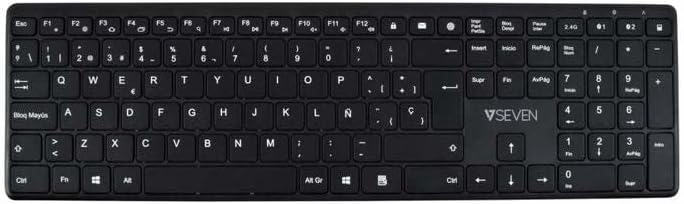
Obrázek: Shora dolů view of the V7 KW550ESBT keyboard, showing the full QWERTY layout and function keys.
4. Ovládání klávesnice
4.1. Standard Key Functions
The keyboard features a standard QWERTY layout with all essential alphanumeric keys, punctuation, and modifier keys (Shift, Ctrl, Alt, Windows/Command).
4.2. Multimediální a funkční klávesy
The top row of keys (F1-F12) often doubles as multimedia or special function keys. These functions are typically accessed by pressing the Fn key simultaneously with the desired F-key. Common functions include:
- Ovládání hlasitosti (ztlumení, snížení, zvýšení)
- Přehrávání médií (přehrávání/pozastavení, předchozí, další)
- Úprava jasu obrazovky
- Funkce vyhledávání
- Uzamknout obrazovku
Refer to the icons printed on your specific keyboard's F-keys for exact functionality.
4.3. Quiet Typing Experience
The scissor-switch key design minimizes typing noise, making it suitable for quiet environments.

Obrázek: Side profile of the V7 KW550ESBT keyboard, highlighting its ultra-slim design.
5. Údržba
5.1. Čištění
Čištění klávesnice:
- Turn off the keyboard and disconnect it from your device.
- Použijte měkký hadřík, který nepouští vlákna dampvodou nebo jemným čisticím roztokem.
- Jemně otřete klávesy a povrch. Zabraňte nadměrné vlhkosti.
- Pro odstranění prachu a nečistot mezi klávesami použijte stlačený vzduch.
5.2. Výměna baterie
When the keyboard's performance degrades or the battery indicator (if present) signals low power, replace the AAA batteries as described in Section 3.1.
6. Řešení problémů
If you encounter issues with your V7 KW550ESBT keyboard, try the following solutions:
| Problém | Možné řešení |
|---|---|
| Klávesnice nereaguje |
|
| Klávesy se zasekávají nebo nereagují |
|
| Párování Bluetooth se nezdařilo |
|
7. Specifikace
| Funkce | Detail |
|---|---|
| Značka | V7 |
| Číslo modelu | KW550ESBT |
| Technologie připojení | Bluetooth, 2.4 GHz Wireless (USB Dongle) |
| Popis klávesnice | Multimédia |
| Doporučené použití | Kancelář |
| Speciální funkce | Bluetooth |
| Barva | Černý |
| Styl | Klasický |
| Rozměry produktu | 16.1 l x 4.7 š x 0.8 v centimetrů |
| Materiál | Plast |
| Zdroj napájení | 2 x AAA baterie (součástí balení) |
8. Záruka a podpora
For warranty information and technical support, please refer to the documentation provided with your purchase or visit the official V7 webUschovejte si doklad o koupi pro případ reklamace.