
1. Úvod
The WAVLINK 8-Port Fast Ethernet Switch is designed to expand your network connectivity with ease. It features 8 RJ45 ports supporting 10/100 Mbps auto-negotiation and Auto-MDI/MDIX, eliminating the need for crossover cables. This plug-and-play device is ideal for extending network connections in various environments, from home offices to conference rooms, providing a reliable and efficient solution for your networking needs. It incorporates Green IT technology for energy saving.
2. Obsah balení
Ověřte, zda váš balíček obsahuje následující položky:
- WAVLINK 8-Port 10/100 Mbps Fast Ethernet Switch (Model RC-N081M2-EU)
- Napájecí adaptér
- Uživatelská příručka
3. Vlastnosti produktu
- 8 RJ45 10/100 Mbps ports with auto-negotiation and Auto-MDI/MDIX.
- Green IT technology for up to 75% energy savings.
- IEEE802.3x flow control ensures reliable data transfer.
- Durable ABS plastic housing for desktop mounting.
- Plug and Play: No configuration or software required.
- Layer 2 switch functions including IGMP Snooping, Port Mirroring, and Spanning Tree.
4. Hardware skončilview
The WAVLINK Fast Ethernet Switch features a compact design with essential ports and indicators for easy monitoring and connectivity.
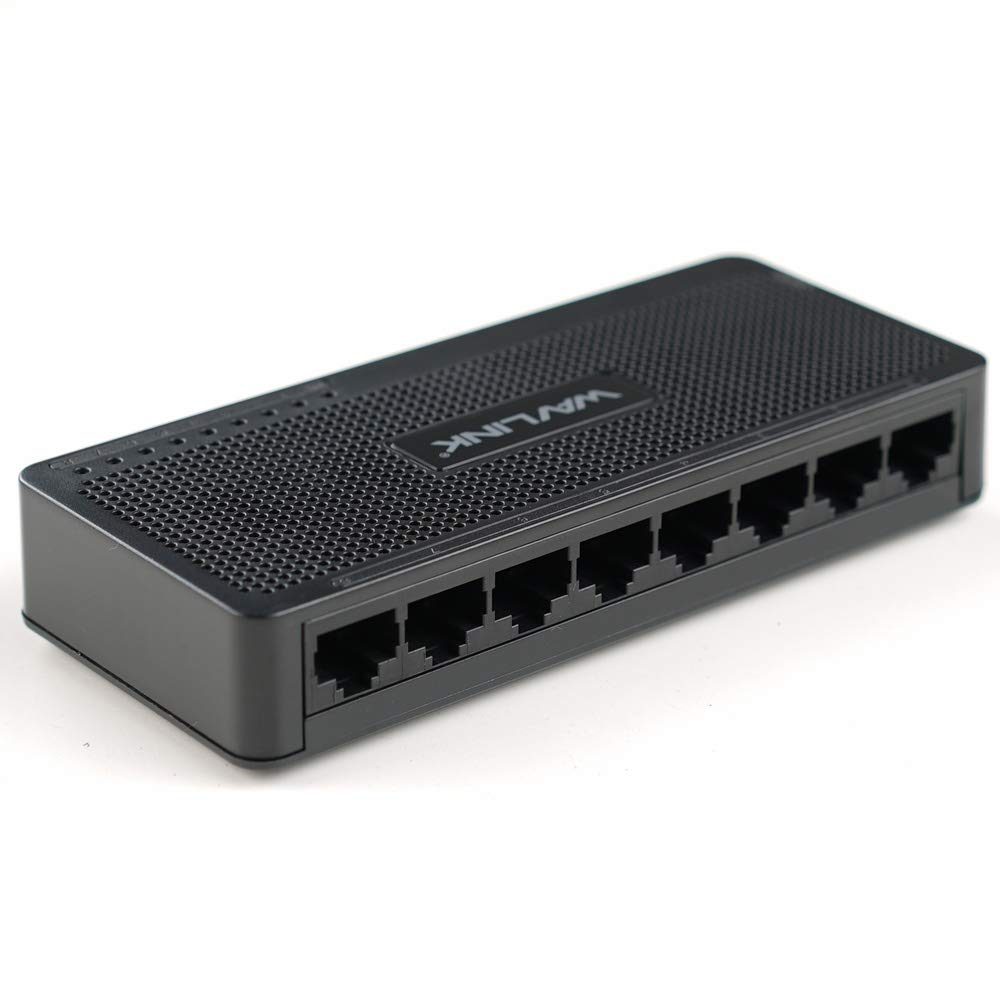
Obrázek 4.1: Nahoře view of the WAVLINK 8-Port Fast Ethernet Switch, showing the brand logo and ventilation holes.
Přední panel
The front panel includes the 8 RJ45 Ethernet ports and LED indicators for status monitoring.

Obrázek 4.2: Přední strana view of the switch, displaying the eight RJ45 Ethernet ports.
- Porty RJ45 (1–8): Connect your network devices (computers, printers, gaming consoles, etc.) using standard Ethernet cables.
- LED indikátory: Each port has an associated LED that indicates connection status and activity.
Zadní panel
Zadní panel obvykle obsahuje port pro připojení napájení.

Obrázek 4.3: Strana view of the switch, illustrating its compact dimensions (13cm x 5.5cm x 2.1cm) and the power input port.
- Příkon: Zde připojte dodaný napájecí adaptér.
5. Průvodce nastavením
The WAVLINK Fast Ethernet Switch is designed for simple plug-and-play installation. No complex configuration is required.
5.1 Připojení přepínače
- Umístění: Choose a stable, flat surface for the switch, such as a desktop. Ensure adequate ventilation around the device.
- Připojte napájení: Plug the provided power adapter into the switch's power input port, then plug the other end into a standard electrical outlet. The power LED on the switch should illuminate.
- Připojení k routeru/modemu: Use an Ethernet cable to connect one of the switch's RJ45 ports to a LAN port on your router or modem.
- Připojení síťových zařízení: Connect your computers, printers, network-attached storage (NAS), gaming consoles, or other network devices to the remaining RJ45 ports on the switch using Ethernet cables.

Figure 5.1: Connection diagram illustrating how the switch integrates into a network, connecting to a router and multiple end devices like computers, printers, and gaming consoles.

Figure 5.2: Visual representation of the plug-and-play setup, showing Ethernet cables ready for connection to the switch's ports.
Once all connections are made, the switch will automatically detect and configure the connected devices. The corresponding port LEDs will light up to indicate an active connection.
6. Ovládání přepínače
The WAVLINK Fast Ethernet Switch operates automatically once powered on and connected. It functions as a central connection point for your wired network devices.
- Přenos dat: The switch intelligently forwards data packets between connected devices at 10/100 Mbps speeds.
- Auto-MDI/MDIX: This feature automatically detects the type of Ethernet cable (straight-through or crossover) and adjusts accordingly, simplifying connections.
- LED indikátory:
- Svítí zelená: Indicates a stable link connection.
- Blikající zelená: Indikuje datovou aktivitu na portu.
- Vypnuto: No device connected or device is powered off.

Figure 6.1: The Ethernet switch acting as a splitter, providing additional wired connections for multiple devices such as laptops, gaming consoles, and printers.
7. Údržba
To ensure optimal performance and longevity of your WAVLINK Fast Ethernet Switch, follow these simple maintenance guidelines:
- Udržujte v čistotě: Regularly wipe the exterior of the switch with a soft, dry cloth. Avoid using liquid cleaners or aerosols.
- Větrání: Ujistěte se, že větrací otvory nejsou zablokované, aby nedošlo k přehřátí.
- Bezpečné vypnutí: If you need to power off the device, disconnect the power adapter from the electrical outlet.
- Podmínky prostředí: Operate the switch within the recommended temperature range of 0°C to 40°C (32°F to 104°F). Avoid extreme humidity.
8. Řešení problémů
If you encounter issues with your WAVLINK Fast Ethernet Switch, refer to the following common problems and solutions:
8.1 Bez napájení
- Ujistěte se, že je napájecí adaptér bezpečně připojen k přepínači i k funkční elektrické zásuvce.
- Ověřte funkčnost elektrické zásuvky zapojením jiného zařízení.
8.2 No Link/Activity LED
- Zkontrolujte, zda je ethernetový kabel bezpečně připojen k portu přepínače i k síťovému zařízení.
- Zkuste jiný ethernetový kabel, abyste vyloučili vadný kabel.
- Ujistěte se, že připojené síťové zařízení je zapnuté a funguje správně.
- Zkuste zařízení připojit k jinému portu na přepínači.
8.3 Pomalá rychlost sítě
- Ensure all connected devices and cables support 10/100 Mbps speeds.
- Zkontrolujte, zda na připojených zařízeních neběží nadměrný síťový provoz nebo aplikace náročné na šířku pásma.
- Verify that your router/modem is providing adequate internet speed.
9. Specifikace
| Funkce | Popis |
|---|---|
| Značka | WAVLINK |
| Číslo modelu | RC-N081M2-EU |
| Počet portů | 8 |
| Typ portu | RJ45 |
| Rychlost přenosu dat | 10/100 Mbps (Fast Ethernet) |
| Automatické vyjednávání | Podporováno |
| Auto-MDI/MDIX | Podporováno |
| Řízení toku | IEEE802.3x |
| Materiál bydlení | ABS plast |
| Instalace | Desktop |
| Provozní teplota | 0 °C ~ 40 °C (32 °F ~ 104 °F) |
| Rozměry (přibližně) | 13 cm x 5.5 cm x 2.1 cm (5.1 palce x 2.2 palce x 0.8 palce) |
10. Systémové požadavky
The WAVLINK Fast Ethernet Switch is compatible with any operating system that supports standard Ethernet connectivity. No specific drivers are required for the switch itself.
- Microsoft Windows (10/8/2012/7/2008/Vista/2003/XP/2000/Me/NT/98/95/3.11)
- macOS
- NetWare
- UNIX
- Linux
11. Záruka a podpora
WAVLINK products are designed for reliability and performance. For warranty information and technical support, please refer to the warranty card included with your product or visit the official WAVLINK webmísto. Uschovejte si doklad o koupi pro případ záručních reklamací.
For further assistance, you may contact WAVLINK customer support through their official channels.