
1. Konec produktuview
The Wendry I8 Plus is a compact 2.4GHz wireless mini QWERTY keyboard featuring an integrated touchpad and LED backlighting. Designed for convenience, it offers a versatile input solution for various devices, allowing for comfortable operation from a distance.
This device combines the functionality of a keyboard and a mouse, making it ideal for controlling smart TVs, PCs, Android TV boxes, and other compatible systems. Its plug-and-play design ensures easy setup without the need for additional software installation.

Image 1.1: The Wendry I8 Plus keyboard demonstrating compatibility with multiple devices.
2. Obsah balení
- Wendry I8 Plus Mini LED Backlit Keyboard
- USB Receiver (located in the battery compartment)
- Rechargeable Lithium-ion Battery (if included, or compartment for AAA batteries)
- USB nabíjecí kabel (pokud je k dispozici)
- Uživatelská příručka (tento dokument)
3. Průvodce nastavením
3.1 Instalace baterie
- Locate the battery compartment on the back of the keyboard.
- Posunutím otevřete kryt baterie.
- Insert the provided rechargeable battery or two AAA batteries, ensuring correct polarity (+/-).
- Pevně zavřete kryt baterie.
3.2 Připojení USB přijímače
- Otevřete kryt bateriového prostoru.
- Carefully remove the USB receiver, which is magnetically stored inside.
- Plug the USB receiver into an available USB port on your device (e.g., PC, Smart TV, Android TV Box).
- The device will automatically detect and install the necessary drivers. No additional software is required.
- Klávesnice je nyní připravena k použití.

Image 3.1: Location of the USB receiver and battery compartment.
4. Návod k obsluze
4.1 Basic Keyboard and Touchpad Use
- psaní: Pro zadávání textu použijte rozložení QWERTY.
- Touchpad: The central area functions as a high-sensitivity touchpad for mouse cursor control.
- Klepnutí jedním prstem: Funguje jako kliknutí levým tlačítkem myši.
- Klepnutí dvěma prsty: Functions as a right mouse click.
- Two Finger Drag: For scrolling up and down.

Image 4.1: Using the high-sensitivity touchpad for navigation.
4.2 Ovládání podsvícení LED
The keyboard features colorful LED backlighting for improved visibility in low-light conditions. To control the backlighting:
- Stiskněte tlačítko Fn klávesu současně s F2 key to toggle the backlight on/off or change its color.

Image 4.2: The keyboard displaying its colorful LED backlighting.
4.3 Nastavení DPI
The touchpad's sensitivity (DPI) can be adjusted to suit your preference and screen size. There are 3 levels of DPI available:
- To adjust the DPI, press the Fn klávesu současně s Mezerník. Repeat to cycle through the DPI levels.
4.4 Multimediální klávesy
The keyboard includes dedicated multimedia control keys for easy access to functions like volume control, play/pause, and track navigation.
- Zvýšení/Snížení hlasitosti: Použijte V+ a V- tlačítka.
- Přehrát/Pozastavit, Další/Předchozí skladba: Use the dedicated media control buttons on the left side.
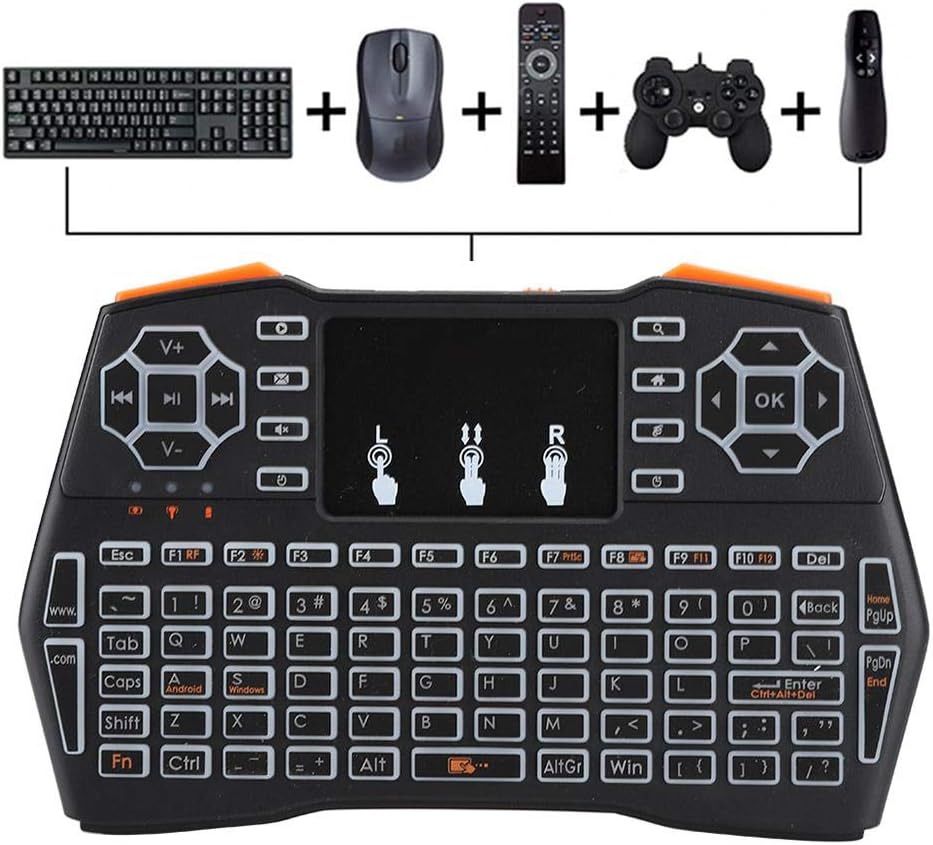
Image 4.3: Using the keyboard for multimedia control and gaming.
5. Údržba
- Čištění: Use a soft, dry cloth to clean the keyboard surface. For stubborn dirt, a slightly damp Lze použít hadřík, ale dbejte na to, aby se do zařízení nedostala vlhkost.
- Skladování: Pokud klávesnici delší dobu nepoužíváte, skladujte ji na chladném a suchém místě.
- Péče o baterie: If using a rechargeable battery, ensure it is charged regularly. If using AAA batteries, remove them if the device will not be used for a long time to prevent leakage.
- USB přijímač: Always store the USB receiver in its designated magnetic slot within the battery compartment to prevent loss.
6. Řešení problémů
- Klávesnice nereaguje:
- Ensure the battery is charged or replaced.
- Ověřte, zda je USB přijímač bezpečně zapojen do zařízení.
- Zkuste zapojit USB přijímač do jiného USB portu.
- Ensure the keyboard is within the 20-meter operating range of the receiver.
- Restartujte připojené zařízení.
- Touchpad not working or erratic:
- Při používání touchpadu se ujistěte, že máte čisté a suché prsty.
- Adjust the DPI settings (Fn + Space Bar) to see if sensitivity improves.
- Očistěte povrch touchpadu.
- Podsvícení nefunguje:
- Ujistěte se, že je baterie dostatečně nabitá.
- Press Fn + F2 to toggle the backlight.
- Krátký provozní dosah:
- Ensure there are no significant obstructions between the keyboard and the USB receiver.
- Avoid using the keyboard near strong electromagnetic interference sources.
7. Specifikace
| Funkce | Detail |
|---|---|
| Číslo modelu | I8 Plus (Wendryng7y53ptgu) |
| Technologie připojení | 2.4GHz Radio Frequency, USB |
| Speciální funkce | Touchpad, LED Backlighting |
| Kompatibilní zařízení | Gaming Console, Personal Computer, Television |
| Popis klávesnice | QWERTY Mini Keyboard |
| Provozní vzdálenost | Až 20 metrů (přibližně 65 stop) |
| Zdroj napájení | 1 Nonstandard Battery (rechargeable) or AAA batteries |
| Hmotnost položky | 6.3 unce (cca 178 gramů) |
| Výrobce | Wendry |
8. Záruka a podpora
For warranty information and technical support, please refer to the documentation provided at the time of purchase or contact your retailer. General support inquiries can often be directed to the manufacturer's official webstránky nebo kanály zákaznických služeb.
Uschovejte si prosím doklad o koupi pro případné reklamace.