
1. Úvod
This manual provides detailed instructions for the setup, operation, and maintenance of your SWIFT SW350T-EP1 Trinocular Compound Microscope. Please read this manual thoroughly before using the microscope to ensure proper function and longevity of the instrument.
2. Bezpečnostní opatření
- S mikroskopem vždy zacházejte opatrně. Vyhněte se náhlým pohybům nebo nárazům.
- Ensure the microscope is placed on a stable, level surface.
- Nevystavujte mikroskop přímému slunečnímu záření, vysokým teplotám ani vysoké vlhkosti.
- Před čištěním nebo prováděním jakékoli údržby odpojte napájecí kabel.
- Keep all optical components clean and free from dust and fingerprints. Use only approved cleaning materials.
- Keep small parts and accessories away from children.
3. Identifikace součásti
Familiarize yourself with the main components of your SWIFT SW350T-EP1 microscope:

Obrázek: Overview of the SWIFT SW350T-EP1 microscope with key components labeled, including the mechanical stage, Abbe condenser, fine/coarse adjustment knobs, and LED light source.
- Okuláry: Pro viewing the magnified image. The SW350T-EP1 includes WF10X and WF25X eyepieces.
- Trinokulární hlavice: A 360-degree rotatable Siedentopf head for comfortable viewing and attachment of a camera.
- Objektivy: Revolving nosepiece with 4 DIN achromatic objectives (4X, 10X, 40X, 100X).
- Mechanický S.tage: Dvouvrstvétage with slide clips and X-Y translational control for precise specimen movement.
- Focus Knobs: Coarse and fine adjustment knobs for focusing the image.
- Abbe kondenzátor: NA 1.25 Abbe condenser with iris diaphragm for controlling illumination.
- LED osvětlovač: Adjustable LED light source for bright and even illumination.
- Port fotoaparátu: Dedicated port on the trinocular head for connecting a microscope camera.
4. Nastavení
4.1 Vybalení a počáteční kontrola
Carefully remove all components from the packaging. Verify that all items listed in the packing list are present and undamaged. The packing list typically includes:
- SW350T microscope body
- 1 pair WF10X eyepieces
- 1 pair WF25X eyepieces
- Sample immersion oil
- Modrý filtr
- Protiprachový kryt
- Náhradní pojistka
- Uživatelská příručka

Image: The SWIFT SW350T-EP1 microscope displayed with its standard accessories, including eyepieces, immersion oil, and power cable.
4.2 Hlavové složení
Place the trinocular head onto the microscope body. Secure it by tightening the set screw located on the side of the head. The Siedentopf head is rotatable 360 degrees for comfortable viewvíce uživateli.

Image: Close-up of the microscope head, illustrating its rotatable design for ergonomic viewIng.
4.3 Eyepiece Installation
Insert the desired eyepieces (WF10X or WF25X) into the eyepiece tubes of the trinocular head. Gently push them down until they are seated firmly.
4.4 Připojení napájení
Connect the power cord to the microscope's power input and then to a suitable electrical outlet (240 Volts). Locate the power switch and the dimming handwheel for illumination control.
4.5 Camera Setup (Optional)
The trinocular head allows for the attachment of a microscope camera (sold separately). Remove the dust cap from the dedicated camera port. Insert the camera into the port and secure it. Connect the camera to your computer via USB. Install the provided software (compatible with Mac OS X/Windows Vista, 7, 8, 10) to view, livestream, record, and capture magnified specimen images.
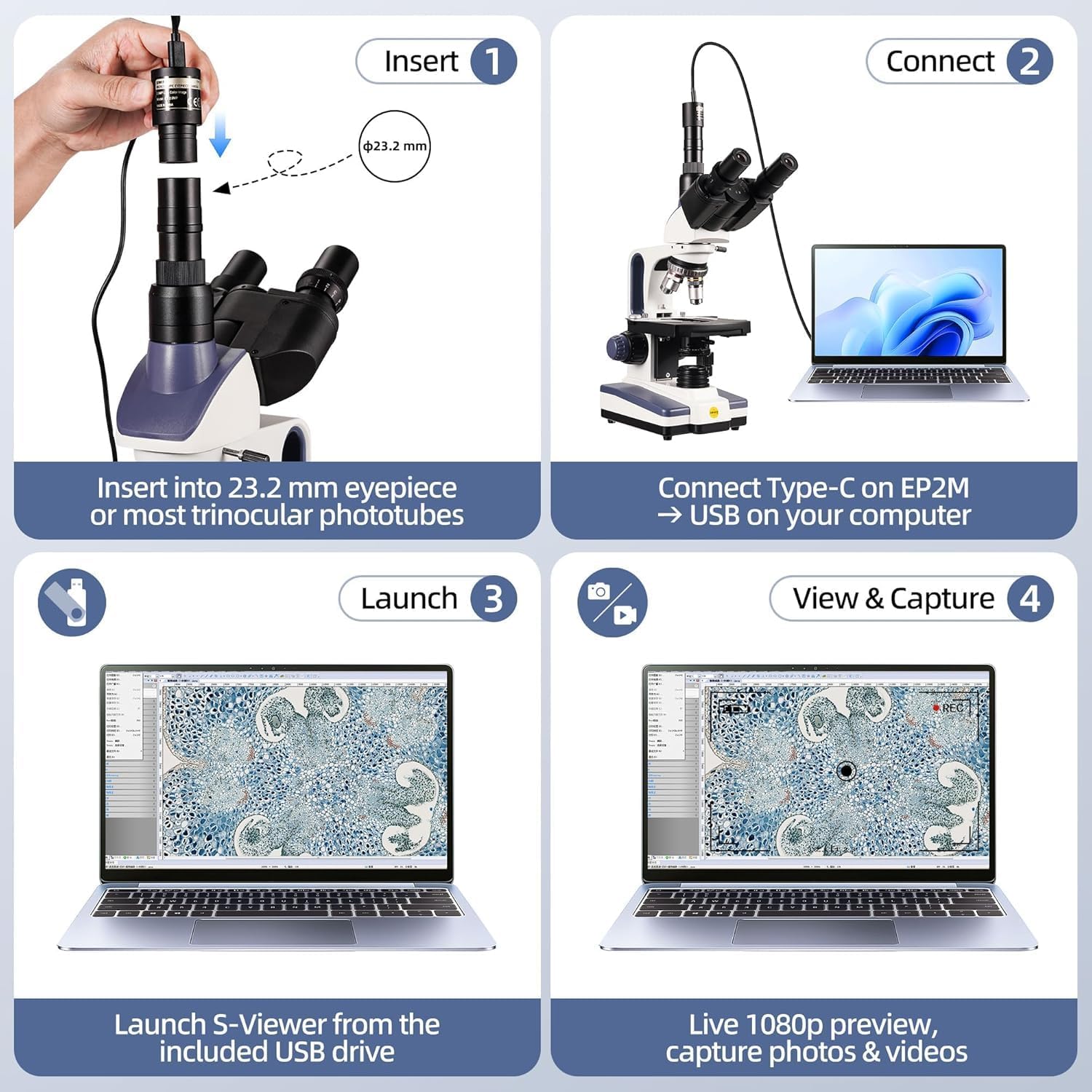
Image: Step-by-step guide showing how to insert the camera into the trinocular port, connect it to a laptop, and launch the S-Viewer software for live preview and image capture.
5. Návod k obsluze
5.1 Umístění podložního sklíčka
Open the slide clips on the mechanical stage. Carefully place your prepared specimen slide onto the stage, ensuring it is flat and secured by the clips. Use the X-Y translational control knobs to position the desired area of the specimen directly under the objective lens.
5.2 Nastavení osvětlení
Turn on the LED illuminator using the power switch. Adjust the brightness using the dimming handwheel. For optimal contrast, adjust the iris diaphragm on the Abbe condenser. The Abbe condenser (NA 1.25) helps to focus light onto the specimen.
5.3 Selecting Magnification
Rotate the revolving nosepiece to select the desired objective lens. Start with the lowest magnification (4X) for initial viewing and then gradually increase to higher magnifications (10X, 40X, 100X) as needed. The microscope offers 6 levels of magnification: 40X, 100X, 250X, 400X, 1000X, 2500X.

Image: The SWIFT SW350T-EP1 microscope showcasing its various objective lenses and examples of magnified views at 40X, 100X, 250X, 400X, 1000X, and 2500X.
5.4 Focusing the Image
While looking through the eyepieces, use the coarse adjustment knob to bring the specimen into approximate focus. Then, use the fine adjustment knob for precise focusing until the image is sharp and clear. Adjust the interpupillary distance and diopter settings on the eyepieces for comfortable viewIng.
5.5 Using Oil Immersion (100X Objective)
For the 100X objective lens, immersion oil is required. Rotate the nosepiece halfway between the 40X and 100X objectives. Place a small drop of immersion oil directly onto the center of the specimen slide. Rotate the 100X objective into the oil drop until it makes contact. Focus carefully using only the fine adjustment knob. After use, clean the 100X objective and the slide thoroughly with lens cleaning solution.
5.6 Digitální Viewing and Capture
If a camera is connected, open the S-Viewer software on your computer. You will see a live feed of the microscope's view. Use the software to capture still images or record videos of your observations. The software offers advanced functions including stitching, EDF (Extended Depth of Field), and measurement.

Image: The SWIFT SW350T-EP1 microscope connected to a laptop, demonstrating real-time viewing, photo, and video capabilities compatible with Windows, macOS, and Linux.
Video: This video demonstrates the unpacking, assembly, and basic operation of the SWIFT SW350T microscope, including head rotation, eyepiece installation, light adjustment, slide placement, objective lens use, oil immersion, and camera connection for digital viewIng.
6. Údržba
6.1 Čištění
- Optické komponenty: Use a soft lens brush to remove dust. For smudges or oil, use lens paper or a microfiber cloth with a small amount of lens cleaning solution. Wipe gently in a circular motion.
- Tělo: Otřete tělo mikroskopu měkkým hadříkemamp tkanina. Vyhněte se používání agresivních chemikálií nebo abrazivních čisticích prostředků.
- Imerzní olej: Always clean immersion oil from the 100X objective immediately after use to prevent it from drying and hardening.
6.2 Skladování
When not in use, cover the microscope with the provided dust cover to protect it from dust and debris. Store it in a cool, dry place, away from direct sunlight and vibrations.
6.3 Výměna pojistky
If the illumination fails, check the power connection. If the issue persists, the fuse may need replacement. Disconnect the power cord, locate the fuse holder (usually near the power input), and replace the fuse with the provided spare fuse of the correct rating.
7. Řešení problémů
| Problém | Možná příčina | Řešení |
|---|---|---|
| Žádné osvětlení | Power cord disconnected, power switch off, bulb/LED failure, blown fuse. | Check power connection, turn on switch, replace LED (contact support), replace fuse. |
| Obraz je rozmazaný/neostrý | Incorrect focus adjustment, slide upside down, objective lens dirty. | Adjust coarse/fine focus, ensure slide cover slip is up, clean objective lens. |
| Tmavé nebo nerovné pole view | Iris diaphragm closed too much, condenser not centered, objective not fully clicked into place. | Adjust iris diaphragm, center condenser, rotate objective until it clicks. |
| Dust or spots in view | Prach na okuláru, objektivu nebo sklíčku. | Clean eyepieces, objectives, and slide. Rotate eyepiece to determine if dust is on it. |
| Kamera nebyla detekována | USB cable disconnected, driver not installed, camera not properly seated. | Check USB connection, install/reinstall camera drivers, ensure camera is firmly in port. |
8. Specifikace
- Model: SW350T-EP1
- Hlava: 360° Rotatable Siedentopf Trinocular
- Okuláry: WF10X, WF25X
- Objektivy: 4 DIN achromatický (4x, 10x, 40x, 100x olejový)
- Rozsah zvětšení: 40x - 2500x
- Stage: Double-layer Mechanical Stage
- Kondenzátor: Kondenzorový snímač NA 1.25 Abbe s irisovou clonou
- Osvětlení: Nastavitelná LED
- Fotoaparát: 1.3 MP USB Camera (with software for Mac OS X/Windows Vista, 7, 8, 10)
- Rozměry (balení): 46.99 x 33.02 x 23.88 cm
- Hmotnost (produkt): 4.7 kg
- svtage: 240 voltů
- Materiál: PTFE (polytetrafluorethylen)
- Číslo dílu výrobce: JP12111
- UPC: 345932435262
9. Záruka a podpora
For warranty information, please refer to the documentation included with your purchase or visit the official SWIFT website. SWIFT is committed to providing quality products and friendly customer service. If you encounter any issues or require assistance, please contact SWIFT customer support.