
ZZIPP TXZZ580
ZZIPP TXZZ580 UHF 48-Channel Wireless Microphone System User Manual
Model: TXZZ580
Zavedení
This manual provides detailed instructions for the proper setup, operation, and maintenance of your ZZIPP TXZZ580 UHF 48-Channel Wireless Microphone System. Please read this manual thoroughly before using the product to ensure optimal performance and longevity.
Konec produktuview
Co je v krabici
- Two Handheld Microphones (Transmitters)
- Přijímací jednotka
- Napájecí adaptér pro přijímač
- Audio propojovací kabel
- Uživatelská příručka
Klíčové vlastnosti
- Bezdrátová technologie UHF
- 48 volitelných kanálů
- Manual and IR Configuration
- Designed for Karaoke and other vocal applications
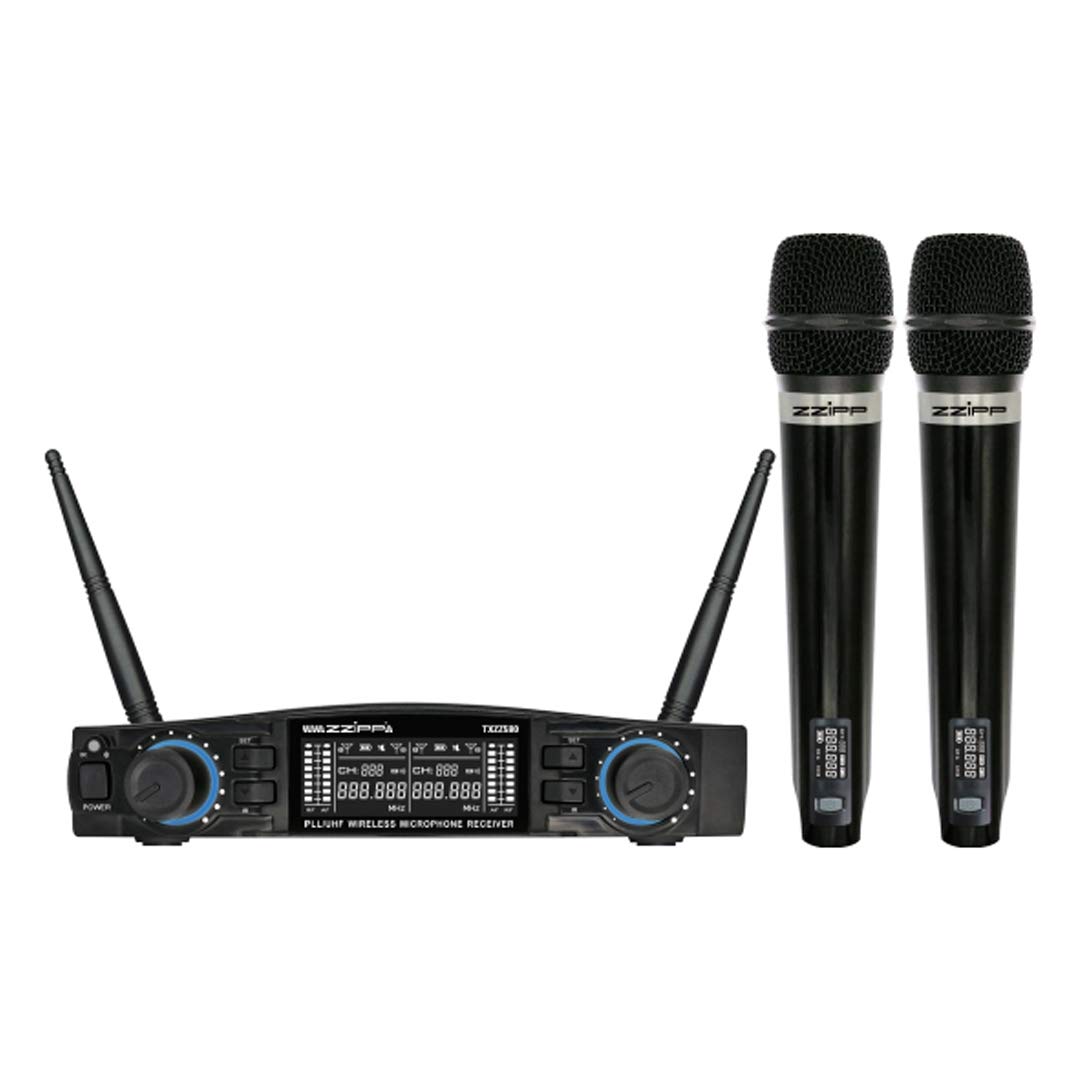
Obrázek 1: Nadview of the ZZIPP TXZZ580 Wireless Microphone System, showing the receiver unit and two handheld microphones.
Nastavení
- Rozbalte komponenty: Opatrně vyjměte všechny položky z obalu.
- Umístění přijímače: Place the receiver unit on a stable surface, away from potential sources of interference such as computers, Wi-Fi routers, or other wireless devices. Ensure good line-of-sight to the area where the microphones will be used.
- Připojte napájení: Connect the provided power adapter to the receiver's DC input and then plug it into a suitable power outlet.
- Připojte zvukový výstup: Connect the receiver's audio output (e.g., 3.5mm Jack) to the input of your mixer, amplifier, or sound system using the supplied audio cable.
- Install Batteries in Transmitters: Open the battery compartment of each handheld microphone and insert the required batteries (typically AA, not always included). Observe correct polarity.
- Zapnutí: Turn on the receiver unit and then each handheld microphone.
- Channel Synchronization (Manual/IR):
- Ruční konfigurace: Refer to the receiver's display and controls to manually select a desired channel for each microphone. Ensure each microphone is set to a unique channel to avoid interference.
- IR Synchronization: For automatic synchronization, align the IR sensor on the microphone with the IR sensor on the receiver. Activate the IR sync function on the receiver, and the microphone will automatically pair to the selected channel.
- Testovací zvuk: Speak into each microphone to test the audio output through your sound system. Adjust volume levels as needed.
Návod k obsluze
Zapnutí/vypnutí
- Přijímač: Stisknutím tlačítka napájení na předním panelu zapnete nebo vypnete jednotku.
- Mikrofony: Press and hold the power button on the microphone handle until the display illuminates (on) or turns off (off).
Výběr kanálu
The system offers 48 UHF channels. If you experience interference, change the operating channel. This can be done manually on the receiver and then synchronized with the microphone via IR, or directly on the microphone if it supports manual channel adjustment.
Ovládání hlasitosti
Adjust the output volume for each microphone using the dedicated volume knobs on the receiver's front panel. Further volume adjustments can be made on your connected mixer or ampživější.
Tipy pro použití
- Maintain a clear line of sight between the microphones and the receiver for optimal signal quality.
- Neumísťujte přijímač do blízkosti velkých kovových předmětů nebo jiných elektronických zařízení, která by mohla způsobovat rušení.
- Regularly check microphone battery levels to prevent unexpected power loss during use.
- For best sound quality, hold the microphone approximately 2-6 inches from your mouth.
Údržba
Výměna baterie
When the microphone's battery indicator shows low power, replace the batteries immediately. Always use fresh batteries of the correct type (e.g., AA). Remove batteries if the microphones will not be used for an extended period to prevent leakage.
Čištění
Clean the receiver and microphones with a soft, dry cloth. Do not use liquid cleaners or solvents, as these can damage the finish or internal components. For microphone grilles, a soft brush can be used to remove debris.
Skladování
Store the system in a cool, dry place, away from direct sunlight and extreme temperatures. If possible, use the original packaging or a protective case for transport and storage.
Odstraňování problémů
| Problém | Možná příčina | Řešení |
|---|---|---|
| Žádný zvuk z mikrofonu |
|
|
| Rušení nebo statická elektřina |
|
|
| Krátký provozní dosah |
|
|
Specifikace
- Značka: ZZIPP
- Model: TXZZ580
- Barva: Černý
- Typ bezdrátového připojení: UHF
- Počet kanálů: 48
- Konektivita: Zásuvka 3.5 mm
- Zdroj napájení: Elektrický kabel (pro přijímač)
- Speciální funkce: Manual and IR Configuration
- Doporučené použití: Karaoke
- Zahrnuté komponenty: Two Handheld Microphones, Receiver
Záruka a podpora
Informace o záruce, technickou podporu nebo servisní dotazy naleznete v dokumentaci dodané s vaším nákupem nebo se obraťte na svého prodejce. Uschovejte si doklad o koupi pro případné reklamace.
Ask a question about this manual
Ask about setup, troubleshooting, compatibility, parts, safety, or missing instructions. Manuals+ will review the question and use this page’s manual context to help answer it.