
1. Úvod
This manual provides detailed instructions for the Amazon Basics Aluminum Type-C Docking Station. This device expands the connectivity of your USB-C enabled laptop or tablet, offering a wide range of ports for various peripherals and external displays. Please read this manual thoroughly before use to ensure proper operation and to maximize the product's functionality.
2. Vlastnosti produktu
- 11-in-1 Multi-Port Design: Integrates Mini DisplayPort, HDMI, VGA, 3 USB-A ports, Ethernet, SD/TF card reader, 3.5mm audio jack, and a Type-C charging port (PD 100W).
- Výstup videa s vysokým rozlišením: Supports Ultra HD 4K output via Mini DisplayPort/HDMI and Full HD 1080P via VGA, allowing for mirroring or extending your display to HDTVs, monitors, or projectors. Note: 4K resolution is supported at 30Hz refresh rate.
- Rychlý přenos dat: Three USB 3.0 A ports provide data transfer speeds up to 5Gbps, backward compatible with USB 2.0/1.0.
- Stabilní síťové připojení: 1000Mbps RJ45 Ethernet port ensures a fast and reliable wired network connection.
- Univerzální čtečka karet: Integrated SD and TF slots allow simultaneous reading of universal SD and Micro SD memory cards.
- Dodávka energie: Type-C charging port supports Power Delivery (PD) up to 100 watts for charging your host device.
- Audio konektivita: 3.5mm audio jack pro sluchátka nebo reproduktory.
- Odolná konstrukce: Features an aluminum pedestal-style housing for enhanced durability and heat dissipation.
3. Obsah balení
- Amazon Basics Aluminum Type-C Docking Station
- Uživatelská příručka
4. Konec produktuview a rozvržení portů
Familiarize yourself with the various ports and their functions on your docking station.

Obrázek: Detail view of the Amazon Basics Type-C Docking Station's ports, including Ethernet, Mini DisplayPort, HDMI, VGA, and USB-C.
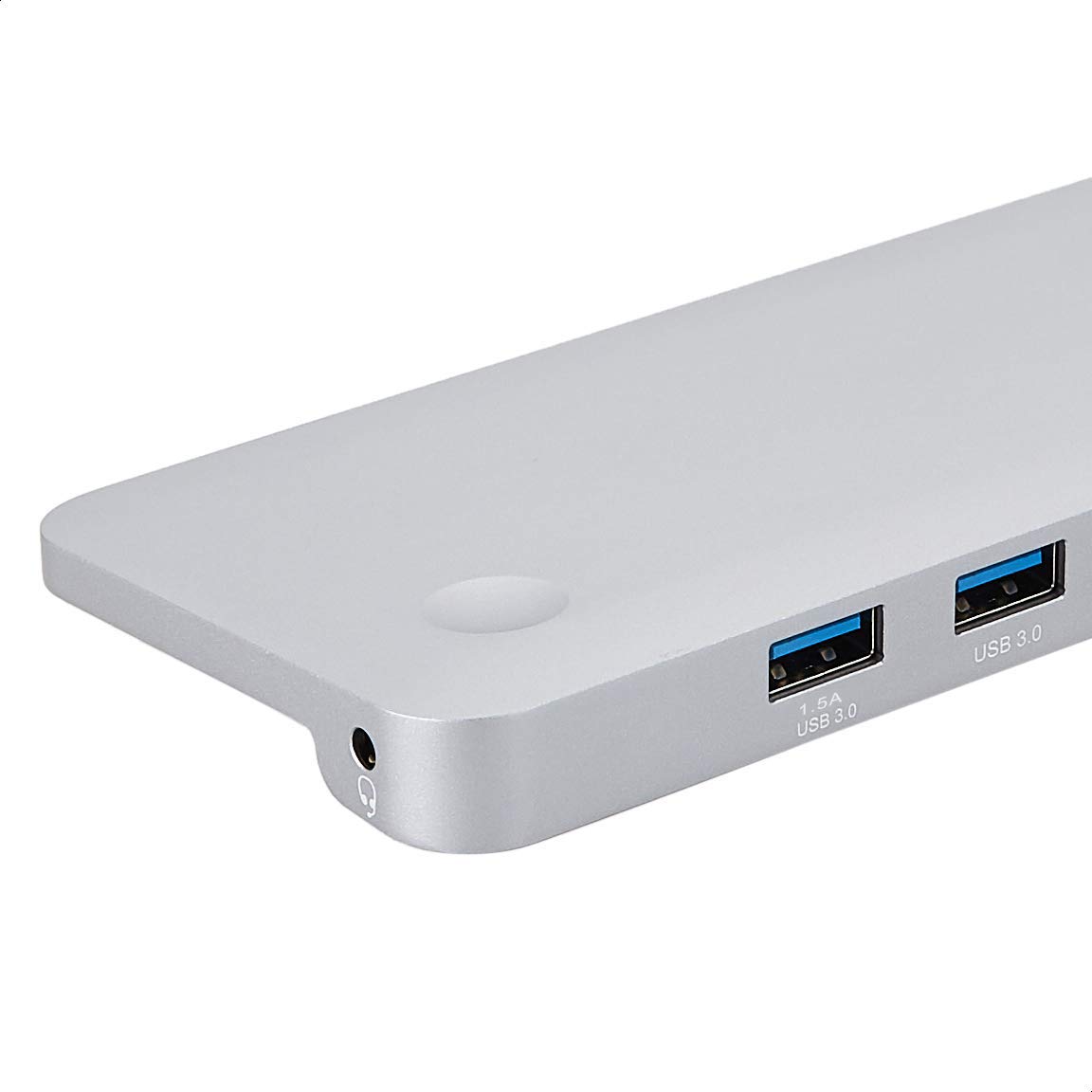
Obrázek: Podrobný view of the USB 3.0 ports and 3.5mm audio jack on the Amazon Basics Type-C Docking Station.
- Hostitelský konektor USB-C: Connects to your laptop or tablet's USB-C port.
- Porty USB 3.0 (x3): For connecting USB devices such as external hard drives, keyboards, mice, or USB flash drives.
- Slot pro SD kartu: Pro čtení standardních paměťových karet SD.
- TF Card Slot (Micro SD): Pro čtení paměťových karet Micro SD.
- Ethernetový port RJ45: Pro kabelové síťové připojení.
- Mini DisplayPort: Pro připojení k externímu displeji.
- Port HDMI: Pro připojení k externímu displeji.
- VGA port: Pro připojení k externímu displeji.
- 3.5mm audio jack: Pro připojení sluchátek nebo reproduktorů.
- Nabíjecí port USB-C PD: For connecting a USB-C power adapter to charge your host device and power the docking station.
5. Pokyny k nastavení
Pro nastavení dokovací stanice postupujte takto:
- Připojení k hostitelskému zařízení: Plug the integrated USB-C host connector cable from the docking station into an available USB-C port on your laptop or tablet. Ensure your host device's USB-C port supports DisplayPort Alt Mode (DP Alt Mode) for video output functionality.
- Připojení napájení (volitelné, ale doporučené): If your host device requires charging or if you are connecting power-intensive peripherals, connect your USB-C power adapter (up to 100W) to the USB-C PD Charging Port on the docking station. This will charge your host device and provide stable power to the docking station and connected peripherals.
- Připojení periferií: Connect your desired peripherals (e.g., external monitors, USB devices, Ethernet cable, SD/TF cards, audio devices) to the corresponding ports on the docking station.

Image: Amazon Basics Type-C Docking Station connected to a laptop, with multiple peripherals like a USB drive and external display cables plugged in.
6. Návod k obsluze
6.1. Video výstup
- Connect your monitor or projector to the HDMI, Mini DisplayPort, or VGA port.
- Your operating system should automatically detect the external display. You may need to adjust display settings (e.g., extend, duplicate) in your computer's display preferences.
- The docking station supports 4K resolution at 30Hz refresh rate via HDMI and Mini DisplayPort. For optimal performance, ensure your display and cables support the desired resolution and refresh rate.
- Dual video display is supported, allowing you to mirror or expand your screen across multiple monitors.
6.2. USB Data Transfer
- Plug your USB devices into the USB 3.0 ports.
- The ports support data transfer speeds up to 5Gbps.
6.3. Ethernetové připojení
- Connect an Ethernet cable from your router or modem to the RJ45 Ethernet port on the docking station.
- Your computer should automatically establish a wired network connection.
6.4. Čtečka SD/TF karet
- Insert your SD or TF (Micro SD) card into the corresponding slot.
- The cards will appear as removable drives on your computer, allowing you to access and transfer files. Oba sloty lze používat současně.
6.5. Zvukový výstup
- Connect your headphones or speakers to the 3.5mm audio jack.
- You may need to select the docking station as the default audio output device in your computer's sound settings.
6.6. Dodávka energie (PD)
- Connect your laptop's USB-C power adapter to the USB-C PD Charging Port on the docking station.
- This port supports up to 100W power delivery to charge your host device while using the docking station.
7. Kompatibilita
This docking station is compatible with a wide range of USB-C enabled devices, including but not limited to:
- MacBook Pro 2018/2017/2016
- iPad Pro 2018
- Mac mini 2018
- MacBook Air
- iMac 2017
- Samsung Note9
- HUAWEI MateBook X
- Dell XPS 13
- ThinkPad
- Chromebook
Důležité: This product functions only with computers that support DisplayPort Alt Mode (DP Alt Mode) via their USB-C port. Please verify your computer's specifications for compatibility before use.
8. Řešení problémů
- Žádný výstup na displej:
- Ujistěte se, že port USB-C vašeho hostitelského zařízení podporuje režim DisplayPort Alt.
- Check all cable connections (USB-C to host, video cable to monitor).
- Verify the external monitor is powered on and set to the correct input source.
- Zkuste restartovat počítač.
- 4K Resolution Not Working at 60Hz:
- This docking station supports 4K resolution at a maximum refresh rate of 30Hz. If your monitor is set to 4K@60Hz, it will not display correctly. Adjust your display settings to 4K@30Hz or a lower resolution with a higher refresh rate if desired.
- Zařízení USB nebyla rozpoznána nebo se odpojují:
- Ensure the docking station is receiving sufficient power. Connect a USB-C power adapter to the PD port if you are using multiple power-intensive USB devices.
- Try connecting the USB device directly to your computer to confirm it is functional.
- Reconnect the docking station to your computer.
- No Network Connection via Ethernet:
- Zkontrolujte připojení ethernetového kabelu k dokovací stanici i k routeru/modemu.
- Verify your network settings on your computer.
- Ujistěte se, že váš router/modem funguje správně.
- Žádný audio výstup:
- Ujistěte se, že jsou sluchátka nebo reproduktory správně připojeny k 3.5mm audio konektoru.
- Check your computer's sound settings and select the docking station as the default audio output device.
- Hostitelské zařízení se nenabíjí:
- Ensure a compatible USB-C power adapter is connected to the docking station's USB-C PD Charging Port.
- Ověřte, zda vaše hostitelské zařízení podporuje napájení přes USB-C.
- Zkontrolujte napájecí adaptér a kabel, zda nejsou poškozené.
9. Specifikace
| Funkce | Specifikace |
|---|---|
| Značka | Základy Amazonu |
| Číslo modelu | UTC-DOCK01-PRO |
| Barva | Šedá |
| Rozměry (DxŠxV) | 28 x 7.5 x 1.4 Centimeters (11.02 x 2.95 x 0.55 Inches) |
| Hmotnost položky | 317 g (0.32 kilogramu) |
| Celkový počet portů | 11 |
| USB porty | 3x USB 3.0 Type-A |
| Video výstupní porty | 1 x HDMI, 1 x Mini DisplayPort, 1 x VGA |
| Rozlišení HDMI | Až 4K@30Hz |
| Mini DisplayPort Resolution | Až 4K@30Hz |
| Ethernetový port | RJ45 Gigabit Ethernet (10/100/1000 Mb/s) |
| Čtečka karet | SD and TF (Micro SD) slots, simultaneous read |
| Audio port | Zvukový konektor 3.5mm |
| Nabíjecí port USB-C PD | Až 100 wattů |
| Hardwarové rozhraní | Ethernet, HDMI, Mini DisplayPort, VGA, USB-A, USB-C, SD/TF, Audio |
10. Údržba
- Čištění: Use a soft, dry cloth to clean the docking station. Avoid using liquid cleaners or aerosols.
- Skladování: Přístroj skladujte na chladném a suchém místě mimo dosah přímého slunečního záření a extrémních teplot.
- Zacházení: Zabraňte pádu zařízení na zem nebo jeho vystavení silným nárazům. Nepokoušejte se dokovací stanici rozebírat ani upravovat.
11. Bezpečnostní informace
- Chraňte zařízení před vodou, ohněm a prostředím s vysokou vlhkostí.
- Nevystavujte zařízení extrémním teplotám.
- Používejte pouze kompatibilní napájecí adaptéry a kabely.
- Uchovávejte mimo dosah dětí.
- If the device is damaged or malfunctions, discontinue use immediately and contact customer support.
12. Záruka a podpora
This Amazon Basics product comes with a 1letá omezená záruka from the date of purchase. This warranty covers manufacturing defects and workmanship under normal use. It does not cover damage caused by misuse, accident, modification, or unauthorized repair.
For warranty claims, technical support, or further assistance, please contact Amazon Basics customer service through your Amazon purchase history or the official Amazon Basics support channels.