

1. Úvod
The RENAISSER Raphael 520 Stylus is a high-precision digital pen designed for seamless interaction with compatible Microsoft Surface and other devices. Featuring MPP 2.0 technology, it offers 4096 levels of pressure sensitivity and tilt support, providing a natural writing and drawing experience. Its ergonomic design, magnetic attachment, and long-lasting rechargeable battery make it an ideal tool for creative and professional tasks.


2. Nastavení
2.1 Počáteční nabíjení
Before first use, it is recommended to fully charge your Raphael 520 Stylus. The stylus features ultra-fast charging capabilities.
- Connect the stylus to a power source using the provided charging cable.
- Desetiminutové nabíjení vystačí přibližně na 50 hodiny používání.
- A full 1-hour charge can last for over 100 hours of continuous use.

2.2 Připojení zařízení
The Raphael 520 Stylus is designed for automatic connection with compatible devices. Simply turn on the stylus, and it should be recognized by your device without the need for Bluetooth pairing.
- Press the power button on the stylus for 1 second to turn it on.
- The stylus will automatically connect to your compatible Surface or other device.
3. Ovládání stylusu
3.1 Pressure Sensitivity and Tilt
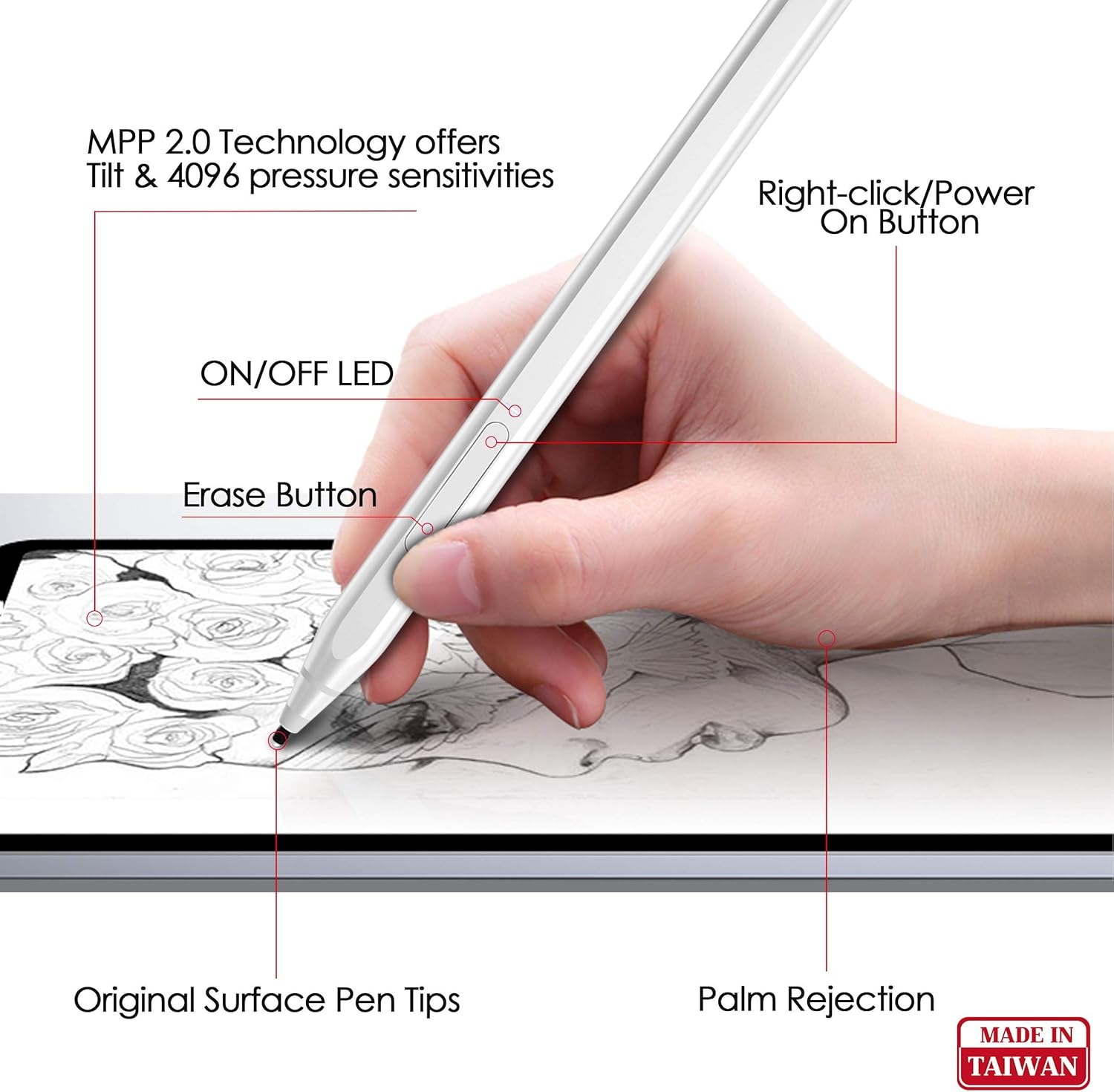
The Raphael 520 Stylus supports 4096 levels of pressure sensitivity, allowing for precise control over line thickness and opacity. Its tilt sensitivity enables shading effects, mimicking a traditional pencil.
- Apply varying pressure to create different line weights.
- Tilt the stylus at an angle to achieve shading effects in supported applications.
3.2 Odmítnutí dlaně
The palm rejection feature allows you to rest your hand comfortably on the screen while writing or drawing, preventing unintended marks.

3.3 Funkce tlačítek
The stylus includes convenient buttons for enhanced functionality:
- Tlačítko Vymazat: Located on the side, this button allows you to quickly erase content.
- Right-Click/Power On Button: This button serves as a right-click function in applications and also powers on the stylus.
4. Vlastnosti a design
The Raphael 520 Stylus is engineered with user comfort and performance in mind.
- Ergonomický design: With a 9.2 mm diameter and weighing only 14 grams, the stylus is comfortable for extended use. Its streamlined design ensures a balanced feel.
- Prémiový materiál: Constructed from high-quality aluminum alloy, the pen is both lightweight and durable.
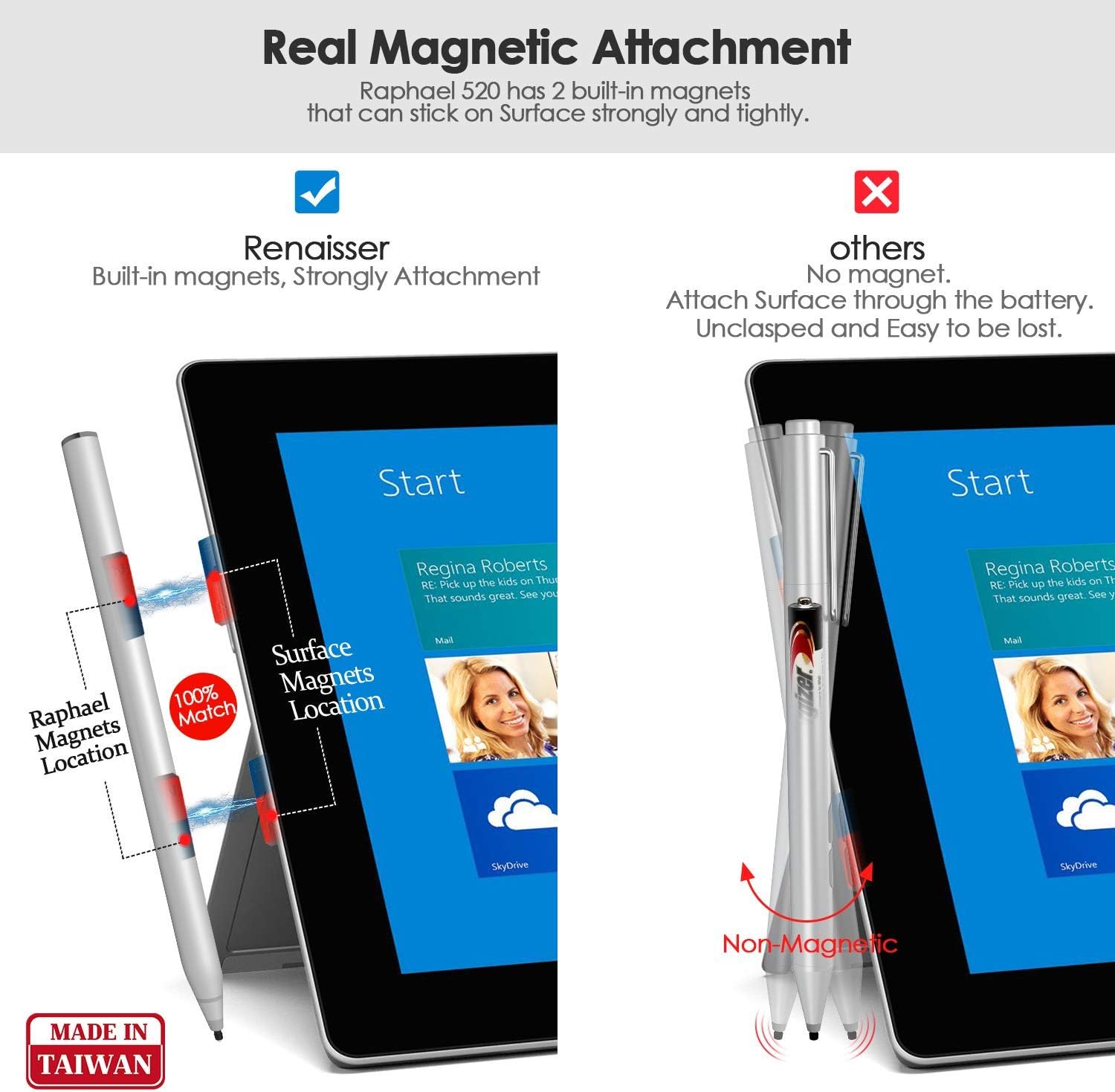
- Magnetický nástavec: The stylus features built-in magnets, allowing it to securely attach to the left side of compatible Surface devices (e.g., Surface Pro/Go/Book), similar to the original Surface Pen.
- Original Surface Pen Tips Supported: The Raphael 520 comes with HB-type and 2H-type pen tips that provide a gentle friction, simulating the feel of writing on real paper. These tips are compatible with original Surface Pen tips.



5. Kompatibilita
The RENAISSER Raphael 520 Stylus is compatible with a wide range of devices. Please refer to the list below for confirmed compatibility:

Microsoft Surface:
- Surface Pro 9, Surface Pro 8, Surface Pro 7+, Surface Pro 7, Surface Pro 6, Surface Pro 5, Surface Pro 4
- Surface Duo/ Duo 2
- Surface Pro X
- Surface Go/Go 2/Go 3
- Surface Book/Book 2/Book 3
- Surface Studio 1st Gen, Surface Studio 2, Surface Studio 2+
- Surface Laptop 1/Laptop 2/Laptop 3/Laptop 4/Laptop 5
- Surface Laptop Studio
*Note: Not compatible with Surface Laptop Go, Surface Laptop Go 2, and other touch screen computers not explicitly listed.
6. Údržba
6.1 Čištění
To maintain the performance and appearance of your stylus:
- Otřete tělo stylusu měkkým, suchým hadříkem, který nepouští vlákna.
- Vyhněte se používání agresivních chemikálií nebo abrazivních materiálů.
6.2 Výměna hrotu
Over time, the pen tip may wear down. Replace it with a new tip from the included spares or purchase official RENAISSER replacement tips.
- Gently pull the old tip straight out from the stylus.
- Insert the new tip firmly until it clicks into place.
7. Řešení problémů
7.1 Stylus nereaguje
- Ensure the stylus is charged. Connect it to a power source and allow it to charge for at least 20 minutes.
- Press the power button on the stylus to ensure it is turned on.
- Verify that your device is compatible with the Raphael 520 Stylus (refer to Section 5).
- Restartujte zařízení.
- If experiencing delays or issues with specific applications (e.g., OneNote), try restarting the application or checking for software updates for both the application and your device's operating system.
7.2 Inaccurate Tracking or Pressure Sensitivity
- Check if the pen tip is securely seated. If loose, remove and reinsert it.
- Vyměňte hrot pera, pokud se jeví opotřebovaný nebo poškozený.
- Ensure your device's screen is clean and free of smudges or debris.
- Calibrate your stylus in your device's settings if available.
7.3 Problémy s magnetickým uchycením
- Ensure you are attempting to attach the stylus to the correct side of your Surface device (typically the left side).
- Verify that your specific Surface model supports magnetic attachment for styluses.
8. Specifikace
| Funkce | Detail |
|---|---|
| Značka | RENAISSER |
| Číslo modelu | Raphael 520 |
| Citlivost na tlak | 4096 úrovní |
| Citlivost naklonění | Podporováno |
| Palm odmítnutí | Podporováno |
| Materiál | Hliníková slitina |
| Hmotnost položky | 14 gramů (0.494 unce) |
| Rozměry produktu (DxŠxV) | 5.59 x 0.36 x 0.34 palce |
| Typ baterie | Lithium-iontová (1A baterie je součástí balení) |
| Doba nabíjení | 1 Hour for full charge |
| Barva | Stříbro |
9. Záruka a podpora
For warranty information, technical support, or any inquiries regarding your RENAISSER Raphael 520 Stylus, please contact RENAISSER customer service. Details can typically be found on the official RENAISSER webwebu nebo prostřednictvím vaší nákupní platformy.
RENAISSER is committed to providing quality products and support to its users.