
ProfiCare PC-BSR 3042
ProfiCare PC-BSR 3042 Návod k obsluze robotického vysavače
Model: PC-BSR 3042
1. Úvod
Thank you for choosing the ProfiCare PC-BSR 3042 Robot Vacuum Cleaner. This manual provides essential information for the safe and efficient operation, maintenance, and troubleshooting of your new appliance. Please read these instructions thoroughly before first use and keep them for future reference.
The ProfiCare PC-BSR 3042 is designed to independently clean various hard floor surfaces and short-pile carpets, effectively removing dirt, dust, crumbs, and pet hair. Its extra-flat design allows for cleaning under furniture, and its quiet operation ensures minimal disturbance.
2. Bezpečnostní pokyny
Vždy dodržujte následující bezpečnostní opatření, abyste předešli zranění nebo poškození spotřebiče:
- Před použitím spotřebiče si pečlivě přečtěte všechny pokyny.
- Tento spotřebič je určen pouze pro použití v domácnosti.
- Do not allow children to play with the appliance. Supervise children and individuals with reduced physical, sensory, or mental capabilities when the appliance is in use.
- Do not immerse the appliance, power adapter, or remote control in water or other liquids.
- Use only the original power adapter supplied with the appliance.
- Do not use the appliance to pick up flammable or combustible materials, hot ashes, or sharp objects.
- Ensure the dustbin and filter are correctly installed before operation.
- Udržujte vlasy, volné oblečení, prsty a všechny části těla v dostatečné vzdálenosti od otvorů a pohyblivých částí.
- The appliance features automatic stair detection. However, always exercise caution near stairs or elevated surfaces.
- If the appliance is damaged, do not operate it. Contact customer support for assistance.
3. Obsah balení
Zkontrolujte prosím, zda jsou všechny položky přítomny a v dobrém stavu:
- Robotický vysavač ProfiCare PC-BSR 3042
- Napájecí adaptér
- Dálkové ovládání
- Side Brushes (2 pre-installed, 2 extra)
- HEPA filtr (předinstalovaný)
- Cleaning Brush for Filter
- Návod k použití
4. Konec produktuview
Familiarize yourself with the components of your robot vacuum cleaner.
Obrázek 4.1: Nahoru view of the robot vacuum cleaner, showing the main power button, HEPA filter indicator, and remote sensor area.

Obrázek 4.2: The multi-function remote control for operating the robot vacuum cleaner.
Součásti hlavní jednotky:
- Vypínač: Located on the top surface for manual start/stop.
- Dustbin Compartment: Houses the removable dustbin and HEPA filter.
- Boční kartáče: Two rotating brushes for sweeping debris into the vacuum's path.
- Nabíjecí port: Pro připojení napájecího adaptéru.
- Infračervené senzory: For obstacle detection and stair avoidance.
- Hnací kola: Rubberized and spring-mounted for smooth movement across various surfaces.
Funkce dálkového ovládání:
- Start / Pauza: Zahájí nebo pozastaví čištění.
- Směrové šipky: Manually guides the robot.
- FOCUS (Spot Cleaning): Directs the robot to clean a specific area intensively.
- RANDOM (Random Cleaning): Robot cleans in a random pattern.
- AUTO (Systematic Cleaning): Robot cleans in a systematic pattern.
- REAGOVAT: Locates the robot.
5. Nastavení
5.1. Nabíjení baterie
- Connect the power adapter to the charging port on the side of the robot vacuum cleaner.
- Zapojte napájecí adaptér do elektrické zásuvky.
- Allow the robot to charge for approximately 5 hours before its first use. The charging indicator light will show the charging status.
5.2. Instalace bočních kartáčů
The robot comes with two side brushes pre-installed. If replacement is needed:
- Otočte robotický vysavač dnem vzhůru.
- Align the new side brush with the brush post and press down until it clicks into place. Ensure the brushes are securely attached.
5.3. Příprava úklidového prostoru
- Remove any large obstacles, loose cables, or delicate items from the floor.
- Ensure doors to areas you want cleaned are open, and doors to areas you want to avoid are closed.
6. Operating the Robot Vacuum Cleaner
6.1. Spuštění čisticího cyklu
You can start the robot in two ways:
- Ruční spuštění: Press the power button on the top of the robot.
- Remote Control Start: Stiskněte tlačítko „Start/Pauza“ na dálkovém ovladači.
The robot will begin cleaning in its default mode (Systematic or Random, depending on the last setting).
6.2. Výběr režimů čištění
Use the remote control to select a specific cleaning program:
- AUTO (Systematic Cleaning): The robot cleans in a structured, back-and-forth pattern to cover the entire area efficiently.
- RANDOM (Random Cleaning): The robot navigates randomly, changing direction upon encountering obstacles.
- FOCUS (Spot Cleaning): Robot čistí koncentrovanou oblast ve spirálovitém vzoru, ideální pro silně znečištěná místa.
6.3. Pausing and Resuming
Press the "Start/Pause" button on the robot or remote control to pause the cleaning cycle. Press it again to resume.
6.4. Stopping the Robot
To stop the robot completely, press and hold the power button on the robot until it turns off, or press the "Start/Pause" button on the remote and then the power button on the robot.
6.5. Funkce časovače
The remote control includes a timer function to schedule cleaning times. Refer to the remote control section in this manual for detailed instructions on setting the timer.
6.6. Stair Detection
The robot is equipped with infrared sensors that automatically detect stairs and prevent it from falling. Ensure these sensors are kept clean for optimal performance.
7. Údržba
Pravidelná údržba zajišťuje optimální výkon a prodlužuje životnost vašeho robotického vysavače.
7.1. Vyprázdnění a čištění odpadkové nádoby

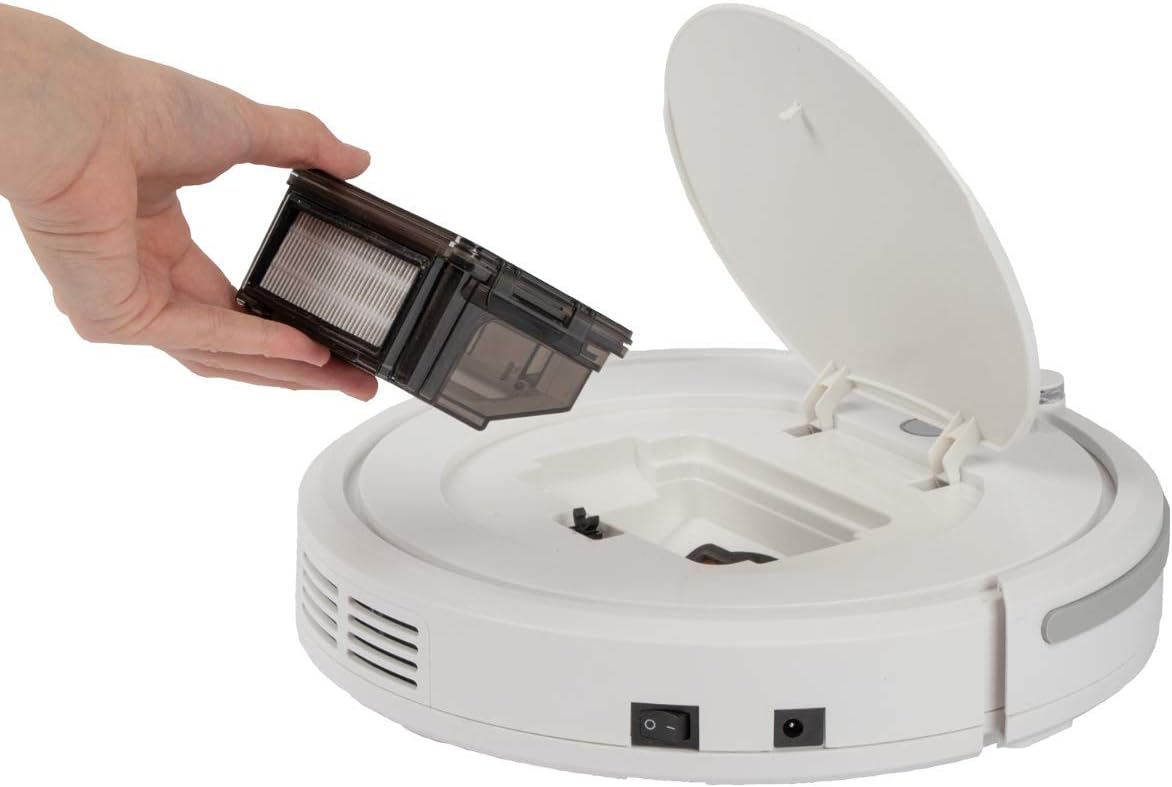
Obrázek 7.1: Removing the dustbin for emptying and cleaning.
- Turn off the robot vacuum cleaner.
- Otevřete horní kryt robota.
- Grasp the handle of the dustbin and lift it out.
- Otevřete popelnici a vysypte její obsah do odpadkové koše.
- V případě potřeby opláchněte nádobu na prach vodou a před opětovnou instalací se ujistěte, že je zcela suchá.
7.2. Čištění HEPA filtru
The HEPA filter is located inside the dustbin. Clean it regularly to maintain suction power.
- Vyjměte nádobu na prach, jak je popsáno výše.
- Opatrně vyjměte HEPA filtr z nádoby na prach.
- Use the provided cleaning brush to remove dust and debris from the filter. Do not wash the HEPA filter with water unless specified by the manufacturer.
- Reinsert the clean HEPA filter into the dustbin and then place the dustbin back into the robot.
7.3. Čištění postranních kartáčů
Periodically check and clean the side brushes for tangled hair or debris.
- Turn off the robot and flip it over.
- Jemně vytáhněte boční kartáče nahoru a vyjměte je.
- Remove any hair or debris wrapped around the brushes or brush posts.
- Reattach the brushes by pressing them down onto their posts until they click.
7.4. Čištění senzorů a kol
Wipe the infrared sensors (located around the bumper and underneath the robot) and the drive wheels with a clean, dry cloth to ensure proper navigation and movement.
8. Řešení problémů
If you encounter issues with your robot vacuum cleaner, refer to the following table for common problems and solutions.
| Problém | Možná příčina | Řešení |
|---|---|---|
| Robot se nezapne. | Baterie je slabá nebo vybitá. | Charge the robot for 5 hours. |
| Robot se neočekávaně zastaví. | Battery is low; Obstacle detected; Wheels/brushes jammed. | Charge the robot; Remove obstacles; Clean wheels and brushes. |
| Špatný čisticí výkon. | Dustbin full; Filter clogged; Side brushes worn or dirty. | Vyprázdněte nádobu na prach; Vyčistěte/vyměňte filtr; Vyčistěte/vyměňte boční kartáče. |
| Robot se nenabíjí. | Power adapter not connected; Faulty adapter/port. | Ensure secure connection; Try a different outlet; Contact support. |
| Robot spadne ze schodů. | Stair sensors are dirty or blocked. | Clean the stair sensors thoroughly. |
9. Specifikace
Technical details for the ProfiCare PC-BSR 3042 Robot Vacuum Cleaner:

Obrázek 9.1: Dimensions of the robot vacuum cleaner.
| Funkce | Detail |
|---|---|
| Číslo modelu | 330420 |
| Typ baterie | Ni-MH |
| Baterie Voltage | 14.4 V |
| Kapacita baterie | 1500 XNUMX mAh |
| Doba chodu baterie | Až 90 minut |
| Doba nabíjení baterie | Přibl. 5 hodin |
| Úroveň hluku | Cca. 61 dB |
| Rozměry (průměr x výška) | 290 mm x 75 mm |
| Hmotnost | 1.9 kg |
| Typ filtru | HEPA filtr |
| Čisticí programy | 3 (Random, Systematic, Spot) |
| Speciální funkce | Automatic stair detection, Mechanical furniture barrier, Remote control, Timer function |
| Doporučení pro povrch | Hard floors, short-pile carpets |
10. Záruka a podpora
10.1. Záruka výrobce
This product is covered by a manufacturer's warranty. Please refer to the warranty card included in your package or contact ProfiCare customer service for specific terms and conditions. Spare parts availability is typically 2 years from the date of purchase.
10.2. Zákaznická podpora
For technical assistance, troubleshooting beyond this manual, or warranty claims, please contact your retailer or the ProfiCare customer support team. Contact information can usually be found on the product packaging or the official ProfiCare webmísto.
Ask a question about this manual
Ask about setup, troubleshooting, compatibility, parts, safety, or missing instructions. Manuals+ will review the question and use this page’s manual context to help answer it.