
Zavedení
Thank you for choosing the iBall Cinebar 200DD. This 2.1 channel soundbar system with a wired subwoofer is designed to enhance your audio experience with 120 Watts of power and Dolby Digital technology. This manual will guide you through the setup, operation, and maintenance of your device to ensure optimal performance.
Co je v krabici
Pečlivě zkontrolujte obsah balení. Pokud některé položky chybí nebo jsou poškozené, kontaktujte zákaznickou podporu.
- Bar Speaker – 1N
- Subwoofer Speaker – 1N
- Remote Control – 1N
- Audio Cable – 1N
- User Manual – 1N
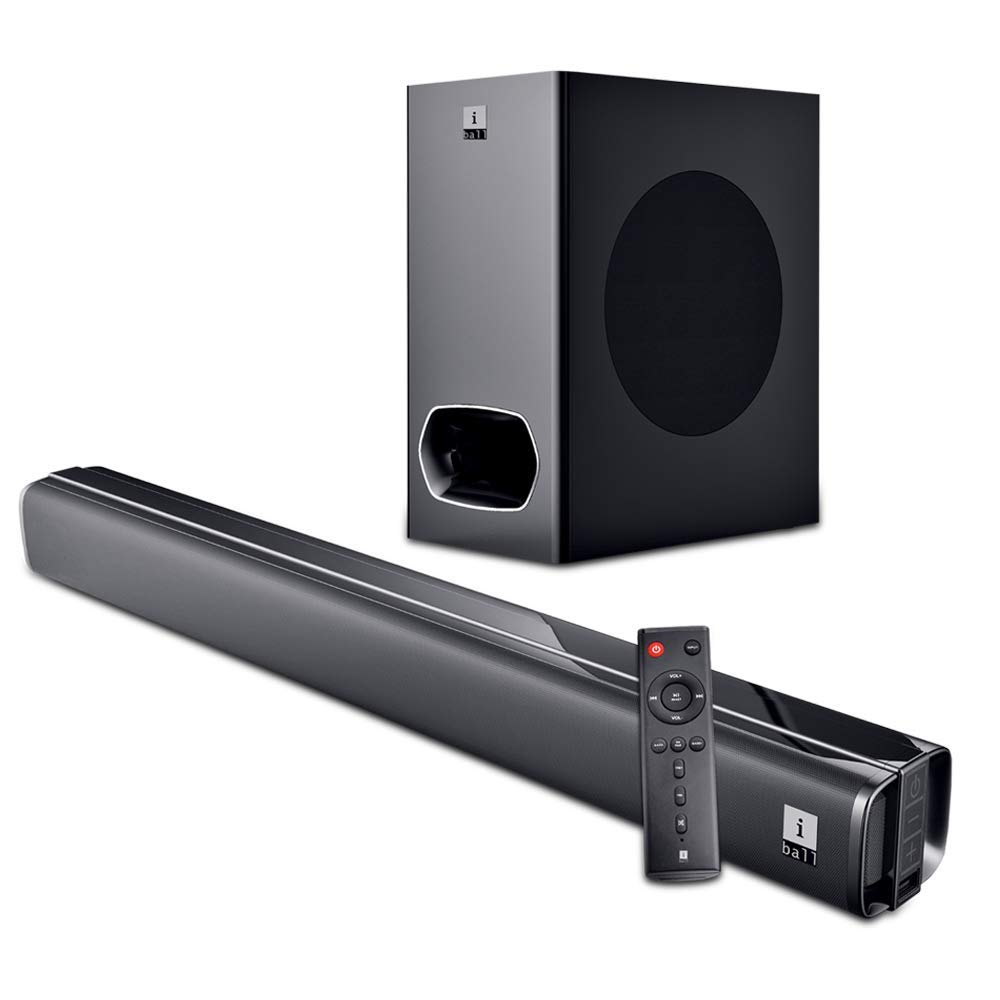
Image: The iBall Cinebar 200DD soundbar, its wired subwoofer, and the included remote control. This image illustrates the main components of the product.
Nastavení
1. Umístění
Place the soundbar on a stable, flat surface in front of your television. Ensure there is adequate space around the soundbar for optimal sound dispersion. The subwoofer should be placed on the floor, ideally near the soundbar, to provide rich bass.

Obrázek: Přední strana view of the iBall Cinebar 200DD soundbar, highlighting its sleek design suitable for placement under a TV.
2. Připojení
Connect the soundbar to your audio source using one of the available connection methods:
- HDMI (ARC): For high-quality digital audio and control via your TV remote (if supported). Connect an HDMI cable from the soundbar's HDMI ARC port to your TV's HDMI ARC port.
- OPTICKÝ: For digital audio connection. Connect an optical cable from the soundbar's optical input to your TV or other audio source's optical output.
- AUX: For analog audio connection. Use the provided audio cable to connect the soundbar's AUX input to the audio output of your device.
- USB: Pro přehrávání zvuku files directly from a USB drive. Insert a USB drive into the USB port.
- Bluetooth (BT): Pro bezdrátové streamování zvuku z kompatibilních zařízení.
Connect the wired subwoofer to the soundbar using the integrated cable from the subwoofer.

Image: The wired subwoofer component of the iBall Cinebar 200DD system, showing its design and connection point.

Obrázek: Pohled shora dolů view of the iBall Cinebar 200DD soundbar, illustrating the locations for HDMI, Optical, and USB connections, along with power and volume buttons.
3. Zapnout
Connect the soundbar's power adapter to an electrical outlet. Press the Power button on the soundbar or the remote control to turn on the device.

Image: A close-up of the integrated controls on the side of the iBall Cinebar 200DD soundbar, showing the Power On/Off, Volume -, and Volume + buttons.
Návod k obsluze
1. Základní ovládací prvky
Use the included remote control or the integrated controls on the soundbar to manage playback and settings.
- Moc: Stisknutím tlačítka napájení zapněte nebo vypněte soundbar.
- Objem: Use VOL+ and VOL- buttons to adjust the volume level.
- Vstup: Press the INPUT button to cycle through available input sources (BT, HDMI, OPTICAL, AUX, USB).
- EQ/PAIR: Press EQ to select sound modes (Music, Movie, News, 3D). Press and hold for Bluetooth pairing.
- BASS+/BASS-: Upravte úroveň basů.
- TRE+/TRE-: Upravte úroveň výšek.

Image: The remote control for the iBall Cinebar 200DD, showing buttons for power, volume, input selection, EQ modes, and bass/treble adjustments.
2. Párování Bluetooth
- Turn on the soundbar and select the Bluetooth input mode using the INPUT button on the remote or soundbar. The LED indicator will flash, indicating pairing mode.
- Povolte Bluetooth na svém mobilním zařízení (chytrém telefonu, tabletu atd.).
- Hledat available devices and select "iBall Cinebar 200DD" from the list.
- Once paired, the LED indicator will stop flashing and remain solid. You can now stream audio wirelessly.
3. Zvukové režimy
The iBall Cinebar 200DD offers various sound modes to optimize your listening experience. Press the EQ button on the remote control to cycle through the following modes:
- Hudba: Optimalizováno pro přehrávání hudby.
- Film: Enhanced for cinematic audio with broader soundstage.
- Zprávy: Clearer vocal reproduction for spoken content.
- 3D: Creates a virtual surround sound effect.
Údržba
Abyste zajistili dlouhou životnost a optimální výkon vašeho soundbaru, dodržujte tyto pokyny pro údržbu:
- Čištění: Use a soft, dry cloth to clean the surfaces of the soundbar and subwoofer. Do not use liquid cleaners, aerosols, or abrasive materials, as these can damage the finish or internal components.
- Větrání: Ujistěte se, že ventilační otvory na soundbaru a subwooferu nejsou zablokované. Správné proudění vzduchu zabraňuje přehřátí.
- Skladování: Pokud budete zařízení skladovat delší dobu, odpojte jej od napájení a uložte jej na chladném a suchém místě mimo dosah přímého slunečního záření a extrémních teplot.
- Napájecí kabel: Regularly inspect the power cord for any damage. If damaged, discontinue use and contact customer support for replacement.
Odstraňování problémů
If you encounter issues with your iBall Cinebar 200DD, refer to the following common problems and solutions:
| Problém | Možná příčina | Řešení |
|---|---|---|
| Žádná síla | Napájecí kabel není připojen; zásuvka není aktivní. | Ujistěte se, že je napájecí kabel bezpečně připojen k soundbaru a k funkční zásuvce. |
| Žádný zvuk | Incorrect input source selected; volume too low; cables not connected properly. | Select the correct input source. Increase the volume. Check all audio cables for secure connections. |
| Bluetooth není párování | Soundbar není v režimu párování; zařízení je příliš daleko; rušení. | Ensure the soundbar is in Bluetooth pairing mode. Move your device closer to the soundbar. Avoid sources of interference. |
| Zkreslený zvuk | Volume too high; poor audio source quality; incorrect EQ settings. | Reduce the volume. Try a different audio source. Adjust EQ settings. |
Specifikace
| Funkce | Detail |
|---|---|
| Název modelu | iBall Cinebar |
| Číslo modelu | CINEBAR-200DD |
| Typ reproduktoru | Soundbar, Subwoofer |
| Konfigurace kanálu | 2.1 |
| Celkový výstupní výkon | 120 wattů |
| Technologie připojení | Bluetooth, HDMI (ARC), Optický, AUX, USB |
| Bezdrátová komunikace | Bluetooth |
| Kontrolní metoda | Dálkové, dotykové |
| Barva | Černý |
| Rozměry produktu (soundbar) | 8.3 x 96 x 7.9 cm |
| Hmotnost položky | 6.1 kg |
| Zdroj napájení | AC |
Záruka a podpora
The iBall Cinebar 200DD comes with a 1 rok záruka from the date of purchase. This warranty covers manufacturing defects under normal use. For warranty claims or technical support, please contact iBall customer service.
Manufacturer Contact: 87, Mistry Industrial Complex, MIDC Cross Road "A" Andheri (E), Mumbai 400 093. Maharashtra India. Toll free No. 18002666409.