
1. Úvod
This manual provides essential information for the setup, operation, and maintenance of your Xtrfy K4 RGB Mechanical Gaming Keyboard. Please read these instructions carefully to ensure optimal performance and longevity of your device. The Xtrfy K4 RGB is designed for high-performance gaming and typing, featuring durable mechanical switches and customizable RGB illumination.
2. Obsah balení
Ověřte, zda jsou v balení přítomny všechny položky:
- Xtrfy K4 RGB Mechanical Gaming Keyboard
- USB kabel (přiložen)
- Uživatelská příručka (tento dokument)
3. Nastavení
Follow these steps to set up your Xtrfy K4 RGB keyboard:
- Rozbalte klávesnici: Opatrně vyjměte klávesnici z obalu.
- Připojení k počítači: Plug the attached USB-A cable from the keyboard into an available USB port on your computer. The keyboard is plug-and-play and does not require additional drivers for basic functionality.
- Umístění: Position the keyboard comfortably on your desk. Ensure stable placement for optimal use.
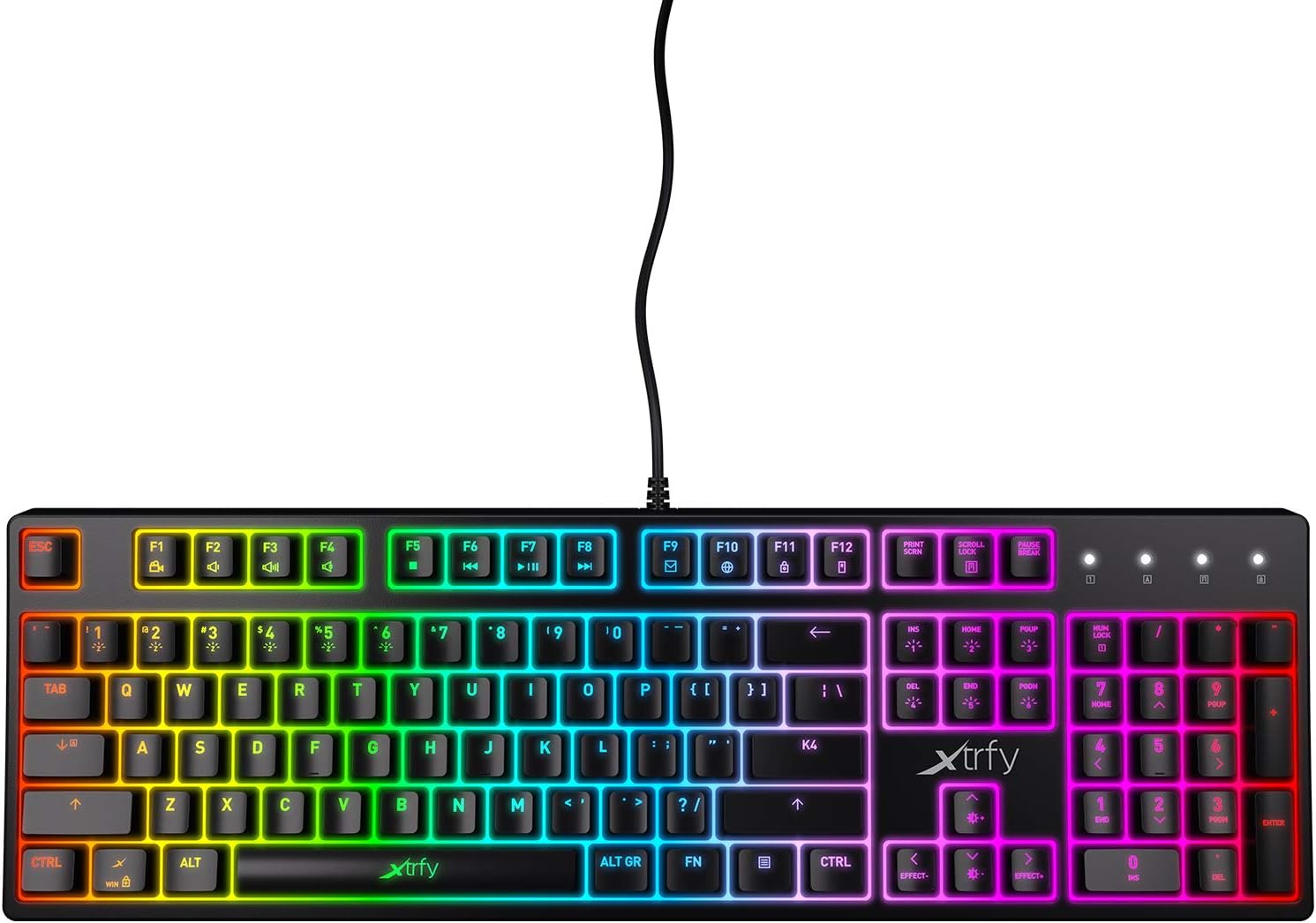
Obrázek 3.1: Shora dolů view of the Xtrfy K4 RGB keyboard, showing key layout and attached USB cable.
4. Návod k obsluze
4.1 Základní funkce klávesnice
The Xtrfy K4 RGB functions as a standard mechanical keyboard. All keys are pre-programmed for their respective characters and functions. It features full N-key rollover and a 1000 Hz polling rate for precise and responsive input.
4.2 Ovládání RGB podsvícení
The keyboard features customizable RGB illumination. Use the Function (FN) key in combination with specific keys to adjust lighting effects, brightness, and colors. Refer to the keycap legends for specific lighting controls.
- FN + F1–F12: These keys often control media functions or system shortcuts. Specific functions are indicated by icons on the keycaps.
- FN + klávesy se šipkami: Typically used to adjust brightness or change lighting directions/patterns.
- FN + Insert/Home/Page Up/Delete/End/Page Down: These keys are commonly used to cycle through different RGB lighting modes and effects.

Figure 4.1: The Xtrfy K4 RGB keyboard showcasinjeho přizpůsobitelné RGB osvětlení.
5. Údržba
Správná údržba zajistí dlouhou životnost a výkon vaší klávesnice:
- Čištění: Use a soft, dry cloth to wipe the surface of the keyboard. For deeper cleaning, use compressed air to remove dust and debris from between the keycaps. Avoid using harsh chemicals or abrasive materials.
- Keycap Removal (Advanced): If necessary, keycaps can be carefully removed using a keycap puller for thorough cleaning. Exercise caution to avoid damaging the switches.
- Skladování: Pokud klávesnici nepoužíváte, skladujte ji v čistém a suchém prostředí mimo dosah přímého slunečního záření a extrémních teplot.
6. Řešení problémů
If you encounter issues with your Xtrfy K4 RGB keyboard, refer to the following common solutions:
- Klávesnice nereaguje:
- Ujistěte se, že je kabel USB bezpečně zapojený do klávesnice i do počítače.
- Zkuste zapojit klávesnici do jiného USB portu.
- Restartujte počítač.
- RGB osvětlení nefunguje/je nesprávné:
- Check if the lighting is turned off or set to a very low brightness using the FN key combinations.
- Ensure no software conflicts are present if you are using third-party lighting control applications.
- Klíče se neregistrují:
- Vyčistěte postiženou oblast klíče, abyste odstranili veškeré nečistoty, které by mohly blokovat spínač.
- If the issue persists, contact Xtrfy support.
7. Specifikace
| Funkce | Detail |
|---|---|
| Značka | Xtrfy |
| Číslo modelu | XG-K4-RGB-R-US |
| Série | K4 RGB |
| Popis klávesnice | Mechanické |
| Klíčové spínače | Mechanical key switches (e.g., Kailh Red, depending on variant) |
| Osvětlení | Customizable RGB |
| Míra hlasování | 1000 Hz |
| N-Key Rollover | Full N-key rollover |
| Konektivita | USB-A (Corded Electric) |
| Kompatibilní zařízení | PC/Mac |
| Hmotnost položky | 2.2 libry (přibližně 1 kg) |
| Rozměry produktu (DxŠxV) | 17.44" x 17.44" x 1.54" (přibližně 44.3 x 44.3 x 3.9 cm) |
| Barva | Černý |
8. Záruka a podpora
Xtrfy products are manufactured to high standards and come with a limited warranty. For specific warranty terms and conditions, please refer to the official Xtrfy webnebo kontaktujte jejich zákaznickou podporu.
For technical assistance, troubleshooting beyond this manual, or warranty claims, please visit the official Xtrfy support page or contact their customer service directly. Keep your purchase receipt as proof of purchase.
Online podpora: www.xtrfy.com/support