
1. Úvod
The Waytronic WT-14 Infrared Motion Sensor Activated Sound Speaker is a versatile device designed to play custom recorded messages or sounds upon detecting motion. It is suitable for various applications, including greeting visitors, providing security alerts, reminding individuals, or even deterring animals. This manual will guide you through the setup, operation, and maintenance of your device.
2. Konec produktuview
The WT-14 features a built-in microphone for direct recording, an infrared motion sensor for activation, and a speaker for audio output. It offers adjustable volume and flexible mounting options.
Klíčové vlastnosti:
- Funkce nahrávání: Built-in microphone allows instant recording of up to 130 seconds of audio.
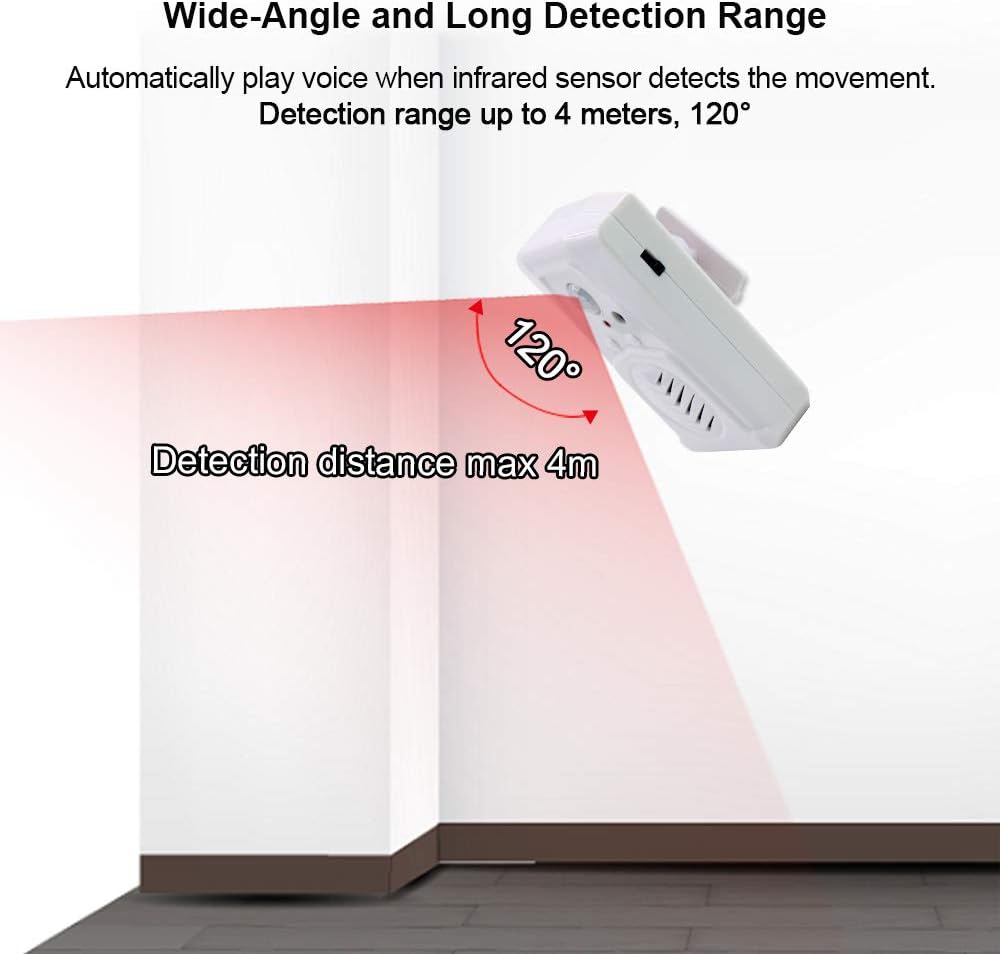
- Široký rozsah detekce: Infrared sensor detects motion horizontally at 120 degrees and vertically at 60 degrees, with a maximum detection distance of 4 meters (13 feet).
- Nastavitelná hlasitost: Two-level volume control for clear sound output.
- Všestranné aplikace: Ideal for door entrance greetings, daily reminders, sale advertising, security alerts, and animal deterrence.
- Jednoduchá instalace: Designed for indoor use with included mounting accessories.
- Možnosti napájení: Operates on 3 AAA batteries (not included) or via a 5V USB cable.
Součásti zařízení:

Obrázek 2.1: Přední strana view of the Waytronic WT-14 with labeled components.
- PIR senzor: Detects motion to trigger audio playback.
- Button A (Record): Press and hold to record audio.
- Button B (Play/Stop): Press to manually play or stop the recorded audio.
- Speaker with Built-in MIC: Outputs sound and captures audio for recording.
- Volume/ON/OFF Switch: Controls power and adjusts sound volume.
- Pouzdro na baterii: Located on the back for 3 AAA batteries.
- Screw Mounting Hole & Bracket Mounting: Pro bezpečnou instalaci.
3. Obsah balení
Prosím, ověřte, zda jsou v balení přítomny všechny položky:
- Waytronic WT-14 Motion Sensor Activated Sound Speaker
- Montážní šrouby
- Ball Mounting Accessories
- Uživatelská příručka (tento dokument)
4. Instalace
4.1 Napájení zařízení
The WT-14 can be powered by batteries or a USB cable.
- Instalace baterie: Open the battery compartment on the back of the device and insert 3 AAA batteries (not included), ensuring correct polarity.
- Napájení USB: Connect a 5V USB cable (not included) to the USB port on the side of the device.
Obrázek 4.1: Zpět view s přihrádkou na baterie a montážními body.

Obrázek 4.2: Strana view showing USB power port and switch.
4.2 Montáž zařízení
The device can be mounted using the included screws and ball mounting accessories.
- Vyberte si vhodné vnitřní místo pro instalaci.
- Attach the ball mounting bracket to the desired surface using the provided screws.
- Secure the WT-14 device onto the ball mounting accessory. The ball joint allows for 360-degree rotation to optimize the detection angle.

Figure 4.3: Ball mounting accessory for flexible positioning.
4.3 Aspekty umístění
For optimal performance and to prevent false triggers, observe the following guidelines:
- Instalujte pouze uvnitř.
- Vyhněte se místům s přímým slunečním zářením.
- Do not place near large temperature variations, such as air conditioners or heaters.
- Position the device to cover the desired detection area, considering the 120-degree horizontal and 60-degree vertical detection angles, and a maximum range of 4 meters (13 feet).

Figure 4.4: Detection range illustration.
5. Provoz
5.1 Záznam zvuku
The WT-14 allows you to record custom audio messages directly using its built-in microphone.
- Ensure the device is powered on using the side switch.
- Stiskněte a podržte Button A (Record). The indicator light may change to confirm recording is active.
- Speak clearly into the built-in microphone. The maximum recording time is 130 seconds.
- Uvolnění Tlačítko A pro zastavení nahrávání.
- Důležité: For successful recording, ensure your message is longer than 3 seconds.

Figure 5.1: Audio file change methods (Button Recording only).
5.2 Přehrávání zvuku
Audio can be played automatically via motion detection or manually.
- Motion Activated Playback: Once a message is recorded, the device will automatically play the audio when the infrared sensor detects movement within its range.
- Ruční přehrávání: Stiskněte Button B (Play/Stop) to manually play the last recorded message. Press it again to stop playback.
5.3 Nastavení hlasitosti
The device features a two-level volume adjustment.
- Použijte Volume/ON/OFF Switch located on the side of the device to select between high and low volume settings.
6. Aplikace
The Waytronic WT-14 can be used in various scenarios:
- Door Entrance Greeting: Welcome visitors to your shop or home with a custom message.
- Security Reminder: Play a warning message or sound when motion is detected in a restricted area.
- Daily Audio Reminder: Set up reminders for tasks or medication.
- Sale Advertising: Announce special offers in a retail environment.
- Animal Deterrent: Record sounds to repel unwanted animals from specific areas.
- Holiday/Festival Sounds: Play festive greetings or spooky sounds for Halloween.

Figure 6.1: Common applications of the sound speaker.

Obrázek 6.2: Přamples of animal repelling and security reminder uses.
7. Řešení problémů
If you encounter issues with your WT-14 device, please refer to the following common solutions:
| Problém | Možná příčina | Řešení |
|---|---|---|
| Zařízení se nezapne. | Baterie jsou vybité nebo nesprávně vložené; USB kabel není připojen nebo je vadný. | Zkontrolujte polaritu baterie a v případě potřeby ji vyměňte. Ujistěte se, že je kabel USB bezpečně připojen k funkčnímu zdroji napájení. |
| Recording is unsuccessful or unclear. | Recording duration too short; microphone too far; background noise. | Ensure recording for at least 3 seconds. Speak closer to the microphone. Record in a quiet environment. |
| Žádné přehrávání zvuku. | Volume set to minimum; no message recorded; speaker malfunction. | Adjust volume using the side switch. Record a message if none exists. If problem persists, contact support. |
| Motion sensor not triggering or false triggers. | Incorrect placement; sensor obstructed; environmental factors. | Ensure device is placed in an optimal location, away from direct sunlight, heat sources, or air currents. Clear any obstructions from the sensor's view. |
| Detection range is shorter than expected. | Environmental interference; sensor angle. | Adjust the device's angle using the ball mounting accessory. Ensure no objects are partially blocking the sensor's field of view. |
8. Specifikace
| Funkce | Specifikace |
|---|---|
| Číslo modelu | WT-14 (Part Number: WT-M14) |
| Značka | Waytronic |
| Barva | Bílý |
| Zdroj napájení | 3 AAA Batteries (not included) or 5V USB |
| Hmotnost položky | 85 gramů (3 unce) |
| Rozměry produktu | 3.54 x 2.36 x 1.02 palce |
| Maximální rozsah detekce | 4 metrů (13 stop) |
| Horizontální úhel detekce | 120 stupňů |
| Vertical Detection Angle | 60 stupňů |
| Doba nahrávání | Až 130 sekund |
| Typ montáže | Door Mount / Wall Mount (with ball mounting accessory) |
| Prostředí použití | Krytý |
9. Bezpečnostní informace
- Toto zařízení je určeno pouze pro použití v interiéru. Nevystavujte ho dešti ani vlhkosti.
- Nepokoušejte se zařízení rozebírat ani upravovat. Mohlo by dojít ke zrušení záruky a poškození.
- Uchovávejte mimo dosah dětí.
- Baterie zlikvidujte v souladu s místními předpisy. Nekombinujte staré a nové baterie ani různé typy baterií.
- Avoid placing the device in direct sunlight or near heat sources to prevent overheating and malfunction.
10. Záruka a podpora
Waytronic provides customer support for any questions or issues you may have regarding your WT-14 device. If you encounter problems not covered in this manual or require further assistance, please contact Waytronic customer service. Refer to your purchase documentation for specific warranty details.
For inquiries, please visit the Waytronic Store on Amazon.