
1. Úvod
This manual provides detailed instructions for the installation, operation, and maintenance of your AMKI 3-Channel DMX512 Decoder. This device is designed to convert universal DMX512 digital signals into PWM signals, allowing it to drive LED lighting products such as RGB LED strips, modules, and other LED fixtures. It features a digital display for easy address setting and mode selection.
2. Bezpečnostní informace
- Zajistěte napájení objtage matches the decoder's requirements (DC12V-24V).
- Do not connect the decoder to AC power directly.
- Před jakýmkoli připojením nebo nastavením vždy odpojte napájení.
- Nevystavujte zařízení vlhkosti nebo extrémním teplotám.
- Nepokoušejte se zařízení otevírat ani upravovat, mohlo by dojít ke ztrátě záruky a mohlo by dojít k poškození nebo zranění.
- Zajistěte správné větrání, aby nedošlo k přehřátí.
3. Konec produktuview
The AMKI 3-Channel DMX512 Decoder is a compact and robust unit designed for reliable DMX control of LED lighting. It features a digital display for easy configuration and multiple input/output options.

Obrázek 3.1: Přední strana view of the AMKI 3-Channel DMX512 Decoder, showing the digital display, control buttons, and XLR input/output ports.
3.1 Ovládací prvky a připojení na předním panelu

Obrázek 3.2: Detailní view of the front panel, highlighting the numerical display, status display (A/H/S), control buttons, and DMX512 IN/OUT XLR interfaces.
- Číselný displej: Shows the current DMX address or selected mode/speed.
- Status Display (A/H/S): Indicates the current operating mode (Address, Mode, Speed).
- Control Buttons (- / + / SET): Used to navigate menus, adjust values, and confirm settings.
- DMX512 IN/OUT (XLR): Standard 3-pin XLR connectors for DMX signal input and output.
3.2 Připojení zadního panelu
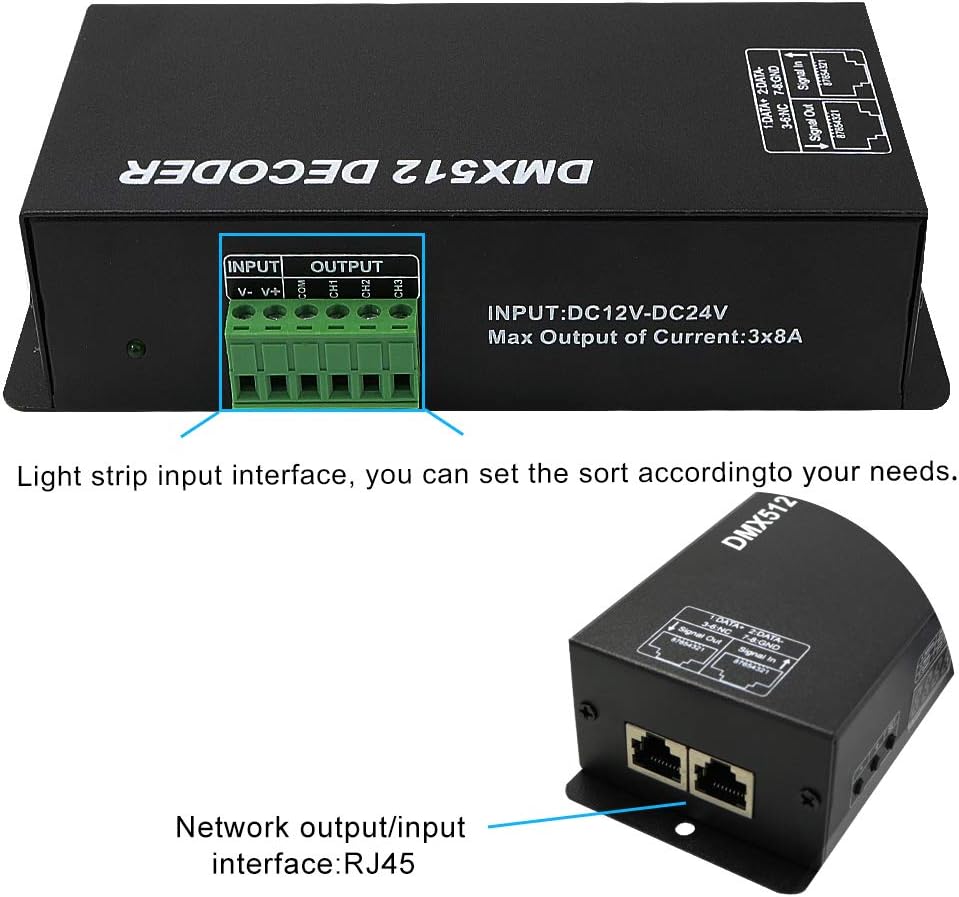
Obrázek 3.3: Detailní view of the rear panel, showing the DC12V-DC24V power input, 3-channel output terminals, and RJ45 network input/output interfaces.
- INPUT: DC12V-DC24V: Power input terminals for connecting a compatible DC power supply.
- OUTPUT: CH1, CH2, CH3: Three output channels for connecting LED lighting products. Each channel supports up to 8A.
- Network Output/Input Interface (RJ45): RJ45 ports for DMX signal input and output, wired with standard DMX pin locations.
4. Nastavení a instalace
Follow these steps to properly install and connect your DMX512 Decoder.
4.1 Schéma zapojení

Figure 4.1: Typical connection diagram for the DMX512 Decoder, illustrating connections from a DMX console, power supply, and to high-power LED lamps.
4.2 Kroky připojení
- Připojení napájení: Connect a DC12V-24V power supply to the "INPUT: DC12V-DC24V" terminals. Ensure correct polarity (V+ to positive, V- to negative). The maximum output current is 3x8A, so ensure your power supply can handle the total load of your LED lights.
- LED Output Connection: Connect your LED lighting products (e.g., RGB LED strips) to the "OUTPUT: CH1, CH2, CH3" terminals. For RGB strips, connect Red to CH1, Green to CH2, Blue to CH3, and the common anode to V+. For single-color lights, connect to any channel. Ensure the total current for each channel does not exceed 8A.
- DMX Signal Input:
- XLR připojení: Connect your DMX controller's output to the "DMX512 IN" XLR port. If daisy-chaining multiple decoders, connect the "DMX512 OUT" of the first decoder to the "DMX512 IN" of the next.
- Připojení RJ45: Alternatively, use a Cat5 Ethernet cable to connect your DMX controller to the RJ45 input port. The RJ45 ports are wired for standard DMX pin locations.
- Zapnutí: Once all connections are secure, apply power to the decoder. The digital display will illuminate.
5. Návod k obsluze
The AMKI DMX512 Decoder offers DMX mode and several built-in static/dynamic modes. The digital display and buttons are used for configuration.
5.1 Setting DMX Address (A Mode)
In DMX mode, the decoder responds to DMX signals starting from a specific address. This is the default operating mode.
- When powered on, the display will typically show an 'A' followed by a four-digit number (e.g., A001). This indicates the current DMX start address.
- Stiskněte tlačítko SOUBOR button to enter address setting mode. The digits will flash.
- Použijte + a - buttons to adjust the DMX start address (range A001 to A512).
- Stiskněte tlačítko SOUBOR button again to confirm and save the address. The display will stop flashing.
- The decoder will now respond to DMX signals on the set address and the subsequent two channels (for a 3-channel device). For example, if set to A001, it will use DMX channels 1, 2, and 3.
5.2 Built-in Modes (H Mode)
The decoder includes pre-programmed static and dynamic lighting effects. These modes disable DMX control.
- From DMX address setting mode (A mode), press the SOUBOR button repeatedly until the display shows 'H' followed by a two-digit number (e.g., H-01). This indicates the built-in mode selection.
- Použijte + a - buttons to cycle through the available built-in modes (H-01 to H-11). Each mode represents a different static color or dynamic effect.
- Stiskněte tlačítko SOUBOR button to confirm the selected mode.
5.3 Adjusting Speed/Brightness (S Mode)
For dynamic built-in modes, you can adjust the speed. For static built-in modes, this may adjust brightness.
- While in a built-in mode (H mode), press the SOUBOR button again until the display shows 'S' followed by a two-digit number (e.g., S-01). This indicates speed/brightness adjustment.
- Použijte + a - buttons to adjust the speed or brightness level (S-01 to S-20).
- Stiskněte tlačítko SOUBOR tlačítko pro potvrzení nastavení.
Note: To return to DMX control, you must manually set the device back to 'A' mode and select a DMX address. The device will retain its last setting upon power cycle.
6. Údržba
- Udržujte zařízení čisté a bez prachu. K čištění používejte měkký, suchý hadřík.
- Ujistěte se, že všechny spoje jsou bezpečné a bez koroze.
- Pokud zařízení nepoužíváte, skladujte ho v suchém a chladném prostředí.
- No user-serviceable parts inside. Refer all servicing to qualified personnel.
7. Řešení problémů
| Problém | Možná příčina | Řešení |
|---|---|---|
| LED diody nesvítí. |
|
|
| LEDs are on but not responding to DMX controller. |
|
|
| Display dims or unit stops responding to buttons. |
|
|
| Difficulty connecting wires to terminals. | Terminals are small for large gauge wires. | Use appropriate wire gauge for the current draw. If necessary, use smaller gauge wire with ferrules or consider professional installation for high current applications. |
8. Specifikace
| Funkce | Detail |
|---|---|
| Číslo modelu | 3CH DMX-8AD |
| Vstupní objemtage | DC12V-DC24V |
| Výstupní kanály | 3 kanály |
| Maximální výstupní proud | 8A per channel (Total 24A) |
| Výstupní výkon | 288 W (12V) / 576 W (24 V) |
| DMX řídicí kanály | 3 DMX kanálů |
| Rozhraní DMX | 3-pin XLR (IN/OUT), RJ45 (IN/OUT) |
| Režim ovládání | DMX512, Stand-alone (built-in modes) |
| Zobrazit | Digitální LED displej |
| Rozměry (D x Š x V) | 166 mm x 67 mm x 41 mm (6.5 x 2.6 x 1.6 palce) |
| Hmotnost | Přibližně 13.7 unce (388 g) |
| Provozní teplota | -20 °C až 60 °C |

Figure 8.1: Physical dimensions of the DMX512 Decoder.
9. Záruka a podpora
AMKI products are designed for reliability and performance. For warranty information, technical support, or service inquiries, please contact your retailer or the manufacturer directly. Please have your product model number (3CH DMX-8AD) and purchase details available when contacting support.
Pro další pomoc prosím navštivte AMKI Store on Amazon.