
1. Úvod a konecview
The ASHATA HW-425 is a compact and versatile Bluetooth 4.2 stereo audio module designed for integration into various DIY audio projects. This module facilitates low-loss, dual-channel stereo lossless audio playback, making it an ideal component for custom speaker systems, audio receivers, and other electronic applications. It operates with a standard 5V power supply and offers a reliable Bluetooth connection range of up to 20 meters in open environments.
Its precise design and high-quality materials ensure durability and ease of installation, providing a superior performance foundation for your audio system.
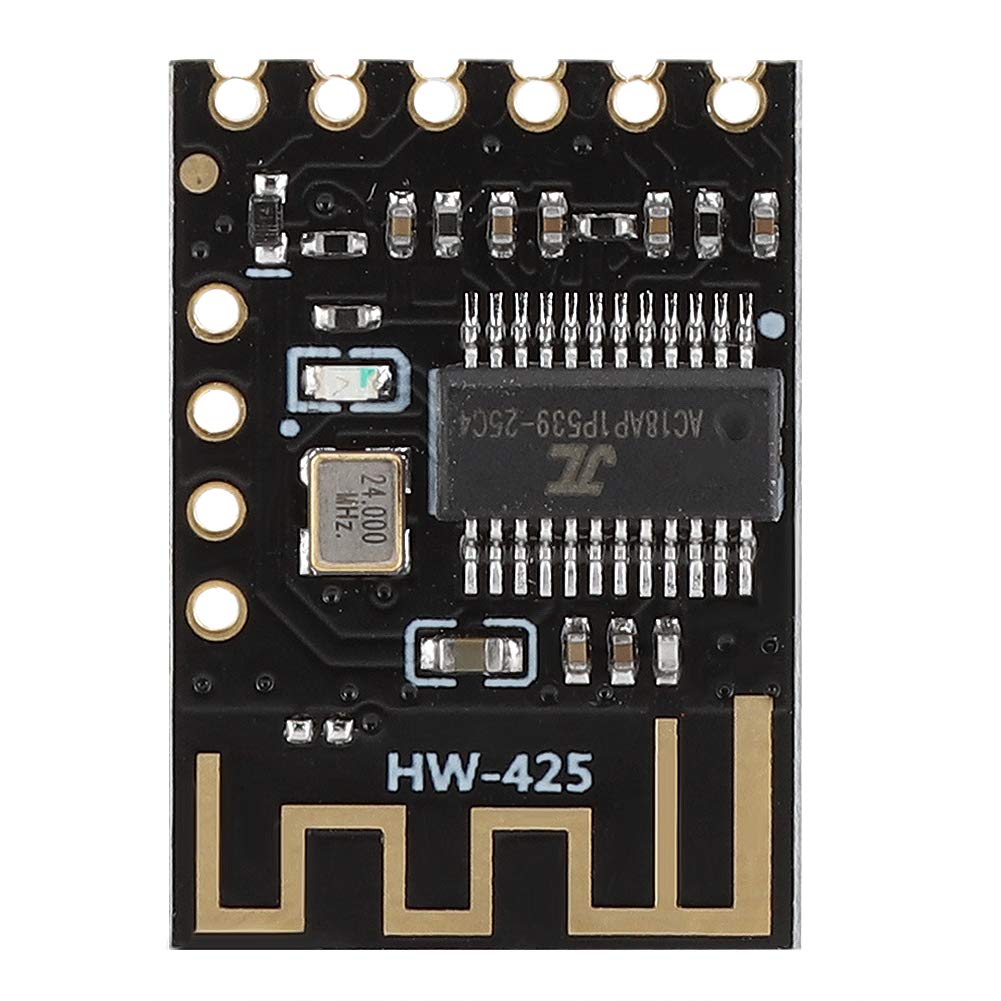
Obrázek 1: Přesview of the ASHATA HW-425 Bluetooth 4.2 Stereo Audio Module.
2. Klíčové vlastnosti
- Připojení Bluetooth 4.2: Utilizes a low-loss Bluetooth 4.2 system for stable and efficient wireless audio transmission.
- Rozšířený dosah připojení: Achieves a Bluetooth connection distance of up to 20 meters in open, unobstructed environments.
- Dual-Channel Stereo Lossless Playback: Supports high-fidelity, lossless stereo audio playback across two channels, suitable for various DIY speaker modifications.
- Optimized Design for Integration: Features precise cuts and interfaces, ensuring a perfect fit for mounting positions and simplifying installation.
- Odolná konstrukce: Manufactured with high-quality materials to effectively resist corrosion and wear, ensuring long-term, reliable use.
- Professional Chipset: Incorporates a professional chipset to guarantee superior performance and stability within your audio system.

Figure 2: The HW-425 module supports dual-channel stereo lossless playback, ideal for DIY speaker projects.
3. Nastavení a instalace
Before installation, ensure all power sources are disconnected to prevent electrical hazards. The HW-425 module is designed for easy integration into custom circuits.
3.1 Schéma zapojení pinů

Figure 3: Pinout diagram of the HW-425 module, indicating connection points for power, audio, and control.
The module features several pins for power, audio output, and control:
- VCC: Power supply input (Default 5V).
- GND: Zemní spojení.
- L: Left audio channel output.
- R: Right audio channel output.
- ZTLUMIT: Mute control pin (functionality may vary based on implementation).
- KLÍČ: Control key input (functionality may vary based on implementation, e.g., play/pause, next track).
3.2 Pokyny pro zapojení
- Připojení napájení: Připojte VCC pin to a stable 5V DC power source and the GND pin to the power source's ground. Ensure the power supply can provide sufficient current for the module and any connected components.
- Zvukový výstup: Připojte L (vlevo) a R (Right) pins to the respective audio input channels of your amplifier or speaker system. Connect the audio ground to the GND kolík.
- Control Pins (Optional): If desired, connect the ZTLUMIT a KLÍČ pins to your control circuit. Refer to your specific application's requirements for their usage.

Figure 4: The module's precise design ensures easy integration and mounting.
4. Návod k obsluze
- Zapnutí: Once correctly wired, apply 5V DC power to the VCC and GND pins. The module will power on and typically enter pairing mode, indicated by an LED (if present on your specific module variant).
- Bluetooth párování:
- Na zařízení s podporou Bluetooth (chytrý telefon, tablet, počítač) přejděte do nastavení Bluetooth.
- Vyhledejte dostupná zařízení.
- Locate and select the device named "HW-425" or a similar identifier.
- Once connected, the module's LED indicator (if present) may change state (e.g., solid blue) to confirm a successful connection.
- Přehrávání zvuku: After successful pairing, play audio from your connected device. The sound will be transmitted wirelessly to the HW-425 module and output through the L and R pins to your connected amplifier/reproduktory.
- Control Functions (if implemented):
- MUTE Pin: If connected to a control circuit, activating this pin may temporarily mute the audio output.
- KEY Pin: If connected, this pin can be used for basic playback controls such as play/pause or skipping tracks, depending on the specific implementation.
5. Specifikace
| Funkce | Detail |
|---|---|
| Typ produktu | Bluetooth audio modul |
| Model | HW-425 |
| Verze Bluetooth | 4.2 (Low-loss system) |
| Napájení | Default 5V DC |
| Vzdálenost připojení Bluetooth | Approx. 20 meters (in open environment) |
| Zvukový výstup | Dual-channel stereo lossless playback |
| Výrobce | ASHATA |
| Reference výrobce | ASHATA0px5seo4na |
| Země původu | Čína |
| Kompatibilní zařízení | Laptop, Smart TV, Smartphone, Tablet |
| Data Link Protocol | Bluetooth |
| UPC / GTIN | 738583057301 |
6. Řešení problémů
If you encounter issues with your ASHATA HW-425 module, refer to the following common problems and solutions:
- Bez napájení:
- Ensure the 5V DC power supply is correctly connected to the VCC and GND pins.
- Verify the power supply is functional and providing the correct voltage.
- Zkontrolujte, zda nejsou uvolněné spoje nebo poškozené vodiče.
- Nelze spárovat se zařízením Bluetooth:
- Make sure the module is powered on and within the 20-meter range of your device.
- Ensure Bluetooth is enabled on your device and it is in scanning mode.
- Try restarting both the module (by cycling power) and your Bluetooth device.
- Confirm no other device is currently paired with the module.
- Žádný zvukový výstup:
- Verify that the module is successfully paired with your audio source device.
- Check the connections from the L, R, and GND pins to your ampzvlhčovač nebo reproduktory.
- Ensure the volume on both your source device and the connected amplifier/speakers is turned up.
- If the MUTE pin is used, ensure it is not activated.
- Poor Sound Quality or Intermittent Connection:
- Reduce the distance between the module and the Bluetooth source device.
- Remove any obstacles (walls, large metal objects) that may interfere with the Bluetooth signal.
- Ensure there are no other strong wireless signals (Wi-Fi, other Bluetooth devices) operating nearby that could cause interference.
- Check the power supply for stability; an unstable power supply can affect performance.
7. Údržba
To ensure the longevity and optimal performance of your ASHATA HW-425 Bluetooth Audio Module, follow these maintenance guidelines:
- Udržujte v suchu: Protect the module from moisture and liquids, as these can cause short circuits and damage components.
- Vyhněte se extrémním teplotám: Do not expose the module to excessively high or low temperatures, which can affect its electronic components.
- Zacházejte opatrně: Electronic modules are delicate. Avoid dropping, bending, or applying excessive force to the module.
- Jemně čistěte: If cleaning is necessary, use a soft, dry cloth. Avoid using harsh chemicals or abrasive materials. Ensure the module is powered off before cleaning.
- Správné větrání: Ensure adequate airflow around the module if it is enclosed in a casing, especially during prolonged operation, to prevent overheating.

Figure 5: The HW-425 module is built with high-quality materials for durability.
8. Záruka a podpora
Specific warranty information for the ASHATA HW-425 module may vary depending on your region and point of purchase. Please refer to the documentation provided by your retailer or contact ASHATA customer support for detailed warranty terms and conditions.
For technical support, inquiries, or assistance with your ASHATA product, please visit the official ASHATA website or contact their customer service department. Keep your purchase receipt or proof of purchase handy when seeking support.