
1. Úvod
This manual provides essential information for the installation, operation, and maintenance of your AMD Ryzen 9 3950X 16-Core, 32-Thread Unlocked Desktop Processor. The AMD Ryzen 9 3950X is designed for high-performance computing, offering advanced capabilities for demanding applications and gaming.

Figure 1: AMD Ryzen 9 3950X Processor Retail Box. This image displays the packaging for the AMD Ryzen 9 3950X processor, highlighting the Ryzen logo and product series.
2. Klíčové vlastnosti
- 16 jádra a 32 vlákna pro zpracování: Offers exceptional multi-tasking and processing power for mainstream desktop applications.
- Vysoký výkon: Capable of delivering ultra-fast 100+ FPS performance in popular games.
- Odemčeno pro přetaktování: Features a 4.7 GHz max Boost clock, allowing for performance tuning.
- Advanced Socket AM4 Platform: Compatible with the AM4 platform, supporting PCIe 4.0 on X570 motherboards.
- DDR4-3200 Support: Optimized for high-speed DDR4 memory.
- 72 MB of Game Cache: Enhances gaming performance and responsiveness.
3. Specifikace
| Funkce | Detail |
|---|---|
| Procesní jádra | 16 |
| Zpracování vláken | 32 |
| Základní taktovací frekvence | 3.5 GHz |
| Max Boost Clock | Až 4.7 GHz |
| Celková mezipaměť L1 | 1 MB |
| Celková mezipaměť L2 | 8 MB |
| Celková mezipaměť L3 | 72 MB |
| CMOS | TSMC 7nm FinFET |
| Verze PCI Express | PCIe 4.0 x16 |
| Zásuvka | AM4 |
| Maximální provozní teplota | 95 °C |
| Podpora OS | Windows 10 - 64-Bit Edition, RHEL x86 64-Bit, Ubuntu x86 64-Bit (OS support may vary by manufacturer) |
| Chladič | Not included (Liquid cooler with 280mm or larger radiator recommended) |
4. Nastavení a instalace
Proper installation is crucial for optimal performance and longevity of your AMD Ryzen 9 3950X processor. Please follow these steps carefully.
4.1. Kontrolní seznam před instalací
- Compatible AM4 motherboard (X570 recommended for PCIe 4.0).
- High-quality CPU cooler (liquid cooler with 280mm or larger radiator recommended).
- Thermal paste (if your cooler does not have it pre-applied).
- Anti-static wrist strap or ensure proper grounding to prevent electrostatic discharge (ESD).
- Sada šroubováků.
4.2. Kompatibilita základních desek
The Ryzen 9 3950X processor is designed for the AM4 socket. Ensure your motherboard has the latest BIOS update to support 3rd Gen Ryzen processors. For optimal performance, X570 motherboards are recommended to fully utilize PCIe 4.0 capabilities.
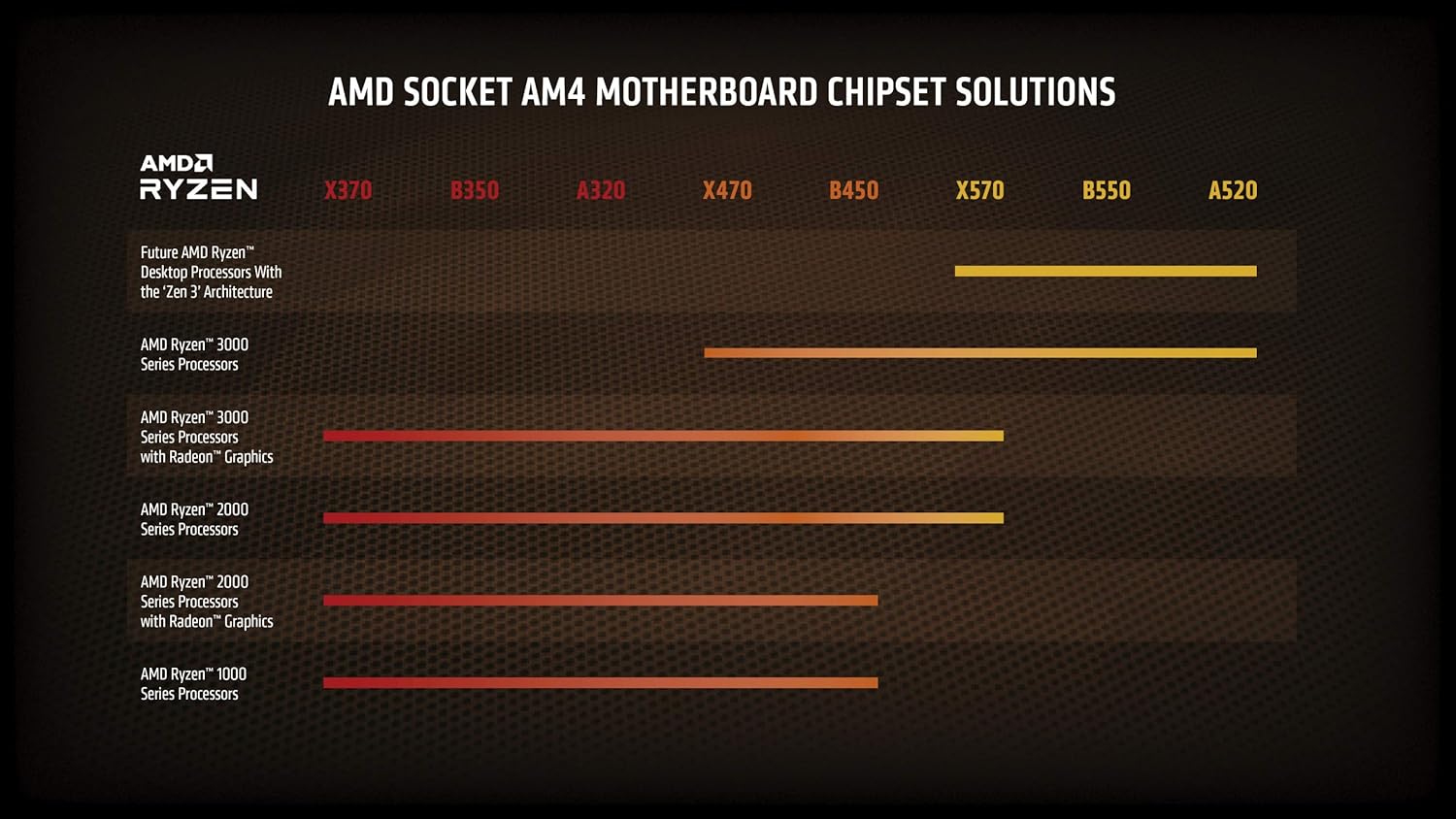
Figure 2: AMD Socket AM4 Motherboard Chipset Solutions. This chart illustrates compatibility of different AMD Ryzen processor generations with various AM4 motherboard chipsets (X370, B350, A320, X470, B450, X570, B550, A520).
4.3. Instalace procesoru
- Příprava základní desky:
- Open the CPU socket retention arm on your AM4 motherboard.
- Carefully lift the metal load plate.
- Instalace procesoru:
- Align the gold triangle on the corner of the Ryzen 9 3950X processor with the triangle on the AM4 socket.
- Opatrně spusťte procesor rovně dolů do patice. Netlačte na něj silou. Pokud se snadno neusadí, znovu zkontrolujte zarovnání.
- Once seated, close the metal load plate and secure it with the retention arm.
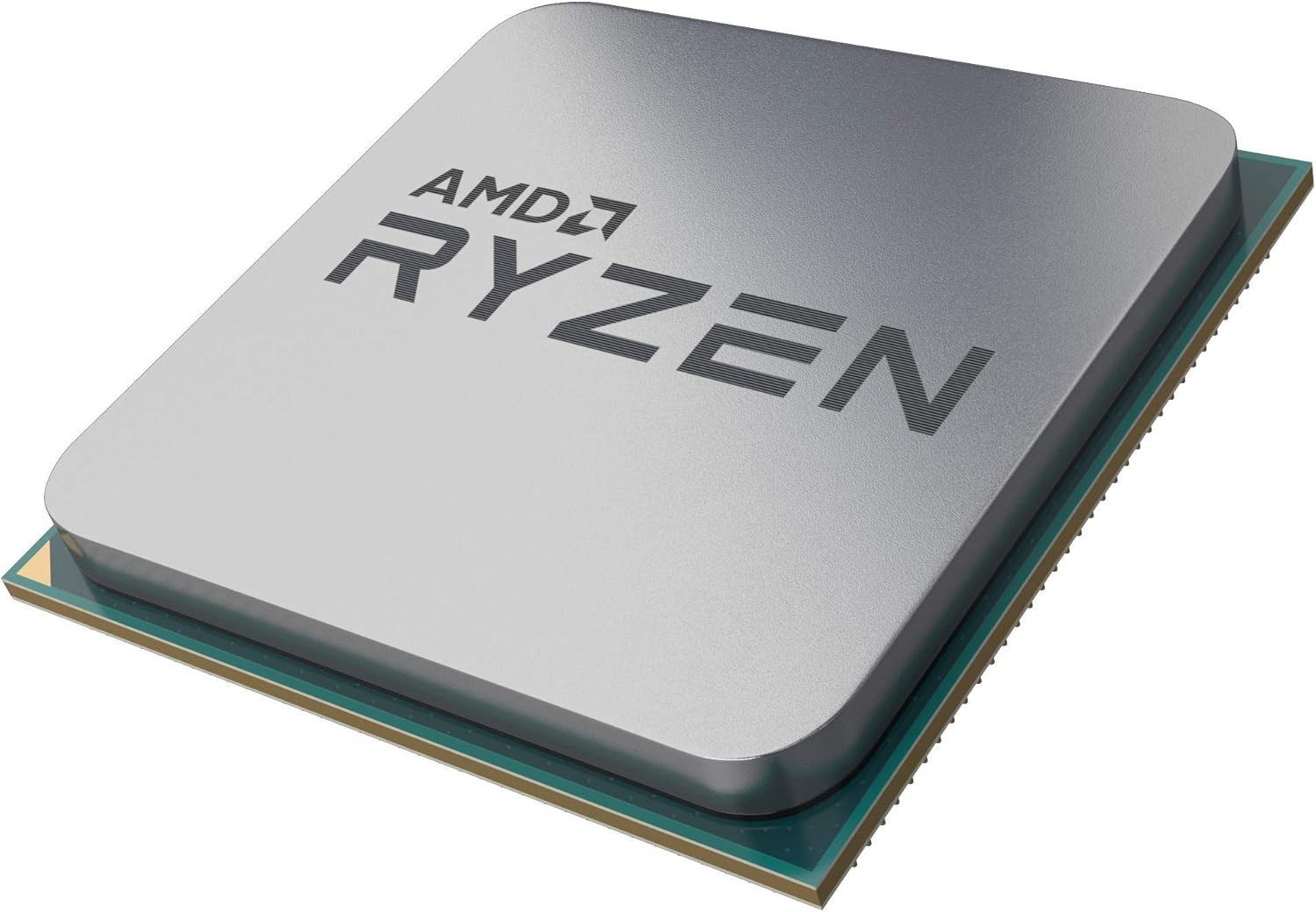
Figure 3: AMD Ryzen 9 3950X Processor. A close-up view of the AMD Ryzen 9 3950X processor, showing its integrated heat spreader (IHS) and pin grid array (PGA) design.
- Naneste teplovzdornou pastu (pokud je to nutné):
- If your cooler does not have pre-applied thermal paste, apply a small, pea-sized dot of thermal paste to the center of the processor's Integrated Heat Spreader (IHS).
- Do not spread the paste manually; the pressure from the cooler will spread it evenly.
- Instalace chladiče CPU:
- Follow the specific instructions provided with your CPU cooler for installation. Ensure it is securely mounted and makes firm contact with the processor's IHS.
- Connect the cooler's fan and pump cables to the appropriate headers on your motherboard (e.g., CPU_FAN, AIO_PUMP, USB headers for control software).
5. Obsluha procesoru
Once installed, your AMD Ryzen 9 3950X processor will operate automatically within your system. Here are some general operating considerations:
- Nastavení BIOSu/UEFI: Access your motherboard's BIOS/UEFI to verify the processor is recognized correctly and to enable features like XMP/DOCP for memory.
- Instalace ovladače: Nainstalujte nejnovější ovladače čipsetu od AMD webweb pro optimální výkon a stabilitu.
- Sledování: Use software utilities (e.g., AMD Ryzen Master, HWMonitor) to monitor CPU temperatures, clock speeds, and utilization. Maintain temperatures below 95°C for safe operation.
- Přetaktování: The Ryzen 9 3950X is unlocked for overclocking. Refer to advanced guides and exercise caution if attempting to overclock, as it may affect system stability and warranty.
6. Údržba
Regular maintenance helps ensure the longevity and performance of your processor.
- Odstranění prachu: Periodically clean dust from your CPU cooler and case fans to maintain efficient airflow and cooling.
- Opětovná aplikace termální pasty: If you remove your CPU cooler for any reason, clean off the old thermal paste from both the CPU and cooler base using isopropyl alcohol and reapply fresh thermal paste before reinstallation.
- Aktualizace softwaru: Keep your operating system, motherboard BIOS/UEFI, and AMD chipset drivers updated to benefit from performance improvements and bug fixes.
7. Řešení problémů
If you encounter issues, consider these common troubleshooting steps:
- Žádné problémy se zobrazením/spouštěním:
- Ujistěte se, že všechny napájecí kabely (24pinový ATX, 8pinový CPU) jsou bezpečně připojeny.
- Verify the CPU is correctly seated in the socket and the cooler is properly installed.
- Zkontrolujte, zda jsou moduly RAM zcela usazeny ve svých slotech.
- Confirm your motherboard BIOS/UEFI supports the Ryzen 9 3950X.
- Vysoké teploty:
- Check CPU cooler mounting pressure and thermal paste application.
- Ensure case airflow is adequate and fans are operating correctly.
- Verify pump and fan speeds are set appropriately in BIOS/UEFI or software.
- Nestabilita/pády systému:
- Aktualizujte BIOS/UEFI základní desky a ovladače čipové sady.
- Test memory stability (e.g., with MemTest86).
- Pokud je přetaktováno, vraťte se k výchozímu nastavení a zkontrolujte stabilitu.
8. Záruka a podpora
AMD processors typically come with a limited warranty. For specific warranty terms, conditions, and duration, please refer to the official AMD website or the documentation included with your processor. For technical support, driver downloads, and further assistance, visit the Podpora AMD webmísto.