
1. Úvod
This manual provides essential instructions for the safe and effective installation, operation, and maintenance of your IBM X3550 M4 550W Hot Swap Power Supply. Please read this manual thoroughly before installation and keep it for future reference. This power supply is designed for use in compatible IBM X3550 M4 server systems.
2. Bezpečnostní informace
Vždy dodržujte následující bezpečnostní opatření, abyste předešli zranění nebo poškození zařízení:
- Elektrické nebezpečí: Disconnect all power cords from the server before installing or removing the power supply. Ensure the server is completely powered off.
- Statický výboj: Use an electrostatic discharge (ESD) wrist strap or take other anti-static precautions when handling the power supply to prevent damage to sensitive electronic components.
- Větrání: Ensure proper airflow around the server and power supply. Do not block ventilation openings.
- Kvalifikovaný personál: Installation and maintenance should only be performed by qualified service personnel.
- Upozornění na výměnu za provozu: While designed for hot-swapping, always follow server manufacturer guidelines for proper hot-swap procedures to avoid system disruption.
3. Konec produktuview
The IBM X3550 M4 550W Hot Swap Power Supply is a critical component designed to provide reliable power to your server. It features a hot-swap design, allowing for replacement without powering down the entire system, enhancing server uptime and serviceability.

Obrázek 3.1: Strana view of the IBM X3550 M4 550W Hot Swap Power Supply, showing the extraction handle.

Obrázek 3.2: Nahoru view of the power supply, illustrating its compact form factor.
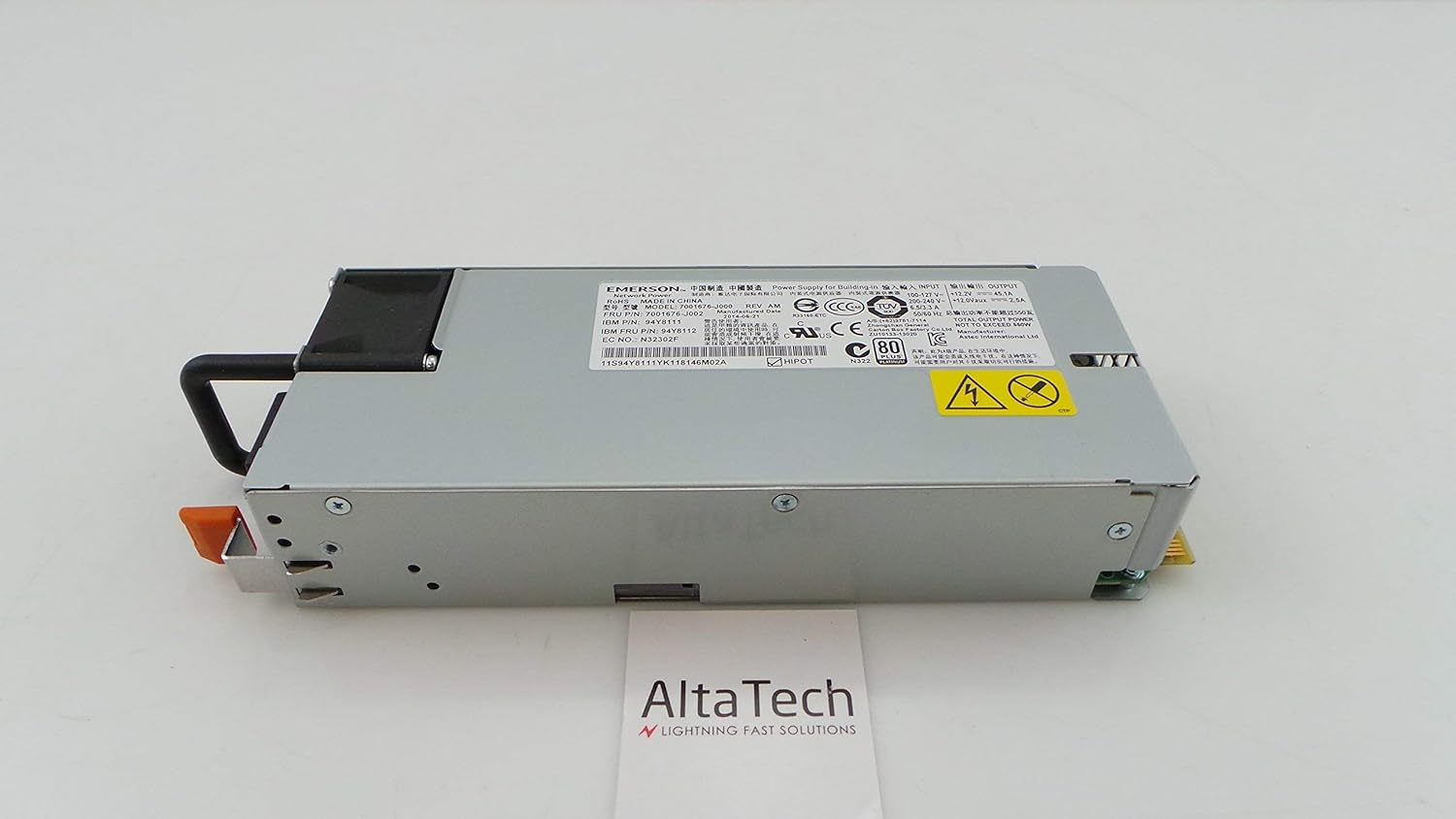
Obrázek 3.3: Zadní view of the power supply, showing the electrical connectors designed for hot-swap functionality.

Obrázek 3.4: Detailní view of the product label, displaying model numbers (e.g., 94Y8111, 7001676-J002) and manufacturing information. The serial number for this unit is 11S94Y8111YK118146M02A.
4. Nastavení a instalace
Follow these steps to properly install the hot-swap power supply into your IBM X3550 M4 server. Refer to your server's documentation for specific bay locations and procedures.
- Příprava: Ensure the server is in a stable environment. If replacing an existing power supply, identify the faulty unit.
- Bezpečnost především: Always wear an ESD wrist strap and ensure proper grounding.
- Demontáž staré jednotky (pokud je k dispozici): If replacing, disconnect the power cord from the old power supply. Press the release latch (if present) and use the handle to slide the old power supply out of its bay.
- Insert New Unit: Align the new power supply with the empty bay. Gently slide the power supply into the bay until it clicks securely into place. Ensure it is fully seated.
- Připojte napájení: Connect the appropriate power cord to the newly installed power supply and then to a grounded electrical outlet.
- Ověřte: Check the status indicator lights on the power supply and the server's control panel to confirm proper operation.
5. Návod k obsluze
Once installed, the power supply operates automatically. It continuously provides power to the server and manages power distribution. Key operational aspects include:
- Indikátory stavu: Most server power supplies include LED indicators. A green or amber light typically indicates operational status. Refer to your server's manual for specific LED meanings.
- Redundance: In systems with multiple power supplies, this unit contributes to power redundancy, ensuring continuous operation even if one power supply fails.
- Možnost výměny za provozu: This power supply can be replaced while the server is running, provided the server supports hot-swap functionality and has sufficient remaining power capacity from other power supplies.
6. Údržba
Regular maintenance helps ensure the longevity and reliability of your power supply:
- Odstranění prachu: Periodically inspect the power supply and server for dust accumulation. Use compressed air to gently clean vents and fan areas. Ensure the server is powered off and unplugged before cleaning.
- Správa kabelů: Ensure all power cables are securely connected and not obstructing airflow.
- Kontrola prostředí: Operate the server in a clean, temperature-controlled environment to prevent overheating and dust buildup.
- Inspekce: Visually inspect the power supply for any signs of damage, such as bulging capacitors or burnt components, during routine server maintenance.
7. Řešení problémů
Pokud narazíte na problémy se zdrojem napájení, zvažte následující běžné kroky pro řešení problémů:
- Bez napájení:
- Verify the power cord is securely connected to both the power supply and the electrical outlet.
- Zkontrolujte funkčnost zásuvky pomocí jiného zařízení.
- Ensure the server's main power switch is in the ON position.
- Error Indicator Light:
- An amber or red indicator light typically signals a fault. Consult your server's documentation for specific error codes or patterns.
- Attempt to reseat the power supply by sliding it out and reinserting it firmly.
- If the issue persists, the power supply may be faulty and require replacement.
- System Instability/Unexpected Shutdowns:
- This could indicate an intermittent power supply issue or insufficient power.
- Ensure the server's cooling system is functioning correctly to prevent overheating, which can stress power components.
- If multiple power supplies are present, check if one is failing.
If troubleshooting steps do not resolve the issue, contact technical support or consider replacing the unit.
8. Specifikace
| Funkce | Detail |
|---|---|
| Značka | IBM |
| Čísla modelů | 94Y8112, 7001676-J002, 94Y8111 |
| Výstupní Wattage | 550 wattů |
| Typ | Hot Swap napájecí zdroj |
| Kompatibilní zařízení | IBM X3550 M4 Personal Computer Servers |
| UPC | 714752780645 |
| Číslo dílu výrobce | 94Y8112-cr |
9. Záruka a podpora
This IBM X3550 M4 550W Hot Swap Power Supply (Renewed) typically comes with a 30denní záruka from the seller. Additionally, as an Amazon Renewed product, it is eligible for replacement or refund under the Obnovená záruka Amazonu pokud nejste s nákupem spokojeni.
For technical support or warranty claims, please contact the seller directly or refer to the Amazon Renewed program details for assistance.