
Geemarc CL595
Geemarc CL595 AmpUživatelská příručka pro kabelový telefon
Model: CL595
Zavedení
This manual provides comprehensive instructions for the setup, operation, and maintenance of your Geemarc CL595 Amplified Corded Telephone. Designed for ease of use, particularly for seniors and individuals with moderate to severe hearing loss, the CL595 features amplified sound, large buttons, and specialized functions like photo memory keys and an SOS emergency call system. Please read this manual thoroughly to ensure proper use and to maximize the benefits of your telephone.
1. Nastavení
Follow these steps to set up your Geemarc CL595 telephone:
- Rozbalení: Carefully remove all components from the packaging. Ensure you have the telephone base, handset, coiled handset cord, telephone line cord, and power adapter.
- Instalace baterie: The telephone requires 3 AAA batteries (not included) for certain functions like memory retention during power outages. Open the battery compartment on the underside of the base and insert the batteries, observing polarity.
- Připojení sluchátka: Plug one end of the coiled handset cord into the handset and the other end into the designated port on the left side of the telephone base.
- Připojení telefonní linky: Plug one end of the telephone line cord into the "LINE" port on the back of the telephone base and the other end into your wall telephone jack.
- Připojte napájecí adaptér: Plug the power adapter into the "DC IN" port on the back of the telephone base, then plug the adapter into a standard electrical outlet.
- Počáteční zapnutí: The telephone display should light up. Follow any on-screen prompts to set the date, time, and language.

Obrázek 1: Přední strana view of the Geemarc CL595 telephone, showing the handset, large keypad, display, and photo memory buttons. This illustrates the overall design and key user interface elements.
2. Návod k obsluze
This section details the various functions and how to operate your CL595 telephone.
2.1 Základní funkce volání
- Uskutečnění hovoru: Lift the handset, wait for a dial tone, then dial the desired number using the large keypad.
- Příjem hovoru: Když telefon zvoní, zvedněte sluchátko pro přijetí hovoru.
- Ukončení hovoru: Place the handset back on the base.
- Hlasitý telefon: Stiskněte tlačítko REPRODUKTOR button to activate the speakerphone function. Press it again to deactivate.
2.2 Amplified Volume and Hearing Aid Compatibility
- Reception Volume: The telephone offers 6 levels of reception amplification. Adjust the volume during a call using the dedicated volume buttons.
- Funkce Boost: Stiskněte tlačítko SOS/AMPLIFY button during a call to instantly amplify the reception volume by up to 50dB. Press again to return to normal volume.
- Hlasitost vyzvánění: The powerful ringer can reach up to 80dB. Adjust the ringer volume using the settings menu.
- Kompatibilita s naslouchátky: If you use hearing aids, switch them to the "T" position for optimal sound quality during calls.
2.3 Photo Memory Keys
The CL595 features three customizable photo memory keys (M1, M2, M3) for quick dialing of frequently called numbers.
- Programování:
- Zvedněte sluchátko.
- Stiskněte tlačítko OBCHOD button (if available, or refer to specific menu instructions).
- Vytočte telefonní číslo, které chcete uložit.
- Press the desired photo memory key (M1, M2, or M3).
- Vyměňte sluchátko.
- Uskutečnění hovoru: Simply lift the handset and press the desired photo memory key (M1, M2, or M3) to dial the stored number.
- Customizing Photos: Lift the transparent cover on each photo key, insert a small photo of the contact, and replace the cover.
2.4 Záznamník
Integrovaný záznamník dokáže nahrát až 30 minut zpráv.
- Přístup ke zprávám: Press the dedicated answering machine button on the base to play back messages.
- Zpomalené přehrávání: If a message is spoken too quickly, activate the "slow playback" function (refer to the menu for specific steps) to listen at a reduced speed.
2.5 Funkce nouzového volání SOS
Červená SOS button on the base activates an emergency call sequence.
- Programming SOS Numbers:
- Access the SOS settings in the telephone menu.
- Program up to four emergency contact numbers in the desired calling order.
- Aktivace SOS: Stiskněte červenou SOS button on the base. The telephone will automatically dial the pre-programmed numbers one after another until a connection is made.
2.6 VIP Directory and Call Blocking
- VIP Directory: You can store up to 50 trusted numbers in a special "VIP" directory. The telephone can be configured to only accept incoming calls from numbers listed in this directory.
- Blokování hovorů: The CL595 allows you to block up to 100 unwanted numbers. Access the call blocking settings in the menu to add numbers to the block list.
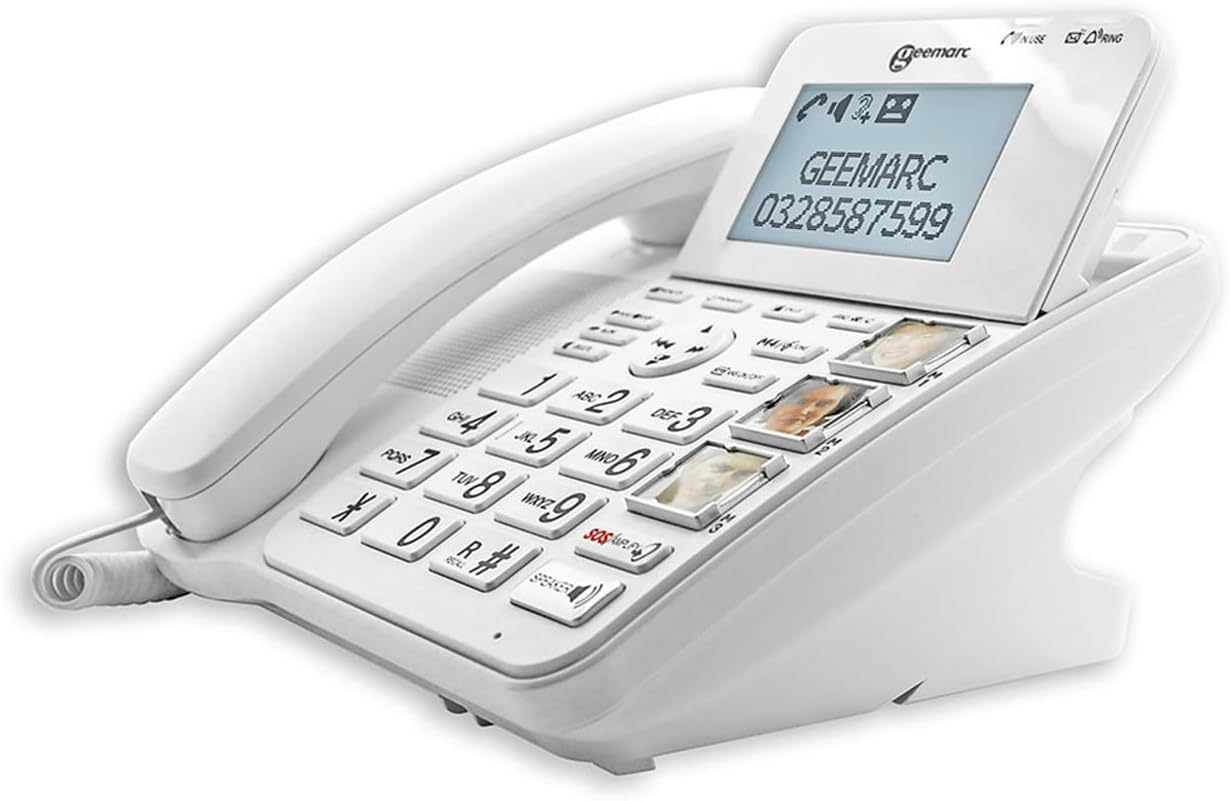
Obrázek 2: Úhlové view of the Geemarc CL595, highlighting the large, well-spaced buttons, the digital display, and the three photo memory keys. This image demonstrates the user-friendly interface for dialing and accessing features.
3. Údržba
Správná údržba zajistí dlouhou životnost a optimální výkon vašeho telefonu.
- Čištění: Použijte měkký, damp cloth to clean the telephone's exterior. Do not use abrasive cleaners or solvents. Ensure no liquid enters the telephone's openings.
- Výměna baterie: If the telephone uses AAA batteries for backup, replace them periodically (e.g., annually) or if the low battery indicator appears.
- Skladování: Store the telephone in a cool, dry place away from direct sunlight and extreme temperatures when not in use for extended periods.
4. Řešení problémů
If you encounter issues with your Geemarc CL595, refer to the following common problems and solutions:
| Problém | Možná příčina | Řešení |
|---|---|---|
| Žádný oznamovací tón | Telefonní kabel je odpojený nebo vadný. | Ujistěte se, že je telefonní kabel bezpečně připojen k telefonu i k zásuvce ve zdi. Pokud je to možné, vyzkoušejte s jiným telefonem. |
| Neslyším volajícího / Volající neslyší mě | Volume settings are too low; handset or line cord issue. | Adjust reception volume using the dedicated buttons or activate the Boost function. Check handset cord connection. |
| Telefon nezvoní | Ringer volume is off or set too low. | Check ringer volume settings in the menu. Ensure "Do Not Disturb" or similar features are not active. |
| Displej je prázdný | Power adapter is disconnected or power outage. | Ensure the power adapter is securely connected to the phone and a working electrical outlet. Check household power. |
If the problem persists after trying these solutions, please contact Geemarc customer support for further assistance.
5. Specifikace
- Model: CL595
- Typ: Kabelový telefon
- Rozměry (D x Š x V): 19 x 20 x 27 cm (přibližně)
- Hmotnost: 1 kilogram
- Zdroj napájení: Elektrický kabel
- Baterie: 3 x AAA (for backup, not included)
- Velikost obrazovky: 5 inches (display)
- Recepce Ampzvedání: Up to +50dB (with Boost function)
- Hlasitost vyzvánění: Až 80 dB
- Kompatibilita s naslouchátky: Yes (T-position)
- Záznamník: Digitální, doba nahrávání až 30 minut
- Photo Memory Keys: 3 přímá paměťová tlačítka
- VIP Directory Capacity: Až 50 čísel
- Kapacita blokování hovorů: Až 100 čísel
- Kompatibilní zařízení: PSTN (veřejná telefonní síť)
- Výrobce: Geemarc Telecom
- Země původu: Čína
6. Záruka a podpora
Záruka: The Geemarc CL595 typically comes with a 1-year parts availability guarantee. For specific warranty terms and conditions, please refer to the documentation provided with your purchase or contact your retailer.
Zákaznická podpora: For technical assistance, troubleshooting beyond this manual, or warranty inquiries, please contact Geemarc customer service. Contact details can usually be found on the manufacturer's webna webu nebo v obalu vašeho produktu.
Související dokumenty - CL595
 |
Geemarc CL595 AmpUživatelská příručka pro kabelový telefon Lified Uživatelská příručka pro Geemarc CL595 ampzabezpečený kabelový telefon s podrobným popisem nastavení, funkcí a řešení problémů. Naučte se, jak jej používat ampživý zvuk, velká tlačítka a různé funkce pro vylepšenou komunikaci. |
 |
Geemarc CL595 AmpStručný průvodce pro kabelový telefon Lified Stručný návod k použití pro Geemarc CL595 ampzabezpečený drátový telefon s podrobným popisem jeho funkcí, nastavení, obsluhy, funkce SOS, záznamníku a technických specifikací. Tento telefon kompatibilní s naslouchátky je navržen pro snadné použití s velkými tlačítky a jasným displejem. |
 |
Stručný návod k obsluze kabelového telefonu Geemarc CL595 Stručný návod k použití kabelového telefonu Geemarc CL595, včetně instalace a základny.view, nastavení nabídky, funkce SOS, ovládání záznamníku a technické specifikace. |
 |
Uživatelská příručka Geemarc CL595 Komplexní uživatelská příručka pro telefon Geemarc CL595, která zahrnuje nastavení, funkce a řešení problémů. |
 |
Geemarc CL610 Amplified Telephone with SOS Emergency Calls - User Guide Explore the Geemarc CL610 amplified telephone, featuring up to 40dB volume boost, SOS emergency calling, large buttons, and hearing aid compatibility. Ideal for users with hearing difficulties seeking safety and clear communication. |
 |
Uživatelská příručka k telefonu Geemarc CL9000 4G s nouzovým voláním SOS Prozkoumejte Geemarc CL9000, 4G ampTelefon s nouzovými funkcemi SOS a kompatibilitou se sluchátky. Tato uživatelská příručka vás provede nastavením, obsluhou a bezpečností pro jasnou komunikaci a klid. |
Ask a question about this manual
Ask about setup, troubleshooting, compatibility, parts, safety, or missing instructions. Manuals+ will review the question and use this page’s manual context to help answer it.