
EARISE M37
EARISE M37 Wooden Box PA System User Manual
Model: M37
1. Konec produktuview
The EARISE M37 is a portable 100W PA system designed for various audio applications, including home parties, small events, and karaoke. It features a wooden cabinet for enhanced acoustics, built-in Bluetooth connectivity, and comes with two wireless microphones for immediate use. The system supports multiple audio inputs including AUX and USB, offering versatile playback options.

Image: The EARISE M37 PA system, showcasing its wooden box design and two included wireless microphones.
2. Bezpečnostní informace
- Nevystavujte jednotku dešti ani vlhkosti, abyste předešli požáru nebo úrazu elektrickým proudem.
- Do not open the cabinet. There are no user-serviceable parts inside. Refer all servicing to qualified personnel.
- Zajistěte dostatečné větrání kolem jednotky. Neblokujte větrací otvory.
- Neumísťujte jednotku do blízkosti zdrojů tepla, jako jsou radiátory, topná tělesa, kamna nebo jiná zařízení (včetně amplifikátory), které produkují teplo.
- Chraňte napájecí kabel před šlapáním nebo přiskřípnutím, zejména u zástrček, zásuvek a v místě, kde vychází z přístroje.
- Odpojte toto zařízení během bouřky s blesky nebo když se delší dobu nepoužívá.
3. Obsah balení
Zkontrolujte prosím balení, zda neobsahuje následující položky:
- EARISE M37 PA System Unit
- 2 x bezdrátové mikrofony
- Dálkový ovladač
- Napájecí adaptér
- Uživatelská příručka (tento dokument)

Image: A visual representation of key features and included accessories: wireless microphone, Bluetooth 4.2, USB auto-play, and remote controller.
4. Vlastnosti a komponenty produktu
Familiarize yourself with the main components and controls of your EARISE M37 PA System.

Image: The control panel of the EARISE M37, showing various inputs and adjustment knobs. Key controls include: Mode, Previous/Next Track, Play/Pause, Record, EQ, Light, Mic 1/2 inputs, AUX In/Out, USB, TF card slot, DC Power In, ON/OFF switch, Charging indicator, ECHO, DELAY, MIC VOL, MASTER VOL, TREBLE, EXTRA BASS, and BASS.
Funkce ovládacího panelu:
- REŽIM: Switches between input modes (Bluetooth, AUX, USB, TF Card).
- Předchozí/následující skladba: Prochází skladby během přehrávání médií.
- Přehrát/pozastavit: Ovládá přehrávání médií.
- Záznam: Initiates or stops recording (requires USB/TF storage).
- EQ: Upravuje nastavení ekvalizace.
- Světlo: Ovládá integrované LED osvětlení.
- MIC 1 / MIC 2: Inputs for wired microphones (if used).
- AUX IN / AUX OUT: Audio input and output jacks for external devices.
- USB: USB port for media playback or recording.
- TF: TF (MicroSD) card slot for media playback or recording.
- DC Power IN: Vstupní proud pro nabíjení a provoz.
- ZAPNUTO VYPNUTO: Vypínač pro jednotku.
- Indikátor nabíjení: Kontrolka indikující stav nabíjení.
- ECHO: Upravuje efekt ozvěny pro mikrofony.
- ZPOŽDĚNÍ: Adjusts the delay effect for microphones.
- MIC VOL: Upravuje hlasitost mikrofonů.
- MASTER VOL: Controls the overall master volume of the system.
- ZTROJNÁSOBIT: Upravuje vysokofrekvenční zvukový výstup.
- EXTRA BASS: Vylepšuje výstup nízkofrekvenčního zvuku.
- BAS: Upravuje nízkofrekvenční zvukový výstup.
5. Nastavení
5.1 Charging the PA System
Before first use, fully charge the PA system. Connect the provided power adapter to the "DC Power IN" port on the unit and plug it into a standard wall outlet. The charging indicator light will show the charging status. A full charge provides up to 7 hours of play time.

Image: Illustration highlighting the 3600mAh battery capacity, providing up to 7 hours of continuous play time.
5.2 Nastavení bezdrátového mikrofonu
The two wireless microphones are pre-paired with the PA system. Insert AA batteries (not included) into each microphone. Turn on the microphones using their respective power switches. They should automatically connect to the PA system.
5.3 Připojení zdrojů zvuku
Připojení Bluetooth:
- Turn on the EARISE M37 PA system.
- Stiskněte tlačítko MODE button until the display shows "Bluetooth" or a Bluetooth icon.
- Na svém mobilním zařízení (chytrém telefonu, tabletu atd.) povolte Bluetooth a vyhledejte dostupná zařízení.
- Select "EARISE M37" from the list. Once connected, you will hear a confirmation sound.

Image: A hand holding a smartphone displaying a Bluetooth connection screen, indicating the ease of pairing with the EARISE M37 PA system.
Přehrávání z USB/TF karty:
Vložte USB flash disk nebo TF (MicroSD) kartu s MP3 audio soubory files into the respective port. The system will automatically detect and begin playing music. Use the Previous/Next Track and Play/Pause buttons to control playback.
Vstup AUX:
Připojte externí audio zařízení (např. MP3 přehrávač, počítač) k AUX IN port using a 3.5mm audio cable (not included). Press the MODE button until AUX input is selected.
6. Návod k obsluze
6.1 Zapnutí/vypnutí
To turn the unit on or off, use the ON/OFF switch located on the control panel.
6.2 Nastavení hlasitosti a efektů
- MASTER VOL: Rotate this knob to adjust the overall volume of the PA system.
- MIC VOL: Upravuje hlasitost připojených mikrofonů.
- ECHO / DELAY: Use these knobs to add or reduce echo and delay effects to the microphone sound.
- TREBLE / BASS / EXTRA BASS: Adjust these knobs to fine-tune the high and low frequencies of the audio output.
6.3 Používání mikrofonů
Once the wireless microphones are powered on and connected, speak into them. Adjust the MIC VOL, ECHOa ZPOŽDĚNÍ knobs on the PA system to achieve the desired sound. For optimal performance, hold the microphone a few inches from your mouth.

Image: Two individuals enjoying karaoke with the EARISE M37 PA system and its wireless microphones, demonstrating typical usage.
6.4 Funkce nahrávání
To record audio (e.g., microphone input or music playback), ensure a USB flash drive or TF card is inserted into the corresponding slot. Press the ZÁZNAM button to start recording. Press it again to stop. Recorded files will be saved to the inserted storage device.
7. Údržba
- Čistěte přístroj měkkým, suchým hadříkem. Nepoužívejte abrazivní čisticí prostředky ani rozpouštědla.
- PA systém skladujte na chladném a suchém místě mimo dosah přímého slunečního záření a extrémních teplot.
- If the unit will not be used for an extended period, fully charge the battery before storage and recharge it every few months to maintain battery health.
8. Řešení problémů
| Problém | Možná příčina | Řešení |
|---|---|---|
| Žádná síla | Baterie je vybitá; napájecí kabel není připojen. | Charge the unit; Ensure power cable is securely connected. |
| Žádný zvuk z mikrofonů | Microphones off; Batteries low/dead; MIC VOL too low. | Turn on microphones; Replace batteries; Increase MIC VOL. |
| Bluetooth se nepřipojuje | PA system not in Bluetooth mode; Device too far; Interference. | Press MODE button to select Bluetooth; Move device closer; Restart both devices. |
| USB/TF karta nepřehrává | Nesprávný file formát; Karta/mechanika nebyla správně vložena; Poškozeno files. | Zajistit files are MP3; Reinsert card/drive; Try different files/device. |
9. Specifikace
| Funkce | Detail |
|---|---|
| Značka | EARISE |
| Model | M37 |
| Výstupní Wattage | 100 wattů |
| Zdroj napájení | Napájení z baterie |
| Technologie připojení | Bluetooth, USB, AUX |
| Verze Bluetooth | 4.2 (from image) |
| Zvukový vstup | Wireless Microphone, AUX |
| Počet kanálů | 2 |
| Hmotnost položky | 11.62 libry |
| Rozměry balení | 18.7 x 12 x 11.9 palce |
| Rozměry produktu (přibližně) | 32.5 cm (12.8 in) H x 25.5 cm (10 in) W x 23.8 cm (9.4 in) D |
| Barva | Černý |
| Typ montáže | Stolní deska |
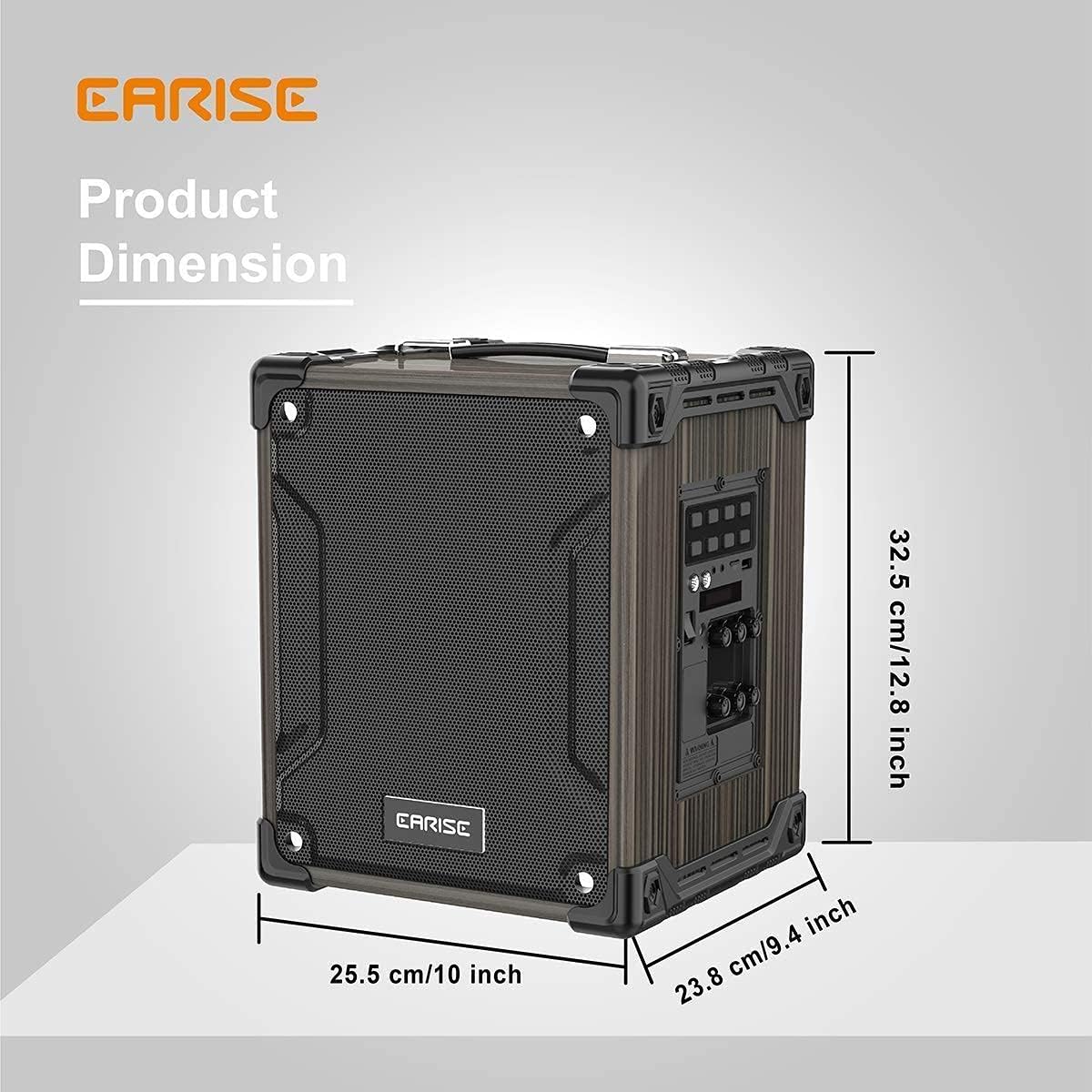
Image: Product dimensions of the EARISE M37, measuring approximately 32.5 cm (12.8 inches) in height, 25.5 cm (10 inches) in width, and 23.8 cm (9.4 inches) in depth.
10. Záruka a podpora
For warranty information or technical support, please refer to the contact details provided with your purchase or visit the official EARISE webUschovejte si doklad o koupi pro případ reklamace.
Ask a question about this manual
Ask about setup, troubleshooting, compatibility, parts, safety, or missing instructions. Manuals+ will review the question and use this page’s manual context to help answer it.