
1. Úvod
Thank you for choosing the iClever BK10 Bluetooth Keyboard. This manual provides essential information for setting up, operating, maintaining, and troubleshooting your new wireless keyboard. Please read it carefully to ensure optimal performance and longevity of your device.
Co je v krabici
- Bluetooth klávesnice iClever BK10
- Nabíjecí kabel USB-C
- Uživatelská příručka
- Protective Silicone Cover (for key protection)

Figure 1: Included items with the iClever BK10 Bluetooth Keyboard.
2. Klíčové vlastnosti
- Sleek & Wireless Design: Constructed with stainless steel and ABS, featuring a 10-degree tilt for comfortable desktop use.
- Multi-Device & Multi-OS Compatibility: Seamlessly switch between up to 3 devices using Bluetooth 5.1 technology. Automatically recognizes and adapts to Windows, macOS, iPadOS, Android, iPhone, and Chromebooks.
- Responzivní a nízkoprofesionálnífile Klíče: Scissor-key mechanism provides enhanced feedback, stability, and quiet typing (below 50 dB). Optimized key-travel and anti-slip tapes ensure comfort and precision.
- Compact & Efficient: Full-size layout with a standard numeric keypad. Includes hotkeys for Calculator, Fn lock, Mute, Volume up/down, and more to boost productivity.
- USB-C Rechargeable & Energy Saving: Built-in rechargeable battery offers up to 45 days of use after a 2-hour charge. Features an automatic power-saving sleep mode after 30 minutes of inactivity.
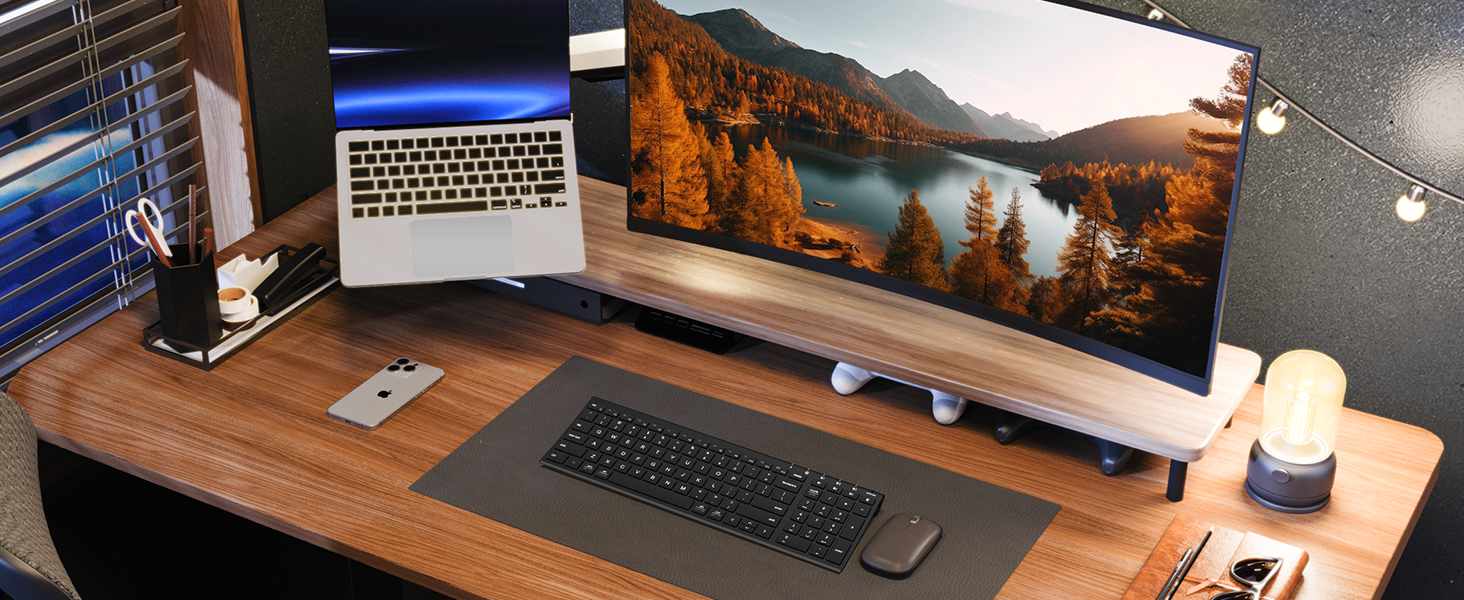
Figure 2: The sleek and wireless design of the iClever BK10 keyboard.
3. Nastavení
3.1 Nabíjení klávesnice
Before initial use, fully charge the keyboard using the provided USB-C cable. Connect the USB-C end to the keyboard's charging port (located on the right side) and the USB-A end to a power source (e.g., computer USB port, USB wall adapter). The charging indicator light will illuminate during charging and turn off when fully charged.

Figure 3: USB-C charging port on the iClever BK10 keyboard.
3.2 Zapnutí/vypnutí
Locate the ON/OFF switch on the top right side of the keyboard. Slide the switch to the 'ON' position to power on the keyboard. Slide it to 'OFF' when not in use to conserve battery life.
3.3 Párování Bluetooth
The iClever BK10 keyboard supports pairing with up to three devices simultaneously. Follow these steps to pair your devices:
- Zapněte klávesnici pomocí vypínače ON/OFF.
- Press and hold one of the Bluetooth channel keys (B1, B2, or B3) for 3-5 seconds until its indicator light starts flashing rapidly. This indicates the keyboard is in pairing mode.
- Na svém zařízení (počítači, tabletu, chytrém telefonu) přejděte do nastavení Bluetooth a vyhledejte dostupná zařízení.
- Select "iClever BK10" from the list of found devices.
- Postupujte podle pokynů na obrazovce a dokončete proces párování. Kontrolka na klávesnici přestane blikat a několik sekund zůstane svítit nepřerušovaně, poté zhasne, což signalizuje úspěšné párování.
- Repeat these steps for up to two additional devices using the other Bluetooth channel keys (B2 and B3).

Figure 4: Multi-device connectivity of the iClever BK10 keyboard.
4. Návod k obsluze
4.1 Přepínání mezi zařízeními
To switch between paired devices, simply press the corresponding Bluetooth channel key (B1, B2, or B3) once. The keyboard will connect to the selected device automatically.
4.2 Function Keys and Hotkeys
The iClever BK10 keyboard features a row of function keys (F1-F12) that also serve as hotkeys for various media and system controls. To use the hotkey functions, press the 'Fn' key simultaneously with the desired function key. Some common hotkeys include:
- Fn+F1: Domov
- Fn+F2: Hledat
- Fn+F3: Vyberte Vše
- Fn+F4: Kopie
- Fn+F5: Pasta
- Fn+F6: Střih
- Fn+F7: Předchozí stopa
- Fn+F8: Přehrát/Pozastavit
- Fn+F9: Další stopa
- Fn+F10: Ztlumit
- Fn+F11: Snížit hlasitost
- Fn+F12: Zvýšení hlasitosti
The keyboard also includes dedicated keys for Calculator, Fn lock, and a standard numeric keypad for efficient data entry.

Obrázek 5: Přesview of keyboard layout and multi-OS features.
4.3 Operating System Layout Recognition
The keyboard automatically recognizes different operating systems (Windows, macOS, iPadOS, Android) and adjusts its key layout accordingly. For example, the 'Win' key functions as 'Alt' on Mac, and 'Alt' functions as 'Cmd'.
5. Údržba
5.1 Čištění
Chcete-li klávesnici vyčistit, vypněte ji a odpojte všechny kabely. Použijte měkký hadřík, který nepouští vlákna, lehce navlhčený.ampened with water or a mild cleaning solution. Avoid excessive moisture and harsh chemicals. The included silicone cover can be removed and washed with mild soap and water.
5.2 Péče o baterii
Pro maximalizaci životnosti baterie:
- Vyhněte se častému úplnému vybíjení baterie.
- Charge the keyboard when the battery indicator is low.
- Pokud klávesnici delší dobu nepoužíváte, skladujte ji na chladném a suchém místě.
- The keyboard enters a power-saving sleep mode after 30 minutes of inactivity. Press any key to wake it up.
6. Řešení problémů
6.1 Klávesnice se nepřipojuje/nepáruje
- Ujistěte se, že je klávesnice zapnutá a plně nabitá.
- Ujistěte se, že je na vašem zařízení povoleno Bluetooth.
- Place the keyboard within the effective range (typically 10 meters) of your device.
- If already paired, try unpairing the keyboard from your device's Bluetooth settings and then re-pairing it.
- Zkuste restartovat klávesnici i zařízení.
6.2 Klávesy nereagují
- Check if the keyboard is connected to the correct device (verify the active Bluetooth channel).
- Ujistěte se, že baterie není kriticky vybitá.
- Očistěte veškeré nečistoty z okolí postižených kláves.
6.3 Connectivity Issues/Lag
- Reduce interference by moving away from other wireless devices (e.g., Wi-Fi routers, cordless phones).
- Ujistěte se, že ovladače Bluetooth vašeho zařízení jsou aktuální.
- Try connecting to a different Bluetooth channel on the keyboard.
7. Specifikace
| Funkce | Detail |
|---|---|
| Číslo modelu | BK10 |
| Technologie připojení | Bluetooth 5.1 |
| Kompatibilní zařízení | Windows laptops/desktops, MacBook/iMac, iPad/iPhone, Android tablets/phones, Chromebooks |
| Počet klíčů | 104 |
| Typ přepínače kláves | Nůžkový spínač |
| Úroveň hluku | <50 dB |
| Zdroj napájení | Dobíjecí baterie (USB-C) |
| Životnost baterie | Up to 45 days (after 2 hours charging) |
| Rozměry produktu (D x Š x V) | 14.41 cm x 4.92 cm x 0.63 cm |
| Materiál | Akrylonitrilbutadienstyren, hliník |
8. Záruka a podpora
8.1 Informace o záruce
The iClever BK10 Bluetooth Keyboard comes with a Záruka 12 měsíců od data nákupu. Tato záruka se vztahuje na výrobní vady a zajišťuje, že váš výrobek při běžném používání neobsahuje vady materiálu a zpracování.
8.2 Zákaznická podpora
If you encounter any issues or have questions regarding your iClever BK10 Bluetooth Keyboard, please refer to the contact information provided in your product packaging or visit the official iClever support webmísto pro pomoc.