
Zavedení
This manual provides detailed instructions for the setup, operation, and maintenance of your CAMRY CR 1166 Weather Station. Please read this manual thoroughly before using the device to ensure proper function and longevity.
Bezpečnostní pokyny
- Udržujte zařízení mimo dosah vody a vysoké vlhkosti.
- Nevystavujte zařízení extrémním teplotám ani přímému slunečnímu záření po delší dobu.
- Používejte pouze určený napájecí adaptér nebo baterie.
- Nepokoušejte se zařízení rozebírat ani opravovat sami. Kontaktujte kvalifikovaný servisní personál.
- Uchovávejte mimo dosah dětí.
Obsah balení
Ověřte, zda jsou v balení přítomny všechny komponenty:
- CAMRY CR 1166 Weather Station (Main Unit)
- Dálkové venkovní čidlo
- Napájecí adaptér
- Návod k použití

Image: Main unit, remote sensor, and power adapter included in the package.
Nastavení
1. Zapnutí hlavní jednotky
- Použití AC napájení: Connect the provided AC power adapter to the main unit and plug it into a standard electrical outlet.
- Použití baterií (volitelné): Open the battery compartment on the back of the main unit and insert the required batteries (not included), observing polarity.
2. Setting up the Remote Outdoor Sensor
- Open the battery compartment of the remote sensor and insert the required batteries (not included), observing polarity.
- Place the remote sensor in a sheltered outdoor location, away from direct sunlight and rain, to ensure accurate temperature and humidity readings. Ensure it is within range of the main unit (connectivity technology: 433 MHz, 868 MHz).
3. Počáteční synchronizace
Once both the main unit and the remote sensor are powered, they should automatically synchronize. The outdoor temperature and humidity will appear on the main unit's display. If synchronization fails, refer to the Troubleshooting section.
Návod k obsluze
Zobrazit přesview
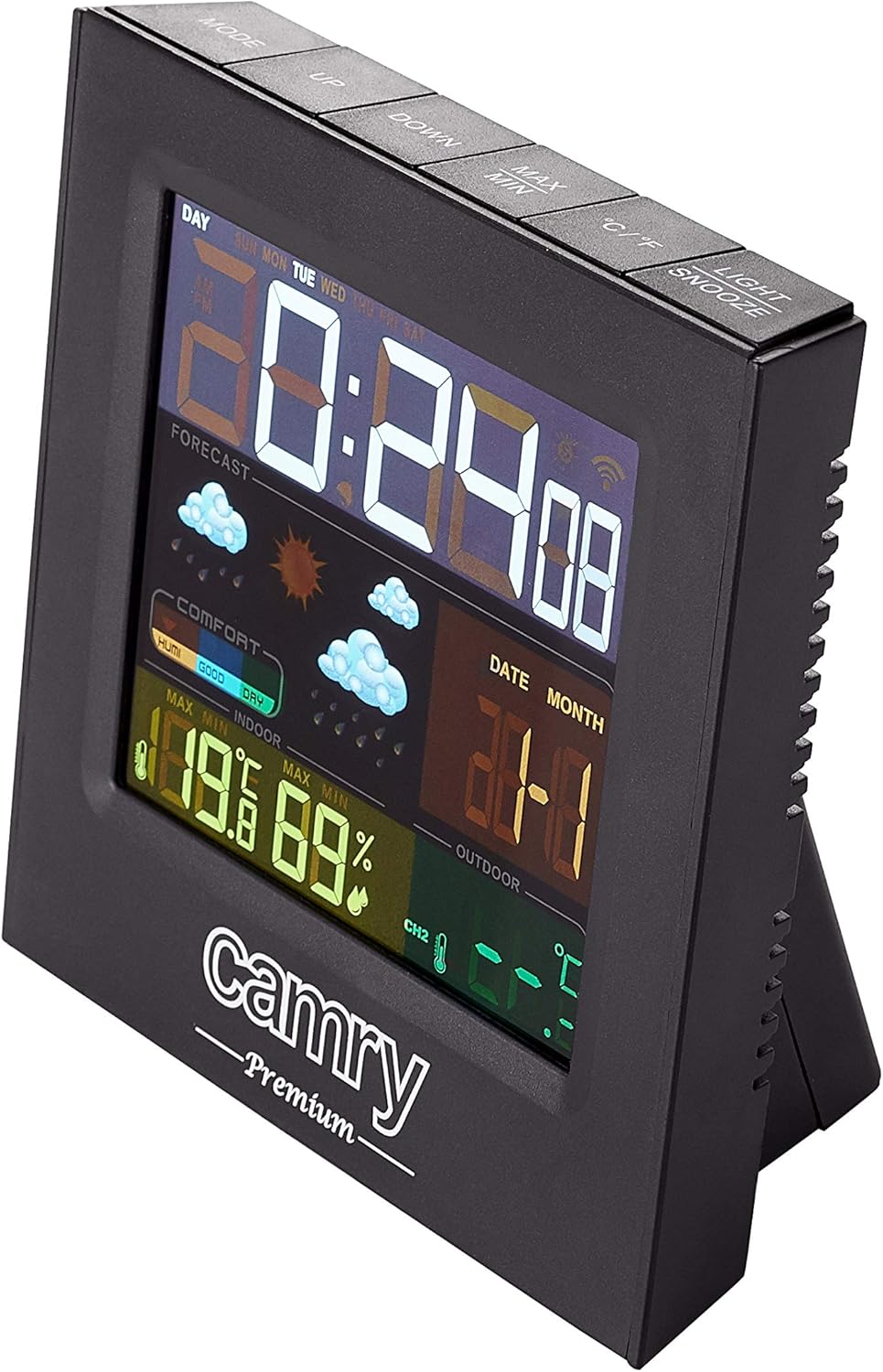
Obrázek: Podrobný view of the weather station's multi-colored LCD display.
The multi-colored LCD display shows various information:
- Čas a datum: Zobrazuje aktuální čas a datum.
- Předpověď počasí: Ikony označují předpovědi počasí (např. slunečno, oblačno, deštivo).
- Vnitřní teplota a vlhkost: Current readings for the indoor environment.
- Venkovní teplota a vlhkost: Aktuální hodnoty z dálkového senzoru.
- Indikátor úrovně pohodlí: Shows indoor comfort based on temperature and humidity.
Nastavení času a data
Refer to the buttons on the top of the unit (e.g., MODE, UP, DOWN).
- Stiskněte tlačítko MODE button to enter time/date setting mode.
- Použijte UP a DOLŮ tlačítka pro úpravu hodnot.
- Stiskněte MODE znovu pro potvrzení a přechod k dalšímu nastavení.
Funkce alarmu
The device includes an alarm clock function.
- Stiskněte tlačítko MODE button repeatedly until the alarm time is displayed.
- Použití UP a DOLŮ pro nastavení času budíku.
- Activate/deactivate the alarm using the designated button (e.g., ALARM ON/OFF or a long press of MODE).
Výběr jednotky teploty (°C/°F)
Stiskněte tlačítko ° C / ° F tlačítko pro přepínání mezi stupni Celsia a Fahrenheita.
Údržba
- Čištění: Zařízení otřete měkkým, suchým hadříkem. Nepoužívejte abrazivní čisticí prostředky ani rozpouštědla.
- Výměna baterie: Replace batteries in both the main unit and the remote sensor when the low battery indicator appears on the display.
- Umístění senzoru: Periodically check the outdoor sensor's placement to ensure it remains protected from direct weather elements and is within effective range.
Odstraňování problémů
| Problém | Možná příčina | Řešení |
|---|---|---|
| Na hlavní jednotce se nezobrazuje žádný displej. | Žádné napájení nebo vybité baterie. | Zkontrolujte připojení síťového adaptéru nebo vyměňte baterie. |
| Venkovní hodnoty se nezobrazují nebo jsou nepřesné. | Senzor mimo dosah, vybité baterie senzoru nebo rušení. |
|
| Inaccurate indoor temperature/humidity. | Unit placed near heat/cold source or in high humidity. | Move the main unit to a location with stable ambient conditions. |
Specifikace
| Model: | CR 1166 |
| Značka: | CAMRY |
| Rozměry produktu (D x Š x V): | 24 x 24 x 76 cm |
| Hmotnost: | 384 gramů |
| Materiál: | Plast |
| Barva: | Černý |
| Typ displeje: | LCD |
| Zdroj napájení: | AC Adapter or Battery |
| Technologie připojení: | 433 MHz, 868 MHz |
| Přesnost teploty: | 1-2 °C |
| Zahrnuté komponenty: | Outdoor sensor, remote-controlled sensor |
| Země původu: | Čína |
Záruka a podpora
For warranty information or technical support, please refer to the documentation provided with your purchase or contact CAMRY customer service.