
1. Úvod
This manual provides instructions for the Easytry123 RC602S replacement remote control. This remote is designed to operate various TCL Smart UHD LED LCD HDTV models. Please note that as a replacement unit, some advanced or specific functions of your original remote may not be fully supported. Ensure your TV model is listed for optimal compatibility.
2. Nastavení
2.1 Instalace baterie
The RC602S remote control requires two (2) AAA batteries (not included). Follow these steps to install the batteries:
- Najděte přihrádku na baterie na zadní straně dálkového ovladače.
- Stiskněte jazýček a posuňte kryt baterie dolů, abyste jej otevřeli.
- Vložte dvě baterie typu AAA a ujistěte se, že kladný (+) a záporný (-) pól správně shodují s označením uvnitř přihrádky.
- Zasuňte kryt baterie zpět na místo, dokud bezpečně nezapadne.

Obrázek 2.1: Přední strana view of the RC602S remote control with the battery compartment detached, illustrating the battery insertion area. Ensure correct polarity when inserting batteries.
2.2 Kontrola kompatibility
This remote is compatible with the following TCL Smart UHD LED LCD HDTV models:
- TCL 50P20US
- TCL 65P20US
- TCL 49C2US
- TCL U55P6046
- TCL 55C2US
- TCL U65P6046
- TCL U60P6046
If your TV model is not listed, this remote may not function correctly or provide full functionality. No programming is typically required for these compatible models; simply insert batteries and point the remote at your TV.
3. Návod k obsluze
The RC602S remote control uses infrared (IR) technology. Ensure there is a clear line of sight between the remote's emitter and your TV's IR receiver for proper operation. Point the remote directly at the television.
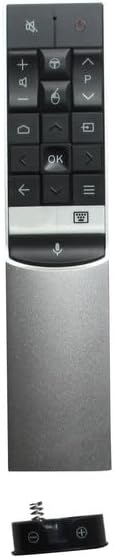
Obrázek 3.1: Konecview of the RC602S remote control, displaying its ergonomic design and button layout.
3.1 klíčové funkce
- Tlačítko napájení (Červený kruh): Zapíná nebo vypíná televizor.
- Tlačítko ztlumení (Reproduktor s X): Ztlumí nebo zruší ztlumení zvuku televizoru.
- Zvýšení/snížení hlasitosti (+/-): Nastavuje úroveň hlasitosti.
- Kanál nahoru/dolů (P^/P˅): Mění televizní kanály.
- Navigační tlačítka (Šipky): Používá se k navigaci v nabídkách a výběru možností.
- Tlačítko OK (OK): Potvrzuje výběry v nabídkách.
- Tlačítko Domů (Ikona domu): Accesses the TV's smart home screen or main menu.
- Tlačítko Zpět (Šipka doleva): Vrátí se na předchozí obrazovku nebo nabídku.
- Tlačítko Vstup/Zdroj (Rectangle with Arrow): Vybere vstupní zdroj (HDMI, AV atd.).
- Tlačítko Menu/Možnosti (Three Horizontal Lines): Opens context-sensitive menus or settings.
- Tlačítko hlasového ovládání (Ikona mikrofonu): Activates voice command features (if supported by your TV model and configured).
4. Údržba
4.1 Čištění dálkového ovladače
K čištění dálkového ovladače použijte měkký, suchý hadřík. V případě odolné nečistoty lehceampOtřete hadřík vodou nebo jemným neabrazivním čisticím prostředkem. Nepoužívejte agresivní chemikálie ani nadměrnou vlhkost, protože by mohly poškodit elektroniku dálkového ovladače.
4.2 Výměna baterie
Vyměňte baterie, když dálkový ovladač reaguje pomalu nebo přestane fungovat. Vždy vyměňujte obě baterie současně za nové baterie AAA. Nekombinujte staré a nové baterie ani různé typy baterií, mohlo by dojít k vytečení nebo poruše.
4.3 Skladování
When not in use for extended periods, it is recommended to remove the batteries to prevent potential leakage and damage to the remote control.
5. Řešení problémů
- Dálkové ovládání nereaguje:
- Zkontrolujte, zda jsou baterie vloženy správně se správnou polaritou.
- Vyměňte staré baterie za nové baterie typu AAA.
- Ujistěte se, že mezi dálkovým ovladačem a infračerveným přijímačem televizoru nejsou žádné překážky.
- Namiřte dálkový ovladač přímo na televizor.
- Omezená funkčnost nebo nefunkční některá tlačítka:
- As a replacement remote, some specific or advanced functions of your original TV remote may not be supported. This is normal for universal or replacement remotes.
- Verify that your TV model is listed in the compatibility section (Section 2.2).
- Tlačítka se zasekávají nebo nereagují:
- Vyčistěte dálkový ovladač dle popisu v části 4.1.
6. Specifikace
| Značka | Easytry123 |
| Model | RC602S |
| Technologie připojení | Infračervený (IR) |
| Kompatibilní zařízení | TCL Televisions |
| Maximální počet podporovaných zařízení | 1 |
| Jsou vyžadovány baterie | 2 x AAA (nejsou součástí balení) |
| Speciální funkce | Ergonomický design |
7. Záruka a podpora
This Easytry123 RC602S remote control is a replacement unit. Specific warranty information is not provided with the product. For any issues or support inquiries, please contact the seller directly through your purchase platform. Ensure you have your order details available when contacting support.