
1. Úvod
The Okaysou AirMic4S Air Purifier is designed to provide clean and fresh air in your home or office. It features an advanced filtration system to capture and reduce airborne particles, odors, and harmful gases, contributing to a healthier indoor environment.

Figure 1.1: Okaysou AirMic4S Air Purifier, illustrating its capability to filter various airborne contaminants including dust, pollen, dander, smoke, and VOCs.
This manual provides detailed instructions for the setup, operation, maintenance, and troubleshooting of your AirMic4S Air Purifier. Please read it thoroughly before use and keep it for future reference.
2. Bezpečnostní informace
Abyste snížili riziko požáru, úrazu elektrickým proudem nebo zranění, dodržujte prosím následující bezpečnostní opatření:
- Před přemisťováním, čištěním nebo výměnou filtrů vždy odpojte čističku vzduchu ze zásuvky.
- Neprovozujte jednotku s poškozeným kabelem nebo zástrčkou.
- Udržujte napájecí kabel mimo dosah horkých povrchů.
- Neblokujte větrací otvory ani neumísťujte jednotku na měkký povrch, kde by mohly být otvory zablokovány.
- Neponořujte jednotku do vody nebo jiných tekutin.
- Tento spotřebič není určen k tomu, aby ho používaly osoby (včetně dětí) se sníženými fyzickými, smyslovými nebo duševními schopnostmi nebo nedostatkem zkušeností a znalostí, pokud na ně nebude dohlíženo nebo na ně nebude dohlížet osoba odpovědná za jejich bezpečnost nebo je poučit o používání spotřebiče. .
- Use only genuine Okaysou replacement filters to maintain optimal performance and warranty.
3. Konec produktuview
The Okaysou AirMic4S features a compact design with powerful air purification capabilities. It utilizes a multi-stage filtration system to effectively clean the air.

Obrázek 3.1: Přední strana view of the Okaysou AirMic4S Air Purifier, showcasinjeho elegantní design.
3.1 klíčové komponenty
- Mřížka přívodu vzduchu: Located on the lower section, designed to capture hair and large particles.
- Ovládací panel: Top-mounted touch panel for all functions.
- Vývod vzduchu: Horní mřížka pro odvod vyčištěného vzduchu.
- Filtrační přihrádka: Houses the multi-stage filtr.
3.2 Filtrační systém
The AirMic4S employs an advanced 3-stage H13 True HEPA filtration system:
- Omyvatelný předfiltr: The first defense, capturing large particles like hair and fur.
- H13 True HEPA filtr: Captures pollen, dander, dust, smell, and smoke particles as small as 0.3 microns.
- Filtr s aktivním uhlím: Effectively absorbs stubborn and unwanted odors, harmful gases, and VOCs.

Figure 3.2: Illustration of the advanced 3-stage H13 True HEPA filtration system, detailing the washable pre-filter, H13 True HEPA filter, and active carbon filter.
4. Nastavení
Follow these steps to set up your Okaysou AirMic4S Air Purifier:
- Rozbalte jednotku: Opatrně vyjměte čističku vzduchu z obalu.
- Odstraňte obal filtru: Before first use, unscrew the bottom cover (twist counter-clockwise) and remove the plastic packaging from the filter.
- Znovu nainstalujte filtr: Vložte filtr zpět do jednotky a ujistěte se, že je správně usazen.
- Secure Bottom Cover: Nasaďte spodní kryt a otočte jím ve směru hodinových ručiček, abyste jej zajistili.
- Umístění: Place the air purifier on a firm, level surface. Ensure there is adequate space around the unit for proper airflow (at least 6 inches from walls or furniture).
- Připojit: Připojte napájecí kabel do vhodné elektrické zásuvky.
5. Návod k obsluze
The AirMic4S features an intuitive touch control panel for easy operation.

Figure 5.1: The control panel of the AirMic4S, showing buttons for power, fan speed, timer, filter reset, and night light/sleep mode.
5.1 Funkce ovládacího panelu
- Tlačítko napájení (⑁): Stiskněte pro zapnutí nebo vypnutí jednotky.
- Fan Speed Button (✴): Cyklicky přepíná rychlosti ventilátoru (nízká, střední, vysoká).
- Timer Button (⌛): Nastaví provozní časovač na 2, 4 nebo 8 hodin. Jednotka se po uplynutí vybraného času automaticky vypne.
- Night Light Mode (🌙): Activates or deactivates the night light feature.
- Sleep Mode (🌛): Activates a quiet operation mode (as low as 24dB) for undisturbed sleep.
- Filter Reset Indicator (📄): Lights up when it's time to replace the filter. Press and hold to reset after filter replacement.
5.2 Obecná obsluha
- Zapnutí: Press the Power button to start the air purifier. It will typically start on a low fan speed.
- Upravte rychlost ventilátoru: Press the Fan Speed button repeatedly to cycle through the desired fan speeds (Low, Medium, High).
- Nastavit časovač: Press the Timer button to select 2H, 4H, or 8H. The corresponding indicator will light up.
- Aktivace režimu spánku: Press the Sleep Mode button to enter ultra-quiet operation. The night light may dim or turn off in this mode.
- Control Night Light: Use the Night Light button to toggle the light on or off independently.
- Vypnout: Opětovným stisknutím tlačítka napájení přístroj vypnete.
6. Údržba
Pravidelná údržba zajišťuje optimální výkon a prodlužuje životnost čističky vzduchu.
6.1 Výměna filtru
The filter replacement indicator will illuminate when it's time to change the filter. Filter lifespan varies based on usage and air quality.
- Odpojte čističku vzduchu ze zásuvky.
- Turn the unit upside down and twist the bottom cover counter-clockwise to remove it.
- Vyjměte starý filtr.
- Insert a new genuine Okaysou filter into the unit.
- Nasaďte spodní kryt a otočte jím ve směru hodinových ručiček, abyste jej zajistili.
- Plug in the unit. With the unit powered on, press and hold the Filter Reset button for 3-5 seconds until the indicator light turns off.
Okaysou offers 4 optional replacement filters tailored to specific needs:
- Původní filtr: Best for general use, absorbing odors, dander, pollen, smoke.
- Customized Blue Filter (G-Defense Filter): Best for humid environments to absorb harmful substances.
- Customized Green Filter (Toxin Absorber Filter): Best for areas with high levels of toxins, vehicle exhaust, VOCs.
- Yellow Odor Remover Filter: Best for powerfully reducing odors from ash, wildfire, cooking.

Figure 6.1: Various optional replacement filters available for the AirMic4S, each designed for specific air purification needs.
6.2 Čištění jednotky
- Vnější povrch čističky vzduchu otřete měkkým, suchým hadříkem.
- The washable pre-filter can be gently cleaned with a soft brush or vacuum cleaner to remove large dust and hair particles. Ensure it is completely dry before reinstallation.
- Nepoužívejte abrazivní čisticí prostředky nebo rozpouštědla.
7. Řešení problémů
If you encounter issues with your AirMic4S Air Purifier, refer to the following table for common problems and solutions:
| Problém | Možná příčina | Řešení |
|---|---|---|
| Jednotka se nezapne. | Není zapojeno do zásuvky; výpadek napájenítage; filtr není správně nainstalován. | Ensure unit is securely plugged in. Check power supply. Verify filter is unwrapped and correctly seated, and bottom cover is secured. |
| Proudění vzduchu je slabé nebo hlučné. | Filtr je znečištěný nebo ucpaný; vstupy/výstupy vzduchu jsou ucpané. | Clean or replace the filter. Ensure nothing is obstructing the air inlets or outlets. |
| Zápach přetrvává. | Filter needs replacement; strong external odor source. | Replace the filter, especially if using the Original filter for strong odors. Consider using an Odor Remover filter. Ensure the room is adequately ventilated. |
| Filter Reset light remains on after replacement. | Reset filtru nebyl proveden správně. | With the unit powered on, press and hold the Filter Reset button for 3-5 seconds until the light turns off. |
If the problem persists after trying these solutions, please contact Okaysou customer support.
8. Specifikace
| Funkce | Detail |
|---|---|
| Číslo modelu | AirMic 4S |
| Rozměry produktu | 8.7"H x 8.7"Š x 11.89"V |
| Hmotnost | 6.6 libry |
| Jmenovitý výkon | 25 wattů |
| Úroveň hluku | 24 dB (režim spánku) |
| Oblast pokrytí | Up to 300 sq. ft. (5x per hour in 150 sq.ft, 3x per hour in 300 sq.ft, 2x per hour in 580 sq.ft) |
| Typ filtrace | H13 True HEPA (3-Stage) |
| Bez ozónu | 100% bez ozonu |
| Certifikace | CARB, CE, RoHS, ETL Listed |
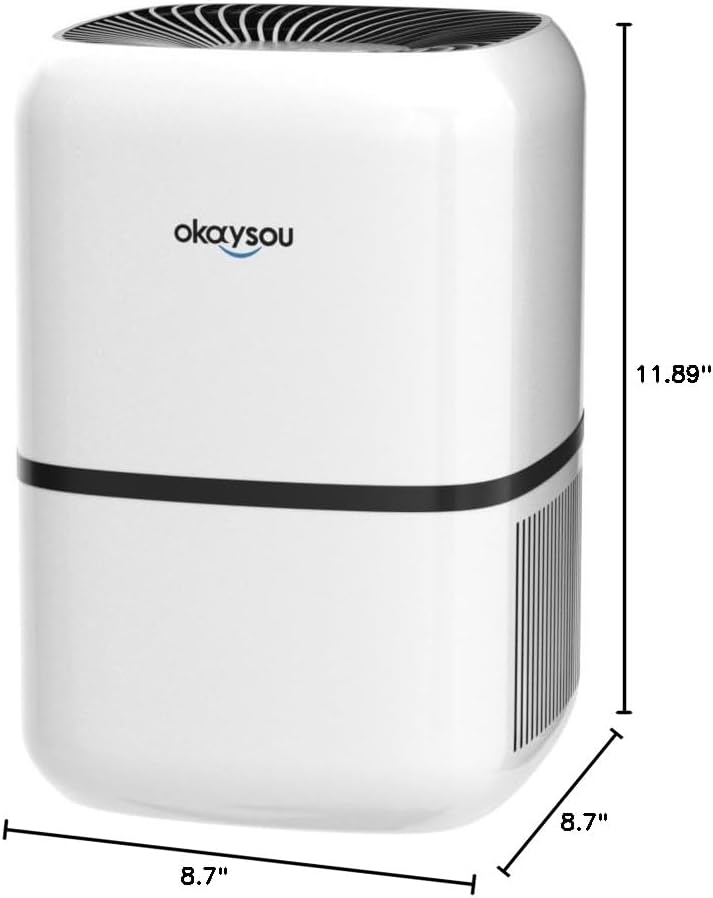
Obrázek 8.1: Rozměry view of the Okaysou AirMic4S Air Purifier, showing its height, depth, and width.
9. Záruka a podpora
The Okaysou AirMic4S Air Purifier comes with a 5-letá záruka. Okaysou also provides lifetime US-based customer support.
For warranty claims, technical assistance, or any questions regarding your product, please contact Okaysou customer support through their official channels or refer to the contact information provided with your purchase.
You can also visit the official Okaysou store on Amazon for more information and support: Okaysou Amazon Store