
Zavedení
This manual provides detailed instructions for the safe and efficient use of your FONESTAR DOTS-N Bluetooth TWS Speaker. Please read this manual thoroughly before operating the device and retain it for future reference.
The FONESTAR DOTS-N is a portable Bluetooth TWS speaker featuring Bluetooth 4.2 and NFC connectivity. It offers powerful sound with enhanced bass, playback controls, and hands-free calling. Equipped with a rechargeable Li-Ion battery providing up to 10 hours of autonomy, it also includes a 3.5mm auxiliary input. Its compact design makes it suitable for home use.
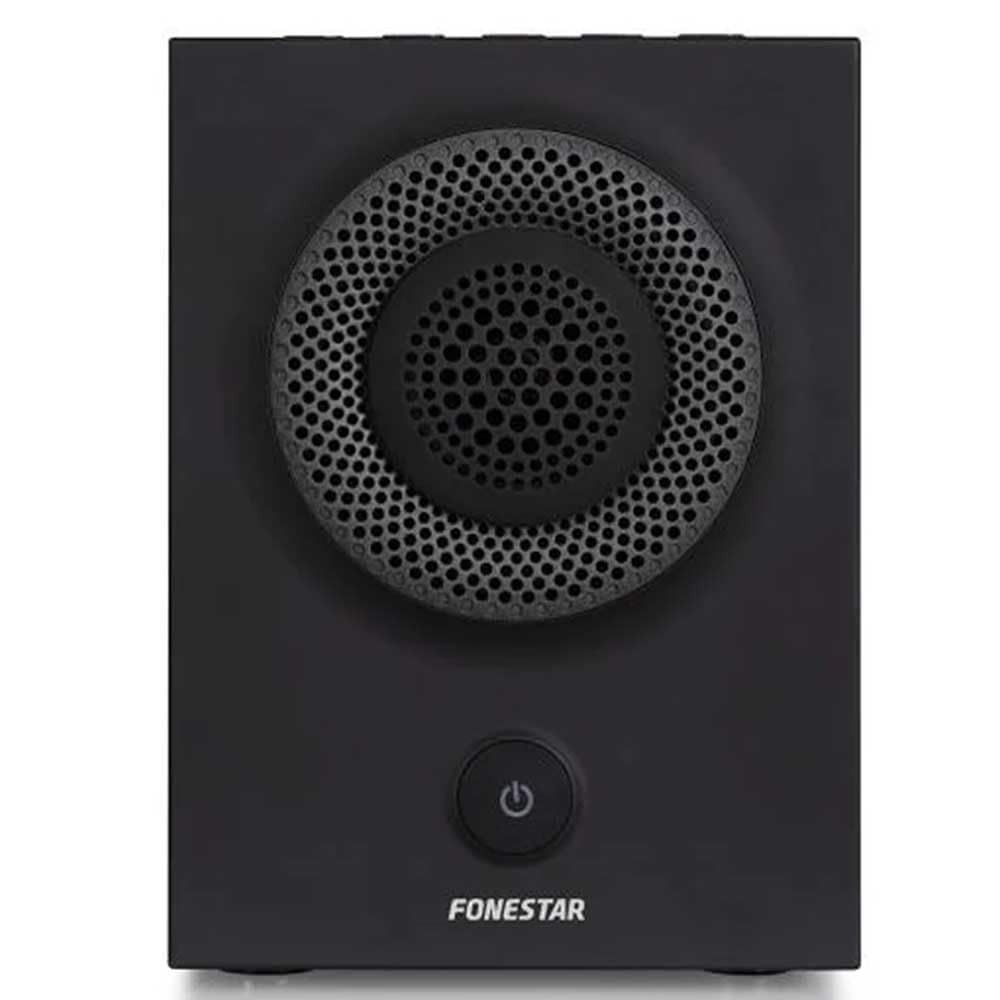
Obrázek 1: Přední strana view of the FONESTAR DOTS-N Bluetooth TWS Speaker.
Nastavení
1. Vybalování
Opatrně vyjměte všechny součásti z obalu. Ujistěte se, že jsou přítomny všechny níže uvedené položky:
- FONESTAR DOTS-N Bluetooth TWS Speaker
- Nabíjecí kabel USB na Micro USB
- 3.5mm stereo audio kabel
- Uživatelská příručka (tento dokument)
2. Nabíjení reproduktoru
Before first use, fully charge the speaker. Connect the Micro USB end of the charging cable to the speaker's charging port and the USB-A end to a compatible USB power adapter (not included) or a computer's USB port.
- Během nabíjení bude svítit kontrolka nabíjení.
- Doba nabíjení je přibližně 3 hodiny pro plné nabití.
- Po dokončení nabíjení se kontrolka změní nebo zhasne.
3. Zapnutí/vypnutí
To power on the speaker, press and hold the power button (usually indicated by a ⏻ symbol) for a few seconds until you hear an audible prompt or see an indicator light. To power off, repeat the process.
Návod k obsluze
1. Párování Bluetooth
Reproduktor podporuje Bluetooth 4.2 pro bezdrátové streamování zvuku.
- Ensure the speaker is powered on and in pairing mode (usually indicated by a flashing LED). If not, press the Bluetooth pairing button or power button briefly to enter pairing mode.
- Na smartphonu, tabletu nebo jiném zařízení s podporou Bluetooth přejděte do nastavení Bluetooth.
- Hledat available devices and select "FONESTAR DOTS-N" from the list.
- Once paired, the speaker will emit an audible confirmation, and the LED indicator will typically become solid.
2. Párování NFC (komunikace blízkého pole)
For devices with NFC, pairing can be done quickly:
- Ujistěte se, že je na vašem zařízení povoleno NFC a reproduktor je zapnutý.
- Tap your NFC-enabled device gently against the NFC area on the speaker (refer to product diagram for exact location, if available).
- Potvrďte požadavek na párování na vašem zařízení.
3 Funkce True Wireless Stereo (TWS)
The TWS function allows you to pair two FONESTAR DOTS-N speakers together for a stereo sound experience.
- Ensure both DOTS-N speakers are powered on and not connected to any other Bluetooth device.
- On one speaker (this will be the primary speaker), press and hold the TWS button (if available) or a designated button for TWS pairing.
- Primární reproduktor vyhledá sekundární reproduktor. Po připojení oba reproduktory vydají potvrzovací zvuk.
- Nyní připojte zařízení Bluetooth k primárnímu reproduktoru, jak je popsáno v části „Párování Bluetooth“. Zvuk bude přehráván stereofonně z obou reproduktorů.
4. Pomocný vstup (AUX)
For non-Bluetooth devices, use the included 3.5mm stereo audio cable.
- Připojte jeden konec 3.5mm audio kabelu k portu AUX-in na reproduktoru.
- Druhý konec připojte ke konektoru pro sluchátka nebo audio výstupu vašeho zařízení.
- Reproduktor se automaticky přepne do režimu AUX nebo může být nutné jej ručně přepnout pomocí tlačítka režimu.
5. Playback Control and Hands-Free Calls
The speaker features integrated controls for music playback and managing calls:
- Přehrát/pozastavit: Press the Play/Pause button (often combined with the power button or a dedicated button).
- Zvýšení/Snížení hlasitosti: Použijte tlačítka hlasitosti (+ / -) na reproduktoru.
- Další / předchozí skladba: Long press or double-press the volume buttons, or use dedicated track skip buttons if present.
- Přijmout/ukončit hovor: Press the Play/Pause button during an incoming call to answer, and again to end the call.
- Odmítnout hovor: Během příchozího hovoru stiskněte a podržte tlačítko Přehrát/Pozastavit.
Údržba
1. Čištění
- Před čištěním vždy reproduktor vypněte.
- K otření vnějších povrchů použijte měkký, suchý hadřík, který nepouští vlákna.
- Nepoužívejte abrazivní čisticí prostředky, vosky ani rozpouštědla, protože by mohly poškodit povrchovou úpravu.
- Zabraňte vniknutí vlhkosti do jakýchkoli otvorů.
2. Skladování
- Reproduktor skladujte na chladném a suchém místě mimo dosah přímého slunečního záření a extrémních teplot.
- Pokud baterii skladujete delší dobu, nabijte ji každé několik měsíců přibližně na 50 %, aby se zachovala její životnost.
3. Péče o baterie
- Do not expose the battery to excessive heat, fire, or direct sunlight.
- Vyhněte se častému úplnému vybíjení baterie, protože to může zkrátit její životnost.
- Only use the provided charging cable or a certified equivalent.
Odstraňování problémů
| Problém | Možná příčina | Řešení |
|---|---|---|
| Reproduktor se nezapne. | Baterie je vybitá. | Nabijte reproduktor pomocí dodaného kabelu USB. |
| Nelze spárovat přes Bluetooth. | Reproduktor není v režimu párování; zařízení je příliš daleko; rušení. | Ensure speaker is in pairing mode. Move device closer (within 10m). Turn off other Bluetooth devices. |
| Žádný zvuk nebo nízká hlasitost. | Příliš nízká hlasitost reproduktoru nebo zdrojového zařízení; nesprávný vstupní režim. | Increase volume on both speaker and source device. Check if the correct input (Bluetooth/AUX) is selected. |
| Párování TWS selhalo. | Speakers are already paired to another device; incorrect TWS pairing procedure. | Ujistěte se, že jsou oba reproduktory odpojeny od ostatních zařízení. Pečlivě dodržujte kroky párování TWS. |
| Zkreslení zvuku. | Příliš vysoká hlasitost; slabá baterie; slabý signál. | Reduce volume. Charge the speaker. Move source device closer to the speaker. |
Technické specifikace

Figure 2: Dimensions of the FONESTAR DOTS-N Bluetooth TWS Speaker.
| Název modelu | DOTS-N |
| Značka | FONESTAR |
| Technologie připojení | Bluetooth 4.2, NFC, 3.5mm AUX |
| Bezdrátové Dosah | Až 10 metrů (33 stop) |
| Režim zvukového výstupu | Stereo (s TWS) |
| Typ reproduktoru | 3" Coaxial Woofer with Tweeter, 3" Subwoofer, 4" Passive Radiator |
| Maximální výstupní výkon reproduktoru | 12 W RMS |
| Frekvenční odezva | 80 - 20,000 Hz |
| Odstup signálu od šumu | ≥ 75 dB |
| Zdroj napájení | Napájení z baterie (dobíjecí Li-ion) |
| Kapacita baterie | 2200 mAh, 7.4 V |
| Autonomie baterie | Až 10 hodin (při 50% hlasitosti) |
| Doba nabíjení | Přibližně 3 hodiny |
| Kontrolní metoda | Hmatové (dotykové) |
| Speciální funkce | High-res audio, Bluetooth, Integrated microphone, USB port (for charging) |
| Kompatibilní zařízení | Chytré telefony, tablety |
| Doporučené použití | For home |
| Barva | Černý |
| Rozměry (Š x V x H) | 125 x 175 x 158 mm (přibližně 4.9 x 6.9 x 6.2 palce) |
| Hmotnost položky | 1.82 kg (cca 4.01 lb) |
| Vodotěsný | Žádný |
Note: Specifications are subject to change without prior notice. Battery autonomy may vary depending on usage, volume level, and music type.
Informace o záruce
FONESTAR products are designed and manufactured to the highest quality standards. This product is covered by a limited warranty against manufacturing defects from the date of purchase. The specific terms and duration of the warranty may vary by region and retailer.
Please retain your proof of purchase (receipt or invoice) as it will be required for any warranty claims. The warranty does not cover damage caused by misuse, accident, unauthorized modification, or normal wear and tear.
For detailed warranty terms and conditions, please refer to the warranty card included with your product or contact your local FONESTAR distributor or retailer.
Zákaznická podpora
If you encounter any issues that are not resolved by the troubleshooting guide, or if you require further assistance, please contact FONESTAR customer support or your authorized retailer.
Při kontaktování podpory si prosím připravte následující informace:
- Product Model: FONESTAR DOTS-N
- Datum nákupu
- popis problému
- Vaše kontaktní údaje
For the most up-to-date support information, including contact details and FAQs, please visit the official FONESTAR webmísto.