
1. Úvod
Welcome to the user manual for your Google Pixel 4 XL smartphone. This guide provides essential information to help you get started, understand its features, and maintain your device. The Google Pixel 4 XL is designed to offer a seamless Android experience with advanced camera capabilities, intuitive gesture controls, and the integrated Google Assistant.

Figure 1.1: Google Pixel 4 XL (Oh So Orange)
2. Nastavení
2.1 Co je v krabici
- Google Pixel 4 XL Smartphone
- AC adaptér
- USB kabel (USB-C na USB-C)
- OTG Dongle (USB-A to USB-C adapter)
- Nástroj pro vysunutí SIM karty
- Rychlý průvodce
2.2 Vložení SIM karty
- Locate the SIM card tray on the side of your Pixel 4 XL.
- Vložte nástroj pro vysunutí SIM karty do malého otvoru vedle držáku a pevně zatlačte, dokud držák nevyskočí.
- Place your Nano SIM card into the tray with the gold contacts facing down. Ensure it fits securely.
- Opatrně zatlačte zásobník SIM karty zpět do telefonu, dokud nezacvakne na místo.

Obrázek 2.1: Umístění přihrádky na SIM kartu
2.3 Počáteční zapnutí a nastavení
- Press and hold the Power button (located on the right side) until the Google logo appears.
- Follow the on-screen instructions to select your language, connect to Wi-Fi, and transfer data from an old device if desired.
- Přihlaste se pomocí svého účtu Google nebo si vytvořte nový.
- Set up security features such as Face Unlock.
2.4 Nabíjení zařízení
Connect the USB cable to the AC adapter and plug it into a power outlet. Connect the other end of the USB cable to the USB-C port at the bottom of your Pixel 4 XL. The device supports fast charging. For optimal battery health, avoid fully discharging the battery frequently.
3. Návod k obsluze
3.1 Základní navigace
The Pixel 4 XL uses a touchscreen interface for navigation. Swipe up from the bottom to go to the home screen, swipe from the left or right edge to go back, and swipe up and hold to view nedávné aplikace.

Figure 3.1: Pixel 4 XL Front Display
3.2 Asistent Google
The new Google Assistant is integrated into the Pixel 4 XL. You can activate it by squeezing the sides of your phone or by saying "Hey Google." Use your voice to send texts, share photos, get directions, and more.
3.3 Funkce fotoaparátu
The Pixel 4 XL camera offers advanced photography capabilities:
- Point and Shoot: Capture brilliant color and control exposure balance.
- Noční vidění: Take clear photos in low-light conditions, including astrophotography for capturing the Milky Way.
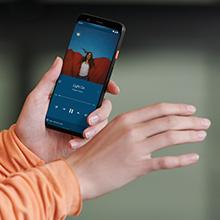
Figure 3.2: Using the Pixel 4 XL Camera
3.4 Motion Sense (Quick Gestures)
Utilize Quick Gestures to control your phone without touching it. Wave your hand above the screen to skip songs, silence calls, and more. Motion Sense functionality is available in specific regions including the US, Canada, Singapore, Australia, Taiwan, and most European countries.
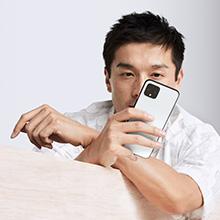
Figure 3.3: Motion Sense in Action
3.5 Call Screen
The Google Assistant's Call Screen feature helps filter out spam calls. It can proactively screen unknown callers and provide a transcript of the conversation, allowing you to decide whether to answer.
3.6 Oficiální video produktu
Video 3.1: An official video from Google Inc showcasing the features of the Google Pixel 4, including Google Assistant and Motion Sense. This video provides a visual overview of key functionalities.
4. Údržba
4.1 Čištění vašeho zařízení
To clean your Pixel 4 XL, use a soft, lint-free cloth. Avoid abrasive materials, solvents, or aerosol sprays. For stubborn marks, slightly dampen the cloth with water. Do not submerge the device in water.
4.2 Aktualizace softwaru
Google regularly releases software updates to improve performance, add features, and enhance security. Ensure your device is connected to Wi-Fi and has sufficient battery life before installing updates. You can check for updates in Settings > System > System update.
4.3 Péče o baterii
Chcete -li prodloužit životnost baterie:
- Vyhněte se extrémním teplotám.
- Use the provided charger or a compatible Qi-certified wireless charger.
- Enable Adaptive Battery in settings to optimize app usage.
- Disable features like Motion Sense and Always-on Display if not actively needed to conserve power.
4.4 Zálohování dat
Regularly back up your data to your Google Account. This includes photos, videos, contacts, and app data. Go to Settings > System > Backup to manage your backup settings.
5. Řešení problémů
5.1 Běžné problémy a řešení
- Zařízení nereaguje: Stiskněte a podržte tlačítko napájení po dobu přibližně 30 sekund pro vynucení restartu.
- Pády aplikací: Clear the cache and data for the problematic app in Settings > Apps & notifications > See all apps > [App Name] > Storage & cache.
- Problémy s připojením (Wi-Fi/Bluetooth): Try toggling Wi-Fi or Bluetooth off and on. If the issue persists, reset network settings in Settings > System > Reset options > Reset Wi-Fi, mobile & Bluetooth.
- Slabá výdrž baterie: Review battery usage in Settings > Battery to identify apps consuming excessive power. Adjust screen brightness and disable unnecessary features.
5.2 Obnovení továrního nastavení
Obnovení továrního nastavení vymaže všechna data z telefonu a obnoví jeho původní tovární nastavení. Tím se mohou vyřešit přetrvávající problémy se softwarem. Warning: Back up all important data before proceeding.
- Přejděte do Nastavení > Systém > Možnosti resetování.
- Klepněte na „Vymazat všechna data (obnovení továrního nastavení)“.
- Potvrďte své rozhodnutí a postupujte podle pokynů na obrazovce.
6. Specifikace
Key technical specifications for the Google Pixel 4 XL:
| Funkce | Specifikace |
|---|---|
| Značka | |
| Název modelu | Pixel 4 XL |
| Operační systém | Android |
| Kapacita paměti | 64 GB |
| Velikost nainstalované paměti RAM | 6 GB |
| Velikost obrazovky | 6.3 palce |
| Rezoluce | 1440 x 2960 |
| Obnovovací frekvence | 120 Hz |
| Model CPU | Snapdragon S3 |
| Rychlost CPU | 2.84 GHz |
| Barva | Oh So Orange |
| Počet slotů pro SIM karty | Jedna SIM karta |
| Typ konektoru | USB typ C |
| Biometrická bezpečnostní funkce | Rozpoznávání tváře |
| Úroveň odolnosti proti vodě | Vodě odolný |
| Jack pro sluchátka | Žádný konektor pro sluchátka |
| Front Photo Sensor Resolution | 8 MP |
| Rozlišení záznamu videa | 4k (30fps) |
| Typ zobrazení | OLED |
| Poskytovatel bezdrátových služeb | Odemčený |
| Průměrná životnost baterie | 12 hodiny |
7. Informace o záruce
Your Google Pixel 4 XL comes with a 2letá záruka výrobce. This warranty covers defects in materials and workmanship under normal use. It does not cover damage caused by accidents, misuse, unauthorized repairs, or normal wear and tear.
For detailed terms and conditions, please refer to the warranty card included with your product or visit the official Google support webmísto.
8. Podpora
If you require further assistance or encounter issues not covered in this manual, please utilize the following resources:
- Online nápověda: Visit the official Google Pixel Help Center for comprehensive articles, FAQs, and troubleshooting guides.
- Komunitní fóra: Engage with other Pixel users and experts in Google's official product forums.
- Kontaktujte podporu: Access direct support options (chat, phone, email) through the Google Pixel Help Center.
Always ensure you are referring to official Google support channels for accurate and up-to-date information.