
Zavedení
The Motorola E202 is a digital cordless phone designed for ease of use and practicality. It features a bright backlit display, speakerphone functionality, and a "Do Not Disturb" mode. This model incorporates essential calling features, including advanced call blocking technology that allows you to block up to 10 unwanted numbers. This manual provides detailed instructions for setting up, operating, and maintaining your Motorola E202 cordless phone.
Obsah balení
Než začnete, ujistěte se prosím, že máte v balení všechny níže uvedené položky:
- Cordless Handset and Base Unit
- Additional Cordless Handset and Charger
- Napájecí adaptér (x2)
- Rechargeable Ni-MH Batteries (x4)
- Kabel telefonní linky
- Uživatelská příručka (tento dokument)

Image: The Motorola E202 Digital Cordless Phone, showing the handset resting in its base unit.
Nastavení
- Nainstalujte baterie: Open the battery compartment cover on the back of each handset. Insert the two supplied Ni-MH rechargeable batteries, observing the correct polarity (+ and -). Close the battery compartment cover securely.

Obrázek: Boční view of the Motorola E202 handset, showing the battery compartment area.
- Připojení základní jednotky:
- Connect one end of the telephone line cord to the TEL LINE socket on the back of the main base unit.
- Zapojte druhý konec telefonního kabelu do telefonní zásuvky ve zdi.
- Connect one power adapter to the POWER socket on the main base unit and plug the other end into a mains power outlet.
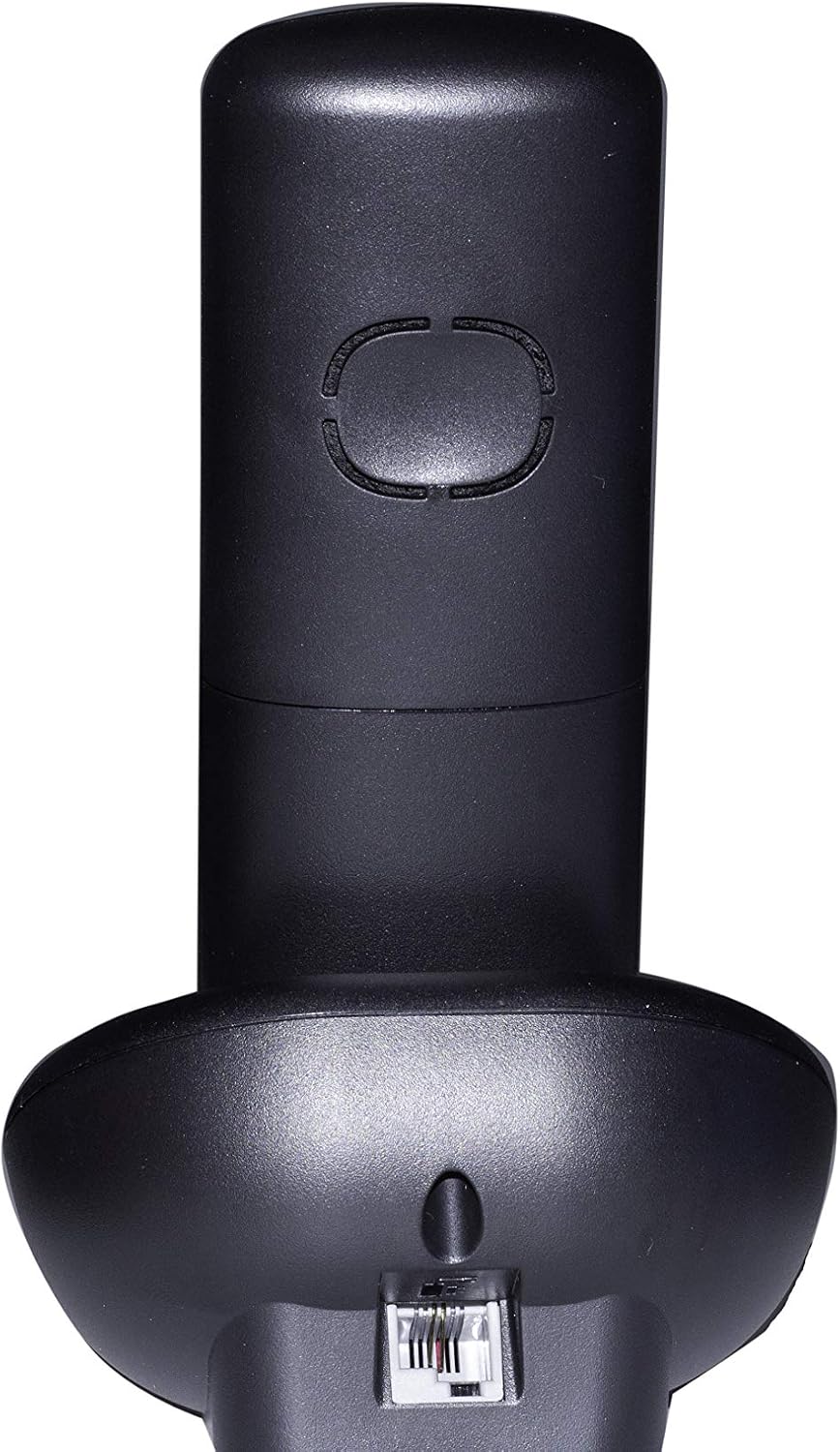
Obrázek: Zadní view of the Motorola E202 base unit, showing the telephone line and power input ports.
- Connect Additional Charger: Connect the second power adapter to the POWER socket on the additional charger unit and plug the other end into a mains power outlet.
- Nabíjení sluchátek: Place each handset on its respective base/charger unit. The handsets will emit a short beep, and the display will indicate charging. Allow the handsets to charge for at least 16 hours before first use to ensure optimal battery performance.
Návod k obsluze

Obrázek: Přední strana view of the Motorola E202 handset, highlighting the display and keypad.
Uskutečňování a přijímání hovorů
- Zavolat: Stiskněte tlačítko Green Call button (looks like a phone receiver), then dial the number. Alternatively, dial the number first and then press the Green Call button.
- Přijmout hovor: Když telefon zvoní, stiskněte Green Call button.
- Ukončení hovoru: Stiskněte tlačítko Red End Call button (looks like a phone receiver with a line through it) nebo vložte sluchátko zpět do základny/nabíječky.
- Hlasitý telefon: Během hovoru stiskněte Tlačítko pro hlasitý odposlech (looks like a speaker icon) pro aktivaci nebo deaktivaci hlasitého odposlechu.
Telefonní seznam
- Do telefonního seznamu lze uložit až 50 jmen a čísel.
- To access the phonebook, press the Navigační tlačítka nahoru/dolů když je sluchátko nečinné.
- Pro přidání, úpravu nebo odstranění položek postupujte podle pokynů na obrazovce.
Blokování hovorů
- The Motorola E202 features advanced call blocking technology, allowing you to block up to 10 specific numbers.
- To block a number, navigate to the Call Blocking menu via the handset's menu options.
- You can also activate the "Do Not Disturb" function by pressing the dedicated "Do Not Disturb" button (looks like a crescent moon).
Caller ID and Redial
- ID volajícího: The handset display shows the caller's name and number (if available and subscribed to Caller ID service). The Caller ID list stores up to 20 names and numbers.
- Opakovaná volba: The phone automatically stores the last 10 dialed numbers. Press the Tlačítko opakované volby (looks like an 'R' or a curved arrow) to access and redial these numbers.
Údržba
To ensure the longevity and optimal performance of your Motorola E202 cordless phone, follow these maintenance guidelines:
- Čištění: Otřete sluchátko a základnu měkkým hadříkemamp tkanina. Nepoužívejte abrazivní čisticí prostředky nebo rozpouštědla.
- Péče o baterie: Use only the specified rechargeable Ni-MH batteries. If the phone will not be used for an extended period, remove the batteries to prevent leakage.
- Umístění: Keep the phone away from heat sources, direct sunlight, and moisture. Avoid placing it near other electrical appliances that may cause interference.
- Vyhněte se kapkám: Handle the handset with care to prevent damage from accidental drops.
Odstraňování problémů
If you encounter issues with your Motorola E202, refer to the following common problems and solutions:
| Problém | Řešení |
|---|---|
| Žádný oznamovací tón. |
|
| Nelze uskutečňovat ani přijímat hovory. |
|
| Poor sound quality or interference. |
|
| Displej sluchátka je prázdný. |
|
Specifikace
| Funkce | Detail |
|---|---|
| Značka | Motorola |
| Model | E202 |
| Barva | Černý |
| Typ telefonu | Bezdrátový telefon |
| Počet sluchátek | 2 (Dual Cordless Phone) |
| Jsou vyžadovány baterie | 2 AAA Ni-MH rechargeable batteries per handset (included) |
| Materiál | Akrylonitrilbutadienstyren (ABS) |
| Rozměry položky (DxŠxV) | 20 x 30 x 20 cm (approximate, likely packaging dimensions) |
| Typ systému odpovědí | Digitální |
| Kompatibilní zařízení | Other cordless devices of the same model, automatic answering, fax |
| Víceřádkový provoz | Ano |
| ID volajícího | Yes (Caller ID list with 20 names and numbers) |
| Kapacita telefonního seznamu | 50 jmen a čísel |
| Blokování hovorů | Blocks up to 10 numbers, "Do Not Disturb" function |
| Paměť pro opakované vytáčení | Posledních 10 čísel |
| Doba hovoru | Až 10 hodin |
| Pohotovostní doba | Až 200 hodin |
Záruka
The Motorola E202 Digital Cordless Phone comes with a Záruka 24 měsíců from the date of purchase. This warranty covers manufacturing defects and material faults under normal use. Please retain your proof of purchase for warranty claims. The warranty does not cover damage caused by misuse, accidents, unauthorized repairs, or normal wear and tear.
Podpora
For further assistance, technical support, or to report a problem not covered in this manual, please refer to the official Motorola support channels. You can often find additional resources, FAQs, and contact information on the official Motorola website. A PDF version of this user manual is also available for download from the product's Amazon page or Motorola's support site.
Nejnovější informace o podpoře naleznete na adrese: www.motorola.com/support