
ROCCAT ROC-12-940-BN
Roccat Vulcan 122 Mechanical Gaming Keyboard User Manual
Model: ROC-12-940-BN
1. Úvod
The Roccat Vulcan 122 is a high-performance mechanical gaming keyboard designed for precision and durability. It features Roccat's unique Titan switches, advanced AIMO RGB lighting, and a robust aluminum construction. This manual provides detailed instructions for setting up, operating, maintaining, and troubleshooting your keyboard.

Image: The Roccat Vulcan 122 keyboard shown with a Roccat mouse and headset, demonstrating its vivid, dynamic lighting synergy with AIMO.
Klíčové vlastnosti:
- Unique design with lowered keycaps and reduced reaction time.
- RGB lighting with configurable LED effects and adjustable AIMO effects.
- High-quality and resistant design with robust materials and an anodized aluminum surface.
- Advanced anti-ghosting with N-Key Rollover (NKRO).
- Programmable macro keys and ROCCAT Easy-Shift[+].
2. Nastavení
2.1 Připojení klávesnice
To connect your Roccat Vulcan 122 keyboard:
- Vybalte klávesnici a její příslušenství.
- Plug the USB connector from the keyboard into an available USB port on your computer.
- Operační systém automaticky vyhledá a nainstaluje potřebné ovladače.
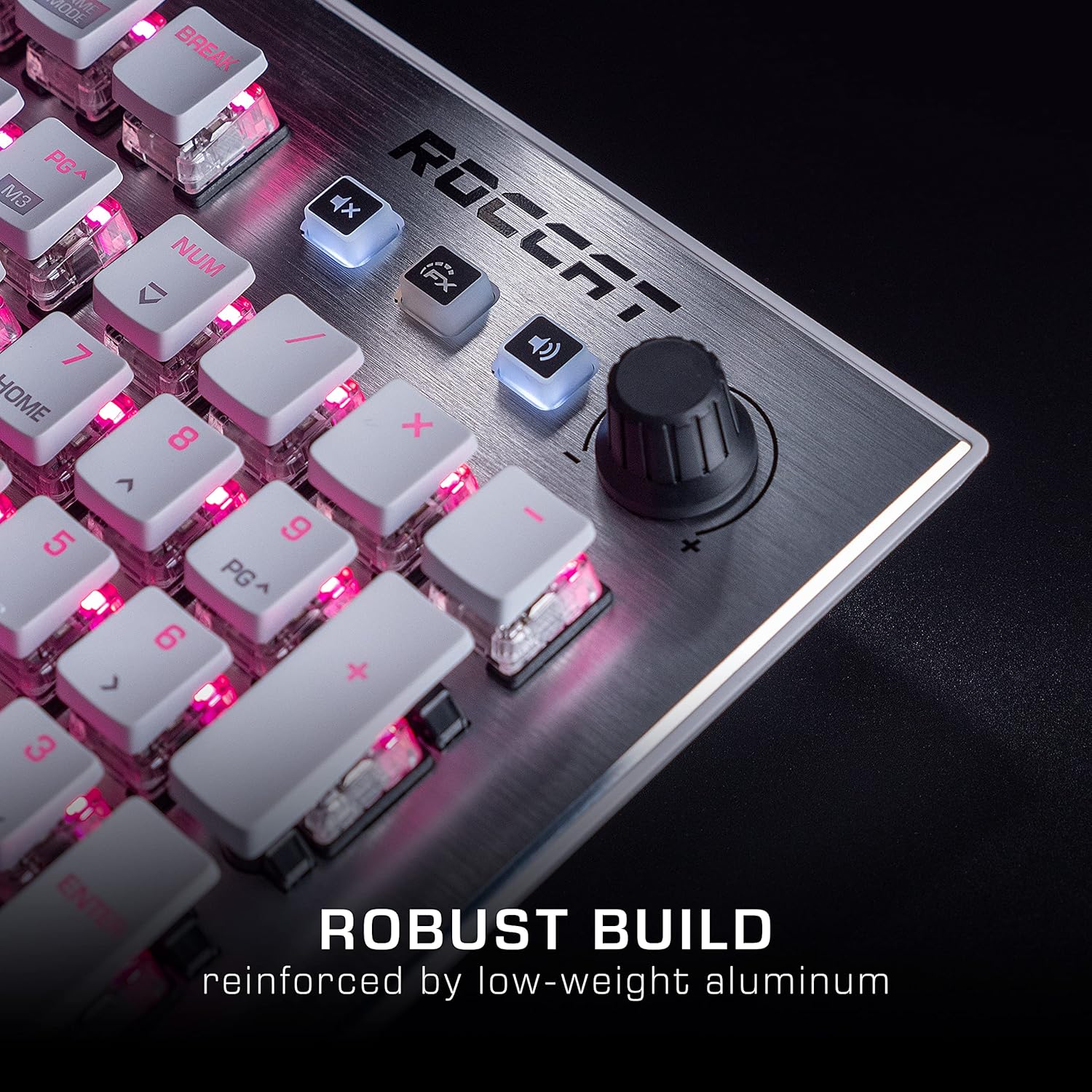
Image: The Roccat Vulcan 122 keyboard shown with its detachable wrist rest, ready for connection.
2.2 Instalace softwaru (ROCCAT Swarm)
For full functionality and customization, install the ROCCAT Swarm software:
- Navštivte oficiální stránky ROCCAT webweb (www.roccat.com) a přejděte do sekce podpory.
- Download the latest version of the ROCCAT Swarm software for your operating system.
- Spusťte instalační program a postupujte podle pokynů na obrazovce.
- After installation, launch ROCCAT Swarm to configure your keyboard settings, lighting, and macros.
3. Ovládání klávesnice
3.1 Standardní funkce kláves
The Vulcan 122 functions as a standard QWERTY keyboard. All alphanumeric keys, function keys (F1-F12), navigation keys, and the numeric keypad operate as expected.
3.2 Ovládací prvky médií
The keyboard features dedicated media controls for convenient audio management.
- Knoflík hlasitosti: Located in the upper right corner, rotate to adjust system volume.
- Tlačítko ztlumení: Stisknutím ztlumíte/zapnete zvuk.
- Tlačítko FX: Cycles through lighting effects or other programmable functions.

Obrázek: Detailní záběr view of the mixer-style media controls on the Roccat Vulcan 122, including the volume knob and dedicated function keys.
3.3 RGB Lighting Customization (AIMO)
The Vulcan 122 features advanced RGB lighting with Roccat's AIMO intelligent lighting system. Use the ROCCAT Swarm software to:
- Select from various pre-set lighting effects.
- Customize individual key illumination.
- Upravte jas a rychlost efektů.
- Synchronize lighting with other AIMO-compatible devices.
3.4 Programmable Macro Keys and Easy-Shift[+]
The keyboard includes programmable macro keys and the Easy-Shift[+] function, allowing you to assign secondary functions to keys.
- Use the ROCCAT Swarm software to record and assign macros to designated keys.
- Easy-Shift[+] allows you to double the number of assignable functions by holding down the Easy-Shift[+] key (usually Caps Lock by default, configurable in Swarm) and pressing another key.
3.5 Anti-Ghosting with NKRO
The Vulcan 122 features advanced anti-ghosting technology with N-Key Rollover (NKRO), ensuring that every key press is registered accurately, even when multiple keys are pressed simultaneously.

Image: A hand demonstrating typing on the Roccat Vulcan 122 keyboard, emphasizing the ergonomic design of the keys for comfortable use.
4. Údržba
4.1 Čištění klávesnice
To ensure the longevity and optimal performance of your Vulcan 122 keyboard, regular cleaning is recommended.
- Před čištěním odpojte klávesnici od počítače.
- Použijte měkký hadřík, který nepouští vlákna dampened with water or a mild cleaning solution to wipe the keycaps and surface. Avoid harsh chemicals.
- For dust and debris between keys, use compressed air. The raised keycap design makes cleaning easier.
- Před opětovným připojením se ujistěte, že je klávesnice zcela suchá.

Image: A close-up of the Roccat Vulcan 122 keyboard keys, illustrating their design which facilitates easy cleaning and resistance to dust and liquids.
5. Řešení problémů
If you encounter issues with your Roccat Vulcan 122 keyboard, refer to the following common problems and solutions:
- Klávesnice nereaguje:
- Ujistěte se, že je kabel USB bezpečně připojen k klávesnici i k počítači.
- Zkuste zapojit klávesnici do jiného USB portu.
- Restartujte počítač.
- Check if the keyboard is disabled in your operating system's device manager.
- RGB osvětlení nefunguje nebo je nesprávné:
- Ensure the ROCCAT Swarm software is installed and up to date.
- Zkontrolujte nastavení osvětlení v softwaru Swarm.
- Perform a firmware update for the keyboard via Swarm.
- Klíče se neregistrují nebo se zobrazují jako ghosting:
- Vyčistěte postižené klávesy podle pokynů v části Údržba.
- Ujistěte se, že firmware klávesnice je aktuální.
- Otestujte klávesnici na jiném počítači, abyste vyloučili problémy specifické pro systém.
- ROCCAT Swarm software not detecting keyboard:
- Ujistěte se, že je klávesnice správně připojena.
- Restart the Swarm software and your computer.
- Znovu nainstalujte software ROCCAT Swarm.
- Zkontrolujte, zda se nevyskytuje konfliktní software nebo ovladače.
6. Specifikace
| Funkce | Detail |
|---|---|
| Značka | ROCCAT |
| Název modelu | Vulkán 122 |
| Číslo modelu | ROC-12-940-BN |
| Popis klávesnice | Mechanické |
| Typ přepínače | Taktilní |
| Materiál | Hliník |
| Speciální funkce | Podsvícení |
| Kompatibilní zařízení | Laptop (PC) |
| Podpora operačního systému | Windows 10, Windows 7, Windows 8 |
| Rozměry produktu | 46.2 x 23.5 x 3.2 cm |
| Hmotnost položky | 1.15 kg |

Obrázek: Explodoval view diagram illustrating the components of a Roccat Titan Tactile mechanical switch, highlighting its design for swift and precise response.
7. Záruka a podpora
7.1 Informace o záruce
Your Roccat Vulcan 122 keyboard is covered by a manufacturer's warranty. The specific terms and duration of the warranty may vary by region and retailer. Please retain your proof of purchase for warranty claims. For detailed warranty information, refer to the warranty card included with your product or visit the official ROCCAT webmísto.
7.2 Technická podpora
For technical assistance, driver updates, or further inquiries, please visit the official ROCCAT support page:
You can find FAQs, troubleshooting guides, and contact information for customer service on their webmísto.
Ask a question about this manual
Ask about setup, troubleshooting, compatibility, parts, safety, or missing instructions. Manuals+ will review the question and use this page’s manual context to help answer it.