This manual provides detailed instructions for the installation, operation, and maintenance of your Alphacool Eisblock Aurora Plexi GPX-A water block, designed specifically for the AMD Radeon 5700 XT Sapphire Nitro+ graphics card. This product is engineered to provide superior cooling performance for your GPU, enhancing stability and potentially extending the lifespan of your hardware. Please read this manual thoroughly before proceeding with installation.
The Alphacool Eisblock Aurora Plexi GPX-A features a nickel-plated copper cooling block, a durable plexiglass top cover, and integrated digital RGB lighting for aesthetic customization. Its design focuses on efficient heat transfer and improved flow rate.
2. Bezpečnostní informace
Varování: Improper installation or handling of this product can lead to damage to your graphics card, other computer components, or personal injury. If you are unsure about any step, seek professional assistance.
Always disconnect power from your computer before beginning any installation or maintenance.
Používejte antistatické rukavice nebo antistatický náramek, abyste zabránili poškození citlivých součástí elektrostatickým výbojem (ESD).
Ensure all fittings are securely tightened to prevent leaks. Use appropriate tools and do not overtighten.
Perform a leak test with distilled water or a dedicated leak testing solution before powering on your system.
Use only compatible coolants in your liquid cooling loop. Mixing incompatible coolants can lead to corrosion and system failure.
Uchovávejte mimo dosah dětí.
3. Obsah balení
Please verify that all items listed below are present in your package. If any items are missing or damaged, contact your retailer or Alphacool support immediately.
Alphacool Eisblock Aurora Plexi GPX-A Water Block
Montážní šrouby a podložky
Termo podložky (předřezané nebo archové)
Termální pasta
G1/4" Stop Plugs
Digital RGB Adapter Cable (3-Pin, 5V)
Návod k použití (tento dokument)
4. Nastavení a instalace
Follow these steps carefully to install your Alphacool Eisblock Aurora Plexi GPX-A water block onto your AMD Radeon 5700 XT Sapphire Nitro+ graphics card.
4.1. Příprava
Sbírejte nástroje: You will need a small Phillips head screwdriver, a clean microfiber cloth, isopropyl alcohol, and anti-static protection.
Odpojit napájení: Ensure your computer is completely powered off and unplugged from the wall.
Remove Graphics Card: Carefully remove your AMD Radeon 5700 XT Sapphire Nitro+ graphics card from your computer.
Disassemble Stock Cooler:
Place the graphics card on an anti-static surface.
Locate and remove all screws securing the stock cooler to the PCB. Pay attention to any screws on the backplate or around the GPU die.
Gently detach the stock cooler. Be mindful of any fan or RGB cables connected to the PCB. Disconnect these carefully.
Clean the GPU die and memory chips thoroughly with isopropyl alcohol and a microfiber cloth to remove all traces of old thermal paste and thermal pad residue.
4.2. Applying Thermal Materials
Aplikace tepelných vložek: Refer to the included diagram (if provided with your specific product) for the correct placement of thermal pads on the VRM components, memory modules, and other designated areas of the graphics card PCB. Ensure good contact.
Naneste termální pastu: Apply a small amount of the provided thermal paste to the center of the GPU die. A pea-sized dot or a thin line is usually sufficient. The pressure from the water block will spread it evenly.
4.3. Montáž vodního bloku
Umístění vodního bloku: Carefully align the Alphacool Eisblock Aurora Plexi GPX-A water block with the mounting holes on the graphics card PCB. Ensure the GPU die makes direct contact with the copper base of the water block.
Bezpečný vodní blok: Insert the provided mounting screws through the PCB and into the water block. Tighten them in a diagonal pattern (e.g., top-left, bottom-right, top-right, bottom-left) gradually until snug. Do not overtighten.
Install Stop Plugs: Screw the G1/4" stop plugs into any unused port on the water block. Ensure they are finger-tight, then use a tool to gently snug them up.
Connect Digital RGB: Connect the 3-Pin 5V Digital RGB cable from the water block to a compatible header on your motherboard or RGB controller.
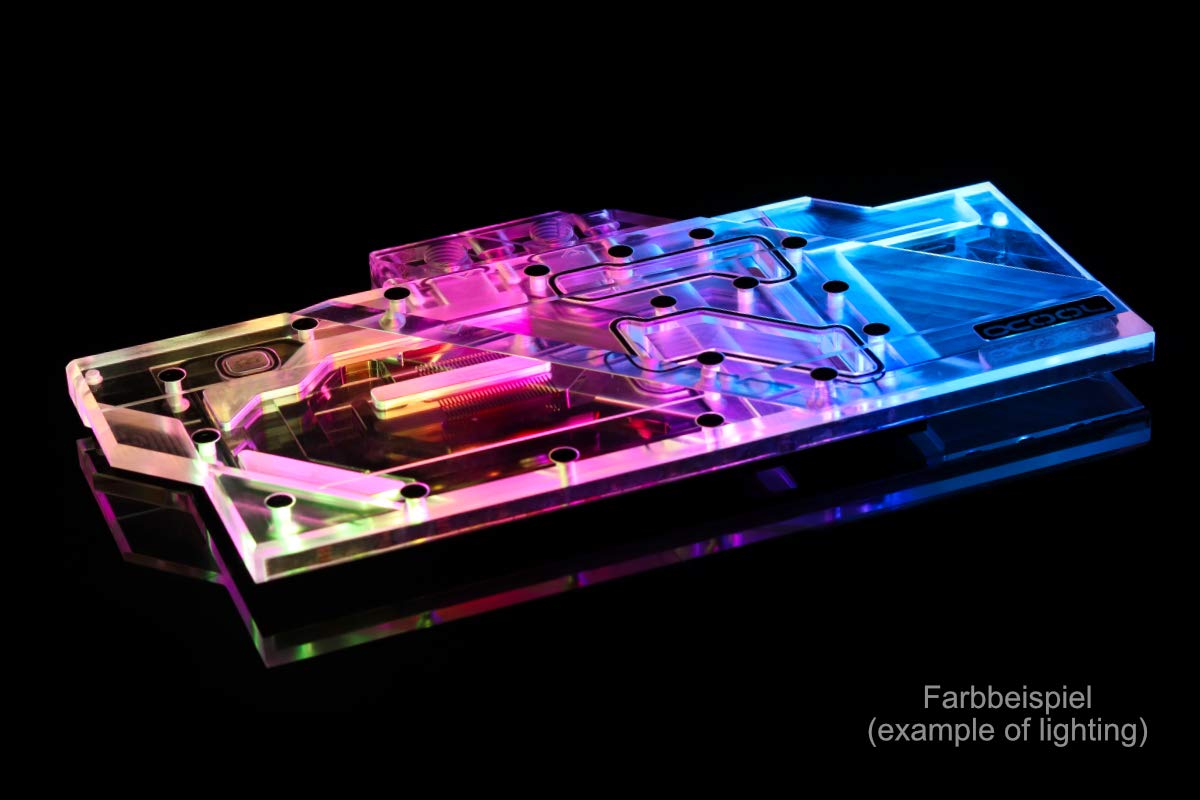
Image: Alphacool Eisblock Aurora Plexi GPX-A water block showcasing its digital RGB lighting effects. This image illustrates the aesthetic potential of the installed block.
Obrázek: Spodní strana view of the Alphacool Eisblock Aurora Plexi GPX-A water block, highlighting the mounting screw holes and the contact areas for the GPU and other components.
4.4. Leak Testing
Integrate into Loop: Connect the water block to your existing or new liquid cooling loop using appropriate fittings and tubing.
Fill Loop: Fill your liquid cooling loop with distilled water or a recommended coolant.
Proveďte zkoušku těsnosti:
Power on only the pump (using a PSU jumper or dedicated pump power supply) without powering on the rest of the system.
Allow the pump to run for at least 12-24 hours, carefully inspecting all connections and the water block for any signs of leaks. Place paper towels under components to easily spot drips.
Only proceed to power on your full system once you are absolutely certain there are no leaks.
5. Návod k obsluze
Once installed and leak-tested, your Alphacool Eisblock Aurora Plexi GPX-A water block operates as part of your custom liquid cooling loop. Ensure your pump is always running when the system is powered on.
Monitorovat teploty: Use monitoring software to keep an eye on your GPU temperatures to ensure optimal cooling performance.
Ovládání RGB: If connected to a compatible RGB header, you can control the lighting effects using your motherboard's software or a dedicated RGB controller.
Vypnutí systému: Always shut down your system properly. Avoid sudden power cuts to prevent potential issues with the cooling loop.
6. Údržba
Regular maintenance is crucial for the longevity and performance of your liquid cooling system.
Výměna chladicí kapaliny: Doporučuje se vyměňovat chladicí kapalinu v okruhu každých 6–12 měsíců, v závislosti na typu chladicí kapaliny a jejím použití.
Proplachování systému: Při výměně chladicí kapaliny zvažte propláchnutí celého okruhu destilovanou vodou nebo speciálním čisticím roztokem, abyste odstranili veškeré usazeniny.
Zkontrolujte komponenty: Periodically inspect the water block, tubing, and fittings for any signs of wear, corrosion, or leaks.
Clean Radiators/Fans: Keep your radiators and fans clean from dust buildup to ensure efficient heat dissipation.
7. Řešení problémů
Tato část se zabývá běžnými problémy, se kterými se můžete setkat.
Bez RGB osvětlení:
Ensure the 3-Pin 5V Digital RGB cable is correctly connected to a compatible header.
Check your motherboard's BIOS or RGB software for proper configuration.
Verify the RGB header on your motherboard is enabled and functioning.
Vysoké teploty GPU:
Confirm the pump is running and coolant is flowing.
Check for air bubbles trapped in the loop; tilt your system to help dislodge them.
Ensure thermal paste and pads are correctly applied and making good contact.
Verify radiator fans are spinning and not obstructed.
Check for blockages in the water block or other loop components.
Leaks Detected:
Immediately power off the system and disconnect from power.
Identifikujte zdroj úniku.
Tighten fittings or replace faulty components/tubing as necessary.
Clean up any spilled coolant thoroughly.
Perform another leak test before powering on the system.
8. Specifikace
Název produktu:
Alphacool Eisblock Aurora Plexi GPX-A
Číslo modelu:
1017642 (11753)
Kompatibilita:
AMD Radeon 5700 XT Sapphire Nitro+
Rozměry (D x Š x V):
260 x 143 x 23 mm (10.24" D x 5.63" Š x 0.91" V)
Čistá hmotnost:
Přibližně 800 g (2.54 liber)
Cooler Material:
Poniklovaná měď
Top Cover Material:
Plexisklo
vlákna:
4x G1/4"
Digital RGB Power:
3-Pin 5V (0.5A)
Maximální pracovní teplota:
60 °C
9. Záruka a podpora
Alphacool products are manufactured to high quality standards. For specific warranty terms and conditions, please refer to the warranty information provided with your purchase or visit the official Alphacool webmísto.
For technical support, troubleshooting assistance, or inquiries regarding replacement parts, please contact Alphacool customer service through their official webstránky nebo vašeho prodejce.
Ask about setup, troubleshooting, compatibility, parts, safety, or missing instructions. Manuals+ will review the question and use this page’s manual context to help answer it.