
1. Úvod a konecview
The hOmeLabs True HEPA Air Purifier is designed to significantly improve indoor air quality by filtering out airborne particles. Featuring a 3-stage filtration system, including a pre-filter, H13 True HEPA filter, and activated carbon filter, it effectively captures 99.97% of particles as small as 0.3 microns. Its compact and modern design makes it suitable for various small to medium-sized spaces such as kitchens, home offices, living rooms, and bedrooms.
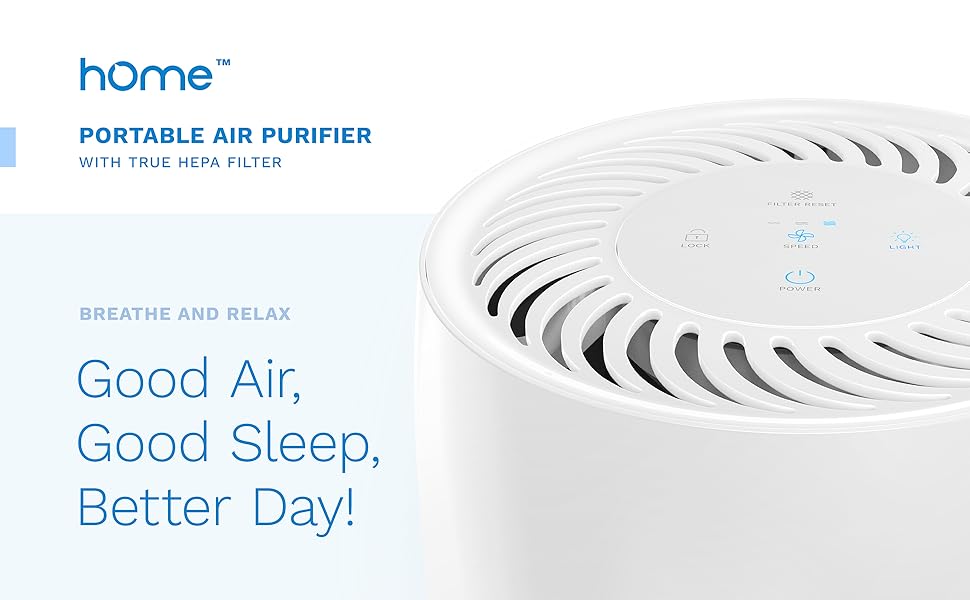
Image: hOmeLabs True HEPA Air Purifier in a living room setting, showcasing jeho kompaktním a moderním designem.
2. Bezpečnostní pokyny
Please read all safety instructions carefully before operating the air purifier to ensure safe and efficient use.
- Always unplug the air purifier from the power outlet before cleaning, performing maintenance, or when not in use.
- Ujistěte se, že je jednotka umístěna na stabilním a rovném povrchu, aby se zabránilo převrácení.
- Keep the air purifier away from water or moist environments to prevent electrical hazards.
- Neblokujte vstupy ani výstupy vzduchu. Kolem jednotky udržujte dostatečný volný prostor pro správné proudění vzduchu.
- Důležité: The included filter ships with a protective plastic sleeve. Please remove this plastic sleeve from the filter before initial use. Failure to do so will prevent the unit from functioning correctly.
- Nepoužívejte přístroj s poškozeným kabelem nebo zástrčkou. Pokud je kabel nebo zástrčka poškozená, kontaktujte zákaznickou podporu.
- Tento spotřebič není určen pro použití osobami (včetně dětí) se sníženými fyzickými, smyslovými nebo duševními schopnostmi nebo nedostatečnými zkušenostmi a znalostmi, pokud na ně nedohlíží osoba odpovědná za jejich bezpečnost nebo jim nebyla poskytnuta instrukce ohledně používání spotřebiče.
3. Komponenty produktu
Familiarize yourself with the main components of your hOmeLabs Air Purifier:
- Hlavní jednotka: The primary housing of the air purifier.
- Ovládací panel: Located on the top of the unit, featuring touch controls for various functions.
- Vstup vzduchu: Located around the lower part of the unit, where air is drawn in for filtration.
- Vývod vzduchu: Located on the top of the unit, where purified air is released.
- Filtrační systém 3 v 1: Consists of a pre-filter, H13 True HEPA filter, and activated carbon filter.

Obrázek: Nahoře view of the hOmeLabs Air Purifier control panel, showing touch-sensitive buttons for various functions.
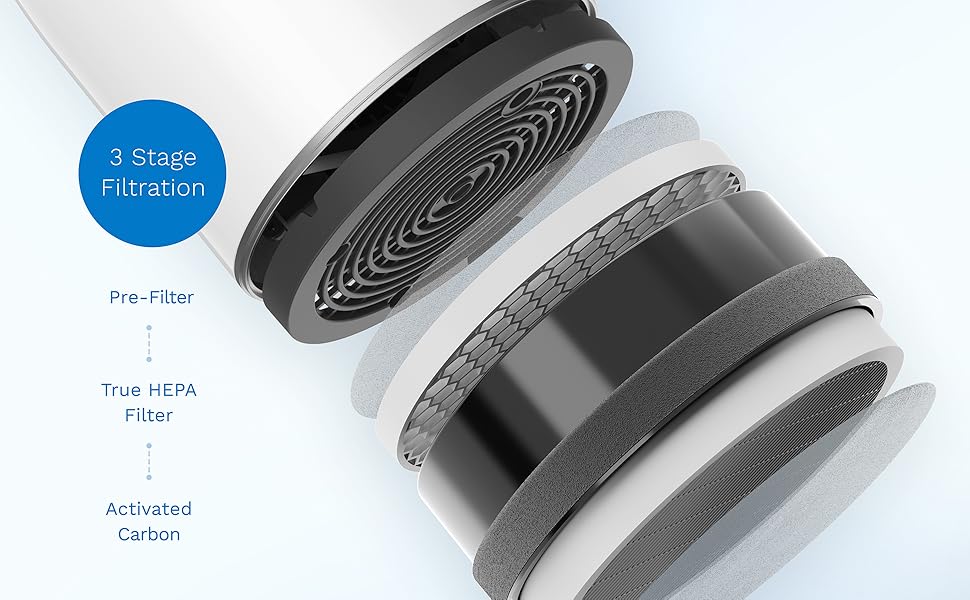
Image: Cross-section diagram illustrating the 3-stage filtration system, including the pre-filter, True HEPA filter, and activated carbon filter.
4. Nastavení
Follow these steps to set up your air purifier for the first time:
- Rozbalit: Opatrně vyjměte čističku vzduchu a veškerý balicí materiál z krabice.
- Odstraňte obal filtru: Turn the unit upside down. Rotate the base counter-clockwise to unlock and remove it. Take out the 3-in-1 filter and remove its protective plastic sleeve. Reinsert the filter into the unit, ensuring it is seated correctly. Secure the base by rotating it clockwise until it locks.
- Umístění: Place the air purifier on a firm, level surface. Ensure there is at least 6 inches (15 cm) of clearance from walls or furniture to allow for optimal airflow.
- Připojení napájení: Zapojte napájecí kabel do standardní elektrické zásuvky.
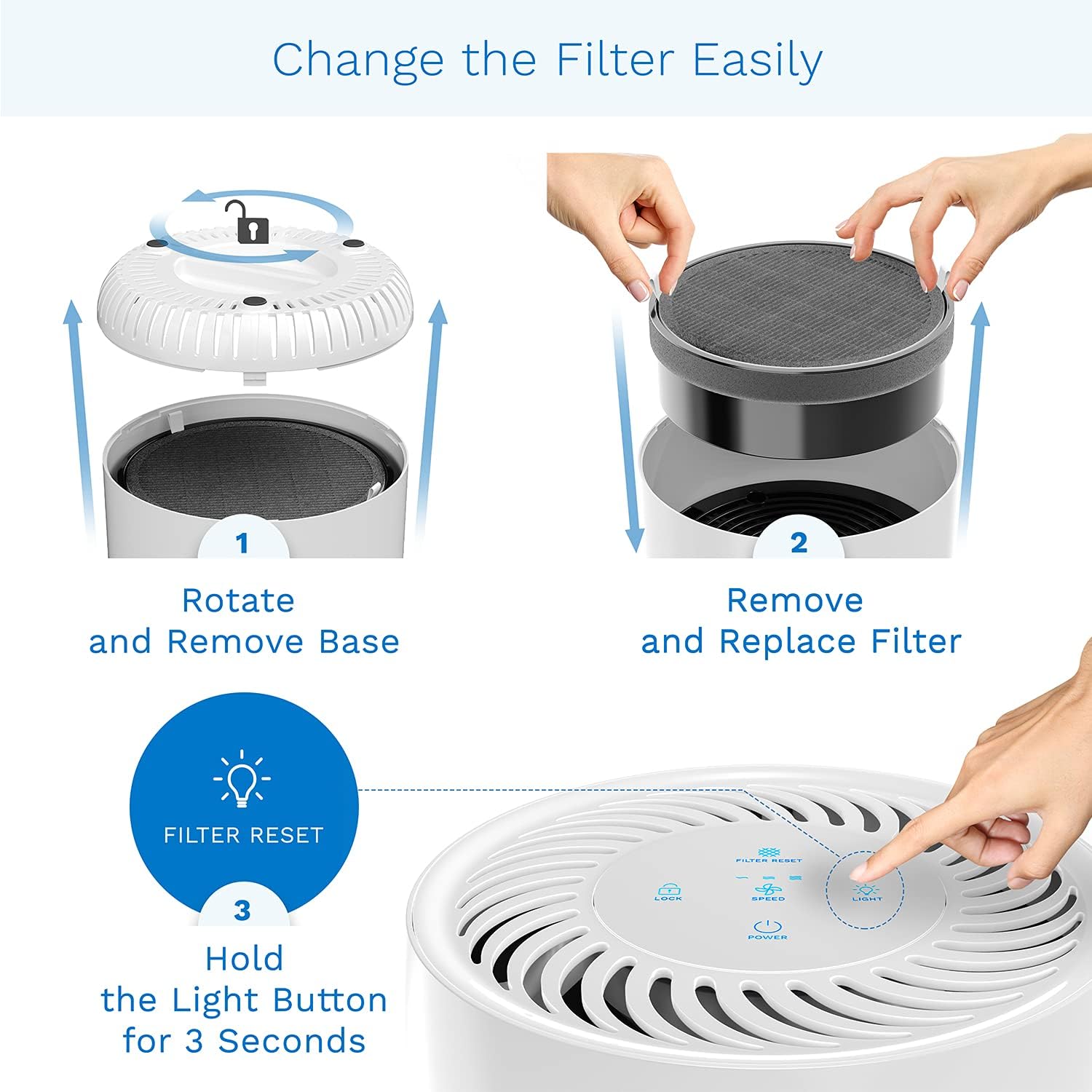
Image: Visual guide for filter replacement, detailing how to access and secure the filter compartment.
5. Návod k obsluze
Your hOmeLabs Air Purifier features an intuitive touch control panel:
- Zapnutí/vypnutí: Dotkněte se Moc tlačítko pro zapnutí nebo vypnutí jednotky.
- Rychlost ventilátoru: Dotkněte se Rychlost button to cycle through three fan speed settings: Low, Medium, and High. The current speed is indicated by illuminated bars on the control panel.
- Noční světlo: Dotkněte se Světlo button to turn the night light on or off. The night light has adjustable brightness options.
- Dětský zámek: Stiskněte a podržte Zámek button for 3 seconds to activate or deactivate the child lock function. This prevents accidental changes to settings.
- Časovač: Dotkněte se Časovač button to set the operating time for 2, 4, 6, or 8 hours. The unit will automatically turn off after the set time.
- Indikátor resetování filtru: A dedicated indicator light will illuminate when it's time to replace the filter.

Obrázek: Podrobný view of the touch control panel, highlighting the various operational buttons.
6. Údržba
Pravidelná údržba zajišťuje optimální výkon a prodlužuje životnost čističky vzduchu.
Výměna filtru
The 3-in-1 filter should be replaced approximately every 2100 hours of use (about 3 months on low to medium fan mode). The Filter Reset Indicator light will illuminate to remind you.
- Vypnutí a odpojení: Vypněte čističku vzduchu a odpojte ji ze zásuvky.
- Odstraňte základnu: Turn the unit upside down. Rotate the base counter-clockwise to unlock and remove it.
- Odstraňte starý filtr: Carefully pull out the used 3-in-1 filter. Dispose of it properly.
- Instalace nového filtru: Insert a new hOmeLabs 3-in-1 replacement filter into the unit, ensuring it is seated correctly.
- Bezpečná základna: Replace the base and rotate it clockwise until it locks securely.
- Indikátor resetování filtru: Plug the air purifier back in. With the unit powered on, press and hold the Světlo button for 3 seconds until the Filter Reset Indicator light turns off. This resets the filter life counter.
Čištění exteriéru
Wipe the exterior of the air purifier with a soft, dry cloth as needed. Do not use abrasive cleaners or solvents.
7. Řešení problémů
If you encounter any issues with your air purifier, refer to the following common problems and solutions:
| Problém | Možná příčina | Řešení |
|---|---|---|
| Jednotka se nezapne. | Napájecí kabel není bezpečně zapojený. | Ujistěte se, že je napájecí kabel pevně zapojený do funkční zásuvky. |
| V zásuvce není proud. | Test the outlet with another device or check the circuit breaker. | |
| Proudění vzduchu je slabé nebo hlučné. | Filtr je znečištěný nebo ucpaný. | Replace the filter as per maintenance instructions. |
| Vstupy/výstupy vzduchu jsou zablokované. | Zajistěte dostatečný volný prostor kolem jednotky. | |
| Filter Reset Indicator light remains on after filter replacement. | Počítadlo životnosti filtru se nevynulovalo. | Stiskněte a podržte Světlo tlačítko po dobu 3 sekund resetujte indikátor. |
| Dětský zámek je aktivní. | Child Lock function is engaged. | Stiskněte a podržte Zámek button for 3 seconds to deactivate. |
If the problem persists after trying these solutions, please contact hOmeLabs customer support.
8. Specifikace
| Funkce | Specifikace |
|---|---|
| Číslo modelu | HME020248N |
| Značka | hOmeLabs |
| Barva | Bílý |
| Rozměry produktu | 7.87"H x 7.87"Š x 12.8"V |
| Hmotnost položky | 5.29 libry |
| Pokrytí podlahové plochy | 215 čtverečních stop |
| Úroveň hluku | 50 decibelů |
| Typ ovladače | Dotykové ovládání |
| Třída filtru | HEPA (H13), Activated Carbon |
| Zdroj napájení | Elektrický kabel |
| UPC | 850000941397 |
9. Záruka a podpora
For warranty information or technical support, please refer to the contact details provided in your product packaging or visit the official hOmeLabs webUschovejte si účtenku jako doklad o koupi pro případné reklamace.